Caddy: Serving initial configuration not specific caddyfile?
Attempted to use caddy and port localhost:2019 is the only port being initialized. Any thoughts?
./caddy run --adapter "caddyfile" --config "./Caddyfile"
127.0.0.1:4000
root * /index.html
 stevenanthonyrevo
All 10 comments
Thanks for opening an issue! We'll look into this.
It's not immediately clear to me what is going on, so I'll need your help to understand it better.
Ideally, we need to be able to reproduce the bug _in the most minimal way possible_. This allows us to write regression tests to verify the fix is working. If we can't reproduce it, then you'll have to test our changes for us until it's fixed -- and then we can't add test cases, either.
I've attached a template below that will help make this easier and faster! It will ask for some information you've already provided; that's OK, just fill it out the best you can. :+1:
I've also included some helpful tips below the template. Feel free to let me know if you have any questions!
Thank you again for your report, we look forward to resolving it!
Template
## 1. Environment

### 1a. Operating system and version

paste here


1b. Caddy version (run caddy version or paste commit SHA)

paste here


1c. Go version (if building Caddy from source; run go version)

paste here


2. Description

2a. What happens (briefly explain what is wrong)

2b. Why it's a bug (if it's not obvious)

2c. Log output

paste terminal output or logs here


2d. Workaround(s)

2e. Relevant links

3. Tutorial (minimal steps to reproduce the bug)
Helpful tips
Environment: Please fill out your OS and Caddy versions, even if you don't think they are relevant. (They are _always_ relevant.) If you built Caddy from source, provide the commit SHA and specify your exact Go version.
Description: Describe at a high level what the bug is. What happens? Why is it a bug? Not all bugs are obvious, so convince readers that it's actually a bug.
- 2c) Log output: Paste terminal output and/or complete logs in a code block. DO NOT REDACT INFORMATION except for credentials.
- 2d) Workaround: What are you doing to work around the problem in the meantime? This can help others who encounter the same problem, until we implement a fix.
- 2e) Relevant links: Please link to any related issues, pull requests, docs, and/or discussion. This can add crucial context to your report.
Tutorial: What are the _minimum required specific steps_ someone needs to take in order to experience the same bug? Your goal here is to make sure that anyone else can have the same experience with the bug as you do. You are writing a tutorial, so make sure to carry it out yourself before posting it. Please:
- Start with an empty config. Add _only_ the lines/parameters that are _absolutely required_ to reproduce the bug.
- Do not run Caddy inside containers.
- Run Caddy manually in your terminal; do not use systemd or other init systems.
- If making HTTP requests, avoid web browsers. Use a simpler HTTP client instead, like
curl. - Do not redact any information from your config (except credentials). Domain names are public knowledge and often necessary for quick resolution of an issue!
- Note that ignoring this advice may result in delays, or even in your issue being closed. 😞 Only actionable issues are kept open, and if there is not enough information or clarity to reproduce the bug, then the report is not actionable.
Example of a tutorial:
Create a config file:Open terminal and run Caddy:{ ... }Make an HTTP request:$ caddy ...Notice that the result is ___ but it should be ___.$ curl ...
 mholt
on 23 Feb 2020
mholt
on 23 Feb 2020
Thanks, @mholt for reaching back. I'll provide some more background below.
1. Environment
1a. Operating system and version
OS: macOS High Sierra v10.13.6
1b. Caddy version (run caddy version or paste commit SHA)
Caddy Version: (devel)
2. Description
I am attempting to use caddy 2 (first-time user here) to host multiple directories similar to Nginx or virtual host, I'd like to run caddy as a binary and pass it a config file to proxy external ports.
2a. What happens (briefly explain what is wrong)
Created a config:
127.0.0.1:4000
root * /index.html
Opened terminal and ran Caddy:
./caddy run --adapter "caddyfile" --config "./Caddyfile"
I had expected the index file to be served on port 4000 instead it had a 200 status with no content or file being served.
2b. Why it's a bug (if it's not obvious)
Notice that the result
2020/02/23 19:19:42.291 INFO    using provided configuration    {"config_file": "./Caddyfile", "config_adapter": "caddyfile"}
2020/02/23 19:19:42.295 INFO    admin   admin endpoint started  {"address": "localhost:2019", "enforce_origin": false, "origins": ["localhost:2019"]}
2020/02/23 19:19:42.296 INFO    tls     cleaned up storage units
2020/02/23 14:19:42 [INFO][cache:0xc0003f9e50] Started certificate maintenance routine
2020/02/23 19:19:42.297 INFO    autosaved config        {"file": "/../../Library/Application Support/Caddy/autosave.json"}
2020/02/23 19:19:42.297 INFO    serving initial configuration
Thanks for the information! It's helpful, for sure, but it's missing the second half. :) How can I reproduce the error that you're seeing? In other words, this:
instead it had a 200 status with no content or file being served.
How can I see the same thing?
mholt
on 23 Feb 2020
3. Tutorial
Folder Structure:
src --/
--/ caddy.exec
--/ Caddyfile
--/ index.html
Run in Terminal:
./caddy run --adapter "caddyfile" --config "./Caddyfile"
Result:
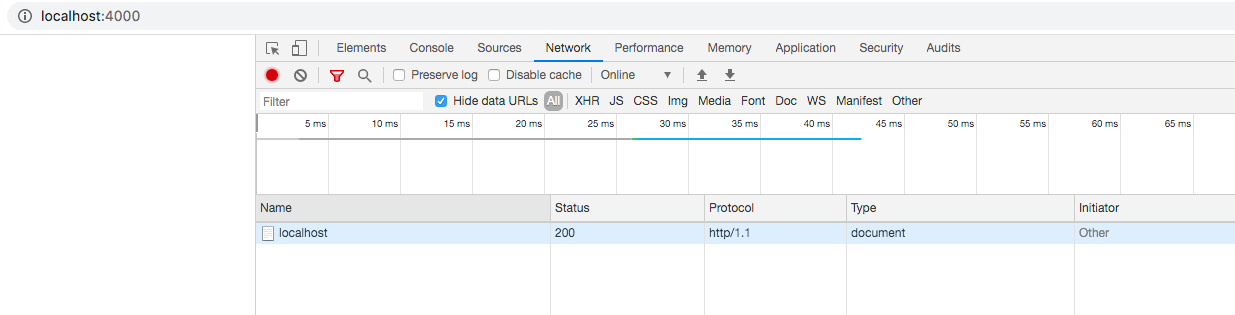
@mholt - Should I be expecting a different result? Does the caddy server allow for PHP files to be served via config?
stevenanthonyrevo
on 23 Feb 2020
@stevenanthonyrevo What is the full output of curl -v "http://localhost:4000"? (with Caddy running, of course)
mholt
on 23 Feb 2020
@mholt Yea, I get this.
* Rebuilt URL to: localhost:4000/
*   Trying ::1...
* TCP_NODELAY set
* Connected to localhost (::1) port 4000 (#0)
> GET / HTTP/1.1
> Host: localhost:4000
> User-Agent: curl/7.54.0
> Accept: */*
>
< HTTP/1.1 200 OK
< Server: Caddy
< Date: Sun, 23 Feb 2020 22:35:23 GMT
< Content-Length: 0
<
* Connection #0 to host localhost left intact
Ah, silly me: the request is for localhost:4000 (see the Host header?) but that doesn't match 127.0.0.1:4000. Either use 127.0.0.1:4000 in your client, or change the Caddyfile to use localhost:4000.
mholt
on 23 Feb 2020
understood, I've changed the caddyfile to:
localhost:4000
root * /index.html
Same result on the curl request.
* Rebuilt URL to: localhost:4000/
*   Trying ::1...
* TCP_NODELAY set
* Connected to localhost (::1) port 4000 (#0)
> GET / HTTP/1.1
> Host: localhost:4000
> User-Agent: curl/7.54.0
> Accept: */*
>
< HTTP/1.1 200 OK
< Server: Caddy
< Date: Sun, 23 Feb 2020 22:44:31 GMT
< Content-Length: 0
<
* Connection #0 to host localhost left intact
Did you reload your config or restart your server? Are you _sure_?
mholt
on 24 Feb 2020
I'll just say that just using :4000 as your label without localhost is often an easier solution if you don't care what domain or IP is used to access the site.
 francislavoie
on 24 Feb 2020
francislavoie
on 24 Feb 2020
Related issues
 muhammadmuzzammil1998
·
3Comments
muhammadmuzzammil1998
·
3Comments
 jgsqware
·
3Comments
jgsqware
·
3Comments
 wayneashleyberry
·
3Comments
wayneashleyberry
·
3Comments
 mikolysz
·
3Comments
mholt
·
3Comments
mikolysz
·
3Comments
mholt
·
3Comments
Most helpful comment
I'll just say that just using
:4000as your label withoutlocalhostis often an easier solution if you don't care what domain or IP is used to access the site.