Caddy: http.browse: Listings not as shiny in Firefox as in Chromium
Seems related to #2179
1. What version of Caddy are you using (caddy -version)?
0.11.0
2. What are you trying to do?
Get directory listings in Firefox as shiny as in Chromium
3. What is your entire Caddyfile?
linuximages.de {
    root /var/www/linuximages.de/htdocs
    browse
}
6. What did you expect to see?
Close to the same appearance in Chromium and Firefox:
- Same background colors
- Same alignment/margin/padding for modified column
Please also consider date formats that have constant width and work better for sorting, e.g. this format:
# date --rfc-3339=seconds | sed 's,.\{6\}$,,'
2018-07-01 18:06:20
(Shall I make a dedicated ticket for that?)
7. What did you see instead (give full error messages and/or log)?
A lot less beautiful appearance in Firefox
Chromium 63:

Firefox 60:
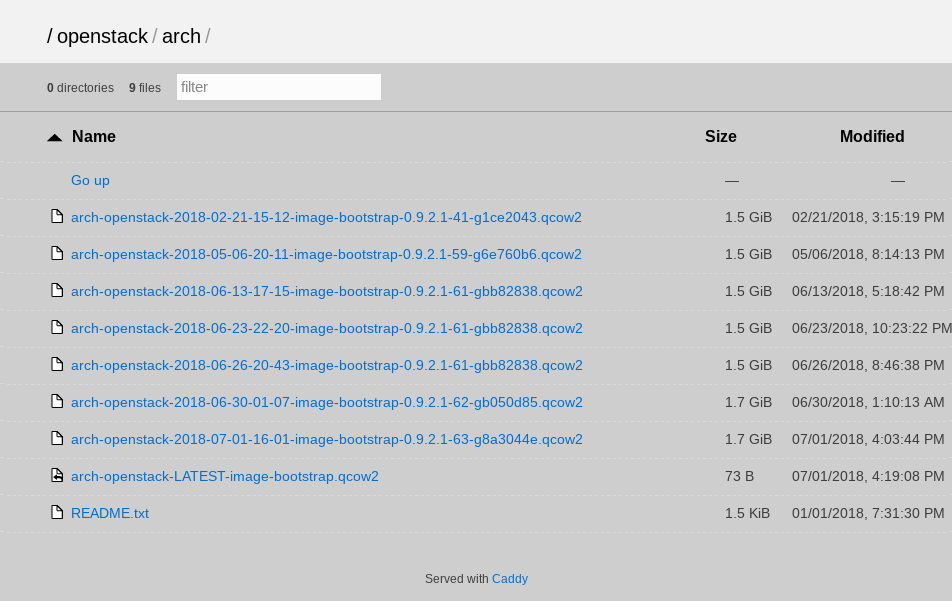
8. How can someone who is starting from scratch reproduce the bug as minimally as possible?
$ echo $'0.0.0.0 {\n\troot /usr/share\n\tbrowse\n}' | expand -t4 > Caddyfile
$ caddy &
$ firefox http://127.0.0.1:2015/
Thanks!
 hartwork
All 13 comments
Hmm, looks fine in Firefox (61) to me:

Maybe a weird browser cache issue?
(Closing, until it can be reproduced)
 mholt
on 1 Jul 2018
mholt
on 1 Jul 2018
I don't see how it would be a caching issue if all CSS and JS are inlined with the only request serving the listing. My Firefox 60 is running on Linux. Yours as well? I can try with Firefox 61 too, takes a few minutes.
hartwork
on 1 Jul 2018
You underestimate browsers 😅
Mine's on Mac, but that shouldn't matter -- either way, it looks like a browser bug.
mholt
on 1 Jul 2018
I'm getting closer to the matter now. We have here what people started coming up with "CSS resets" for, i.e. slight differences in browser rendering defaults. I have a fix for a part now, let's see how far I get. Please re-open.
hartwork
on 1 Jul 2018
I can't reproduce it in Firefox on Linux either. It'll have to be reproducible first before we consider a fix.
mholt
on 1 Jul 2018
The differences you can see in my shots make two parts:
- different background colors for most of the page — which is know to vary across browsers and may well vary across platforms
- different align/padding of the rightmost column "modified" — which is already confirmed by #2179
You don't have access to a GNU/Linux box with X11 somewhere?
For the background issue, I can confirm adding this for a minimal fix:
body {
    background-color: #fff;
}
The right column thing is more tricky, Firefox more or less ignores the td:last-child { padding-right: 5%; } that Caddy feeds to it.
For background-color I am happy to make a pull request. Please re-open.
hartwork
on 1 Jul 2018
You don't have access to a Linux box with X11 somewhere?
I do, and I tried it, and it works fine. I think it's just your machine.
I even spun up a new Linux VM to try it and it also had the same (white) appearance.
mholt
on 1 Jul 2018
I can't reproduce it either, on LInux.
 abiosoft
on 1 Jul 2018
abiosoft
on 1 Jul 2018
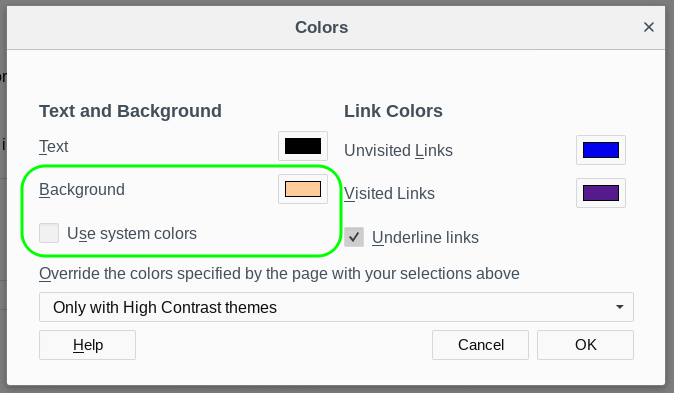
It turns out that Firefox has an option "Use system colors" (browser.display.use_system_colors in about:config) that defaults to true/enabled. That option cam be described as following:
Use system colors: Check this preference to use the colors defined in your operating system settings instead of the colors specified above.
The minute I turn Use system colors _off_, the background turns to whatever color is configured in Firefox: Something salmon-like in the screenshot below, _white_ for most other setups, probably.
If Caddy did serve body { background-color: #fff; } then Firefox option use_system_colors would not have a say in the rendering of Caddy's directory listings and would not end up with a mix of browser defaults and page-forced colors at some places. So in a way it is my setup, but I don't see any conscious customization or uniqueness or non-standard aspect about it: I'm not the only one getting not-white for a background. What a relief :smile:
hartwork
on 2 Jul 2018
It turns out that Firefox has an option "Use system colors" (
browser.display.use_system_colorsinabout:config) that defaults to true/enabled.
The default is false.
 elcore
on 2 Jul 2018
elcore
on 2 Jul 2018
Default is also false on my system. Wasn't able to replicate the issue on Firefox 61.0 stable.
 whitestrake
on 2 Jul 2018
whitestrake
on 2 Jul 2018
+1 for adding body { background-color: #fff; } IMO, doesn't hurt to have.
 francislavoie
on 2 Jul 2018
francislavoie
on 2 Jul 2018
Default is also false on my system.
I have checked the Firefox 61.0 sources now, confirming false for a default. (Now sure why it's not marked as changed/bold in about:config as done for other options...)
Wasn't able to replicate the issue on Firefox 61.0 stable.
An easy way to replicate is:
- Go to the color dialog in Firefox settings
- Select a background color noticably different from white
- Turn off "Use system colors" (to have that explicit color selected in 1 take effect) if enabled
- Hit "OK" to save settings
- Browse to some Caddy listing, e.g. https://linuximages.de/
- See that background color in action
hartwork
on 2 Jul 2018
Related issues
mholt
·
3Comments
 whs
·
3Comments
whs
·
3Comments
 klaasel
·
3Comments
klaasel
·
3Comments
 la0wei
·
3Comments
la0wei
·
3Comments
 dafanasiev
·
3Comments
dafanasiev
·
3Comments
Most helpful comment
+1 for adding
body { background-color: #fff; }IMO, doesn't hurt to have.