Cache: Tracking: Permission Errors when restoring and creating cache
Issue
Files not created by the local user may fail when restored from the cache as tar preserves file permissions. Permission errors can also occur when the current user does not have permissions to read files when creating the cache. This is likely just a Linux and/or macOS issue (all the reports are Linux)
Reports
- https://github.com/actions/cache/issues/11
- https://github.com/actions/cache/issues/117
- https://github.com/actions/cache/issues/130
- https://github.com/actions/cache/issues/131
Possible solutions
- Run
tarwithsudo
- What are the downsides of this approach?
 joshmgross
All 40 comments
What are the downsides of this approach?
The only downside I see is that it will likely not work on Windows, since tar assumes a unix-style permission system. I haven't tried this personally but I would be very surprised if it worked outside of cygwin/WSL. Reading your issue more closely, it seems like the permissions are only a problem on Unix in any case.
 jyn514
on 18 Dec 2019
jyn514
on 18 Dec 2019
Files not created by the local user may fail when restored from the cache as tar preserves file permissions.
I don't think this is an accurate description of the issue. If you look at my issue, it has this snippet:
/bin/tar: ./overlay2: Cannot open: Permission denied
/bin/tar: ./builder: Cannot open: Permission denied
...
/bin/tar: Exiting with failure status due to previous errors
This is when the tar file is being _created_, not when it is being unpacked; the problem comes because the current user does not have permissions to read files owned by root, separate from anything tar does. This is why I'm surprised it's not an issue on Windows.
jyn514
on 18 Dec 2019
I don't think this is an accurate description of the issue.
Great point, I missed that difference. I've updated the issue title and description to cover both restore and creation.
This is why I'm surprised it's not an issue on Windows.
It's likely that the user account provisioned for hosted Windows runners has the necessary admin privileges, whereas Linux/macOS require sudo
joshmgross
on 18 Dec 2019
btw what you guys mean with 'current user'? in my use case (caching cargo files) usually all files should be owned by the user that invokes the cargo command and stored in the current user ~/.cargo directory. Thus i don't really get all these permissions errors. Aren't all actions executed by the same user? This bug breaks rust usage
 filcuc
on 27 Dec 2019
filcuc
on 27 Dec 2019
btw what you guys mean with 'current user'?
Current systems user as opposed to root. I'm not familiar with rust so I don't know why certain files in ~/.cargo would be owned by root.
Does anyone have a reproduction of this issue that I can test with?
joshmgross
on 27 Dec 2019
@joshmgross I'm facing the same with gradle on all of Android projects (configured to run on Linux)
Gradle wrapper doesn't restore itself from cache.
I'll be able to add sample Inn a couple of hours.
 deniszpua
on 27 Dec 2019
deniszpua
on 27 Dec 2019
@joshmgross we’re seeing the issue at tauri-apps/tauri as well (also cargo-related): https://github.com/tauri-apps/tauri/pull/237/checks?check_run_id=364927646#step:7:9
 rajivshah3
on 27 Dec 2019
rajivshah3
on 27 Dec 2019
Thanks @rajivshah3
I have a repro at https://github.com/joshmgross/tauri/ and am testing out solutions. Based on how exec works, it won't be as simple as running sudo tar but I'm looking into alternatives.
joshmgross
on 27 Dec 2019
AFAIK cargo doesn't create files as root. The only way that this could happen is cargo being executed as root or with sudo
filcuc
on 27 Dec 2019
In github actions, ~/.cargo is a symlink to /usr/share/rust/.cargo and all the files/directories under there are owned by root.
You can verify this with a step that runs ls -l ~/.cargo.
 dsilva
on 28 Dec 2019
dsilva
on 28 Dec 2019
~/.cargo is a symlink to /usr/share/rust/.cargo
That seems weird ... How can cargo update the registry or download new packages?
jyn514
on 28 Dec 2019
Maybe the cargo has a suid bit set?
Il giorno sab 28 dic 2019 alle ore 14:41 Joshua Nelson <
[email protected]> ha scritto:
~/.cargo is a symlink to /usr/share/rust/.cargo
That seems weird ... How can cargo update the registry or download new
packages?—
You are receiving this because you are subscribed to this thread.
Reply to this email directly, view it on GitHub
https://github.com/actions/cache/issues/133?email_source=notifications&email_token=ABWTXI5MI3WKJR72SQP7KOLQ25JSNA5CNFSM4J4DS5IKYY3PNVWWK3TUL52HS4DFVREXG43VMVBW63LNMVXHJKTDN5WW2ZLOORPWSZGOEHYKFBA#issuecomment-569418372,
or unsubscribe
https://github.com/notifications/unsubscribe-auth/ABWTXI2BW6V6D3JJKD4DQPDQ25JSNANCNFSM4J4DS5IA
.
--
Filippo Cucchetto
filcuc
on 28 Dec 2019
The only way that this could happen is cargo being executed as root or with sudo
Is it possible that the Ubuntu instances provided by GitHub Actions are running on Docker? I think Docker uses root by default
rajivshah3
on 28 Dec 2019
Is it possible that the Ubuntu instances provided by GitHub Actions are running on Docker?
No, they're individual Ubuntu VMs, see Docs: Cloud hosts for GitHub-hosted runners.
Files created by container actions, however, will likely be created by the root user.
joshmgross
on 28 Dec 2019
Simply the /usr/share/rust/.cargo/ subdirectories and the cargo executable itself are readable/writable/executable by anyone
filcuc
on 29 Dec 2019
I'm using Cloudflare Wrangler from https://github.com/cloudflare/wrangler-action
After using that following post action for cache fails
Publish Cloudflare Worker     26s
Post actions/cache@v1         0s
##[error]The template is not valid. Access to the path '/home/runner/work/xxx/.wrangler' is denied.,Permission denied
 tvainika
on 3 Jan 2020
tvainika
on 3 Jan 2020
Files created by container actions, however, will likely be created by the root user.
I was running into this, where caching had been working fine on the main Linux host, but simply moving the workflow into a container caused the cache saving step to fail with the following:
Post actions/cache@v1
[error]The template is not valid. Access to the path '[some unrelated path]' is denied.,Permission denied
The path reported was consistent, but had nothing to do with the cache path. (It may have corresponded to the first entry of ls -R from the repository root, but I’m not exactly sure.)
I was able to work around it by running chmod -R a+rwx . as the very last thing happening in the container. That grants (absolutely all) privileges back to the host’s user, so that the cache action can access whatever it needs.
Note that simply enabling permissions for the path to be cached was not sufficient. I tired of experimenting before I could figure out exactly which permissions were and weren’t needed. I leave that exercise to someone else if their use case necessitates tighter security.
 SDGGiesbrecht
on 10 Jan 2020
SDGGiesbrecht
on 10 Jan 2020
I'm using Cloudflare Wrangler from https://github.com/cloudflare/wrangler-action
After using that following post action for cache fails
Publish Cloudflare Worker     26s
Post actions/cache@v1         0s
##[error]The template is not valid. Access to the path '/home/runner/work/xxx/.wrangler' is denied.,Permission denied
I have the exact same issue. As SDGGiesbrecht noted, this file has nothing to do with the cache path. Why would the file need to be read if it's not in the cache path?
 ericselin
on 10 Jan 2020
ericselin
on 10 Jan 2020
Why would the file need to be read if it's not in the cache path?
Saving the cache calls tar on that directory specified. Does your cache path container symlinks to other paths?
What path are you specifying for your cache?
joshmgross
on 10 Jan 2020
What path are you specifying for your cache?
My cache is Yarn cache taken from here https://github.com/actions/cache/blob/master/examples.md#node---yarn
tvainika
on 10 Jan 2020
Does your cache path container symlinks to other paths?
In my case there are no symlinks in the cache at all.
In case it is helpful, here are:
- The log of the last failing attempt while I was still elevating permissions only for the cache path itself.
- The commit that elevated permissions for the entire repository.
- The associated log where the cache saved successfully. (The only intervening commit was the one linked in the previous bullet.)
- The subsequent log where the cache was fetched and used successfully.
(The branch itself has already been deleted, but you can verify the chain of events by starting with the last link, clicking its associated commit, and then recursively clicking each commit’s parent.)
SDGGiesbrecht
on 10 Jan 2020
Having the same problem with a standard yarn install workflow - https://github.com/JaneJeon/express-objection-starter/pull/353/checks?check_run_id=465098286...!
And no, the configuration isn't wrong - it worked for _months_ and now it suddenly doesn't work.
 JaneJeon
on 24 Feb 2020
JaneJeon
on 24 Feb 2020
hey @JaneJeon, it looks like you're hitting the issue described in https://github.com/actions/cache/issues/129, which stems from caching not being supported for all event types.
joshmgross
on 24 Feb 2020
We're having the following problems in https://github.com/OpenEthereum/open-ethereum/pull/11528
this is a rust project and caching artifacts works properly only on macOS, on linux we get
https://github.com/OpenEthereum/open-ethereum/runs/474579803#step:5:7
/bin/tar: ./src/github.com-1ecc6299db9ec823/rand_chacha-0.2.1/src: Cannot utime: Operation not permitted
and on windows
https://github.com/OpenEthereum/open-ethereum/pull/11528/checks?check_run_id=474579823#step:5:7
./index/github.com-1ecc6299db9ec823/.git/objects/pack/pack-a1b8e2d02676504008fea86ca360367fcee5bd43.idx: Can't unlink already-existing object
 ordian
on 28 Feb 2020
ordian
on 28 Feb 2020
Any updates on this?
I also run into errors on cargo registry related cache
(on rust)
 shunkakinoki
on 4 Mar 2020
shunkakinoki
on 4 Mar 2020
I worked around this using sudo chown -R $(whoami):$(id -ng) ~/.cargo to make ~/.cargo owned by the current user.
 bjorn3
on 13 Mar 2020
bjorn3
on 13 Mar 2020
@bjorn3 it didn't seem to work for me https://github.com/openethereum/openethereum/pull/11568/checks?check_run_id=506808818
ordian
on 13 Mar 2020
A cache where root is still owner got used. I think tar sets the owner before trying to set time and permissions, so those fail. If you invalidate the cache, for example by changing the cache key, it should work.
bjorn3
on 13 Mar 2020
Registry and ~/.cargo/bin are somehow not fixed by the chown for my project, but index and target dir caches are. I tried invalidating the cache, but the same problem persists.
bjorn3
on 14 Mar 2020
lrwxrwxrwx 1 runner docker 22 Mar 13 15:33 /home/runner/.cargo -> /usr/share/rust/.cargo
~/.cargo is a symlink for /usr/share/rust/.cargo, so the chown only changed the owner of the symlink. Appending a / to the path (sudo chown -R $(whoami):$(id -ng) ~/.cargo/) does fix it without requiring a cache invalidation.
bjorn3
on 14 Mar 2020
Is your feature request related to a problem? Please describe.
I am trying to cache Ubuntu apt but it is failing with permission errors: https://github.com/evandroforks/anki/runs/527868018?check_suite_focus=true#step:32:3
      - name: Cache /var/lib/apt
        uses: actions/cache@v1
        with:
          path: /var/lib/apt
          key: ${{ runner.os }}-/var/lib/apt-${{ hashFiles('**/linux_checks.yml') }}
      - name: Cache /var/cache/apt
        uses: actions/cache@v1
        with:
          path: /var/cache/apt
          key: ${{ runner.os }}-/var/cache/apt-${{ hashFiles('**/linux_checks.yml') }}
      - name: Set up ripgrep, pyaudio, gettext, rename
        run: |
          sudo apt update
          sudo apt install portaudio19-dev gettext rename
          sudo snap install ripgrep --classic
Describe the solution you'd like
Run /bin/tar with sudo, so I can cache anything I would like.
On Windows, this is are already working because there is no sudo restrictions. There, I am caching the Git directory because I am installing the Unix Package manager (pacman) on it: https://github.com/evandroforks/anki/runs/527868075?check_suite_focus=true#step:6:16
Describe alternatives you've considered
I tried to run:
- name: Fix ~/.cache permissions
  run: |
    sudo chown -R $(whoami):$(id -ng) /var/lib/apt/
    sudo chown -R $(whoami):$(id -ng) /var/cache/apt/
But I still got permissions issues: https://github.com/evandroforks/anki/runs/527941668?check_suite_focus=true#step:32:3
 Post Cache /var/cache/apt3m 27s
[warning]Tar failed with error: The process '/bin/tar' failed with exit code 2
Post job cleanup.
/bin/tar -cz -f /home/runner/work/_temp/eaec2b9b-137e-4294-b816-46168ff6028f/cache.tgz -C /var/cache/apt .
/bin/tar: ./archives/partial: Cannot open: Permission denied
/bin/tar: Exiting with failure status due to previous errors
[warning]Tar failed with error: The process '/bin/tar' failed with exit code 2
 evandrocoan
on 23 Mar 2020
evandrocoan
on 23 Mar 2020
@evandrocoan The problem may be related to the fact that you run apt as root after you changed the permissions. This means that any new files will be owned by root again.
bjorn3
on 23 Mar 2020
I could be related but if I do not run it as sudo it will not have permissions to install things in other system directories other than the ones I am caching. And the last time I tried to chown -R everything to my user I broke my linux.
Also, I think this ./archives/partial inside the directory is a symlink to somewhere. Both directories /var/cache/apt and /var/lib/apt have this partial thing:
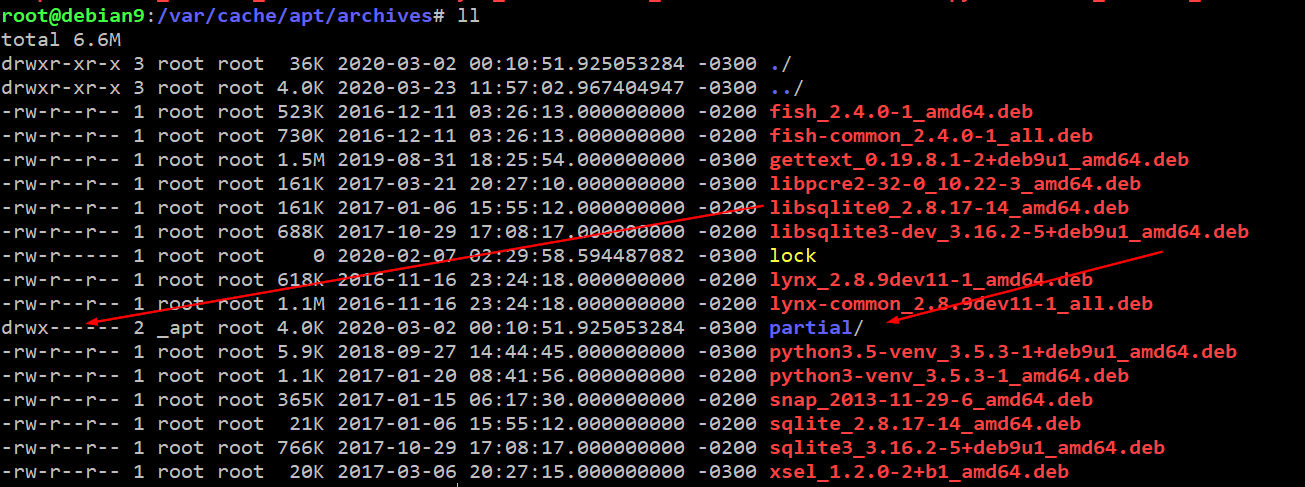
evandrocoan
on 23 Mar 2020
Try doing the chown both before caching and after running apt.
bjorn3
on 23 Mar 2020
I just run apt without sudo:
      - name: Fix ~/.cache permissions
        run: |
          sudo chown -R $(whoami):$(id -ng) /var/lib/apt/
          sudo chown -R $(whoami):$(id -ng) /var/cache/apt/
          sudo chown -R $(whoami):$(id -ng) /var/lib/dpkg/
          apt update
          apt install --download-only portaudio19-dev gettext rename
      - name: Cache /var/lib/apt
        id: apt-cache
        uses: actions/cache@v1
        with:
          path: /var/lib/apt
          key: ${{ runner.os }}-/var/lib/apt-${{ hashFiles('**/linux_checks.yml') }}
      - name: Cache /var/cache/apt
        uses: actions/cache@v1
        with:
          path: /var/cache/apt
          key: ${{ runner.os }}-/var/cache/apt-${{ hashFiles('**/linux_checks.yml') }}
      - name: Download apt packages
        if: steps.apt-cache.outputs.cache-hit != 'true'
        run: |
          apt update
          apt install --download-only portaudio19-dev gettext rename
      - name: Set up ripgrep, pyaudio, gettext, rename
        run: |
          sudo apt install portaudio19-dev gettext rename
It did not worked at the end. It still complaining about permissions on the partial strange directory: https://github.com/evandroforks/anki/runs/528257104?check_suite_focus=true#step:32:3
 Post Cache /var/cache/apt4m 19s
[warning]Tar failed with error: The process '/bin/tar' failed with exit code 2
Post job cleanup.
/bin/tar -cz -f /home/runner/work/_temp/1e279de1-a28a-49c1-bf3e-c1a9318da6b0/cache.tgz -C /var/cache/apt .
/bin/tar: ./archives/partial: Cannot open: Permission denied
/bin/tar: Exiting with failure status due to previous errors
[warning]Tar failed with error: The process '/bin/tar' failed with exit code 2
In another attempt, I tried running apt install without sudo, but this is something which will definitely not work: https://github.com/evandroforks/anki/runs/528316073?check_suite_focus=true#step:15:33
```
After this operation, 11.0 MB of additional disk space will be used.
dpkg: error: requested operation requires superuser privilege
E: Sub-process /usr/bin/dpkg returned an error code (2)
[error]Process completed with exit code 100.
evandrocoan
on 23 Mar 2020
For Rust projects the permissions issue was fixed (see https://github.com/actions/virtual-environments/issues/572#issuecomment-626624527) for Ubuntu. There still a problem with tar on Windows
On Windows, the issue is different and i don't think that it is image issue.
actions/cache uses tar to pack and unpack files and tar doesn't work properly with symlinks on Windows.
ordian
on 13 May 2020
Thanks for the update @ordian
Could someone confirm that they are able to use caching with Rust on Linux without any permissions workarounds?
joshmgross
on 14 May 2020
Works for me on Linux. The Windows run has worked too, restoring from an ante-fix cache.
 mzabaluev
on 14 May 2020
mzabaluev
on 14 May 2020
Thanks all!
Going to close this issue out as https://github.com/actions/virtual-environments/issues/572 is now resolved.
https://github.com/actions/cache/issues/120 is tracking the issue with symlinks on Windows.
If you hit permissions issues, feel free to file a new issue with your specific use-case and the errors you're hitting.
As for the proposed solution of running tar with sudo, we can't guarantee that all runners will be using a password-less sudo.
joshmgross
on 15 May 2020
So what's the "correct" solution to this? I see all these commits saying that they're removing workarounds, but we're still experiencing this exact problem after our action moves some temp files (created as -rw------- by default) into our cache folder. Are we supposed to make our action run as another user (and if so, which and how?)? Is there extra config needed to make this action run as root? Should we give up and micro-manage permissions in the cache (that seems like the very workaround that those projects removed)?
Might as well paste in all the links in case someome reads this...
- Failed run of actions/cache: https://github.com/KSP-CKAN/NetKAN/runs/1758832548
- Workflow: https://github.com/KSP-CKAN/NetKAN/blob/master/.github/workflows/inflate.yml
- Our action: https://github.com/KSP-CKAN/xKAN-meta_testing/blob/master/action.yml
- Our container: https://github.com/KSP-CKAN/CKAN/blob/master/Dockerfile.metadata
 HebaruSan
on 25 Jan 2021
HebaruSan
on 25 Jan 2021
Related issues
 Fatme
·
3Comments
Fatme
·
3Comments
 wrightak
·
4Comments
wrightak
·
4Comments
 s-weigand
·
5Comments
s-weigand
·
5Comments
 Cerberus
·
5Comments
Cerberus
·
5Comments
 jwt27
·
3Comments
jwt27
·
3Comments
Most helpful comment
~/.cargois a symlink for/usr/share/rust/.cargo, so the chown only changed the owner of the symlink. Appending a/to the path (sudo chown -R $(whoami):$(id -ng) ~/.cargo/) does fix it without requiring a cache invalidation.