Hi.
I'm use Android Studio 3 (Canary 4). Language: Java.
I have in build.gradle (project):
buildscript {
ext.butterKnife = "8.4.0"
}
There is build.gradle (app module):
dependencies {
compile "com.jakewharton:butterknife:$butterKnife"
annotationProcessor "com.jakewharton:butterknife-compiler:$butterKnife"
}
My activity:
public class LeadPlaceActivity extends BaseActivityJ implements LeadPlaceView {
@BindView(R.id.next) View next;

@Override
    protected void onCreate(Bundle savedInstanceState) {
        setTheme(R.style.AppThemeActionBar);
        super.onCreate(savedInstanceState); // here called setContentView
        ButterKnife.setDebug(true);
        ButterKnife.bind(this);
}
So, my "next" button is null all time.
Logcat:
D/ButterKnife: Looking up binding for com.carfix.android.ui.activity.LeadPlaceActivity
D/ButterKnife: Not found. Trying superclass com.carfix.android.ui.common.BaseActivityJ
D/ButterKnife: Not found. Trying superclass com.arellomobile.mvp.MvpAppCompatActivity
D/ButterKnife: Not found. Trying superclass android.support.v7.app.AppCompatActivity
D/ButterKnife: MISS: Reached framework class. Abandoning search.
BaseActivityJ - my abstract activity. You can see, that I'm use moxy library.
I try 8.5.0 and 8.6.0 versions too, no success.
 yshinkarev
All 13 comments
You should invoke the method of setContentView in onCreate
 hzvtc
on 27 Jun 2017
hzvtc
on 27 Jun 2017
Of couse, I call setContentView. It called in my base activity: BaseActivityJ (it's abstract activity that have method int getContentViewId()).
Anyway, I moved @BindView to this parent activity (where setContentView called), "next" still null.
yshinkarev
on 27 Jun 2017
Is the generated code for that activity visible in the build/generated/source/ folder?
 JakeWharton
on 2 Jul 2017
JakeWharton
on 2 Jul 2017
i guess the problem is kapt
 StephenGiant
on 3 Jul 2017
StephenGiant
on 3 Jul 2017
JakeWharton, please see simple project here (zip-archive).
You can see in file _LocationLogViewHolder.java_ comments lines.
If I back code to use BindView annotation, then view is null.
I test on Android Studio Canary 4 (gradle 4.0) and Canary 5 (gradle 4.1).
yshinkarev
on 3 Jul 2017
I also encountered similar problems, please help to solve
 yuxia761
on 5 Jul 2017
yuxia761
on 5 Jul 2017
I also encounter this problem i was using 8.5.1 and now the latest 8.7.0 still I'm facing the same problem. Is there any limit that butterknife can accommodate?
 DavidMont
on 11 Jul 2017
DavidMont
on 11 Jul 2017
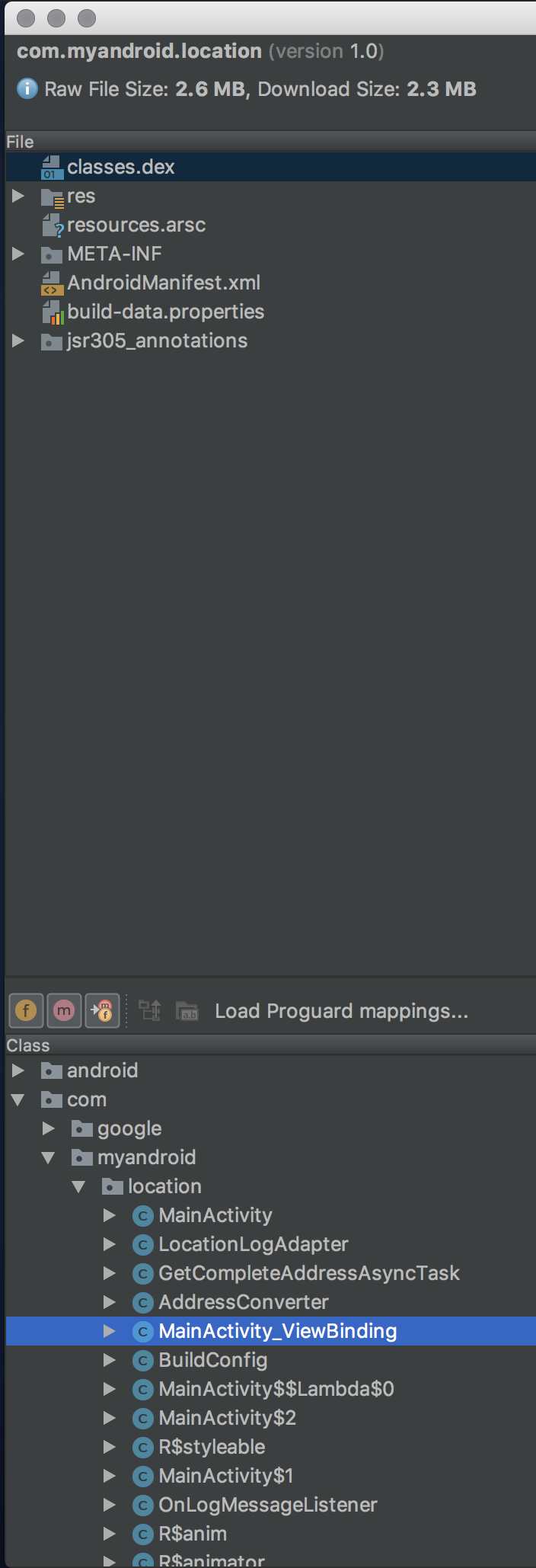
I cannot reproduce. Butter Knife correctly generates code and it winds up in the APK:

JakeWharton
on 18 Jul 2017
@JakeWharton is there any problem if I set my fragment as retained in setRetainInstance and then unbind them on onDestroy ?
DavidMont
on 19 Jul 2017
Not as long as you are re-binding in onCreateView and not touching the fields between.
JakeWharton
on 19 Jul 2017
I'm having similar problem with 8.8.1. Butterknife just doesn't bind the elements.
Here's what Buterknife.debug() says:
D/ButterKnife: Looking up binding for com.myproj.features.homescreen.HomeActivity_
D/ButterKnife: Not found. Trying superclass android.support.v7.app.AppCompatActivity
D/ButterKnife: MISS: Reached framework class. Abandoning search.
 alex-berdnikov
on 25 Sep 2017
alex-berdnikov
on 25 Sep 2017
@alex-berdnikov
I had similar problem In my case I had to add line below because I was using Kotlin in few places in my project
kapt 'com.jakewharton:butterknife-compiler:8.7.0'
 arkzb
on 25 Sep 2017
arkzb
on 25 Sep 2017
Ok, the thing is that we use old gradle plugin in the project I encountered it, so I had to use apt instead of annotationProcessor. My fault.
alex-berdnikov
on 26 Sep 2017
Related issues
 momochenxx
·
3Comments
momochenxx
·
3Comments
 Jay-YaoJie
·
3Comments
Jay-YaoJie
·
3Comments
 zwlxt
·
3Comments
zwlxt
·
3Comments
 coderau776
·
3Comments
coderau776
·
3Comments
 engr-umar-qureshi
·
3Comments
engr-umar-qureshi
·
3Comments
Most helpful comment
@alex-berdnikov
I had similar problem In my case I had to add line below because I was using Kotlin in few places in my project
kapt 'com.jakewharton:butterknife-compiler:8.7.0'