Buttercup-desktop: Entry types: note, SSH key, etc
Howdie,
Thanks so much for this project, love it!
I noticed today that the in-browser vault editor has a New Entry button, with a dot-dot-dot button beside it offering other Entry types:
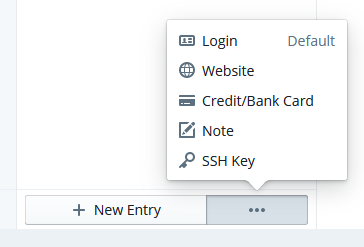
There's an Add Entry button in the Windows / macOS desktop app, but there's no dot-dot-dot-button
Is there a different way to access alternative Entry types in the desktop app?
I'm using Windows 10 with the Buttercup desktop app v1.16.2
 jokeyrhyme
All 6 comments
Hello! Not yet unfortunately.. this will come with the new desktop version that is underway. @sallar is tackling this at the moment :)
 perry-mitchell
on 17 Sep 2019
perry-mitchell
on 17 Sep 2019
Super. So looking forward to this one!
I ran into issue #717 using custom fields as a workaround, but notes will solve the need.
Thank you very much for your time working on this project @perry-mitchell @sallar 🎉
 keywordnew
on 25 Nov 2019
keywordnew
on 25 Nov 2019
Thanks @keywordnew! Nice to see you on here 😁. Yep this stuff is dropping very soon with the new UI. First party support for custom structures and UI.. notes will look like notes and so on. This will probably arrive some time after we finish OTP/2FA codes support for the mobile app (almost complete).
perry-mitchell
on 30 Nov 2019
Any news about this feature ?
 sidahmed-malaoui
on 2 Jun 2020
sidahmed-malaoui
on 2 Jun 2020
I'm using the browser plugin for that reason, but would love to see that on mobile and desktop too.
This is a great tool.
 andradei
on 17 Feb 2021
andradei
on 17 Feb 2021
Released in v2.
perry-mitchell
on 5 Apr 2021
Related issues
 mannp
·
4Comments
mannp
·
4Comments
 wtsiamruk
·
6Comments
wtsiamruk
·
6Comments
 KneePham
·
3Comments
KneePham
·
3Comments
 julianpoemp
·
6Comments
julianpoemp
·
3Comments
julianpoemp
·
6Comments
julianpoemp
·
3Comments
Most helpful comment
Hello! Not yet unfortunately.. this will come with the new desktop version that is underway. @sallar is tackling this at the moment :)