Buttercup-desktop: Global hotkey
Hi, thanks for this awesome app.
Can we add a global hotkey for maximizing/minimizing buttercup?
It would be also nice to have a preferences dialog where we can customize these things.
 mokhosh
All 14 comments
Hi! I'm currently working on a preferences window https://github.com/buttercup/buttercup-desktop/pull/699 and added the max and minimizing feature you've mentioned. Feel free to pull and test it :) The shortcut is: CommandOrControl+Shift+X
 ph1p
on 20 Jan 2019
ph1p
on 20 Jan 2019
Thanks, awesome job. Can we customize hotkeys btw?
mokhosh
on 21 Jan 2019
Definitely! I'll create a solution inside the preferences window later. Currently it's hard coded.
Maybe a restart of buttercup is required, we will see (:
ph1p
on 21 Jan 2019
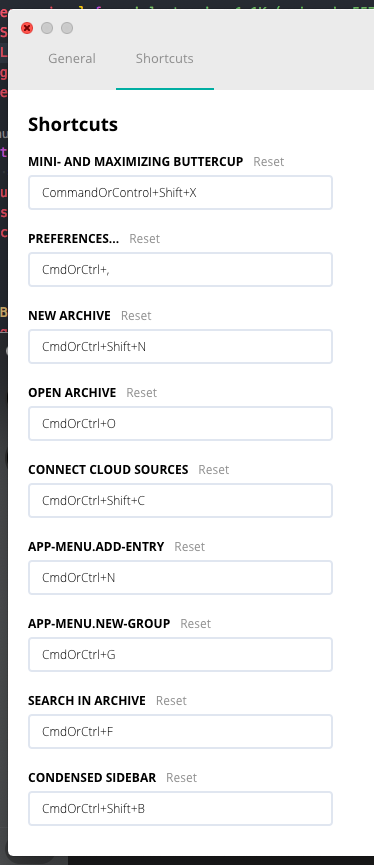
@mokhosh I have pushed a solution to my branch. Please take a look at it. (:
Okay. I have added all the shortcuts I could find ^^
ph1p
on 22 Jan 2019
@mokhosh I have pushed a solution to my branch. Please take a look at it. (:
Great job dude 👍
By taking a look do you mean I should compile your branch and take a look at it? Cause I didn't find any release.
mokhosh
on 24 Jan 2019
Jep. Just clone it, run npm i and npm start or build.
ph1p
on 24 Jan 2019
Good job.
I don't think the minimize/maximize shortcut is global. It does minimize the window when it's focused but doesn't bring it back when it's not.
Also, the preferences window looks weird in Windows (tabs are way too big).
And I think preferences usually belongs in Edit menu, doesn't it?
mokhosh
on 24 Jan 2019
Thank you for your feedback! 👍 I'm developing this feature on Mac. I will test everything under windows again. The design is only functional. I will redesign it and test it again everywhere.
I don't think the minimize/maximize shortcut is global. It does minimize the window when it's focused but doesn't bring it back when it's not.
Okay. Good to know! Maybe that's a problem with Windows.
I take a look at it.
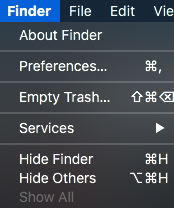
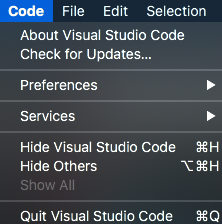
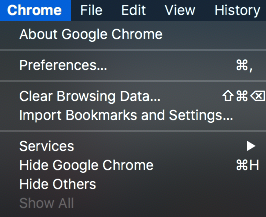
And I think preferences usually belongs in Edit menu, doesn't it?
I think on windows, this makes sense.
The preferences window on mac is always included in the first tab.
ph1p
on 24 Jan 2019
@mokhosh Fixed global hotkey and disable the menubar in preferences window
ph1p
on 26 Jan 2019
Unhandled Error
TypeError: Cannot read property 'isMinimized' of undefined
at Function._electron.globalShortcut.register (D:/dev/buttercup-desktop/src/main/global-shortcuts.js:38:18)
This happens when the window is closed and Buttercup is in the notification area.
[0] ERROR in ./src/renderer/index.js
[0] Module not found: Error: Can't resolve 'redux-subscriber' in 'D:\dev\buttercup-desktop\src\renderer'
[0]  @ ./src/renderer/index.js 23:0-46 89:18-32
[0]  @ multi (webpack)-dev-server/client?http://localhost:3000 (webpack)/hot/dev-server.js react-hot-loader/patch ./src/renderer/index
[0] i 「wdm」: Failed to compile.
I also had this one.
[1] TypeError: Cannot read property 'isMinimized' of undefined
[1]     at Function._electron.globalShortcut.register (D:\dev\buttercup-desktop\src\main\global-shortcuts.js:38:18)
[1] npm ERR! code ELIFECYCLE
[1] npm ERR! errno 3221225477
[1] npm ERR! [email protected] start:main: `cross-env HOT=1 BABEL_ENV=node NODE_ENV=development electron -r @babel/register ./src/main/app`
[1] npm ERR! Exit status 3221225477
[1] npm ERR!
[1] npm ERR! Failed at the [email protected] start:main script.
[1] npm ERR! This is probably not a problem with npm. There is likely additional logging output above.
[1]
npm ERR! A complete log of this run can be found in:
[1] npm ERR!     C:\Users\Momo\AppData\Roaming\npm-cache\_logs\2019-01-26T16_17_44_993Z-debug.log
[1] npm run start:main exited with code 3221225477
--> Sending SIGTERM to other processes..
[0] npm run start:renderer exited with code 1
npm ERR! code ELIFECYCLE
npm ERR! errno 1
npm ERR! [email protected] start: `concurrently --kill-others "npm run start:renderer" "npm run start:main"`
npm ERR! Exit status 1
npm ERR!
npm ERR! Failed at the [email protected] start script.
npm ERR! This is probably not a problem with npm. There is likely additional logging output above.
This happened after I tried to bring Buttercup back by clicking on the notification area icon.
mokhosh
on 26 Jan 2019
Fixed it (: The setting of the tray icon is now taken into account. The redux-subscriber package is now added to the package-lock.json.
ph1p
on 26 Jan 2019
Great job!
Everything seems to be working, except I couldn't npm install for some reason, but that won't be an issue when the app is compiled of course.
mokhosh
on 27 Jan 2019
Good to hear! (: I've already created an issue. https://github.com/buttercup/buttercup-desktop/issues/740 But yeah, this shouldn't be a problem at the end.
Next steps for me: Testing if all settings work correctly, writing tests and creating a final design.
ph1p
on 27 Jan 2019
any updates on this?
mokhosh
on 22 Jul 2019
Related issues
 FuridamuFaita
·
3Comments
FuridamuFaita
·
3Comments
 VARed
·
3Comments
VARed
·
3Comments
 perry-mitchell
·
5Comments
perry-mitchell
·
5Comments
 frigaut
·
6Comments
mokhosh
·
6Comments
frigaut
·
6Comments
mokhosh
·
6Comments
Most helpful comment
Hi! I'm currently working on a preferences window https://github.com/buttercup/buttercup-desktop/pull/699 and added the max and minimizing feature you've mentioned. Feel free to pull and test it :) The shortcut is: CommandOrControl+Shift+X