Buttercup-desktop: TOTP/HOTP 2FA and one time passwords
OTP support is a useful feature. You can see how it is implemented for entries in KeepassXC. Would allow buttercup entries to be used for two factor authentication.
 sunjam
All 17 comments
@sunjam How do you mean? TOTPs are used with services that provide authentication endpoints that use these (often alongside a username and password). Are you suggesting for Buttercup to have implemented a TOPTP client that can read these like the Google Authenticator app?
 perry-mitchell
on 18 Apr 2018
perry-mitchell
on 18 Apr 2018
Yes, I’m suggesting a client be implemented that can generate codes from OTP secret key files stored in Buttercup. See this video example from KeepassXC. or checkout the Nextcloud Passman otp app implementation on their hosted demo
sunjam
on 18 Apr 2018
This is actually the last thing I'm waiting for before I can move from 1password over to buttercup. Got a bunch of totp tokens inside 1password as a custom field..
Any thoughts on this since April?
 xeor
on 7 Dec 2018
xeor
on 7 Dec 2018
Well I've been lucky enough to have had several discussions since then with some terribly smart people regarding OTP implementations. It's still tricky for myself as I don't really use any OTP services currently (usually password+2FA only). That being said it's a strongly-requested feature from our users and we recognise the importance of it.
Still hoping someone might want to contribute it to the core but otherwise we'd be able to get to it eventually.
perry-mitchell
on 8 Dec 2018
Perhaps use this as starting point:
https://github.com/jaden/totp-generator
 jmfederico
on 16 May 2019
jmfederico
on 16 May 2019
@jmfederico That's for generating OTPs right? Don't we want to _connect_/consume OTP services on websites that we want to log in to? Please excuse any misunderstanding I have regarding this. To my understanding we want an OTP consumer library that will act like the Google Authenticator app, for example.
perry-mitchell
on 21 May 2019
@perry-mitchell The idea is that Buttercup can generate the temporary codes that a user needs to login to the service for which he/she stored the credentials.
What is needed to generate a TOTP is a key. Buttercup can then instead of displaying the key, display the generated code.
TOTP Generator is a time-based one time passwords generator in javascript. It is an example of how it can be implemented in Buttercup.
jmfederico
on 21 May 2019
@jmfederico thank you for bringing this subject back to life again. A lot of time has already passed.
I simply assumed this feature would already be implemented, since it's one of those core features you can find in other password managers. I'll keep an eye on this thread and give it another shot once it's implemented. Nevertheless the devs did a great job with this app! Thanks
 anubis-genix
on 23 May 2019
anubis-genix
on 23 May 2019
I've had some time to wrap my head around this. My understanding is that the difficulty is not in actually processing the codes generated by the TOTP and HOTP protocols, but actually _connecting_ to the service used by the user. For instance, connecting Twitter's 2FA using TOTP requires capturing a QR code, decoding it into its otpauth:// URL and then processing that using its key and other parameters by passing them to the TOTP library. All of this will require some mechanism in each app - desktop, mobile and browser ext. - to recognise and handle the QR codes.
I'll leave this issue open as it'll cover the implementation in the desktop app, but for the core implementation and integration, please see buttercup/buttercup-core#251.
perry-mitchell
on 28 May 2019
Usually websites give the user the option of "can not scan QR", and a "code" will be shown instead, which is what is needed to generate the TOTP.
Maybe initially providing the option to just generate the codes from the stored data, and later create the "QR" readers.
jmfederico
on 28 May 2019
Initially one could manually add the "key", and name the field "TOTP", or something similar.
jmfederico
on 28 May 2019
Would certainly love to see this feature as well. Right now I use Bitwarden primarily because it supports TOTP keys (although only at a premium level, which I presume is not 100% open source)
To speak to @perry-mitchell concern about consuming TOTP codes presented as QR codes, I wonder if the processing of those QR codes could be added to the mobile apps.
 ssmiller25
on 31 Jul 2019
ssmiller25
on 31 Jul 2019
@ssmiller25 We’ll be adding support for OTP codes and login to all of our platforms, with features being implemented where possible (depending on what the platform supports). Desktop will have display only for now, browser will have display, form fill and detection/consumption of qr codes, and the mobile will have display at least. I’m not sure what else is possible on mobile but if there’s some way to open a qr code in Buttercup we can of course then consume them there too.
perry-mitchell
on 1 Aug 2019
Can't wait for OTP and credit cards support in desktop version to switch from Enpass ...
 loxK
on 15 Nov 2019
loxK
on 15 Nov 2019
@perry-mitchell is it a feature we can help you with?
Indeed, enpass has a very simple interface, listing all you OTP codes in one place, having them refreshed every 30 seconds.
Something like this (but much nicer):

(Edit): the above comes from https://github.com/gbraad/gauth, a simple page that you can host anywhere (including locally) to store your OTP keys in local storage. I'm using it for years now.
A very useful first step would be to:
- let users provide the OTP key in a
TOTP(or whatever convention) field on their entries - add a a page per vault displaying codes for all keys found
- let users manually copy and paste codes when they need to.
More advanced features could be shipped later, if there is an actual demand for them:
- saving keys in an entry by scanning the QR code, or uploading an image (quite common amongst competitors)
- automatically filling TOTP form fields in browser/mobile (never saw it yet, but handy)
 feugy
on 15 Nov 2019
feugy
on 15 Nov 2019
We actually already have OTP support in the core, available in the browser extension right now:
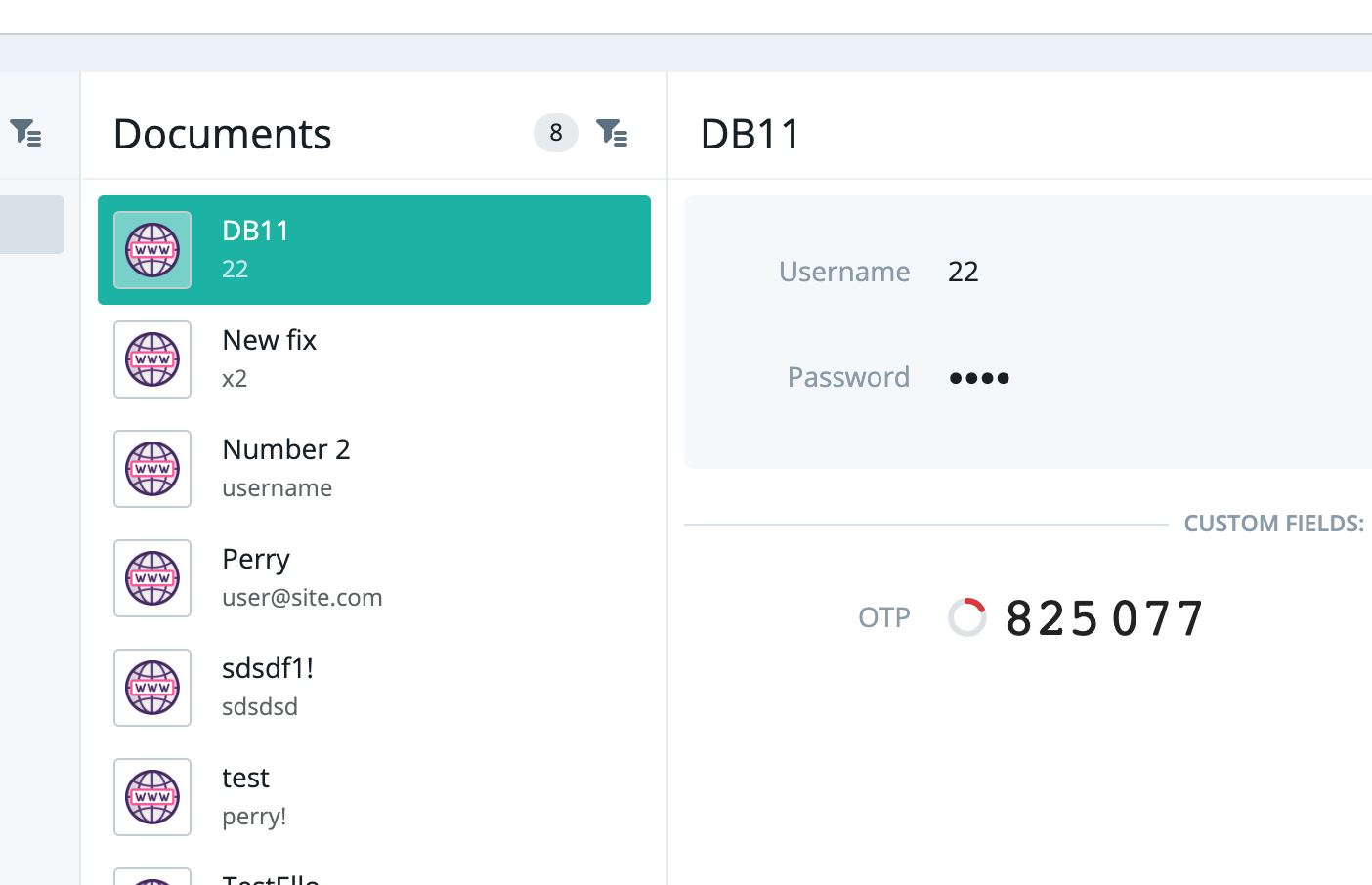
The trick is this:
- Adding it to an easily accessible list (browser)
- Adding it to a list within the desktop app
- Mobile.. etc.
But with desktop it's a bit tricky - @sallar and I need to first transfer the UI to the new one (visible in the extension, as shown above), so that these features are all built once and used everywhere.
In my opinion Buttercup's use of OTPs is different to that of an authenticator app, like Google Authenticator, for example - Those apps don't provide login functionality, and only need to show the codes. Buttercup first and foremost should make the codes available as a 1 or 2 click process to enter in forms requiring OTP codes, replacing the need for any authenticator application. Otherwise OTPs should maybe be shown in search results, attached to entries.
So right now I'd say that unfortunately there's not a whole lot to do. There's more work in the extension right now, as that could use what you were suggesting - QR code recognition and OTP code URL/QR-code recognition (automatic). If you wanted to help with any of that, we could use the help.
perry-mitchell
on 15 Nov 2019
Available in v2.
perry-mitchell
on 5 Apr 2021
Related issues
 zrzro
·
4Comments
zrzro
·
4Comments
 FuridamuFaita
·
3Comments
perry-mitchell
·
6Comments
FuridamuFaita
·
3Comments
perry-mitchell
·
6Comments
 julianpoemp
·
3Comments
julianpoemp
·
6Comments
julianpoemp
·
3Comments
julianpoemp
·
6Comments
Most helpful comment
This is actually the last thing I'm waiting for before I can move from 1password over to buttercup. Got a bunch of totp tokens inside 1password as a custom field..
Any thoughts on this since April?