Buttercup-desktop: Changing master password corrupts password file
Changing the master password corrupts the password file.
After trying to change the master password for my buttercup file I was not able to open it again.
The following error appeared after filling out the "Change Password" form:
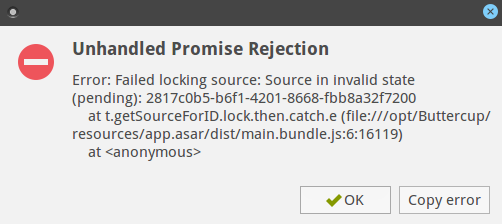
Then I was no longer able to use buttercup, I had to kill the process on the CLI.
I started buttercup again but I could no longer use the file, neither with the initial password nor with the new which I tried to set.
Tested under Windows 10 with buttercup version 1.5.2 and Ubuntu 16.04 with buttercup 1.5.1.
I think this can be quite dangerous if someone is trying to change the master password, but then the file gets corrupted!
THX for your help, Georg
 gschoenberger
All 7 comments
Hi @gschoenberger - Sorry about the delay.
I've reproduced this as well - Though it occurred for me after locking the file (after changing the password). I'll have a look at it shortly..
 perry-mitchell
on 15 Mar 2018
perry-mitchell
on 15 Mar 2018
Yes, locking or closing -> both leads to the same issue.
THX for taking a look!
gschoenberger
on 15 Mar 2018
Ok, I found the issue. The desktop app is using some new functionality to improve the archive management, which had a bug. The archive source (after having the password changed) was running into a queue deadlock when trying to serialise the source 😵.
It's being fixed in core now, with a release coming soon.
perry-mitchell
on 15 Mar 2018
This should be released tomorrow (Friday).
perry-mitchell
on 15 Mar 2018
THX for the fast fix!
gschoenberger
on 16 Mar 2018
@gschoenberger If you remove the file from Buttercup Desktop and re-add it again, it should start working again. Right @perry-mitchell? (The release to fix this issue is coming in a few minutes)
 sallar
on 16 Mar 2018
sallar
on 16 Mar 2018
@sallar @gschoenberger Yes, it should work like that, but can't guarantee. It was a mix up in terms of the written content - the content itself should not get corrupted.
Thanks for reporting @gschoenberger!
perry-mitchell
on 16 Mar 2018
Related issues
 wtsiamruk
·
6Comments
wtsiamruk
·
6Comments
 julianpoemp
·
3Comments
perry-mitchell
·
4Comments
julianpoemp
·
3Comments
perry-mitchell
·
4Comments
 mokhosh
·
6Comments
mokhosh
·
6Comments
 zrzro
·
4Comments
zrzro
·
4Comments