Description
On Safari only, the link color is not correctly computed when inserted in a hero with some color modifier.
To reproduce
<section class="hero is-info">
  <a>Hello world</a>
</section>

<section class="hero">
  <a>Hello world</a>
</section>
Result:
| Correct behavior (Chrome) | Wrong behavior (Safari) |
| --- | --- |
|  |
|  |
|
I expect that the link color should be $link-color as on Chrome.
Reason
When not working (on Safari only), the following rule is triggered:
https://github.com/jgthms/bulma/blob/master/sass/layout/hero.sass#L24-L26
I cannot explain why this occurs only on Safari, but for sure, inheriting the color (i.e. take the parent color) cannot lead to a good result here.
 fabienrohrer
All 9 comments
Naively, I would go to drop the lines:
https://github.com/jgthms/bulma/blob/master/sass/layout/hero.sass#L24-L26
.. but I don't know the side effects. I don't see any example when inheriting the color is a good idea.
fabienrohrer
on 29 Jan 2020
Could I have the opinion of Bulma maintainers? I could submit a patch to drop these lines.
fabienrohrer
on 29 Jan 2020
Do you have a sample HTML code to share? It might come from an error in your markup where the browser doesn’t parse your page correctly.
 jgthms
on 29 Jan 2020
jgthms
on 29 Jan 2020
I confirm I can reproduce the issue with this simple example:
<!DOCTYPE html>
<html>

  <head>
    <meta charset="utf-8">
    <meta http-equiv="X-UA-Compatible" content="IE=edge">
    <meta name="viewport" content="width=device-width, initial-scale=1">

    <link rel="stylesheet" href="https://cdnjs.cloudflare.com/ajax/libs/normalize/8.0.1/normalize.min.css" />
    <link rel="stylesheet" href="https://cdn.jsdelivr.net/npm/[email protected]/css/bulma.min.css">
  </head>
  <body>

    <section class="hero is-info">
      <a>Hello world</a>
    </section>

    <section class="hero">
      <a>Hello world</a>
    </section>

  </body>

</html>
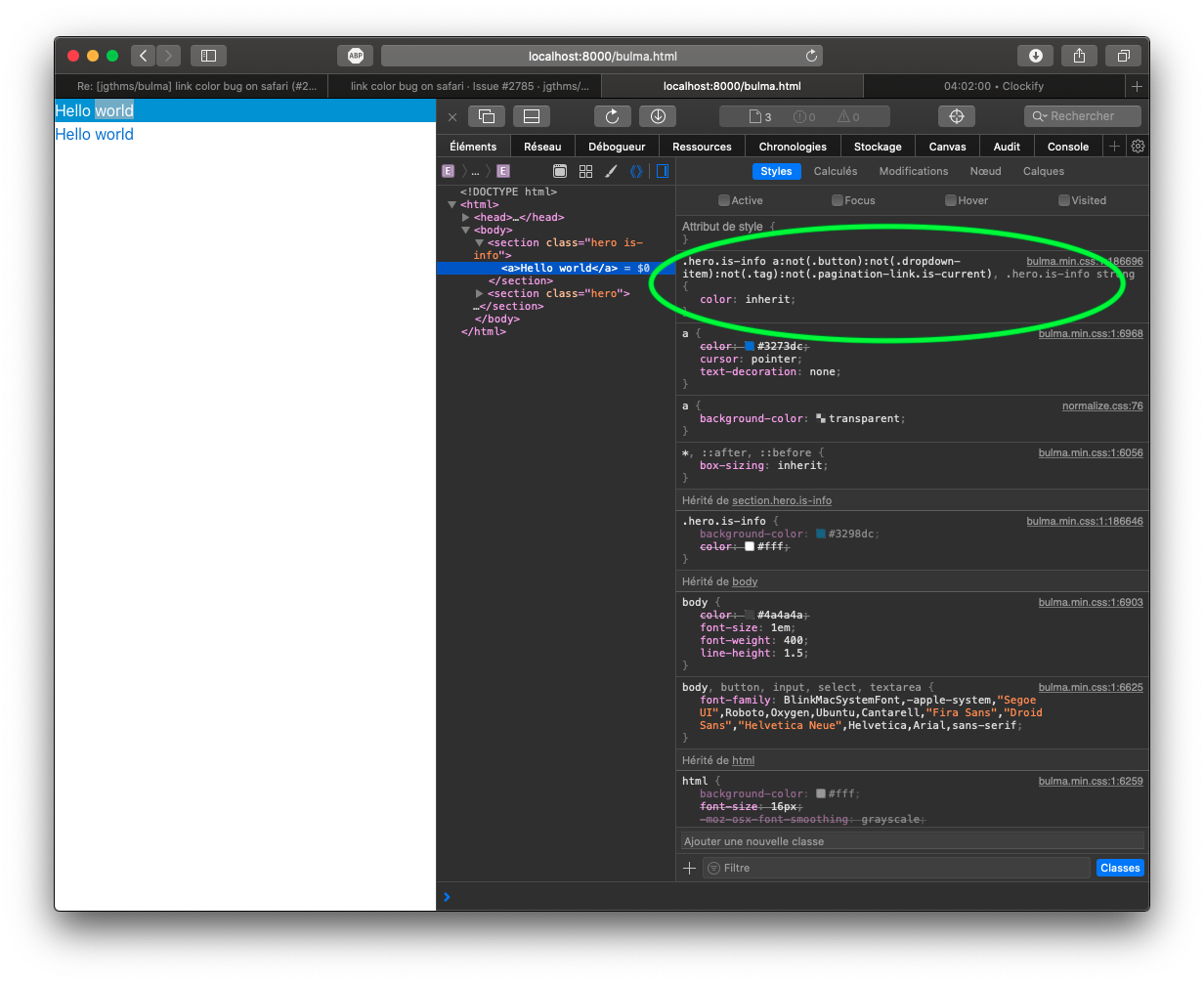
Do I missed something?
fabienrohrer
on 29 Jan 2020
That is the correct behaviour. In hero components, all links inherit the text color. Otherwise, the links would be blue on blue.
jgthms
on 29 Jan 2020
The bug is that this small sample does not provide the same result on safari (the first ‘hello world’ is white) and on Chrome/Firefox (the first ´Hello World’ is blue). I expect that the Chrome behavior is more correct, but the important thing to me is that Bulma should behave the same in every Browser.
fabienrohrer
on 29 Jan 2020
Seems Safari is the only browser to support chaining :not() selectors: https://developer.mozilla.org/en-US/docs/Web/CSS/:not#complex-selector-list
jgthms
on 30 Jan 2020
Thank you for your reply and interest, this explains indeed why there is a difference here.
- I also observe the same issue in iOS.
- Therefore, using
:not()in your sass files is not a good idea. It may explain other bugs as this one: #2597 - This is my personal point of view, but I am not fan of the fact that the link color inherits from its parent in case of
strongandain a hero section. A link is a link, I would like to be able to see clearly it's a link, consistently in the whole page. => I would go to drop this rule, without pressure :-D
How to proceed next?
fabienrohrer
on 30 Jan 2020
This issue has been automatically marked as stale because it has not had recent activity. It will be closed if no further activity occurs. Thank you for your contributions.
![stale[bot] picture](https://avatars3.githubusercontent.com/in/1724?v=4&s=40) stale[bot]
on 29 Jul 2020
stale[bot]
on 29 Jul 2020
Related issues
 swamikevala
·
3Comments
swamikevala
·
3Comments
 choonggg
·
3Comments
choonggg
·
3Comments
 guillecro
·
3Comments
guillecro
·
3Comments
 rogervila
·
3Comments
rogervila
·
3Comments
 Antrikshy
·
3Comments
Antrikshy
·
3Comments
Most helpful comment
Thank you for your reply and interest, this explains indeed why there is a difference here.
:not()in your sass files is not a good idea. It may explain other bugs as this one: #2597strongandain a hero section. A link is a link, I would like to be able to see clearly it's a link, consistently in the whole page. => I would go to drop this rule, without pressure :-DHow to proceed next?