@jgthms
This is about Bulma | the Docs.
Is it a bug/feature/question or do you need help?
Overview of the problem
This is about the Bulma CSS framework
I'm using Bulma version [0.7.1]
My browser is: Chrome 66
I am sure this issue is not a duplicate?
Description
Steps to Reproduce
- add an icon next to text for a server status.
- Added icon next to text
- ICON and text are not aligned horizontally.
Expected behavior
Both should be aligned.
Actual behavior
Icon went up and text below
Here is the Code:
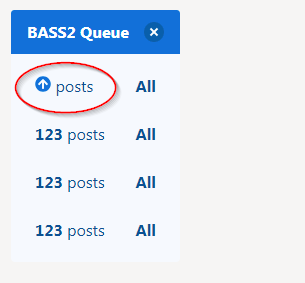
 mpoonuru
All 7 comments
This works for me:
<span className="is-size-7">
<i className="fas fa-location-arrow" />
<span style={{paddingLeft: 5}}>{addressString}</span>
</span>
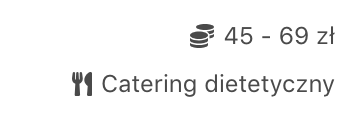
 makstr
on 18 May 2018
makstr
on 18 May 2018
An icon is an inline-flex element, so any text alignment applies here.
You could also try using a level: https://bulma.io/documentation/layout/level/
 jgthms
on 23 May 2018
jgthms
on 23 May 2018
For those who are struggling with this as @jgthms says with the level you can align text and icon
<div className="level">
 <div className="level-left">
  <div className="level-item">
   <span className="icon">
    <i className="fa fa-mobile"></i>
   </span>
   <p>xxx-xxx-xxxx</p>
  </div>
 </div>
</div>
 cgonzalezp91
on 1 Oct 2019
cgonzalezp91
on 1 Oct 2019
For those who are struggling with this as @jgthms says with the level you can align text and icon
<div className="level"> <div className="level-left"> <div className="level-item"> <span className="icon"> <i className="fa fa-mobile"></i> </span> <p>xxx-xxx-xxxx</p> </div> </div> </div>This can't honestly be the best solution, can it? It reads a lot like "go screw yourself" for wanting simple text alignment with icons. It's been a year, how do other people deal with this?
 treystout
on 14 Oct 2020
treystout
on 14 Oct 2020
_"An icon is an inline-flex element, so any text alignment applies here."_ - @jgthms
Can you elaborate this statement? I'm having difficulties aligning icons to text, and using levels feels a bit overkill in some scenarios.
 devJ0n
on 4 Nov 2020
devJ0n
on 4 Nov 2020
If i use Icon component, then yes, i have hard time aligning it, the Level does help, but that is too much (in terms of pile of markup for such task). BUT i found pretty simple solution, do not use the Icon component (e.g. class "icon"), just go like so:
Status: <i class="fas fa-spinner fa-pulse"></i> Loading
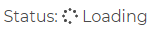
Also want to add to some example above: always close "i" tag, do not use <i ... />, always use <i ...></i> (even if its empty like in our case).
 greenya
on 21 Nov 2020
greenya
on 21 Nov 2020
Hi!
Also stuck with this issue (or no?), and in the end just removed class="icon" from span element (which wraps an icon) and the desired look was achieved.
 zhibirc
on 10 Dec 2020
zhibirc
on 10 Dec 2020
Related issues
 NurdinDev
·
3Comments
NurdinDev
·
3Comments
 swthate
·
3Comments
swthate
·
3Comments
 Cosbgn
·
3Comments
Cosbgn
·
3Comments
 JenCant
·
3Comments
JenCant
·
3Comments
 Qard
·
3Comments
Qard
·
3Comments
Most helpful comment
For those who are struggling with this as @jgthms says with the level you can align text and icon