This is about Bulma.
Description
Hi,
I want know if there is a way to have circular image, thanks
 Piero87
All 10 comments
That's just a css property: border-radius: 50% for fully circular, or if you want just rounded corners you could use a smaller value.
You could either provide your own custom class or override the Bulma image class where you customize it.
 stern-shawn
on 18 Jan 2018
stern-shawn
on 18 Jan 2018
Extending @stern-shawn answer:
If you use images like this:
<figure class="image is-128x128">
  <img src="https://bulma.io/images/placeholders/128x128.png">
</figure>
you have to apply border-radius: 50%; to the <img> tag:
<figure class="image is-128x128">
  <img style="border-radius:50%" src="https://bulma.io/images/placeholders/128x128.png">
</figure>

<!-- or -->

<style>
.is-circular {
    border-radius: 50%;
}
</style>

<figure class="image is-128x128">
  <img class="is-circular" src="https://bulma.io/images/placeholders/128x128.png">
</figure>
 jnsdrtlf
on 18 Jan 2018
jnsdrtlf
on 18 Jan 2018
Thank you all for the answer but border-radius: 50%; doesn't cover all the cases and the problem that can happens with various resolution of image, like portrait or landscape. I think this could be a more proper solution:
<div class="rounded-img-container">
  <img class="rounded-img" src="https://hypb.imgix.net/image/2017/08/bryan-cranston-toxic-relationship-breaking-bad-performance-twtr.jpg?w=960&q=90&fit=max&auto=compress%2Cformat"/>
</div>
.rounded-img-container {
  display: inline-block;
  width: 250px;
  height: 250px;
  border-radius: 50%;
  overflow: hidden;
}
.rounded-img {
  width: inherit;
  height: inherit;
  border-radius: inherit;

  object-fit: cover;
  object-position: center;
}
Hi,
here is my code to do it:
.image
  &.is-rounded
    img
      object-fit: cover
      object-position: center center
      height: 100%
      width: 100%
      border-radius: 250983px
used like that:
<figure class="image is-96x96 is-rounded">
   <img src="https://images.unsplash.com/photo-1506919258185-6078bba55d2a?dpr=1&auto=format&fit=crop&w=1000&q=80&cs=tinysrgb">
</figure>
and also for icon:
.icon
  &.is-rounded
    border-radius: 250983px
 Wikiki
on 19 Jan 2018
Wikiki
on 19 Jan 2018
@Piero87 this could be accieved with the 'is-square' class. Much simpler.
jnsdrtlf
on 3 Feb 2018
why is this still not a feature???
other frameworks have this option by default.
 diomed
on 5 Apr 2018
diomed
on 5 Apr 2018
it exists but not in the docs
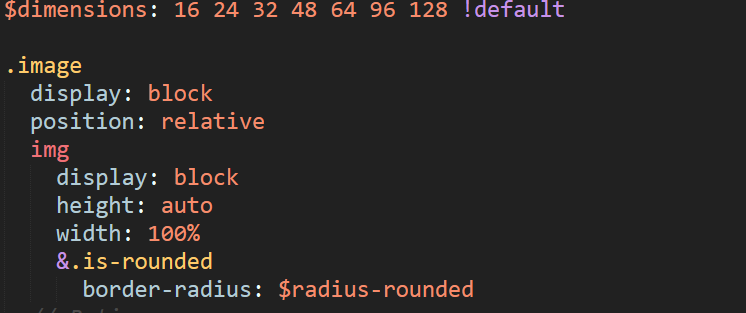
@jgthms this is missing in the docs, wonder if I should create a seperate issue for this or not ?
 darkylmnx
on 20 Apr 2018
darkylmnx
on 20 Apr 2018
I use as below:
<figure class="image is-128x128  ">
   <img class="is-rounded" src="https://bulma.io/images/placeholders/256x256.png">
</figure>
 bravohex
on 4 Jun 2018
bravohex
on 4 Jun 2018
This issue has been automatically marked as stale because it has not had recent activity. It will be closed if no further activity occurs. Thank you for your contributions.
![stale[bot] picture](https://avatars3.githubusercontent.com/in/1724?v=4&s=40) stale[bot]
on 21 Jan 2019
stale[bot]
on 21 Jan 2019
The image class="is-rounded" only works if the image is square; for other image it does not work. But the same feature is there in bootstrap as class="rounded-circle" and that works perfectly.
 santm
on 14 May 2020
santm
on 14 May 2020
Related issues
 Laraveldeep
·
3Comments
Laraveldeep
·
3Comments
 Antrikshy
·
3Comments
Antrikshy
·
3Comments
 Yard8
·
3Comments
Yard8
·
3Comments
 bigZ-again
·
3Comments
bigZ-again
·
3Comments
 dotMastaz
·
3Comments
dotMastaz
·
3Comments
Most helpful comment
it exists but not in the docs

@jgthms this is missing in the docs, wonder if I should create a seperate issue for this or not ?