Bulma: Question: How can I center elements vertically?
Overview of the problem
This is about the Bulma CSS framework.
I need some help.
I'm using Bulma 0.6.0
Description
I just started setting up my blog prototype with Bulma. There is a footer section with two equally divided columns. I'd like the three items (Twitter, Email, etc.) to be vertically centered in the yellow area. Is there any special class for that available in Bulma?
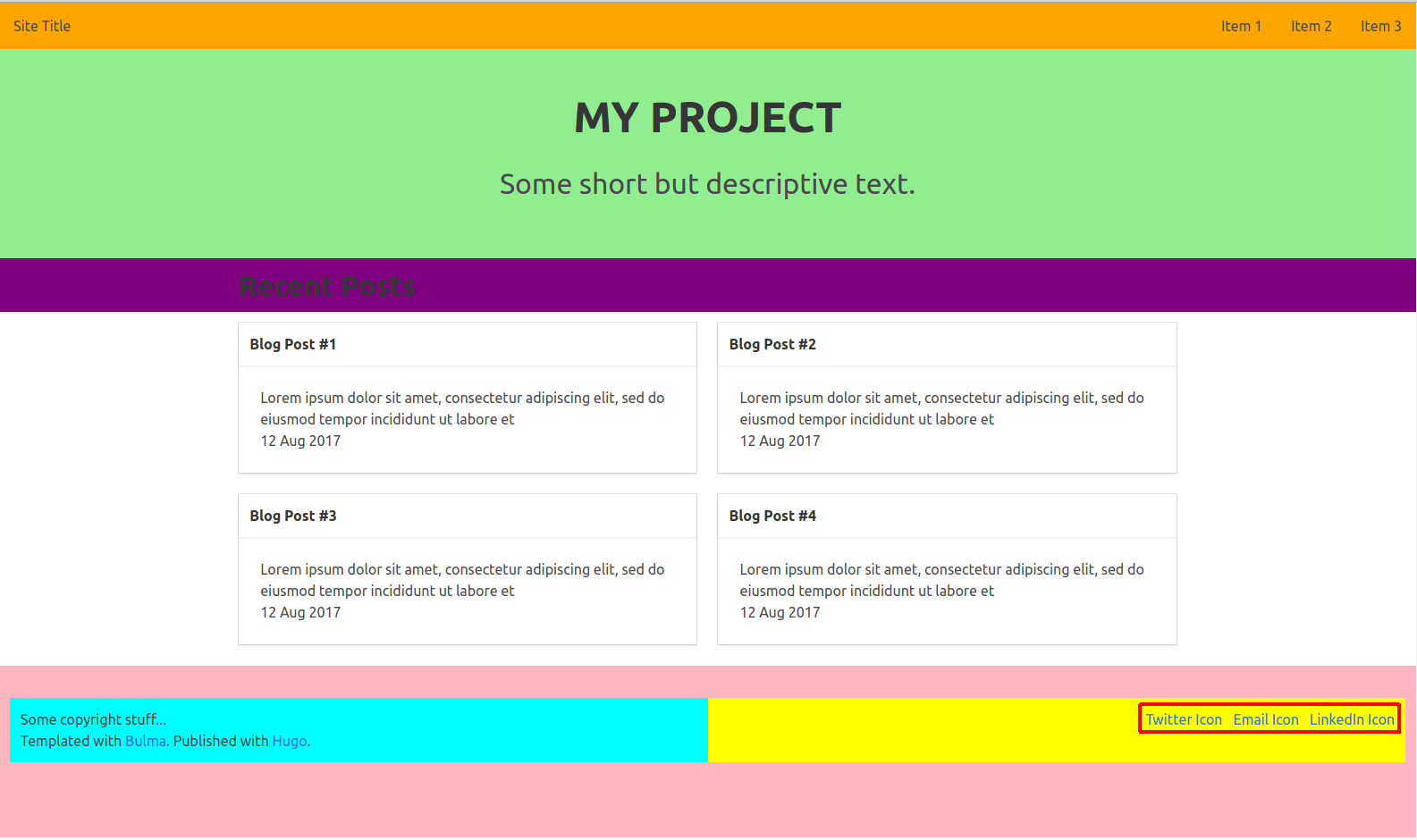
(Please see the full example on codepen.io)
   <footer class="footer" style="background-color: lightpink;">
        <div class="columns">
          <div class="column has-text-centered-touch" style="background-color: cyan;">
            <p>Some copyright stuff...</p>
            <p>Templated with <a href="https://bulma.io" target="_blank">Bulma</a>. Published with <a href="https://gohugo.io/" target="_blank">Hugo</a>.</p>
          </div>
          <div class="column has-text-right" style="background-color: yellow;">
            <div class="level">
              <div class="level-left"></div>
              <div class="level-right">
                <a class="level-item" href="#">Twitter Icon</a>
                <a class="level-item" href="#">Email Icon</a>
                <a class="level-item" href="#">LinkedIn Icon</a>
              </div>
            </div>
          </div>
        </div>
    </footer>
 straurob
All 5 comments
My current workaround uses the approach from Vertical Centering - Solved by Flexbox by adding this modifier to the level:
.is-vertical-center {
  display: flex;
  align-items: center;
}
Maybe there is an "official Bulmaic" way of doing this?
straurob
on 2 Nov 2017
I also solved a similar problem using a custom modifier as described in the previous post. I searched all the docs but found no official way of doing this, unless I overlooked something.
 BarFoo
on 2 Nov 2017
BarFoo
on 2 Nov 2017
You can vertically align columns by using <div class="columns is-vcentered"> but you can't vertical align the content of a single column because it requires display: flex;.
 jgthms
on 5 Nov 2017
jgthms
on 5 Nov 2017
I have the same problem and use class="columns is-desktop is-vcentered"
Also I think the semantics off is-vcentered suggests that it is columns that gets vertically centered. But what it actually does is to make children of columns to be vertically centered inside columns.
 kenn44
on 23 May 2018
kenn44
on 23 May 2018
but you can't vertical align the content of a single column because it requires
Maybe there is some reason to add same code
&.is-vcentered
    align-items: center
for "is-flex is-vcentered"
 mkarkachov
on 27 Jul 2018
mkarkachov
on 27 Jul 2018
Related issues
 Antrikshy
·
3Comments
Antrikshy
·
3Comments
 leofontes
·
3Comments
leofontes
·
3Comments
 Qard
·
3Comments
Qard
·
3Comments
 NurdinDev
·
3Comments
NurdinDev
·
3Comments
 JenCant
·
3Comments
JenCant
·
3Comments
Most helpful comment
My current workaround uses the approach from Vertical Centering - Solved by Flexbox by adding this modifier to the level:
Maybe there is an "official Bulmaic" way of doing this?