Bulma: How to have an icon in a navbar-item?
Hello!
Overview of the problem
This is about the Bulma CSS framework
I'm using Bulma v0.5.3.
My browser is: Safari 11.0 on OSX.
Description
I have a dropdown menu in a navbar component. I have several items in the dropdown and I have added an icon to each.
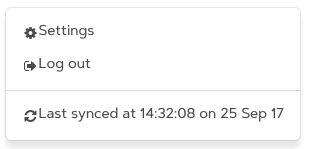
However the icons do not line up with the text (the icons are lower) and there is no gap between the icons and the text.
Here's a screenshot:
Steps to Reproduce
Here's my HTML:
<div class="navbar-item has-dropdown is-hoverable">
  <a class="navbar-link">Blah</a>
  <div class="navbar-dropdown is-right is-boxed">
    <a class="navbar-item" href="/settings">
      <span class="icon is-small"><i class="fa fa-gear"></i></span>
      <span>Settings</span>
    </a>
    <a class="navbar-item" href="/log-out">
      <span class="icon is-small"><i class="fa fa-sign-out"></i></span>
      <span>Log out</span>
    </a>
    <div class="navbar-divider"></div>
    <div class="navbar-item">
      <span class="icon is-small"><i class="fa fa-refresh"></i></span>
      <span>Last synced at 14:32:08 on 25 Sep 17</span>
    </div>
  </div>
</div>
Expected behavior
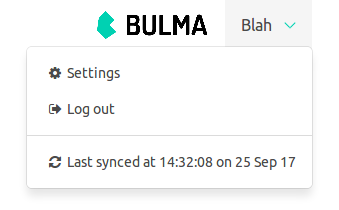
I expected each icon to line up with its text just as it does in, for example, a tab:

Here's my HTML for the tabs screenshot:
<div class="tabs is-boxed">
  <ul>
    <li class="is-active">
      <a>
        <span class="icon is-small"><i class="fa fa-refresh"></i></span>
        <span>Sync</span>
      </a>
    </li>
    <!-- etc -->
  </ul>
</div>
Actual behavior
See first screenshot above.
Thank you in advance!
 airblade
All 5 comments
 bstashio
on 28 Sep 2017
bstashio
on 28 Sep 2017
Thanks for the reply.
Looking at the difference between your codepen example and my code, I realised that I was on bulma v0.5.1, not v0.5.3. Somehow I didn't manage to upgrade properly and when I checked the version I got that wrong too.
I also realised that the font I'm using, Artegra Sans Medium, isn't quite centred vertically:

However I found that inserting a div with relative positioning fixes the vertical centering:
<a class="navbar-item" href="/settings">
  <div style="position:relative">
    <span class="icon"><i class="fa fa-gear"></i></span>
    <span>Settings</span>
  </div>
</a>
The upper item has the relatively positioned div; the lower doesn't:
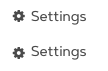
It's the same with OS X's system font: without the relatively positioned div, the icon and the text aren't quite aligned vertically.
airblade
on 29 Sep 2017
Not sure if that's a Safari issue or font related; I ran a test on safari iOS and it was properly v-aligned, unfortunately can't perform a test on OS X as I use a different OS.
bstashio
on 29 Sep 2017
OK. Thanks for the help!
airblade
on 30 Sep 2017
I found this issue while searching around, because I encountered the same problem. I have a Navbar Dropdown with icons that are not perfectly aligned. However, adding the div with position:relative solved it. I'm on Chrome / Win with latest bulma.
 apocalyarts
on 8 Nov 2017
apocalyarts
on 8 Nov 2017
Related issues
 Antrikshy
·
3Comments
Antrikshy
·
3Comments
 JenCant
·
3Comments
JenCant
·
3Comments
 rogervila
·
3Comments
rogervila
·
3Comments
 Cosbgn
·
3Comments
Cosbgn
·
3Comments
 NurdinDev
·
3Comments
NurdinDev
·
3Comments
Most helpful comment
Try removing
is-smallfromicon.You can check it out here.