Bulma: navbar-dropdown disappearing on hover
Overview of the problem
This is about the Bulma CSS framework
I'm using Bulma version [0.4.3]
My browser is: Chrome Version 59.0.3071.115 (official Build) (64-Bit Linux Mint)
This is a Sass issue: I'm using version [0.4.3]
I am sure this issue is not a duplicate.
Description
Hey folks. I'm builing a laravel-app with bulma and wanted to use the new navbar-component.
My html is in the attached screenshoot (github won't let me...).
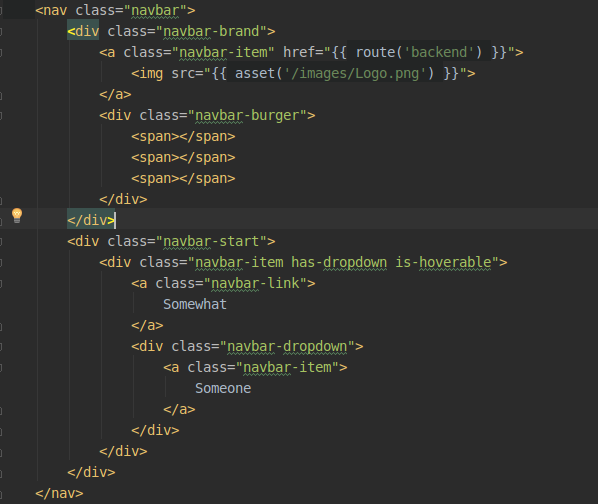
Now everytime I hover over the "Somewhat" the dropdown pops open (yay!) but as soon as I move my mouse down to the Dropdown-content -> it disappears.
Steps to Reproduce
- Create a new laravel-app
- install bulma via npm
- set a new view
- set the navbar inside the app-layout, outside of the view-content
- add a nav with navbar-brand + navbar-burger
- add the above code after the closed navbar-brand
- Error!
Expected behavior
That the dropdown-content stayes visible while I'm inside the dropdown-area with my mouse.
Actual behavior
Is disappeared. Bad dropdown!

 Husky110
All 11 comments
I have the same issue on Firefox 54
 PanArnaud
on 27 Jul 2017
PanArnaud
on 27 Jul 2017
Plus personally I don't think it's a browser-issue, since Google are the most upfront when it comes to new standards and stuff...
Husky110
on 27 Jul 2017
I haven't been able to reproduce it. I'll have to investigate.
 jgthms
on 3 Aug 2017
jgthms
on 3 Aug 2017
Have the same problem here. Seem like if there is a container underneath the list, the container get the focus and not the dropdown.
 brenouchoa
on 9 Aug 2017
brenouchoa
on 9 Aug 2017
As I expected, if i put a breadcrum right under the navbar i don't have the problem. An empty breadcrum div will also solve the problem.
brenouchoa
on 9 Aug 2017
@brenouchoa Can you share the code please ? Thank you
PanArnaud
on 10 Aug 2017
I could reproduce the problem. I fixed it by increasing the z-index value of my navbar. Apply the following in your stylesheets:
#my-navbar-selector {
    z-index: 1000;
}
 suchmaske
on 28 Aug 2017
suchmaske
on 28 Aug 2017
Same issue here. Only when navbar is inside a container.
Increasing z-index fixes it.
 livingos
on 25 Oct 2017
livingos
on 25 Oct 2017
this is should me merge for upgrading i guess, thanks for @suchmaske
 sidaurukfreddy
on 29 Jan 2018
sidaurukfreddy
on 29 Jan 2018
This issue has been automatically marked as stale because it has not had recent activity. It will be closed if no further activity occurs. Thank you for your contributions.
![stale[bot] picture](https://avatars3.githubusercontent.com/in/1724?v=4&s=40) stale[bot]
on 21 Jan 2019
stale[bot]
on 21 Jan 2019
Has this been fixed or do we still have to use the workaround provided by @suchmaske ?
Husky110
on 28 Jan 2019
Related issues
 leofontes
·
3Comments
leofontes
·
3Comments
 swamikevala
·
3Comments
swamikevala
·
3Comments
 Wikiki
·
3Comments
Wikiki
·
3Comments
 Cosbgn
·
3Comments
Cosbgn
·
3Comments
 bigZ-again
·
3Comments
bigZ-again
·
3Comments
Most helpful comment
I could reproduce the problem. I fixed it by increasing the
z-indexvalue of my navbar. Apply the following in your stylesheets: