EDIT: I only searched for closed issues, and now i did find a partial dublicate. Please close this issue. Sorry.
Is it about Bulma
Is it a question (maybe a bug)
Overview of the problem
This is about the Bulma CSS framework
I'm using Bulma version 0.4.2
My browser is: Google Chrome, Mozilla Firefox, Microsoft Edge and Safari (iOS)
I am sure this issue is not a duplicate
Description
strong tag/selector has an fixed dark grey color (#363636) defined, which means that it can't be used in ex. notification is-primary tag. I'm not using SASS. Just using the bulma.css file.
Steps to Reproduce
<div class="notification is-primary">
    <strong>Lorem ipsum dolor sit amet, consectetur adipiscing elit</strong>
    <ul>
        <li>Sub-item #1</li>
        <li>Sub-item #2</li>
    </ul>
</div>
Expected behavior
Shouldn't strong tags inherit the color from parent element?
Actual behavior
Notification with is-primary contains white text, but the strong element will become dark grey.
 mm98
mm98
All 8 comments
I just hit this issue. I don't feel it is a duplicate as it seems to happen outside of notifications as well? With a <strong> tag, adding is-primary has does not effect the colour. This feels like a bug to me.
 ctolkien
on 3 Jul 2017
ctolkien
on 3 Jul 2017
I've been working on a fix for this and quite a few other coloring bugs.
 PaddoSwam
on 4 Jul 2017
PaddoSwam
on 4 Jul 2017
Hello,
I just wanted to say I got the latest version of bulma and get this code inside my page:
<div class="notification is-danger" ref="notification">
   <button class="delete" @click.prevent="closeNotification"></button>
   Le <strong>format</strong> de votre fichier est <strong>invalide</strong>
   ou sa <strong>taille excède 25 Mo</strong>.<br /><br />
</div>
It displays as shown below:

Seems to be related to your bug. The documentation shows different behavior.
 FrancoisH
on 3 Aug 2017
FrancoisH
on 3 Aug 2017
I can confirm it's fixed in the latest version (0.5.1)
 RickCraig
on 9 Sep 2017
RickCraig
on 9 Sep 2017
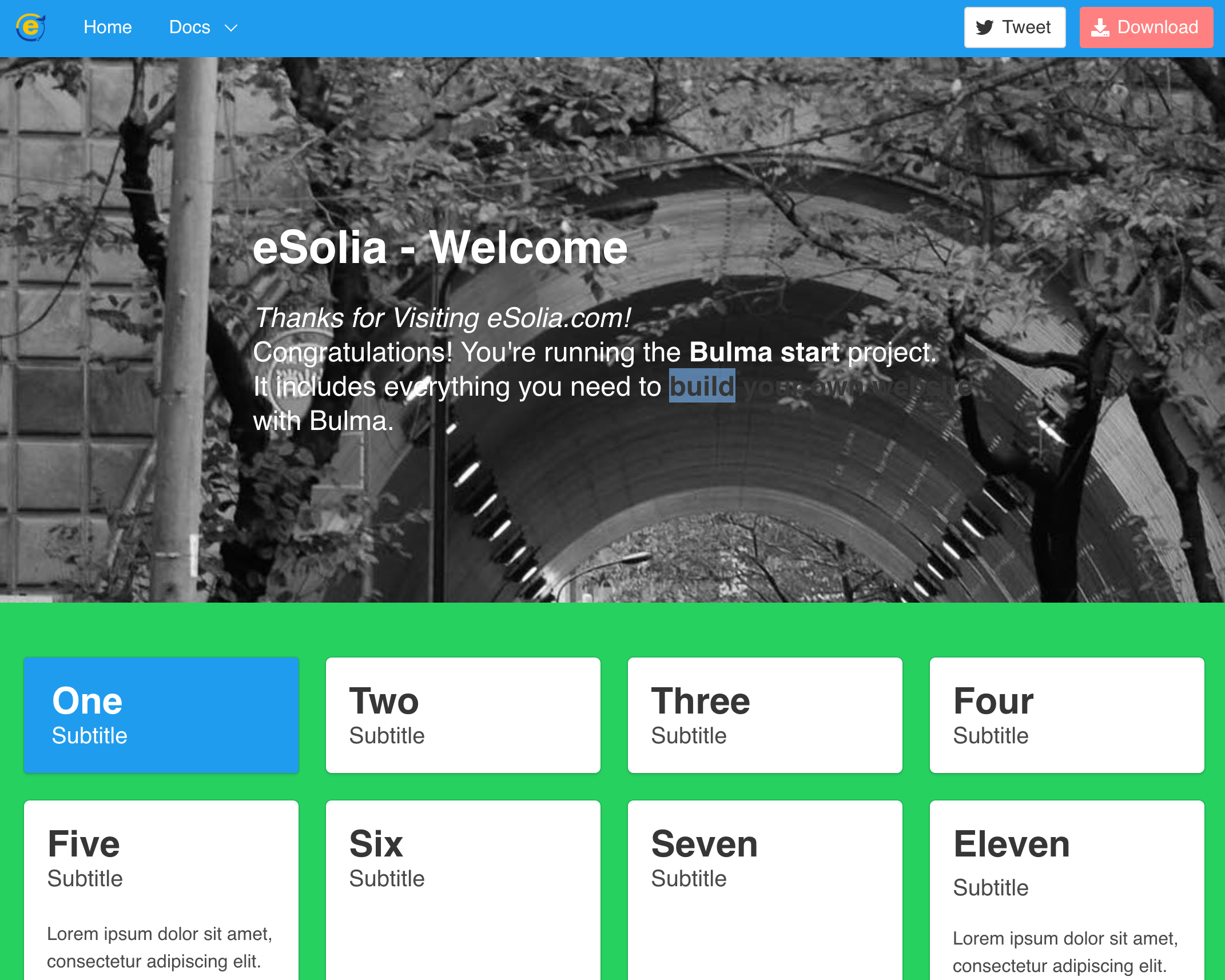
New Bulma user as of yesterday. I feel like I'm getting this same issue, so I'll tack it on here but, let me know if I should make another issue for it. I'm happy to.
- Bulma css framework-related
- Using [email protected], installed 29 March 2018 (Japan)
- Observed in chrome on Mac Version 65.0.3325.181 (Official Build) (64-bit)
Testing with the html from bulma-start package. (N.b. Curly brackets are from Go template in Hugo SSG.)
   <section class="hero is-medium hero-bg-atagotunnel">
      <div class="hero-body">
        <div class="container">
          <div class="columns">
            <div class="column is-8-desktop is-offset-2-desktop">
              <h1 class="title is-2 is-spaced has-text-white">
                {{ .Title }}
              </h1>
              <h2 class="subtitle is-4 has-text-white">
                  {{ .Content }}
                  Congratulations! You're running the <strong class="has-text-white">Bulma start</strong> project.
                  <br>
                  It includes everything you need to <strong>build your own website</strong> with Bulma.
              </h2>
            </div>
          </div>
        </div>
      </div>
    </section>
What I observe is, if I set the class of <strong> to have has-text-white, the strong bit appears the same as the h2, as expected. If I don't set it, it's gray like you can see in the screenshot below.
I tried overriding in my main.scss to no avail. This doesn't help:
strong {
   color: inherit;
   font-weight: $strong-weight;
}
So the workaround is to force it, but, I'm wondering if this will also happen in body text. Sorry, haven't tested that yet.
 RickCogley
on 29 Mar 2018
RickCogley
on 29 Mar 2018
It's annoying that it's coloured by default. 99% of the time I never want to change strong's colour from it's containing tag so 99% of the time I use Bulma I have to reset this manually.
 wrabit
on 21 Nov 2018
wrabit
on 21 Nov 2018
I find this as a bug too. I know there is a reason, that <strong> should be more contrast like it's explained here https://jgthms.com/web-design-in-4-minutes/, but it makes unpredictable results sometimes.
There is a quick fix though, just add this after generic.sass
```
strong {
color: currentColor;
}
````
 PayteR
on 13 Apr 2019
PayteR
on 13 Apr 2019
$text-strong: inherit; if extending in scss
wrabit
on 9 Oct 2019
Related issues
 Laraveldeep
·
3Comments
Laraveldeep
·
3Comments
 Cosbgn
·
3Comments
Cosbgn
·
3Comments
 DAreRodz
·
3Comments
DAreRodz
·
3Comments
 swamikevala
·
3Comments
swamikevala
·
3Comments
 leofontes
·
3Comments
leofontes
·
3Comments
Most helpful comment
I've been working on a fix for this and quite a few other coloring bugs.