Bulma: Select element scrunched horizontally
Overview of the problem
This is about the Bulma CSS framework
I'm using Bulma version [0.4.1]
My browser is: Chrome/Firefox/Brave
Description
When built with webpack the select element is shortened horizontally so that the arrow is overlayed on top of the text. It only occurs when run with "npm run build"; appears normally when using the dev server.
I'm a novice with webpack but suspect it has to do with my config: https://gist.github.com/3cb/e425ebce867ba2cbc72327645f02b5a9
Steps to Reproduce
Expected behavior
Actual behavior
 3cb
3cb
All 6 comments
I'm experiencing the same issue. Screenshots here: https://github.com/Caiyeon/goldfish/issues/33
It seems like it's not taking the angle icon's size into account.
Curiously, it also only occurs for me on npm run build, which for my project is shorthand for cross-env NODE_ENV=production node build/build.js.
 Caiyeon
on 27 May 2017
Caiyeon
on 27 May 2017
I noticed the same issue today. Only happens when running with npm run build.
Build is configured in package.json as below:
"build": "cross-env NODE_ENV=production webpack --progress --hide-modules"
I'm using sass-loader 6.0.5
 albertoantunes
on 1 Jun 2017
albertoantunes
on 1 Jun 2017
Had another look at this issue today and more time to investigate.
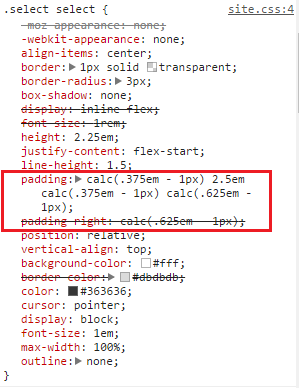
Turns out that by simply adding the class has-icons-right to my p element containing the select fixed the issue, like below:
<p class="control has-icons-right">
     <span class="select">
         <select>
         </select>
     </span>
</p>
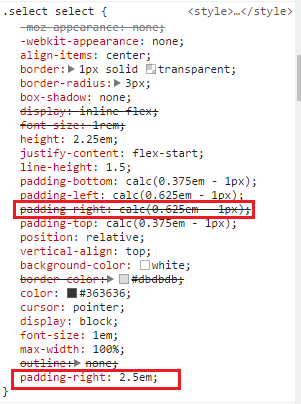
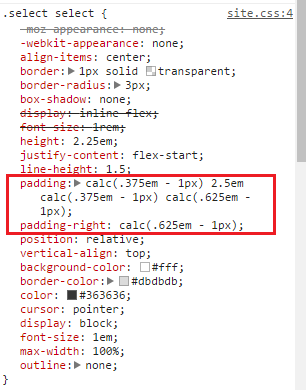
But this seems to be just a quick hack. The issue seems to be with a padding-right that is applied differently when running webpack in dev vs build. I don't have much knowledge in webpack and Sass though, so I can't say for sure if the problem is in webpack sass plugin or in bulma.
Below is a comparison of the styles applied:
Building with npm run dev (select looks ok):
Building with npm run build (select gets scrunched):
Building with npm run build with the class has-icons-right added (select looks ok)
albertoantunes
on 9 Jun 2017
I believe this issue is due to a minify / uglier that merges property definitions. Since the select element declares padding in a 'padding' property as well as a 'padding-right' property the processor merges the two which breaks the select's padding.
 mirshko
on 9 Jun 2017
mirshko
on 9 Jun 2017
I had this exact same issue after minifying code. I believe mirshko is right. The padding-right property for the selector ".select select" seems to be declared twice as "padding-right: calc(0.625em - 1px);" and then again as "padding-right: 2.5em" in the source code. Minifying probably breaks it.
On a note, you can just add this css snippet to fix it.
.select select {
  padding-right: 2.5em;
}
 djizco
on 28 Jun 2017
djizco
on 28 Jun 2017
Since the select element declares padding in a 'padding' property as well as a 'padding-right' property the processor merges the two which breaks the select's padding.
That's the reason it breaks. It shouldn't merge them since the second padding-right is here to override the default one coming from +control.
The problem is with the minifier not properly understanding CSS priorities.
 jgthms
on 28 Jun 2017
jgthms
on 28 Jun 2017
Related issues
 swamikevala
·
3Comments
swamikevala
·
3Comments
 dotMastaz
·
3Comments
dotMastaz
·
3Comments
 swthate
·
3Comments
swthate
·
3Comments
 DAreRodz
·
3Comments
DAreRodz
·
3Comments
 jaredreich
·
3Comments
jaredreich
·
3Comments
Most helpful comment
That's the reason it breaks. It shouldn't merge them since the second
padding-rightis here to override the default one coming from+control.The problem is with the minifier not properly understanding CSS priorities.