Bulma: V0.3.1 - Close Button Is Not Displayed Correctly in IOS Safari
It is about Bulma.
It is most likely a bug.
Overview of the problem
This is about the Bulma CSS framework
I'm using Bulma version [0.3.1]
My browser is: IOS Safari
Description
Close button is not displayed correctly in IOS Safari, as shown in the images attached below. Images are captured on Bulma Official Documentation Website using IOS Safari.
Steps to Reproduce
- Find an IOS Device with latest version of IOS and Safari
- Browse http://bulma.io/documentation/components/modal/ OR http://bulma.io/documentation/elements/notification/
Expected behavior
Close button is expected to be shown correctly, as per below (These images are captured using Chrome):


Actual behavior
Close button is not shown correctly in latest version of IOS Safari:


 junyik
All 7 comments
How do I solve this?
 xereda
on 24 Feb 2017
xereda
on 24 Feb 2017
This has been fixed.
 jgthms
on 26 Mar 2017
jgthms
on 26 Mar 2017
this hasn't been fixed. still broken on IOS and 0.4.2
 mendrik
on 1 Jun 2017
mendrik
on 1 Jun 2017
I am still having this issue on:
Chrome on iOS and 0.4.2
Safari on iOS and 0.4.2
Please consider reopening.
 mr-feek
on 4 Jun 2017
mr-feek
on 4 Jun 2017
This is a screenshot from the message component documentation on bulma.io as it looks on iPad Safari. It is better than in the original issue, but still distorted. 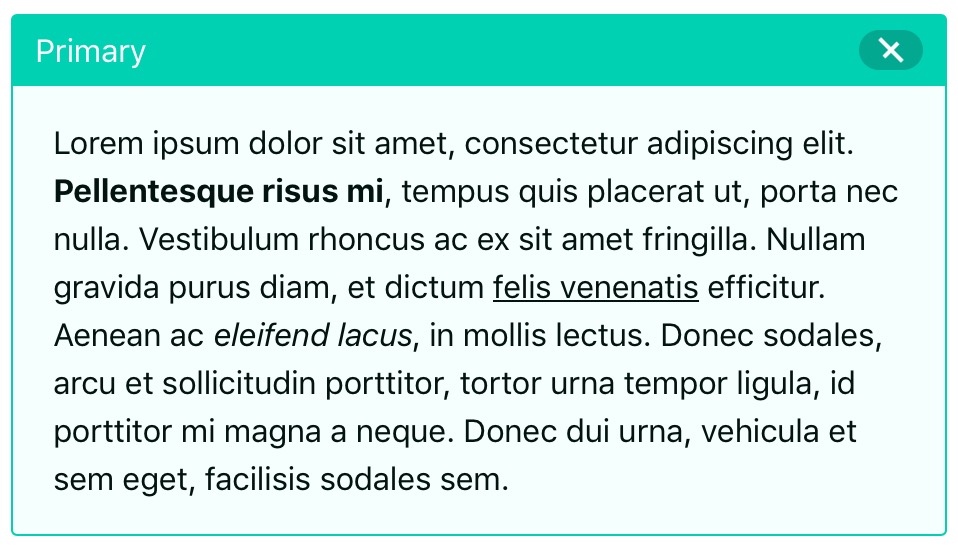
I think this issue should be reopened.
 johan13
on 9 Jul 2017
johan13
on 9 Jul 2017
@jgthms, you closed this issue. Do you think we should re-open it? Or should I submit a separate bug?
johan13
on 13 Jul 2017
Stil broken on iOS9:
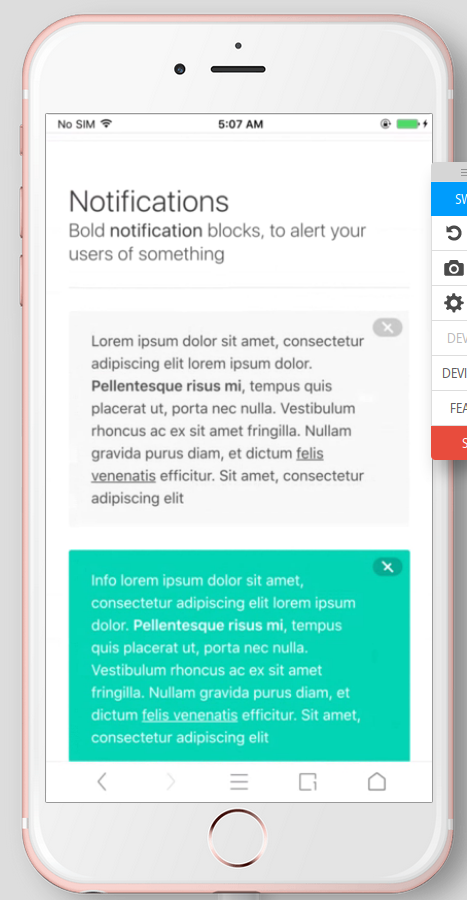
It seems that iOS's builtin style adds extra padding to every button, as mentioned in https://stackoverflow.com/questions/23970478/css-circles-look-oval-on-ios.
A quickfix has been presented in https://github.com/robin900/bulma/commit/3e9a12f31da13acecd017df8cd52b285c8564564 which simply adds padding: 0.
 htfy96
on 27 Jul 2017
htfy96
on 27 Jul 2017
Related issues
 leofontes
·
3Comments
leofontes
·
3Comments
 swthate
·
3Comments
swthate
·
3Comments
 swamikevala
·
3Comments
swamikevala
·
3Comments
 jaredreich
·
3Comments
jaredreich
·
3Comments
 NurdinDev
·
3Comments
NurdinDev
·
3Comments
Most helpful comment
this hasn't been fixed. still broken on IOS and 0.4.2