Checklist
- [x] This is about Bulma the CSS framework and not about the Bulma website
- [x] I'm using Bulma version 0.0.28
- [x] My browser is: 51.0.2704.84 (64-bit)
- [x] I am sure this issue is not a duplicate?
Description
Bulma currently doesn't seem to properly support <select>s with the multiple attribute. That, or I can't just seem to find it in the documentation.

 SEAPUNK
All 7 comments
What kind of support should be offered here?
- Remove the green caret-down
- Make the default height of the select element taller for
multipleselects?
 owenconti
on 7 Dec 2016
owenconti
on 7 Dec 2016
Pitching in here, but shouldn't we at least have Bulma not interfere with the selects by default (using a :not([multiple]) I'd guess), until it's supported?
 jpmurray
on 29 Jan 2017
jpmurray
on 29 Jan 2017
@jpmurray just dont wrap ur select in <span class="select">
I've made this little bit of css, designed to work with bulma vs changing it. It doesn't but probably should make use of any defined variables.
(excuse the ng bindings)
select[multiple].multi-select {
    all: initial;
    font: inherit;
    overflow-y: auto;
    border-radius: 3px;
    padding-bottom: 0.5em;
    padding-left: 0.625em;
    padding-top: 0.5em;
    background-color: white;
    border: 1px solid #dbdbdb;
    color: #363636;
    cursor: pointer;
    display: block;
    outline: none;
    padding-right: 2.5em;
}

select[multiple].multi-select:active, select[multiple].multi-select:focus {
    border-color: #00d1b2;
}
<div class="field">
                            <label class="label">Place</label>
                            <p class="control">
                                <select class="multi-select" multiple="multiple" name="place" ng-model="vm.place" ng-required="true" ng-options="place.id as (place.name + ' ' + place.shortDescription) group by place.company.name for place in vm.places|orderBy:'name'">
                                </select>
                            </p>
                        </div>

 worldspawn
on 20 Mar 2017
worldspawn
on 20 Mar 2017
It's coming in 0.4.4: http://bulma.io/documentation/form/select/
 jgthms
on 20 Jul 2017
jgthms
on 20 Jul 2017
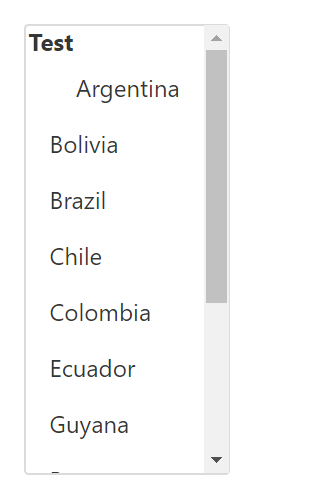
Optgroup usage doesn't appear in the example. Has it been considered? @jgthms
worldspawn
on 21 Jul 2017
This feature seems to be broken. Will only select one item at a time.
 devNigel
on 7 Mar 2019
devNigel
on 7 Mar 2019
Yeah this isn't working for me either. Even the live example on Bulma's website doesnt work for me on Chrome or Firefox.
EDIT: I just realized, to use it you have to either click and drag over multiple options, or hold control and click on multiple options like you would while highlighting files. That's weirdly difficult to use. Not bulma's fault.
 dyllandry
on 22 Jul 2020
dyllandry
on 22 Jul 2020
Related issues
 Yard8
·
3Comments
Yard8
·
3Comments
 Wikiki
·
3Comments
Wikiki
·
3Comments
 scottgrayson
·
3Comments
scottgrayson
·
3Comments
 JenCant
·
3Comments
JenCant
·
3Comments
 fundon
·
3Comments
fundon
·
3Comments
Most helpful comment
It's coming in
0.4.4: http://bulma.io/documentation/form/select/