Bulma: Font Awesome icon(s) doesn't have enough space in a button

<a class="button">
  <i class="fa fa-object-ungroup"></i> fa-object-ungroup
</a>
 csk157
All 7 comments
I agree that this seems off but the following HTML will give you the expected result:
    <a class="button">
        <span class="icon is-small">
            <i class="fa fa-object-ungroup"></i>
        </span>
        fa-object-ungroup
    </a>
 ncksllvn
on 11 Mar 2016
ncksllvn
on 11 Mar 2016
Thanks! It does look better :smile:
csk157
on 12 Mar 2016
This is tricky one. Because most icons will look good:

But @ncksllvn has provided a very good solution.
 jgthms
on 12 Mar 2016
jgthms
on 12 Mar 2016
This is still rendering improperly for me...
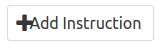
<button class="button"><span class="icon"><i class="fa fa-plus"></i></span><!-- react-text: 73 --> Add Instruction<!-- /react-text --></button>
Even if I make the button small (<span class="icon is-small">):
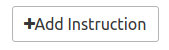
 mnpenner
on 10 Aug 2017
mnpenner
on 10 Aug 2017
👍2
button > svg {
    margin-right: 8px;
}
your mileage may vary :)
 thomhickey
on 24 Mar 2018
thomhickey
on 24 Mar 2018
@mnpenner, solution is to wrap your anonymous text block in span:
```html
 mclaudt
on 28 Sep 2018
mclaudt
on 28 Sep 2018
👍4
@mclaudt not working for me
 wrabit
on 18 Oct 2018
wrabit
on 18 Oct 2018
Was this page helpful?
0 / 5 - 0 ratings
Related issues
 Antrikshy
·
3Comments
Antrikshy
·
3Comments
 Yard8
·
3Comments
Yard8
·
3Comments
 leofontes
·
3Comments
leofontes
·
3Comments
 fundon
·
3Comments
fundon
·
3Comments
 Cosbgn
·
3Comments
Cosbgn
·
3Comments
Most helpful comment
@mnpenner, solution is to wrap your anonymous text block in span:
```html