Buildx: 'docker build' error: "failed to solve with frontend dockerfile.v0"
- [x] I have tried with the latest version of my channel (Stable or Edge)
- [x] I have uploaded Diagnostics
- Diagnostics ID: DAA27533-4D93-4AF4-916C-8492CC6BF66B/20201015121621
Expected behavior
I expect to build a docker image from my Dockerfile for my R Shiny application.
Actual behavior
I get the resulting error from the docker build command:

Information
Docker version is:

Windows Version: Windows 10 Home, version 1909
And docker run hello-world does work as expected:

I'm working with Docker Desktop for Windows 10 Home and I've followed this guide for the installation:
Install Docker Desktop on Windows Home
Since I think I have followed the guide correctly, and passed the docker run hello-world test, I'm not sure how to begin debugging this error.
I would really appreciate any help on clarifying what the error means, and how to potentially address it. Thank you!
 nromagno
All 74 comments
Thanks for the report, moving to buildx repository.
 stephen-turner
on 15 Oct 2020
stephen-turner
on 15 Oct 2020
Please post docker version and a reproducer. Also, check if there is anything interesting in the daemon logs.
 tonistiigi
on 16 Oct 2020
tonistiigi
on 16 Oct 2020
@tonistiigi my docker version is:

Also, by reproducer, do you mean a reproducible example?
And for the daemon logs you suggested, I'm not sure if I have been able to locate them correctly. I followed the advice here on where to find them (on my Windows it was under AppData\Local\Docker and I found this log.txt file.
I looked through the log.txt file but I couldn't find anything helpful.
Is this the correct file? And did I miss something important within it?
nromagno
on 19 Oct 2020
I noticed this as well with the same version after the update.
Fixed after I purged the settings and restarted.
 Muqito
on 21 Oct 2020
Muqito
on 21 Oct 2020
Name the file Dockerfile exactly. I got the same error because i named it DockerFile
 ArifIstaka
on 26 Oct 2020
ArifIstaka
on 26 Oct 2020
changing name 'Dockerfile' from 'dockerfile' also worked for me
 UlasKasim
on 27 Oct 2020
UlasKasim
on 27 Oct 2020
@UlasKasim @ArifIstaka the name of the file is already capitalized.

@Muqito Can you clarify a little bit on how you "purged the settings and restarted." Thanks!
nromagno
on 27 Oct 2020
@nromagno Sure thing.
Click on this little bug icon up to the right, and then you'll see the following settings:

I think I might have also reset to factory settings. Not sure though
Muqito
on 27 Oct 2020
@Muqito I purged the data and restarted as you described, but unfortunately the same error still appears.
nromagno
on 27 Oct 2020
@stephen-turner, @tonistiigi, @nromagno, Good afternoon! I am new to Docker. I try to run the image and container based on it by reading the Microsoft documentation step by step:
https://docs.microsoft.com/ru-ru/dotnet/core/docker/build-container?tabs=windows
But if I specify a Dockerfile without an extension, then I encounter an error reading Dockerfile by Docker itself (for some reason, it does not see the Dockerfile in this directory). When I specify the .txt extension (docker build -t counter-image -f Dockerfile.txt .
), Docker sees this file:
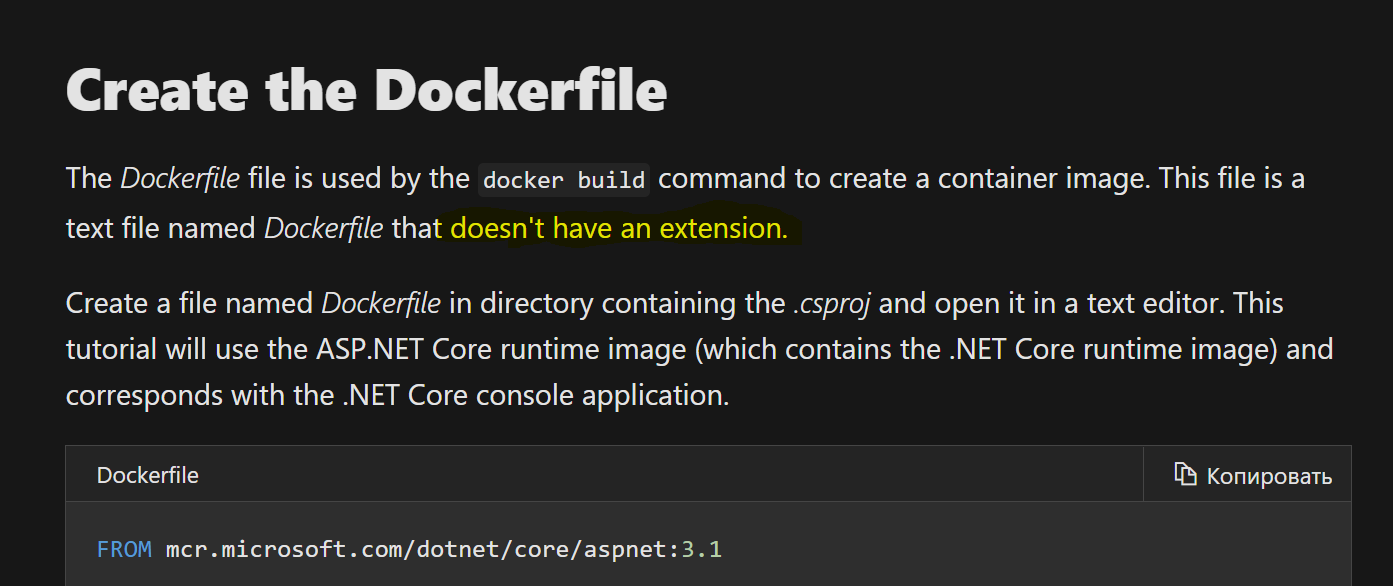


So do I not understand something due to lack of experience, or is there really some problem?
Best regards, Kusanagi-2029
 Kusanagi-2029
on 28 Oct 2020
Kusanagi-2029
on 28 Oct 2020
I just hit the same issue. I use the WSL2 engine, which is of course case-sensitive. The command sent to docker from Visual Studio is specifying a fully lowercase path, which breaks the command of course.
 bravecobra
on 31 Oct 2020
bravecobra
on 31 Oct 2020
I just hit the same issue. I use the WSL2 engine, which is of course case-sensitive. The command sent to docker from Visual Studio is specifying a fully lowercase path, which breaks the command of course.
Same here. Visual Studio debugging with Docker works fine. Output window shows:
>docker build -f "C:\dev\src\Project.Name\Dockerfile" args...
But building from the context menu when right clicking on the Dockerfile in the solution explorer executes this:
>docker build -f "c:\dev\src\project.name\dockerfile" args...
 llwydsj
on 1 Nov 2020
llwydsj
on 1 Nov 2020
This may help someone else:
The instructions say to make sure you are in the directory "node-bulletin-board/bulletin-board-app" and I was getting the above error when running in "node-bulletin-board". Changed into the bulletin-board-app child directory and it ran. Naturally I only re-read the doc after trying everything else.
 bette
on 4 Nov 2020
bette
on 4 Nov 2020
Simply change name of "dockerfile" to "Dockerfile" and then build, it works for me.
 Pranav021
on 9 Nov 2020
Pranav021
on 9 Nov 2020
These reports seem to be unique for windows. Afaics NTFS is a case-sensitive filesystem so I'm not sure how having Dockerfile in the wrong case producing an error could be a regression and not just an expected result. If someone can show the exact reproduction steps that show something that previously worked not working anymore in buildx it is possible we could do something about it or improve documentation.
edit: reading some more, apparently case-sensitivity is optional in NTFS (and some modern Windows don't use NTFS anymore). Assuming that is the underlying issue some investigation needs to be made why it worked previously (if it is a regression). It think it may be possible to have some exception to keep it working in buildx.
tonistiigi
on 9 Nov 2020
I don't know if it's a regression from old build, but I would say that it's highly unexpected for dockerfile and Dockerfile to behave differently on a typical Windows machine.
stephen-turner
on 9 Nov 2020
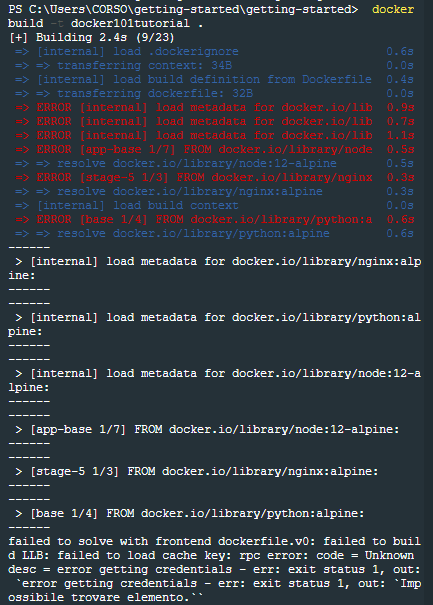
even the tutorial in a fresh Docker Desktop installation fails...
 DanieleB89
on 13 Nov 2020
DanieleB89
on 13 Nov 2020
Same here:
failed to solve with frontend dockerfile.v0: failed to build LLB:
$ docker --version
Docker version 19.03.13, build 4484c46d9d
 c0ri
on 15 Nov 2020
c0ri
on 15 Nov 2020
I don't know if it's a regression from old build, but I would say that it's highly unexpected for dockerfile and Dockerfile to behave differently on a typical Windows machine.
It's not too unexpected as I'm 99% sure that if you would just create a tarball of your build context and send it to the daemon (simplified version on how the API works) it would fail with any version of the builder. There is some preprocessing specifically for this file and that's why the casing is masked. For any other file referred to in Dockerfile no such exception exists as well. These are all linux container builds that are referred here and (common) Linux filesystems are case sensitive.
tonistiigi
on 15 Nov 2020
Same here:
failed to solve with frontend dockerfile.v0: failed to build LLB: error from sender: context created
Docker version:
Docker version 19.03.13, build 4484c46d9d
 pythiantech
on 16 Nov 2020
pythiantech
on 16 Nov 2020
The solution is in https://github.com/docker/buildx/issues/415#issuecomment-716606000
tonistiigi
on 16 Nov 2020
The Dockerfile is named "Dockerfile". I have also tried purging and restarting but the issue persists.
pythiantech
on 16 Nov 2020
@tonistiigi file name is not the only issue here, or I have just another bug
Here is what I face when running docker build command:
failed to solve with frontend dockerfile.v0: failed to build LLB: failed to load cache key: rpc error: code = Unknown desc = error getting credentials - err: exec: "docker-credential-desktop.exe": executable file not found in $PATH, out: ``
Renaming "credsStore": "desktop.exe" to "credStore": "desktop.exe" in ~/.docker/config.json is what helped me actually, but it seems like Docker Destkop keeps adding credsStore entry in that config file
 amankkg
on 16 Nov 2020
amankkg
on 16 Nov 2020
even the tutorial in a fresh Docker Desktop installation fails...
I had this same problem.
Just Sgin in in your Docker account
 mrmariush
on 18 Nov 2020
mrmariush
on 18 Nov 2020
@llwydsj can you expand a little bit on your comment and the how you suggested to resolve this issue? I'm not familiar with Visual Studio, so how could I check if my issue also arises from case sensitivity. Thanks!
nromagno
on 18 Nov 2020
I did some digging and it turned out this was not even caused by the case-sensitivity of the filesystem. There is a special fallback https://github.com/moby/moby/pull/10858 that allows name dockerfile when loading Dockerfile fails. It is only valid for dockerfile name, eg. dockerfilE will not work.
I've provided patches in buildx https://github.com/docker/buildx/pull/444 and also in Dockerfile frontend in Buildkit https://github.com/moby/buildkit/pull/1816 to maintain compatibility. Only one of them is needed to have the old behavior back.
tonistiigi
on 19 Nov 2020
Rename dockerfile to Dockerfile. Doing this fixed my issue.
 therealsohail
on 25 Nov 2020
therealsohail
on 25 Nov 2020
I had the same issue (on a Mac). running a test from my home directory /Users/norm
failed to solve with frontend dockerfile.v0: failed to build LLB: error from sender: open .Trash: operation not permitted
I moved the Dockerfile out of my home directory into a subdirectory (/Users/norm/test/) and was able to build without the above error when executed from /Users/norm/test/. Seems permission related`
 normjon
on 25 Nov 2020
normjon
on 25 Nov 2020
I moved the Dockerfile out of my home directory into a subdirectory (/Users/norm/test/) and was able to build without the above error when executed from /Users/norm/test/. Seems permission related`
Yes, that situation is expected; always start builds from a directory that only contains files that you need for your build.
When you run docker build ., the last . is the path of the "build context" (in case of a . that's the current directory). Running a build will send the build context and all files and subdirectories to the daemon, so that they can be used as part of your build (sending your entire home directory is likely not what you want 😅)
Buildkit is smarter in that it only sends files that are used by a COPY or ADD instruction in your Dockerfile, but it may still scan the directory for file changes (and in your case run in permission issued)
 thaJeztah
on 26 Nov 2020
thaJeztah
on 26 Nov 2020
changing name 'Dockerfile' from 'dockerfile' also worked for me
Hello,
Where can I find this file?
I'm trying on a Mac and Windows computer and is the same error and I cannot find that file.
Thanks.
 fanpero87
on 26 Nov 2020
fanpero87
on 26 Nov 2020
The Dockerfile is a file you create yourself if you want to build an image: https://docs.docker.com/get-started/part2/
thaJeztah
on 26 Nov 2020
changing name 'Dockerfile' from 'dockerfile' also worked for me
Funny, for me the fix is the other way round....I don't think we have found the culprit yet
bravecobra
on 27 Nov 2020
Apparently this issue (or at least the one I'm experiencing) is already known with the visual studio people and the fix is pending release: https://developercommunity.visualstudio.com/content/problem/1192625/build-docker-image-failing-because-of-lowercased-d.html
bravecobra
on 1 Dec 2020
Hi, I had the same issue and I could finally solve it by disabling buildkit feature as explained here: https://stackoverflow.com/questions/64382812/docker-has-the-same-error-regardless-of-what-i-try-to-build-windows-10
 antoniofruci
on 2 Dec 2020
antoniofruci
on 2 Dec 2020
Hi, I had the same issue and I could finally solve it by disabling buildkit feature as explained here: https://stackoverflow.com/questions/64382812/docker-has-the-same-error-regardless-of-what-i-try-to-build-windows-10
Worked for me, thanks
pythiantech
on 2 Dec 2020
The lowercase dockerfile issue will be fixed by https://github.com/docker/buildx/pull/444, which adds a fallback to check both for Dockerfile and dockerfile for backward-compatibility with the classic builder, which had that fallback in place. (note that other cases, such as dOCkerFile _won't_ be supported
Note that other errors starting with failed to solve with frontend dockerfile.v0 may be unrelated; the failed to solve.. prefix is a generic prefix for this part of builds, and the errors _after that_ are the underlying error, so if you run into another issue and think it's a bug, please open a new ticket instead.
thaJeztah
on 2 Dec 2020
Details:
Windows 10 Pro
Docker version : 19.03.13
I try to change the name:
Dockerfile.dockerfile
I delete ".dockerfile"... so
"dockerfile" not extension... It's working now...
 JuniorAguilera
on 3 Dec 2020
JuniorAguilera
on 3 Dec 2020
@stephen-turner, @tonistiigi, @nromagno, Good afternoon! I am new to Docker. I try to run the image and container based on it by reading the Microsoft documentation step by step:
https://docs.microsoft.com/ru-ru/dotnet/core/docker/build-container?tabs=windows
But if I specify a Dockerfile without an extension, then I encounter an error reading Dockerfile by Docker itself (for some reason, it does not see the Dockerfile in this directory). When I specify the .txt extension (docker build -t counter-image -f Dockerfile.txt .
), Docker sees this file:
So do I not understand something due to lack of experience, or is there really some problem?
Best regards, Kusanagi-2029
I have encountered the same problem after some searching I luckily found that using Dockerfile with Extention will do the trick
Instead of Doing this
docker build -t hello-world -f Dockerfile .
I changed this to
docker build -t hello-world -f Dockerfile .txt .
 UsmanAsifTaqi
on 4 Dec 2020
UsmanAsifTaqi
on 4 Dec 2020
So I was having this problem on my mac, and it turns out that there was a docker temp file in the current folder. Deleting it solved it. Here's the error and the file in question :
Exception :
failed to solve: rpc error: code = Unknown desc = failed to solve with frontend dockerfile.v0: failed to build LLB: Error processing tar file(exit status 1): unexpected EOF
File :
-rw------- 1 rlavoie 1177235957 2428567552 4 Dec 00:10 .docker_temp_499366070
 darkrift
on 4 Dec 2020
darkrift
on 4 Dec 2020
Same error here, when is there a solution ? Kubernetes, docker and visual studio 2019..a lot of bugs and weird things. Can it become a steady working environment to work in?
 V4A001
on 7 Dec 2020
V4A001
on 7 Dec 2020
@V4A001 what is "same error"? If it's because of a lowercase dockerfile, rename the file to Dockerfile to fix the problem. "lots of bugs and weird things" is not very helpful; also see https://github.com/docker/buildx/issues/415#issuecomment-737279041
Note that other errors starting with
failed to solve with frontend dockerfile.v0may be unrelated; thefailed to solve..prefix is a generic prefix for this part of builds, and the errors _after that_ are the underlying error, so if you run into another issue and think it's a bug, please open a new ticket instead.
thaJeztah
on 7 Dec 2020
It seems OO-design is lacking with throws same bug at various places? If I use in VS 2019 the debugger to build a docker images that works fine with Docker file (capital first letter). If I right click on the Docker file and do 'Build Docker Image' it fails see below. If I change to lower caps it builds.
`
8>failed to solve with frontend dockerfile.v0: failed to read dockerfile: open /var/lib/docker/tmp/buildkit-mount840562661/dockerfile: no such file or directory
8>d:projects-dockerfile : error CTC1014: Docker command failed with exit code 1.
8>d:projects-dockerfile : error CTC1014: #1 [internal] load .dockerignore
8>d:projects-dockerfile : error CTC1014: #1 transferring context: 35B done
8>d:projects-dockerfile : error CTC1014: #1 DONE 0.0s
8>d:projects-dockerfile : error CTC1014:
8>d:projects-dockerfile : error CTC1014: #2 [internal] load build definition from dockerfile
8>d:projects-dockerfile : error CTC1014: #2 transferring dockerfile: 2B done
8>d:projects-dockerfile : error CTC1014: #2 DONE 0.0s
8>d:projects-dockerfile : error CTC1014: failed to solve with frontend dockerfile.v0: failed to read dockerfile: open /var/lib/docker/tmp/buildkit-mount840562661/dockerfile: no such file or directory
`
V4A001
on 7 Dec 2020
Hi, I had the same issue and I could finally solve it by disabling buildkit feature as explained here: https://stackoverflow.com/questions/64382812/docker-has-the-same-error-regardless-of-what-i-try-to-build-windows-10
Worked for me, thanks
Worked for me as well, many thanks
 Geremie
on 8 Dec 2020
Geremie
on 8 Dec 2020
@V4A001
failed to read dockerfile: open /var/lib/docker/tmp/buildkit-mount840562661/dockerfile: no such file or directory
When you mention "If I right click on the Docker file and do 'Build Docker Image' it fails see below. If I change to lower caps it builds."; is the Dockerfile your building named Dockerfile or dockerfile?
Note that the while fix in buildx that was merged is on "master", it's not in a released version yet. I also don't know how the Build Docker Image option is implemented in VScode, which could play a role here.
thaJeztah
on 8 Dec 2020
The debugger of debugger itself works with Dockerfile
The right click on the file to build the image only works if the file is dockerfile
V4A001
on 8 Dec 2020
Hi, I had the same issue and I could finally solve it by disabling buildkit feature as explained here: https://stackoverflow.com/questions/64382812/docker-has-the-same-error-regardless-of-what-i-try-to-build-windows-10
I tired this and it finally worked! thanks!
nromagno
on 20 Dec 2020
I tried many options but unfortunately didn't helped, and I realized that my Dockerfile was mistakenly inside /app/src, moved Dockerfile back to root, and it just WORKED!! 💯
FROM node:latest

RUN mkdir -p /app/src

WORKDIR /app/src

COPY package.json .

RUN npm install

COPY . .

EXPOSE 3000

CMD ["npm", "start"]
 bhuvmhz
on 22 Dec 2020
bhuvmhz
on 22 Dec 2020
Hi, I had the same issue and I could finally solve it by disabling buildkit feature as explained here: https://stackoverflow.com/questions/64382812/docker-has-the-same-error-regardless-of-what-i-try-to-build-windows-10
this worked for me. thanks!
 doomlancer
on 28 Dec 2020
doomlancer
on 28 Dec 2020
Same issue with Github Actions ubuntu-latest. https://github.com/Cytrus-RE/debia/runs/1643130474?check_suite_focus=true
 Devnol
on 4 Jan 2021
Devnol
on 4 Jan 2021
It only appears to only break if I attempt to cross-build for an architecture such as armv7 or anything that isn't x86/64
Devnol
on 4 Jan 2021
I had that issue on my mac as well
Devnol
on 4 Jan 2021
on macOS renaming "DockerFile" to "dockerfile" fixed the problem for me.
 Peter-Schorn
on 9 Jan 2021
Peter-Schorn
on 9 Jan 2021
My file was named "Dockerfile" and building only for amd64 with the default build system worked fine. When I used buildx to build for a different architecture it would error out.
Devnol
on 9 Jan 2021
Another situation that I encountered was that .dockerignore was blocking the COPY . For example:
dockerfile:
FROM nginx:1.19.6-alpine as nginx
COPY ./Build/release/authenticator/conf/nginx.conf /etc/nginx/conf.d/default.conf
error:
failed to solve: rpc error: code = Unknown desc = failed to solve with frontend dockerfile.v0: failed to solve with frontend gateway.v0: rpc error: code = Unknown desc = failed to build LLB: failed to compute cache key: "/Build/release/authenticator/conf/nginx.conf" not found: not found
The solution was to add !/Build/release/authenticator/conf/nginx.conf in .dockerignore
 mariancraciun1983
on 16 Jan 2021
mariancraciun1983
on 16 Jan 2021
@tonistiigi file name is not the only issue here, or I have just another bug
Here is what I face when running
docker buildcommand:failed to solve with frontend dockerfile.v0: failed to build LLB: failed to load cache key: rpc error: code = Unknown desc = error getting credentials - err: exec: "docker-credential-desktop.exe": executable file not found in $PATH, out: ``Renaming
"credsStore": "desktop.exe"to"credStore": "desktop.exe"in~/.docker/config.jsonis what helped me actually, but it seems like Docker Destkop keeps addingcredsStoreentry in that config file
Crazy, this worked for me. Thanks!
Win 10 Pro WSL2 Ubuntu 20.04
 Xandrak
on 17 Jan 2021
Xandrak
on 17 Jan 2021
No such thing as credStore config key. https://github.com/docker/cli/blob/master/cli/config/configfile/file.go#L37
tonistiigi
on 18 Jan 2021
Renaming credsStore to credStore would be the equivalent to _removing_ the credsStore config (which makes docker skip the credentials-helper, and to store credentials as base64 encoded plain text in the configuration file).
thaJeztah
on 18 Jan 2021
restarting docker worked for me
 HamedNN76
on 27 Jan 2021
HamedNN76
on 27 Jan 2021
Deleting docker config file from inside WSL2 Ubuntu shell fixed it for me:
rm ~/.docker/config.json
I'm using Windows 10.
 ww9
on 29 Jan 2021
ww9
on 29 Jan 2021
My issue was regarding the permissions to download the FROM image
I ran the docker build command as following:
sudo docker build -t myapp .
Also the docker file was named 'Dockerfile'
That worked for me
 RGA052
on 29 Jan 2021
RGA052
on 29 Jan 2021
Well, docker message is confusing.
In my case I just used invalid working directory (so I just have to cd to the right subdir with my Dockerfile).
Instead of explaining message like "No Dockerfile found, looked at current working directory /foo/bar" on my docker build --no-cache --tag jaroslavtyc/pb-web:8.0 . command I saw
[+] Building 0.0s (2/2) FINISHED
 => [internal] load build definition from Dockerfile                                                                                                                                                                               0.0s
 => => transferring dockerfile: 2B                                                                                                                                                                                                 0.0s
 => CANCELED [internal] load .dockerignore                                                                                                                                                                                         0.0s
 => => transferring context:                                                                                                                                                                                                       0.0s
failed to solve with frontend dockerfile.v0: failed to read dockerfile: open /var/lib/docker/tmp/buildkit-mount710040659/Dockerfile: no such file or directory
 jaroslavtyc
on 5 Feb 2021
jaroslavtyc
on 5 Feb 2021
Window 10 Home restart worked for me

 James-sss
on 13 Feb 2021
James-sss
on 13 Feb 2021
For anyone stumbling across this issue on mac...
failed to solve with frontend dockerfile.v0: failed to create LLB definition: rpc error: code = Unknown desc = failed to parse /Users/myusername/.docker/.token_seed: unexpected end of JSON input
I just deleted .token_seed and .token_seed.lock inside of /Users/myusename/.docker
 mariusdkm
on 18 Feb 2021
mariusdkm
on 18 Feb 2021
@mariusdkm could you open a new ticket for that?
thaJeztah
on 18 Feb 2021
Great..
$ docker build . -t spa-react:1.0
[+] Building 12.0s (8/12)
 => [internal] load build definition from Dockerfile                                                                                                                               0.9s
 => => transferring dockerfile: 552B                                                                                                                                               0.0s
 => [internal] load .dockerignore                                                                                                                                                  0.6s
 => => transferring context: 2B                                                                                                                                                    0.0s
 => [internal] load metadata for docker.io/library/nginx:1.19.6                                                                                                                    0.0s
 => [internal] load metadata for docker.io/library/node:15.8.0                                                                                                                     0.0s
 => [node-server 1/5] FROM docker.io/library/node:15.8.0                                                                                                                           0.0s
 => ERROR [internal] load build context                                                                                                                                           11.0s
 => => transferring context: 81.80MB                                                                                                                                              10.8s
 => CACHED [client-app 1/2] FROM docker.io/library/nginx:1.19.6                                                                                                                    0.0s
 => CACHED [node-server 2/5] WORKDIR /usr/src/app                                                                                                                                  0.0s
------
 > [internal] load build context:
------
failed to solve with frontend dockerfile.v0: failed to build LLB: error from sender: open node_modules\eslint-plugin-testing-library\node_modules\@typescript-eslint\experimental-utils\_ts3.4\dist\ts-eslint-scope: Access is denied
 JesielPalacios
on 20 Feb 2021
JesielPalacios
on 20 Feb 2021
@JesielPalacios looks unrelated; from the error it looks like you don't have permissions to read a file in your build context;
error from sender:
open node_modules\eslint-plugin-testing-library\node_modules\@typescript-eslint\experimental-utils\_ts3.4\dist\ts-eslint-scope:
Access is denied
see https://github.com/docker/buildx/issues/415#issuecomment-737279041
Note that other errors starting with
failed to solve with frontend dockerfile.v0may be unrelated; thefailed to solve..prefix is a generic prefix for this part of builds, and the errors _after that_ are the underlying error,
thaJeztah
on 20 Feb 2021
@thaJeztah Mm.. i think that's weird, cause i'm working like administrator user and just trying to deploy an Angular App using the Multi-Stage Build feature from Docker.
I gonna need to get mor info on the internet about how to do it. If you got some info about it i'll be so gratefull to know it. Thanks!
JesielPalacios
on 26 Feb 2021
If you're working on wsl2 environment this worked for me: wsl --shutdown
 almontasser
on 2 Mar 2021
almontasser
on 2 Mar 2021
For anyone stumbling across this issue on mac...
failed to solve with frontend dockerfile.v0: failed to create LLB definition: rpc error: code = Unknown desc = failed to parse /Users/myusername/.docker/.token_seed: unexpected end of JSON inputI just deleted
.token_seedand.token_seed.lockinside of/Users/myusename/.docker
@mariusdkm life saver! thank you.
 KAVA-Leigh
on 10 Mar 2021
KAVA-Leigh
on 10 Mar 2021
@tonistiigi file name is not the only issue here, or I have just another bug
Here is what I face when running
docker buildcommand:failed to solve with frontend dockerfile.v0: failed to build LLB: failed to load cache key: rpc error: code = Unknown desc = error getting credentials - err: exec: "docker-credential-desktop.exe": executable file not found in $PATH, out: ``Renaming
"credsStore": "desktop.exe"to"credStore": "desktop.exe"in~/.docker/config.jsonis what helped me actually, but it seems like Docker Destkop keeps addingcredsStoreentry in that config file
This was my issue as well. Running Docker Desktop on WSL2. I just changed credsStore to credStore, so I haven't seen yet if it gets changed back, but I'll update here if it happens to me too. Seems like #444 didn't fix this issue entirely since credsStore vs credStore wasn't addressed in that PR.
- Docker version 20.10.5, build 55c4c88
- Windows 10 Pro Insider Preview, Build 21332.rs_prerelelease.210306-1859
 andrew-chang-dewitt
on 17 Mar 2021
andrew-chang-dewitt
on 17 Mar 2021
I was having the "failed to solve with frontend dockerfile.v0: failed to create LLB definition: rpc error: code = Unknown desc = error getting credentials" issue under Docker Desktop Windows/WSL2.
Running with sudo worked for me.
 th5
on 25 Mar 2021
th5
on 25 Mar 2021
Estoy siguiendo los pasos para usar Docker y me salta este error al ejecutar el comando : docker build -t captacion-php ./
[+] Building 0.3s (2/2) FINISHED
=> [internal] load build definition from Dockerfile 0.1s
=> => transferring dockerfile: 32B 0.0s
=> [internal] load .dockerignore 0.1s
=> => transferring context: 2B 0.0s
failed to solve with frontend dockerfile.v0: failed to create LLB definition: dockerfile parse error line 4: unknown instruction: LIBMCRYPT-DEV
¿me echáis una mano? gracias!
 antoniobarquero
on 29 Mar 2021
antoniobarquero
on 29 Mar 2021
If i run docker build with build kit (DOCKER_BUILDKIT=1 docker build -t base .), the error occurs.
I simply remove that params (docker build -t base .) and its works.
 0123hoang
on 30 Mar 2021
0123hoang
on 30 Mar 2021
in my case adding tag after image name resolved the issue.
FROM nginx to FROM nginx:latest
 subiron
on 9 Apr 2021
subiron
on 9 Apr 2021
Related issues
 smurfpandey
·
5Comments
smurfpandey
·
5Comments
 joshuaavalon
·
12Comments
joshuaavalon
·
12Comments
 Aaltis
·
6Comments
Aaltis
·
6Comments
 minusdelta
·
10Comments
minusdelta
·
10Comments
 securisec
·
9Comments
securisec
·
9Comments
Most helpful comment
Name the file Dockerfile exactly. I got the same error because i named it DockerFile