buildkit import and push image is much slower than docker(enable buildkit)
The same dockerfile built and push by buildkitd and docker:
Dockerfile:
_FROM centos:centos7

COPY test.total.tgz /root/_
test.total.tgz is a pkg about 150M;
builkitd
run buildkitd with runc as worker;
buildctl .... --output type=image,name=test:0.0.1,push=true
_=> exporting to image 46.5s
=> => exporting layers 8.5s
=> => exporting manifest sha256:63ff5acc68cb50a4d1bd613f6d7bdc3edfafd39c06c1 0.0s
=> => exporting config sha256:e614d8137014fcee833324a3dde6a84d813a7e2a379be1 0.0s
=> => pushing layers 37.5s
=> => pushing manifest for test:0.0.1 0.5s_
The total time is about 46s;
Docker
docker build -f Dockerfile -t test:0.0.1 .
__=> exporting to image 1.2s
=> => exporting layers 1.2s
=> => writing image sha256:ac66482d1cbf65535512d4c3607a0fa95ff858a7b1ed94a8d74 0.0s
=> => naming to test:0.0.1 0.0s_
time docker push test:0.0.1
_The push refers to repository [test]
e42b399ab8b7: Pushed
1113ccf1ca7d: Pushed
49bc294c3ae4: Layer already exists
388257de058b: Layer already exists
3d8b4cafda1d: Layer already exists
90a0151d4347: Layer already exists
f5b1e8ecaa86: Layer already exists
bca75dc8012f: Layer already exists
6038a3292cfd: Layer already exists
02852158a8f1: Layer already exists
e7f4df977e01: Layer already exists
5f70bf18a086: Layer already exists
2f4511388a8e: Layer already exists
3895c50d48c1: Layer already exists
79c7e168a304: Layer already exists
1009: digest: sha256:d6c82cb25d60b4c87db12ce7a3f78454696bc46d9508e96cc1b26dffb4acb0b3 size: 3891
real 0m28.171s
user 0m0.054s
sys 0m0.032s__
The total time is less than 30s
The export and push is much slower when use buildit directly than use docker build and docker push
 lugeng
All 21 comments
Are you sure you are comparing equivalent builds? The second one is faster because most of the layers were already pushed once. Even from the "exporting layers" line you can see that in the second a lot less new data was created.
 tonistiigi
on 10 Oct 2019
tonistiigi
on 10 Oct 2019
Yes, this is equivalent builds, just take export stage as example in picture:

And found that the added file size larger and the time gap will be longer.
lugeng
on 10 Oct 2019
Ah, I didn't notice this was buildctl vs DOCKER_BUILDKIT=1. @dmcgowan Pretty sure this is the inefficient timestamp comparison in the containerd differ.
tonistiigi
on 10 Oct 2019
I will take a look this.
 fuweid
on 14 Oct 2019
fuweid
on 14 Oct 2019
I think containerd provides native diff functionality with folder diff. It is abstraction for every kind of snapshot. But in dockerd, for the aufs/overlayfs, we don't need to get folder diff and the layer is the diff. I think we can add diff interface for each kind of snapshotter to improve export performance.
fuweid
on 28 Oct 2019
In docker aufs uses own diff, overlay switched back to generic one recently. Containerd could have a special one for overlay for extra performance but that is not the main issue here. The difference between generic drivers in docker and containerd is that docker will not generate a change unless change-time changes while containerd will go into a full file content scan if timestamp does not have nanoseconds.
Docker approach should be safe enough for containerd. Nanoseconds are only missing for the files extracted from tar and these files do not need to be diffed. We should also start putting nanoseconds to tar files always now using PAX to avoid this completely but that alone wouldn't fix the issue for existing images.
tonistiigi
on 28 Oct 2019
@tonistiigi thanks! the information is helpful! Trying to file patch for this.
fuweid
on 30 Oct 2019
hi @tonistiigi @lugeng
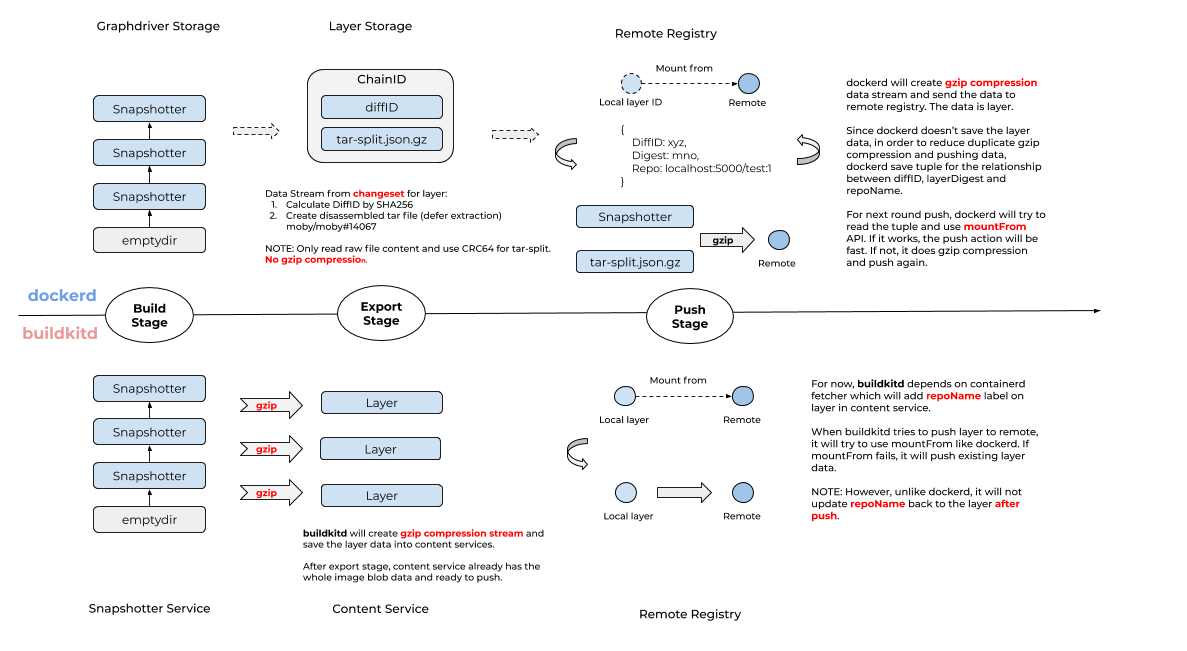
I made summary of difference between dockerd and buildkit. I uses three stages for building action: build, exporting and pushing.
The summary picture is here.
NOTE: The following description for docker is with
DOCKER_BUILDKIT=1.
build stage
This stage is to build image, and dockerd has the most same foundational functions with buildkit.
export stage
This stage is to prepare data before pushing, for instance, diffID between two layers.
For dockerd, it will read changeset between two layers and figure out the diffID. And also create tar-split tar file recording metadata for add/deleted files, for instance, path and size of file. It have not created real layer blob data yet. Just prepare metadata.
But for buildkitd, not just figure out the diffID, and also uses gzip to compress changeset into content service. It will create ready-to-push layer blob data. It is big difference. Since gzip is consuming more Cpu resource, buildkitd will take long time to handle export stage than dockerd.
NOTE: For overlayfs/aufs, dockerd can read changeset from diff folder instead of scanning the whole rootfs(handled by containerd). But comparing with gzip compression of big file, it has small impacts for performance. It can be improved and I created pr for this, https://github.com/containerd/continuity/pull/145.
pushing stage
This stage is to pushing whole image into remote registry.
For dockerd, since it doesn't create ready-to-push layer blob data, it reads changeset between two layers, create gzip tar stream and push it to remote registry directly. For next round push of same changeset, in order to save time, dockerd saves tuple data between diffID, changeset and source repo. The source repo is used for mountFrom. If the pushing layer can be mountFrom, it will save time. If not, it will create tar stream again.
For buildkitd, since the layer blob is ready to push, the pusher will read local tar file and send it to remote registry directly. buildkitd also uses mountFrom to save time. But the metadata for mountFrom is only created when pull action. It is different from dockerd.
conclusion
For the brand new image, the new built layers have not been pushed yet. There is minimal differences between dockerd and buildkitd, because dockerd defers to create gzip tar stream data at pushing stage.
After push, dockerd has more metadata for mountFrom. If dockerd hits the mountFrom, dockerd is better than buildkit. If not, buildkit is better than dockerd because no need to create gzip tar data again.
Even if it depends on user cases, the update metadata for mountFrom after pushing is more reasonable. Also, I create pr https://github.com/moby/buildkit/pull/1278.
Does it make senses?
cc @AkihiroSuda
fuweid
on 2 Dec 2019
Does it make sense?
Yes. Would be interesting to know the actual cost of different stages eg. diffing, gzip, storing blob, tar-split. Although tar-split doesn't save as much data I think it has some overhead as well for encoding a big json structure etc. Overall, with the contentstore approach containerd took, building a local image will always be slower, build+push should at least be equal. For the images that don't need to be pushed and are only used for development, we can approach this by not creating an oci image at all and starting a development container straight from the snapshot.
There is another difference between dockerd and buildkitd in naive differ. https://github.com/moby/buildkit/blob/b1f83754d5ede64d79769c69cb0bf860a8be6491/vendor/github.com/containerd/continuity/fs/path.go#L119 vs https://github.com/moby/moby/blob/3152f9436292115c97b4d8bb18c66cf97876ee75/pkg/archive/changes.go#L74 where containerd goes to slower content based diff on comparing files that were extracted from tar and didn't change. I hoped this was more significant but it should have shown with https://github.com/containerd/continuity/pull/145 as well. Anyway better measurement would help here.
tonistiigi
on 2 Dec 2019
Although tar-split doesn't save as much data I think it has some overhead as well for encoding a big json structure etc.
Yeah. It use CRC64 encoding for the each file. It has some overhead.
For the images that don't need to be pushed and are only used for development, we can approach this by not creating an oci image at all and starting a development container straight from the snapshot.
Agree. For now, in order to use image, we have to create oci structure. Random thought that we can use provided Rootfs to run container actually. Just need relationship between image name and existing snapshotter. For testing/dev purpose, I think it will provide better UEX.
There is another difference between dockerd and buildkitd in naive differ.
Yes! Still testing it https://github.com/containerd/continuity/pull/145. Will update later.
Also trying it add some stub to collect tracing to measure each step better and hope it can be debug mode in upstream. I would like to share the data and pr when it is ready.
fuweid
on 3 Dec 2019
I'm running into this as well. I have a 1.71GB image that is already fully cached and pushed. When I rebuild and push again with buildkit it still takes 386.5s just to push the layers. With docker its just a few seconds.
 sethpollack
on 24 Dec 2019
sethpollack
on 24 Dec 2019
I'm running into this as well. I have a 1.71GB image that is already fully cached and pushed. When I rebuild and push again with buildkit it still takes 386.5s just to push the layers. With docker its just a few seconds.
Hi @sethpollack , the master branch has been fixed this issue. did you try it with master branch?
fuweid
on 25 Dec 2019
@fuweid yes, with moby/buildkit:master-rootless
sethpollack
on 25 Dec 2019
@fuweid yes, with
moby/buildkit:master-rootless
@sethpollack could you mind to show me the commit id or digest of image? thanks
fuweid
on 25 Dec 2019
moby/buildkit@sha256:526a8004a1ce70b6024122e8f7f24b60cf121149ff9b45e99e729907e0c1403d
sethpollack
on 25 Dec 2019
Thanks @sethpollack and image you using contains the #1278. I think it should use mountFrom feature.
Could you show me the log about repush action? The export action contains exporting tar file and pushing. If the cached can be used and target repo name is the same to previous pushed one, the mountFrom will be active and not take long time.
fuweid
on 25 Dec 2019
#21 exporting to image
#21 exporting layers 0.0s done
#21 exporting manifest sha256:e45c450ade8c4757b641ee8c802405d1940a3673b8c0a955ddd3d1614113dc8b done
#21 exporting config sha256:0632fe36a8e5d19daadf55f902753abbfbc187048ec26f9f5574070125da3fe4 done
#21 pushing layers
#21 pushing layers 386.3s done
#21 pushing manifest for myimage 0.1s done
#21 DONE 386.5s
Ok, never mind, seems like the slowness is related to the ecr credential helper.
sethpollack
on 26 Dec 2019
lugeng
on 4 Mar 2020
@tonistiigi is it reasonable to limit the max concurrent uploaded layers for each push? For the some case (>=10 layers and each layer is larger), it is useful. :)
ref: https://github.com/containerd/containerd/pull/5260/files
fuweid
on 14 Apr 2021
Is there any way to work around the file contents-based comparison now? Also, it seems that mod timestamps are truncated even with PAX format: https://github.com/containerd/containerd/commit/372472b5f648bccb7c3045ccd5921b0082fd87bb
 shevelevs
on 15 Apr 2021
shevelevs
on 15 Apr 2021
Related issues
 beatak
·
5Comments
beatak
·
5Comments
 rittneje
·
4Comments
tonistiigi
·
4Comments
rittneje
·
4Comments
tonistiigi
·
4Comments
 imayobrown
·
5Comments
imayobrown
·
5Comments
 daveisfera
·
4Comments
daveisfera
·
4Comments
Most helpful comment
hi @tonistiigi @lugeng
I made summary of difference between dockerd and buildkit. I uses three stages for building action: build, exporting and pushing.
The summary picture is here.
build stage
This stage is to build image, and dockerd has the most same foundational functions with buildkit.
export stage
This stage is to prepare data before pushing, for instance, diffID between two layers.
For dockerd, it will read changeset between two layers and figure out the diffID. And also create
tar-splittar file recording metadata for add/deleted files, for instance, path and size of file. It have not created real layer blob data yet. Just prepare metadata.But for buildkitd, not just figure out the diffID, and also uses gzip to compress changeset into content service. It will create ready-to-push layer blob data. It is big difference. Since gzip is consuming more Cpu resource, buildkitd will take long time to handle export stage than dockerd.
pushing stage
This stage is to pushing whole image into remote registry.
For dockerd, since it doesn't create ready-to-push layer blob data, it reads changeset between two layers, create gzip tar stream and push it to remote registry directly. For next round push of same changeset, in order to save time, dockerd saves tuple data between diffID, changeset and source repo. The source repo is used for
mountFrom. If the pushing layer can be mountFrom, it will save time. If not, it will create tar stream again.For buildkitd, since the layer blob is ready to push, the pusher will read local tar file and send it to remote registry directly. buildkitd also uses
mountFromto save time. But the metadata formountFromis only created when pull action. It is different from dockerd.conclusion
For the brand new image, the new built layers have not been pushed yet. There is minimal differences between dockerd and buildkitd, because dockerd defers to create gzip tar stream data at pushing stage.
After push, dockerd has more metadata for mountFrom. If dockerd hits the mountFrom, dockerd is better than buildkit. If not, buildkit is better than dockerd because no need to create gzip tar data again.
Even if it depends on user cases, the update metadata for mountFrom after pushing is more reasonable. Also, I create pr https://github.com/moby/buildkit/pull/1278.
Does it make senses?
cc @AkihiroSuda