Buildah: can buildah run in a docker container?
I'd like to use buildah inside a an OpenShift / Kubernetes pod. So I'm testing buildah from inside a docker container however buildah bud and buildah run commands fail with:
ERRO[0000] 'overlay' is not supported over overlay
ERRO[0000] 'overlay' is not supported over overlay
ERRO[0000] backing file system is unsupported for this graph driver
backing file system is unsupported for this graph driver
 rawlingsj
All 134 comments
I think you should have /var/lib/containers/ volume mounted into the container which should work. Since that storage would not be on a overlay file system then. Right now you are building a container on top of a /var/lib/container/storage inside.
 rhatdan
on 23 Jun 2017
rhatdan
on 23 Jun 2017
Thanks @rhatdan that fixed it although I had to run the docker container as privileged for it to work. Are there any plans or is it even possible to use buildah in a non privileged docker container?
rawlingsj
on 23 Jun 2017
It could potentially run some workloads without requiring too much privilege,
You would need to add capability SYS_ADMIN since it is mounting shares. It should be able to work with SELinux enforcing on it though. @nalind WDYT
rhatdan
on 23 Jun 2017
My main use case is to build images with fabric8 / OpenShift.io using non privileged pods and also push (using skopeo?) that image to external registries.
rawlingsj
on 23 Jun 2017
FWIW these are the steps I took to test this incase it's helpful to others. I have a Mac so decided to use minishift so I could mount the /var/lib/containers/ dir.
I created a Dockerfile which includes the example from the blog http://www.projectatomic.io/blog/2017/06/introducing-buildah/
eval $(minishift docker-env)
git clone https://github.com/rawlingsj/buildah.git
cd buildah
docker build -t  test/buildah:dev .
docker run --privileged -v /var/lib/containers/:/var/lib/containers/ -ti test/buildah:dev bash
buildah bud -t hellofromcontainer .
buildah run hellofromcontainer-working-container
Could you see if this would work with a couple of tweeks.
docker run --cap-add=SYS_ADMIN -v /var/lib/containers/:/var/lib/containers/:Z -ti test/buildah:dev bash
That if this works it proves that buildah would work with a more confined container, then privileged.
BTW
buildah run != docker run.
It is really equivalent of executing the RUN statement inside of a Dockerfile. It will execute a the sepcified command inside the buildcontainer using runc.
rhatdan
on 23 Jun 2017
It is really equivalent of executing the RUN statement inside of a Dockerfile. It will execute a the sepcified command inside the buildcontainer using runc.
Ah ok, so we'd still need to be able to perform buildah run.
Could you see if this would work with a couple of tweeks.
docker run --cap-add=SYS_ADMIN -v /var/lib/containers/:/var/lib/containers/:Z -ti test/buildah:dev bash
Sure thing, so bud works and run fails:
buildah run hellofromcontainer-working-container
[root@7e09af59a10a example]# buildah run hellofromcontainer-working-container
container_linux.go:259: starting container process caused "process_linux.go:257: getting pipe fds for pid 74 caused \"readlink /proc/74/fd/0: permission denied\""
The SYS_ADMIN capability is as good as root. http://forums.grsecurity.net/viewtopic.php?f=7&t=2522
Building container images without requiring root would be a benefit to those of us who want to build images in shared CI environments without single-use virtual machines.
 mariusgrigoriu
on 27 Jun 2017
mariusgrigoriu
on 27 Jun 2017
That article is comparing CAPABILITIES. Not CAPABILITIES while in a container. With things like SELinux further locking the processes down. Namespaces/seccomp would provide some hurdles needed to break through as well.
That being said, I am not sure how easily someone can break out of the containment with SYS_ADMIN. First thing would be to remount the kernel file systems to read/write and see if you could modify the kernel to break out.
@rawlingsj The difficult part here is figuring out what was blocked.
Could you see if you have any AVC's. ausearch -m avc -ts recent
rhatdan
on 29 Jun 2017
I'm interested in building container images within a container, as the original poster is.
I'm using Docker for Mac, and do
On the Mac
$ sudo mkdir -p /private/var/lib/containers

$ sudo chmod -R ugo+rwx /private/var/lib/containers

$ docker run --cap-add=SYS_ADMIN -v /private/var/lib/containers/:/var/lib/containers/:rw,Z -ti fedora bash
Within the container
# dnf install -y buildah

# buildah from fedora
Getting image source signatures
Copying blob sha256:4db9daa7aafd1ea07f24d2ec893833adc17b5a9c5dde4150cf99a5789b3d322e
 72.07 MiB / 72.07 MiB [=======================================================]
ERRO[0009] error pulling image "fedora": Error writing blob: Error processing tar file(exit status 1): open /root/.bash_logout: permission denied
Any ideas on how to fix this?
Thanks.
 ae6rt
on 17 Aug 2017
ae6rt
on 17 Aug 2017
I have no idea, do you have any AVC's from the host?
rhatdan
on 17 Aug 2017
The version of Linux used by Docker for Mac is some Alpine variant that has no SELinux enabled as far as I can tell.
(The buildah docker image in the docker-run commands below is nothing more than fedora with dnf install -y buildah run on it).
But this is interesting: consider basing a new buildah-image on ubuntu, and then another one on alpine. The ubuntu build fails, but not in the same way the fedora build above fails. The alpine build succeeds.
Ubuntu
$ docker run --cap-add=SYS_ADMIN -v /private/tmp/containers/:/var/lib/containers/:rw,Z -ti buildah buildah from ubuntu
Getting image source signatures
Copying blob sha256:d5c6f90da05dc7e77d2e5fef63c341ab05ba2a03396ab5ae8f18814a7bbf5265
 43.44 MiB / 45.07 MiB [=====================================================>-]
 45.07 MiB / 45.07 MiB [=======================================================]
ERRO[0006] error pulling image "ubuntu": Error writing blob: Error processing tar file(exit status 1): function not implemented
Alpine
$ docker run --cap-add=SYS_ADMIN -v /private/tmp/containers/:/var/lib/containers/:rw,Z -ti buildah buildah from alpine
Getting image source signatures
Copying blob sha256:88286f41530e93dffd4b964e1db22ce4939fffa4a4c665dab8591fbab03d4926
 0 B / 1.90 MiB [--------------------------------------------------------------]
Copying config sha256:7328f6f8b41890597575cbaadc884e7386ae0acc53b747401ebce5cf0d624560
 0 B / 1.48 KiB [--------------------------------------------------------------]
Writing manifest to image destination
Storing signatures
 1.90 MiB / 1.90 MiB [=========================================================]
alpine-working-container
More on fedora
Circling back to the fedora build, because the failure message mentioned a specific file (/root/.bash_logout), if you set --debug on buildah while building the fedora image, you get this excerpt
$ docker run --cap-add=SYS_ADMIN -v /private/tmp/containers/:/var/lib/containers/:rw,Z -ti buildah buildah --debug from fedora
...
DEBU[0001] GET https://registry-1.docker.io/v2/library/fedora/blobs/sha256:4db9daa7aafd1ea07f24d2ec893833adc17b5a9c5dde4150cf99a5789b3d322e
DEBU[0002] Detected compression format gzip
 0 B / 72.07 MiB [-------------------------------------------------------------]DEBU[0002] Using original blob without modification
DEBU[0002] Applying tar in /var/lib/containers/storage/overlay/4a78003b84c8ead429ff490634b32ac9cb15c1b5edadfd4c997c97c9a521cc71/diff
 72.07 MiB / 72.07 MiB [=======================================================]DEBU[0008] error importing layer blob "sha256:4db9daa7aafd1ea07f24d2ec893833adc17b5a9c5dde4150cf99a5789b3d322e" as "4a78003b84c8ead429ff490634b32ac9cb15c1b5edadfd4c997c97c9a521cc71": Error processing tar file(exit status 1): open /root/.bash_logout: permission denied

ERRO[0009] error pulling image "fedora": Error writing blob: Error processing tar file(exit status 1): open /root/.bash_logout: permission denied
If you pull that fedora layer manually with
curl -L -O -H"Authorization: Bearer ${token}" https://registry-1.docker.io/v2/library/fedora/blobs/sha256:4db9daa7aafd1ea07f24d2ec893833adc17b5a9c5dde4150cf99a5789b3d322e
and inspect the layer tar file, you see
$ tar tvf sha256\:4db9daa7aafd1ea07f24d2ec893833adc17b5a9c5dde4150cf99a5789b3d322e
...
dr-xr-x---  0 0      0           0 Jul  5 14:48 root/
-rw-r--r--  0 0      0          18 Feb 11  2017 root/.bash_logout
-rw-r--r--  0 0      0         176 Feb 11  2017 root/.bash_profile
-rw-r--r--  0 0      0         176 Feb 11  2017 root/.bashrc
-rw-r--r--  0 0      0         100 Feb 11  2017 root/.cshrc
-rw-r--r--  0 0      0         129 Feb 11  2017 root/.tcshrc
...
I still don't know what it all means, but more info is better than less :)
ae6rt
on 18 Aug 2017
I'll try the AVC's again. This was on a Fedora rather than a MAC host. After posting my previous comment I realized I'd not chmod the file as @ae6rt had.
[root@58f3375e03c8 /]# buildah from fedora
Getting image source signatures
Copying blob sha256:4db9daa7aafd1ea07f24d2ec893833adc17b5a9c5dde4150cf99a5789b3d322e
72.07 MiB / 72.07 MiB [=======================================================]
ERRO[0012] error pulling image "fedora": Error writing blob: Error processing tar file(exit status 1): error unmounting root: permission denied
Aug 17 18:08:29 localhost.localdomain audit[2284]: AVC avc: denied { unmount } for pid=2284 comm="exe" scontext=system_u:system_r:container_t:s0:c600,c868 tcontext=system_u:object_r:fs_t:s0 tclass=filesystem permissive=0
Aug 17 18:08:39 localhost.localdomain dockerd-current[1000]: [4.1K blob data]
Aug 17 18:08:39 localhost.localdomain audit[2278]: AVC avc: denied { unmount } for pid=2278 comm="buildah" scontext=system_u:system_r:container_t:s0:c600,c868 tcontext=system_u:object_r:fs_t:s0 tclass=filesystem permissive=0
Aug 17 18:08:39 localhost.localdomain audit[2278]: AVC avc: denied { unmount } for pid=2278 comm="buildah" scontext=system_u:system_r:container_t:s0:c600,c868 tcontext=system_u:object_r:fs_t:s0 tclass=filesystem permissive=0
Aug 17 18:08:39 localhost.localdomain audit[2278]: AVC avc: denied { unmount } for pid=2278 comm="buildah" scontext=system_u:system_r:container_t:s0:c600,c868 tcontext=system_u:object_r:fs_t:s0 tclass=filesystem permissive=0
Aug 17 18:08:40 localhost.localdomain audit[2278]: AVC avc: denied { unmount } for pid=2278 comm="buildah" scontext=system_u:system_r:container_t:s0:c600,c868 tcontext=system_u:object_r:fs_t:s0 tclass=filesystem permissive=0
Aug 17 18:08:40 localhost.localdomain audit[2278]: AVC avc: denied { unmount } for pid=2278 comm="buildah" scontext=system_u:system_r:container_t:s0:c600,c868 tcontext=system_u:object_r:fs_t:s0 tclass=filesystem permissive=0
Aug 17 18:08:40 localhost.localdomain audit[2278]: AVC avc: denied { unmount } for pid=2278 comm="buildah" scontext=system_u:system_r:container_t:s0:c600,c868 tcontext=system_u:object_r:fs_t:s0 tclass=filesystem permissive=0
Aug 17 18:08:40 localhost.localdomain audit[2278]: AVC avc: denied { unmount } for pid=2278 comm="buildah" scontext=system_u:system_r:container_t:s0:c600,c868 tcontext=system_u:object_r:fs_t:s0 tclass=filesystem permissive=0
Aug 17 18:08:40 localhost.localdomain audit[2278]: AVC avc: denied { unmount } for pid=2278 comm="buildah" scontext=system_u:system_r:container_t:s0:c600,c868 tcontext=system_u:object_r:fs_t:s0 tclass=filesystem permissive=0
Aug 17 18:08:40 localhost.localdomain audit[2278]: AVC avc: denied { unmount } for pid=2278 comm="buildah" scontext=system_u:system_r:container_t:s0:c600,c868 tcontext=system_u:object_r:fs_t:s0 tclass=filesystem permissive=0
Aug 17 18:08:40 localhost.localdomain audit[2278]: AVC avc: denied { unmount } for pid=2278 comm="buildah" scontext=system_u:system_r:container_t:s0:c600,c868 tcontext=system_u:object_r:fs_t:s0 tclass=filesystem permissive=0
:
 TomSweeneyRedHat
on 18 Aug 2017
TomSweeneyRedHat
on 18 Aug 2017
I'm sorry, I should have stated my buildah version: it is
$ docker run --cap-add=SYS_ADMIN -v /private/tmp/containers/:/var/lib/containers/:rw,Z -ti buildah buildah version
Version:       0.3
Go Version:    go1.8.1
Image Spec:    1.0.0
Runtime Spec:  1.0.0
Git Commit:    e9748f0
Built:         Thu Jul 20 20:45:03 2017
OS/Arch:       linux/amd64
Ok so lets start by putting the machine into permissive mode to gather the AVC's. It would probably be best to run "buildah" containers under a different context or with SELinux Disabled in the container. SELinux will definitely block mounting behaviour.
rhatdan
on 18 Aug 2017
For my part, using Docker for Mac, there is no SELinux:
/ # cat /etc/os-release
NAME="Alpine Linux"
ID=alpine
VERSION_ID=3.5.0
PRETTY_NAME="Alpine Linux v3.5"
HOME_URL="http://alpinelinux.org"
BUG_REPORT_URL="http://bugs.alpinelinux.org"
/ # apk info | grep selinux
/ # ls -ld /etc/se*
-rw-r--r--    1 root     root            71 Aug 17 16:00 /etc/securetty
-rw-r--r--    1 root     root         36141 Nov 25  2016 /etc/services
So your VM is running alpine?
rhatdan
on 18 Aug 2017
Yes. When a user installs Docker for Mac, you get an Alpine VM as the actual docker host.
ae6rt
on 18 Aug 2017
FWIW. Running a Fedora VM (not making any changes to it) then doing the commands @ae6rt (Mark) had:
# sudo mkdir -p /private/var/lib/containers
# sudo chmod -R ugo+rwx /private/var/lib/containers
# docker run --cap-add=SYS_ADMIN -v /private/var/lib/containers/:/var/lib/containers/:rw,Z -ti fedora bash

Then in the container  'vi /etc/sysconfig/docker' and change this line:
  OPTIONS='--selinux-enabled --log-driver=journald'
to
  OPTIONS='--log-driver=journald'

[root@653f673b728c /]# dnf install -y buildah
[root@653f673b728c /]# buildah from fedora
Getting image source signatures
Copying blob sha256:4db9daa7aafd1ea07f24d2ec893833adc17b5a9c5dde4150cf99a5789b3d322e
 72.07 MiB / 72.07 MiB [=======================================================]
Copying config sha256:49236bc2f0da4105c84cfb7238b48879efb489a62fe8536934434cf2072a2319
 0 B / 2.29 KiB [--------------------------------------------------------------]
Writing manifest to image destination
Storing signatures
fedora-working-container
No selinux, but otherwise happy sauce.
Mark, TYVM! for telling us about this and for working through this issue with us. Much appreciated!
TomSweeneyRedHat
on 18 Aug 2017
Of course, Tom. Happy to help. There is a tremendous need for a tool like buildah. And with so many Macs in developer hands these days, getting it to work well with Docker for Mac would be a very big deal. Let me know if I can help further. I'm motivated.
ae6rt
on 18 Aug 2017
@ae6rt I think this could be seccomp related or CAPABILTIES, I think next step would be to turn off all caps, and see if it works. If yes then we can start guessing at which cap it needs.
rhatdan
on 18 Aug 2017
@rhatdan Here is what I believe you are advising. It also fails:
$ docker run --security-opt="seccomp=unconfined" --cap-add=ALL -v /private/tmp/containers/:/var/lib/containers/:rw,Z -ti buildah buildah from fedora
Getting image source signatures
Copying blob sha256:4db9daa7aafd1ea07f24d2ec893833adc17b5a9c5dde4150cf99a5789b3d322e
 72.07 MiB / 72.07 MiB [=======================================================]
ERRO[0130] error pulling image "containers-storage:[overlay@/var/lib/containers/storage+/var/run/containers/storage]docker.io/library/fedora:latest": Error writing blob: Error processing tar file(exit status 1): open /root/.bash_logout: permission denied
More information, gathered from inside the Alpine VM that is the docker host:
/ # docker info
Containers: 597
 Running: 0
 Paused: 0
 Stopped: 597
Images: 121
Server Version: 17.06.0-ce
Storage Driver: overlay2
 Backing Filesystem: extfs
 Supports d_type: true
 Native Overlay Diff: true
Logging Driver: json-file
Cgroup Driver: cgroupfs
Plugins:
 Volume: local
 Network: bridge host ipvlan macvlan null overlay
 Log: awslogs fluentd gcplogs gelf journald json-file logentries splunk syslog
Swarm: inactive
Runtimes: runc
Default Runtime: runc
Init Binary: docker-init
containerd version: cfb82a876ecc11b5ca0977d1733adbe58599088a
runc version: 2d41c047c83e09a6d61d464906feb2a2f3c52aa4
init version: 949e6fa
Security Options:
 seccomp
  Profile: default
Kernel Version: 4.9.36-moby
Operating System: Alpine Linux v3.5
OSType: linux
Architecture: x86_64
CPUs: 4
Total Memory: 1.952GiB
Name: moby
ID: AQ6J:JHUG:2CHZ:A4RA:AGVM:JAIE:ECC4:RG6A:25YV:XJYF:TDRQ:D4ZS
Docker Root Dir: /var/lib/docker
Debug Mode (client): false
Debug Mode (server): true
 File Descriptors: 22
 Goroutines: 46
 System Time: 2017-08-18T18:02:27.865040689Z
 EventsListeners: 1
No Proxy: *.local, 169.254/16
Registry: https://index.docker.io/v1/
Experimental: true
Insecure Registries:
 127.0.0.0/8
Live Restore Enabled: false
Which brings us to seccomp. Run with --privileged, and see if that helps. If that works you can disable seccomp with
docker run -ti security-opts seccomp:unconfined ...
I think.
rhatdan
on 18 Aug 2017
I ran with seccomp unconfined here, but I'm probably misunderstanding something.
Here is what I get when I add --privileged to the mix:
$ docker run --privileged --security-opt="seccomp=unconfined" --cap-add=ALL -v /private/tmp/containers/:/var/lib/containers/:rw,Z -ti buildah buildah from fedora
Getting image source signatures
Copying blob sha256:4db9daa7aafd1ea07f24d2ec893833adc17b5a9c5dde4150cf99a5789b3d322e
 72.07 MiB / 72.07 MiB [=======================================================]
ERRO[0154] error pulling image "containers-storage:[overlay@/var/lib/containers/storage+/var/run/containers/storage]docker.io/library/fedora:latest": Error writing blob: Error processing tar file(exit status 1): open /root/.bash_logout: permission denied
What happens if you run alpine with out buildah and attempt to write to /root/.bash_logout?
rhatdan
on 18 Aug 2017
Oh, I'm sorry, I don't understand. What should I type, even if pseudo-code?
ae6rt
on 18 Aug 2017
What I can do, and whether it proves anything seems unlikely, is that getting a shell inside a plain fedora container, then grabbing the offending fedora image layer like I did here, then running tar zxf thelayer successfully in a scratch directory succeeds. There, /root/.bash_logout is written just fine. The fedora container where I get the shell to run these tasks resides on the Alpine Docker for Mac VM.
# ls -al root
total 40
dr-xr-x---  2 root root 4096 Jul  5 21:48 .
drwxr-xr-x 15 root root 4096 Aug 18 20:26 ..
-rw-r--r--  1 root root   18 Feb 11  2017 .bash_logout
-rw-r--r--  1 root root  176 Feb 11  2017 .bash_profile
-rw-r--r--  1 root root  176 Feb 11  2017 .bashrc
-rw-r--r--  1 root root  100 Feb 11  2017 .cshrc
-rw-r--r--  1 root root  129 Feb 11  2017 .tcshrc
-rw-------  1 root root 2955 Jul  5 21:48 anaconda-ks.cfg
-rw-r--r--  1 root root  435 Jul  5 21:48 anaconda-post.log
-rw-------  1 root root 2615 Jul  5 21:48 original-ks.cfg
docker run -ti buildah touch /root/.bash_logout
rhatdan
on 18 Aug 2017
Did you do this on the /var/lib/containers directory? What is the file system in this directory? This could be something where overlay is not allowed to write to the file system.
@rhvgoyal @nalind Any ideas?
rhatdan
on 18 Aug 2017
That works fine, and I would expect it to.
docker run -ti buildah touch /root/.bash_logout
<no output>
Lest I confuse what you asked for with what I think buildah is doing, I would say that the failure to un-tar /root/.bash_logout in my failure cases is buildah failing, for whatever reason, to un-tar the fedora layer in question to someplace in /var/lib/containers, right? Unless I am missing something, /root/.bash_logout in the fedora container itself is not the filesystem object the failure is talking about.
ae6rt
on 18 Aug 2017
Yes I misread, the error. I think this is something with the COW layer.
You could try a hack of passing in
buildah --storage-driver=vfs from fedora
rhatdan
on 18 Aug 2017
1) Still fails, but the error is slightly different, referencing 'ApplyLayer', and failing way before the entire blob is downloaded (see the lone ">" picket before the fast-failure), unlike the earlier failures:
# buildah  --storage-driver=vfs from fedora
Getting image source signatures
Copying blob sha256:4db9daa7aafd1ea07f24d2ec893833adc17b5a9c5dde4150cf99a5789b3d322e
 943.20 KiB / 72.07 MiB [>-----------------------------------------------------]
ERRO[0008] error pulling image "containers-storage:[vfs@/var/lib/containers/storage+/var/run/containers/storage]docker.io/library/fedora:latest": Error writing blob: ApplyLayer exit status 1 stdout:  stderr: open /root/.bash_logout: permission denied
2) but lookie here, based on your question about 'can you untar to /var/lib/containers'. This is from inside the fedora container, where buildah had been run previously. I grab the layer and try to untar while pwd == /var/lib/containers/t (t seemed as good as anywhere else):
# cat /sha256\:4db9daa7aafd1ea07f24d2ec893833adc17b5a9c5dde4150cf99a5789b3d322e | tar zxf - 2>&1 | head
tar: root/.bash_logout: Cannot open: Permission denied
tar: root/.bash_profile: Cannot open: Permission denied
tar: root/.bashrc: Cannot open: Permission denied
tar: root/.cshrc: Cannot open: Permission denied
tar: root/.tcshrc: Cannot open: Permission denied
tar: root/anaconda-ks.cfg: Cannot open: Permission denied
tar: root/anaconda-post.log: Cannot open: Permission denied
tar: root/original-ks.cfg: Cannot open: Permission denied
tar: usr/bin/[: Cannot open: Permission denied
tar: usr/bin/alias: Cannot open: Permission denied
...
If you just run a shell can you write to /var/lib/containers? Or is it blocked? Are you using UserNamespace?
Can you write to this location before buildah but not afterwards?
rhatdan
on 18 Aug 2017
I can write to /var/lib/containers from a shell
docker run --privileged --cap-add=ALL -v /private/tmp/containers/:/var/lib/containers/:rw,Z -ti buildah echo foo > /var/lib/containers/foo
I can continue to write after the buildah failure to 'buildah from fedora'.
ae6rt
on 18 Aug 2017
How would I know if I was using UserNameSpace?
ae6rt
on 18 Aug 2017
But why is the tar failing?
rhatdan
on 18 Aug 2017
@aweiteka Could you try this out on your MAC?
rhatdan
on 18 Aug 2017
I hate to ask this, but I thought for decades that tar was pretty dumb - just get the archive contents and start writing blobs. Can tar make decisions about symlinks and mounts?
ae6rt
on 18 Aug 2017
No I don't think tar is causing this. It knows nothing about mounts, links maybe
rhatdan
on 18 Aug 2017
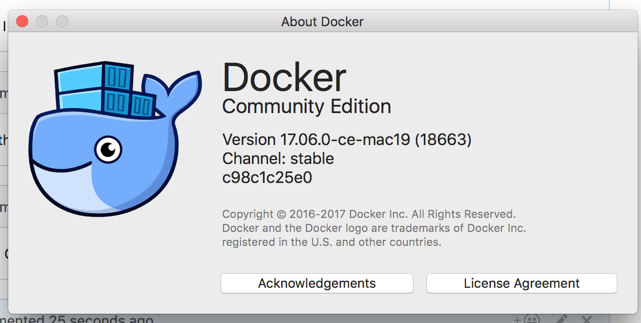
My Docker for Mac version.
ae6rt
on 18 Aug 2017
Thread's getting long. A summary of the failing operation:
sudo rm -rf /tmp/containers && sudo mkdir -p /tmp/containers && sudo chmod -R ugo+rwx /tmp/containers && docker run --privileged  --cap-add=ALL -v /tmp/containers/:/var/lib/containers/:rw,Z -ti buildah buildah from fedora
Getting image source signatures
Copying blob sha256:4db9daa7aafd1ea07f24d2ec893833adc17b5a9c5dde4150cf99a5789b3d322e
 72.07 MiB / 72.07 MiB [=======================================================]
ERRO[0083] error pulling image "containers-storage:[overlay@/var/lib/containers/storage+/var/run/containers/storage]docker.io/library/fedora:latest": Error writing blob: Error processing tar file(exit status 1): open /root/.bash_logout: permission denied
where the buildah container is nothing more than "fedora" (latest) with "dnf install -y buildah" run on it.
ae6rt
on 18 Aug 2017
The layer (which is basically a tarball, give or take special entries ("whiteout"), typically with length=0, which are interpreted by extraction logic as an instruction to "remove this file") doesn't know anything about mountpoints, but it can contain both hard and symbolic links. If you want to dig into it, the references linked from the top of the archive/tar reference make for good reading.
The error message you're seeing is produced after the child process which is writing the files to disk has done a chroot() into the container's root directory.
 nalind
on 18 Aug 2017
nalind
on 18 Aug 2017
Well this is interesting. Now, enter the Alpine VM and bind mount a directory from the VM into the container. Said directory is not also mounted into the VM from the Mac, like /tmp was.
So, from the root command line prompt inside the Docker for Mac Alpine VM dockerhost:
/ # docker run --privileged --security-opt seccomp=unconfined  --cap-add=ALL -v
/t:/var/lib/containers/:rw -ti buildah bash
[root@0c15ad363c5c /]#
[root@0c15ad363c5c /]#
[root@0c15ad363c5c /]#
[root@0c15ad363c5c /]# buildah from fedora
Getting image source signatures
Copying blob sha256:4db9daa7aafd1ea07f24d2ec893833adc17b5a9c5dde4150cf99a5789b3d322e
 72.07 MiB / 72.07 MiB
Copying config sha256:49236bc2f0da4105c84cfb7238b48879efb489a62fe8536934434cf2072a2319
 0 B / 2.29 KiB
Writing manifest to image destination
Storing signatures
fedora-working-container
Works. Need to poke at this some more to make sure I'm not seeing things. But at first glance it looks like some weird interaction between the Alpine VM, docker and the Mac directories mounted inside the Alpine VM, where were in turn mounted inside the buildah container.
Would welcome independent confirmation or reproduction of this result.
ae6rt
on 19 Aug 2017
Could it be attempting to set extended attributes which MAC Doesn't Allow?
rhatdan
on 19 Aug 2017
I don't know. I'm grasping at this point. Maybe I can build a debug version of buildah to get more information.
ae6rt
on 19 Aug 2017
Another small step forward: Assume /alpinevm exists inside the Alpine docker host (the Docker for Mac docs call this the Moby Linux VM). From inside the Moby Linux VM, observe
# ls -ld /alpinevm/
drwxr-xr-x    3 root     root            60 Aug 19 13:50 /alpinevm/
Now, from the Mac, mount this into the fedora-based buildah container and run buildah, which now succeeds
$ docker run --cap-add=SYS_ADMIN -v /alpinevm/:/var/lib/containers/:Z -ti buildah buildah from fedora
Getting image source signatures
Copying blob sha256:4db9daa7aafd1ea07f24d2ec893833adc17b5a9c5dde4150cf99a5789b3d322e
 72.07 MiB / 72.07 MiB [=======================================================]
Copying config sha256:49236bc2f0da4105c84cfb7238b48879efb489a62fe8536934434cf2072a2319
 0 B / 2.29 KiB [--------------------------------------------------------------]
Writing manifest to image destination
Storing signatures
fedora-working-container
Have you tried to use buildah with an image like alpine?
I am wondering if the fedora image comes with XAttrs while the alpine image would not.
rhatdan
on 20 Aug 2017
Yes, I can build alpine without errors:
$ docker run --cap-add=SYS_ADMIN -v /tmp/:/var/lib/containers/:Z -ti buildah buildah from alpine
Getting image source signatures
Copying blob sha256:88286f41530e93dffd4b964e1db22ce4939fffa4a4c665dab8591fbab03d4926
 1.90 MiB / 1.90 MiB [=========================================================]
Copying config sha256:7328f6f8b41890597575cbaadc884e7386ae0acc53b747401ebce5cf0d624560
 0 B / 1.48 KiB [--------------------------------------------------------------]
Writing manifest to image destination
Storing signatures
alpine-working-container
Building ubuntu fails differently that does building fedora
$ docker run --cap-add=SYS_ADMIN -v /tmp/:/var/lib/containers/:Z -ti buildah buildah from ubuntu
Getting image source signatures
Copying blob sha256:d5c6f90da05dc7e77d2e5fef63c341ab05ba2a03396ab5ae8f18814a7bbf5265
 45.00 MiB / 45.07 MiB [=======================================================]
 45.07 MiB / 45.07 MiB [=======================================================]
ERRO[0090] error pulling image "containers-storage:[overlay@/var/lib/containers/storage+/var/run/containers/storage]docker.io/library/ubuntu:latest": Error writing blob: Error processing tar file(exit status 1): function not implemented
Here is a small program that examines the tar.Header structure for files starting with "root/" in the fedora layer that is causing problems. I don't see any Xattrs in anything.
https://gist.github.com/ae6rt/0100903271711499293d91ced0de998e
Run it:
tartool$ ./tartool sha256\:4db9daa7aafd1ea07f24d2ec893833adc17b5a9c5dde4150cf99a5789b3d322e.tar
&{Name:root/ Mode:16744 Uid:0 Gid:0 Size:0 ModTime:2017-07-05 14:48:05 -0700 PDT Typeflag:53 Linkname: Uname: Gname: Devmajor:0 Devminor:0 AccessTime:0001-01-01 00:00:00 +0000 UTC ChangeTime:0001-01-01 00:00:00 +0000 UTC Xattrs:map[]}
&{Name:root/.bash_logout Mode:33188 Uid:0 Gid:0 Size:18 ModTime:2017-02-11 14:28:42 -0800 PST Typeflag:48 Linkname: Uname: Gname: Devmajor:0 Devminor:0 AccessTime:0001-01-01 00:00:00 +0000 UTC ChangeTime:0001-01-01 00:00:00 +0000 UTC Xattrs:map[]}
&{Name:root/.bash_profile Mode:33188 Uid:0 Gid:0 Size:176 ModTime:2017-02-11 14:28:42 -0800 PST Typeflag:48 Linkname: Uname: Gname: Devmajor:0 Devminor:0 AccessTime:0001-01-01 00:00:00 +0000 UTC ChangeTime:0001-01-01 00:00:00 +0000 UTC Xattrs:map[]}
&{Name:root/.bashrc Mode:33188 Uid:0 Gid:0 Size:176 ModTime:2017-02-11 14:28:42 -0800 PST Typeflag:48 Linkname: Uname: Gname: Devmajor:0 Devminor:0 AccessTime:0001-01-01 00:00:00 +0000 UTC ChangeTime:0001-01-01 00:00:00 +0000 UTC Xattrs:map[]}
&{Name:root/.cshrc Mode:33188 Uid:0 Gid:0 Size:100 ModTime:2017-02-11 14:28:42 -0800 PST Typeflag:48 Linkname: Uname: Gname: Devmajor:0 Devminor:0 AccessTime:0001-01-01 00:00:00 +0000 UTC ChangeTime:0001-01-01 00:00:00 +0000 UTC Xattrs:map[]}
&{Name:root/.tcshrc Mode:33188 Uid:0 Gid:0 Size:129 ModTime:2017-02-11 14:28:42 -0800 PST Typeflag:48 Linkname: Uname: Gname: Devmajor:0 Devminor:0 AccessTime:0001-01-01 00:00:00 +0000 UTC ChangeTime:0001-01-01 00:00:00 +0000 UTC Xattrs:map[]}
&{Name:root/anaconda-ks.cfg Mode:33152 Uid:0 Gid:0 Size:2955 ModTime:2017-07-05 14:48:05 -0700 PDT Typeflag:48 Linkname: Uname: Gname: Devmajor:0 Devminor:0 AccessTime:0001-01-01 00:00:00 +0000 UTC ChangeTime:0001-01-01 00:00:00 +0000 UTC Xattrs:map[]}
&{Name:root/anaconda-post.log Mode:33188 Uid:0 Gid:0 Size:435 ModTime:2017-07-05 14:48:05 -0700 PDT Typeflag:48 Linkname: Uname: Gname: Devmajor:0 Devminor:0 AccessTime:0001-01-01 00:00:00 +0000 UTC ChangeTime:0001-01-01 00:00:00 +0000 UTC Xattrs:map[]}
&{Name:root/original-ks.cfg Mode:33152 Uid:0 Gid:0 Size:2615 ModTime:2017-07-05 14:48:05 -0700 PDT Typeflag:48 Linkname: Uname: Gname: Devmajor:0 Devminor:0 AccessTime:0001-01-01 00:00:00 +0000 UTC ChangeTime:0001-01-01 00:00:00 +0000 UTC Xattrs:map[]}
2017/08/20 06:39:06 EOF
As a reference, here is a "tar tvf thelayer.tar" on the layer itself
https://gist.github.com/ae6rt/0a89d644a4158e9244516e5e0aa46a64
ae6rt
on 20 Aug 2017
Here is a whole page about the tradeoffs when mounting OS X filesystems into the Moby VM that ships with Docker for Mac: https://docs.docker.com/docker-for-mac/osxfs-caching/#tuning-with-consistent-cached-and-delegated-configurations
I vainly tried running with the :delegated, :cached, and :consistent options, where I was admittedly thrashing around, trying anything.
ae6rt
on 20 Aug 2017
@vbatts @rhvgoyal Any ideas?
The only thing special fedora might put down would be xattrs for things like SELinux, File Capabilities, perhaps ACLs?
But this is definitely a file system issue.
rhatdan
on 20 Aug 2017
I asked another Mac user to run these commands to see if he obtained the same failure as I have observed on the fedora layer.
https://gist.github.com/ae6rt/d6455fba727b611a4c3ef346bca48224
He did. So it's not just me :)
ae6rt
on 22 Aug 2017
We need to get someone who understands Mac File systems versus Linux to see what is causing these issues.
rhatdan
on 23 Aug 2017
A workaround to run it without mounting `/var/lib/containers/storage':
mkdir -p /var/lib/containers/storage
mount -t tmpfs -o size=20G tmpfs /var/lib/containers/storage
 vrutkovs
on 23 Sep 2017
vrutkovs
on 23 Sep 2017
Good idea, although you will need a lot of memory...
rhatdan
on 23 Sep 2017
@ae6rt did you ever get this running? did @vrutkovs suggested fix make any progress?
 jtligon
on 2 Oct 2017
jtligon
on 2 Oct 2017
@jtligon I did not succeed in getting this to run. The way I read @vrutkovs's suggestion was to mount a scratch tmpfs directory from the docker host into the buildah container, which is not what I sought. What I need is a mount from the OS X filesystem into the docker host into the container to be workable.
Maybe I misunderstood @vrutkovs suggestion.
ae6rt
on 2 Oct 2017
mount a scratch tmpfs directory from the docker host into the buildah container
mount would create a new FS, which would use RAM as a storage. This would bypass overlay check in buildah. It doesn't need any mounts from host to work.
Note, that there is no easy way to move the stored container to host (except for pushing to the registry), so this workaround has a lot of disadvantages
vrutkovs
on 2 Oct 2017
@vrutkovs What about using a storage backend of vfs? That might work. @rhvgoyal He is trying to use a OS X as an overlay file system, which Linux does not seem to support.
rhatdan
on 2 Oct 2017
This is relevant to my interests. We're trying to replace DockerInDocker or mounted docker sockets with buildah, so we can run our container builds in k8s.
Are the requirements so far:
- Privileged (CAP SYS ADMIN)
- not using overlayfs storage driver for docker/rkt/crio?
 Spindel
on 3 Nov 2017
Spindel
on 3 Nov 2017
You can use overlayfs, as long as you volume mount the /var/lib/containers/storage into your container. The problem is if /var/lib/containers/storage in the container is on an Overlay file system it will cause issues.
rhatdan
on 3 Nov 2017
I am trying to run buildah within a pod on OpenShift 3.6. My image is simply rhel7.4 + buildah. Here's my pod definition:
apiVersion: v1
items:
- apiVersion: v1
  kind: Pod
  metadata:
    name: scan-image-grtvf
  spec:
    containers:
    - command:
      - /bin/bash
      - -c
      - |
        buildah from registry.access.redhat.com/rhel7.4
      image: docker-registry.default.svc:5000/cicd/image-scan-base:latest
      name: scan-image
      securityContext:
        privileged: true
      volumeMounts:
      - mountPath: /var/lib/containers/
        name: docker-mount
    restartPolicy: Never
    serviceAccount: imagemanager
    volumes:
    - hostPath:
        path: /var/lib/containers/
      name: docker-mount
kind: List
metadata: {}
And I am getting the same overlay errors:
  | time="2017-11-07T01:03:49Z" level=error msg="'overlay' not found as a supported filesystem on this host. Please ensure kernel is new enough and has overlay support loaded."
-- | --
  | time="2017-11-07T01:03:49Z" level=error msg="'overlay' not found as a supported filesystem on this host. Please ensure kernel is new enough and has overlay support loaded."
  | time="2017-11-07T01:03:49Z" level=error msg="kernel does not support overlay fs: driver not supported
  | kernel does not support overlay fs: driver not supported"
I also have concerns with the amount of privilege that I have to give the pod is going against the norms of openshift. Any thoughts/advice would be appreciated!
@raffaelespazzoli
 domenicbove
on 7 Nov 2017
domenicbove
on 7 Nov 2017
My goal is to use buildah and OpenScap to scan images built by OpenShift without doing Docker in Docker. The full pod script will look something like
buildah from registry.access.redhat.com/rhel7.4
buildah mount rhel7.4-working-container
oscap-chroot /var/lib/containers/storage/overlay/dafb9ee7e8f9a774242afae1c5dce5b357cb1dfcb020bed629092b0cf21e2bfe/merged oval eval --results oval-results.xml --report report.html /usr/share/xml/scap/ssg/content/ssg-rhel7-oval.xml
You will need two things.
First a newer version os skopeo-containers or at least add
override_kernel_check = "true"
to your /etc/containers/storage.conf
This tells the storage driver to ignore the kernel version, since the RHEL kernel has backported the fixes.
The second issue you will see is buildah can not use overlay on top of overlay.
To fix this you will need to volume mount in disk area on top of /var/lib/containers/storage. Or theoretically you could put a tmpfs on that directory.
rhatdan
on 7 Nov 2017
Hi @rhatdan Thanks for getting back to me. Can you take a look at my Repo?
Here's my Dockerfile:
FROM registry.access.redhat.com/rhel7/rhel
USER root
RUN yum --enablerepo="rhel-7-server-extras-rpms" --enablerepo="rhel-7-server-optional-rpms" -y install libassuan-devel \
  ostree-devel runc skopeo-containers openscap-utils scap-security-guide
RUN curl -o buildah-0.4.1.x86_64.rpm https://kojipkgs.fedoraproject.org//packages/buildah/0.4/1.git9cbccf8.fc27/x86_64/buildah-0.4-1.git9cbccf8.fc27.x86_64.rpm && \
  rpm -ivh buildah-0.4.1.x86_64.rpm && yum -y install buildah && \
  rm buildah-0.4.1.x86_64.rpm
COPY storage.conf etc/containers/storage.conf
I found that after installing all the rpms, there was no storage.conf file in etc/containers. I then went and found a storage.conf file online and tried putting the override_kernel_check flag as you recommended. Here's the storage.conf file I then added to /etc/containers:
# The "container storage" table contains all of the server options.
[storage]

# Default Storage Driver
driver = "overlay"

[storage.options]
# AdditionalImageStores is used to pass paths to additional Read/Only image stores
# Must be comma separated list.
additionalimagestores = [
]

# Size is used to set a maximum size of the container image.  Only supported by
# certain container storage drivers.
size = ""

# OverrideKernelCheck tells the driver to ignore kernel checks based on kernel version
override_kernel_check = "true"
And again when I run the command buildah from registry.access.redhat.com/rhel7.4 on that image I get the same error: "'overlay' not found as a supported filesystem on this host. Please ensure kernel is new enough and has overlay support loaded."
Any ideas?
domenicbove
on 7 Nov 2017
@rhatdan I'm working with @domenicbove. We are using the following versions:
[root@scan-image-70h3o-debug /]# rpm -qa | grep skopeo
skopeo-containers-0.1.24-1.dev.git28d4e08.el7.x86_64
[root@scan-image-70h3o-debug /]# rpm -qa | grep buildah
buildah-0.4-1.git9cbccf8.fc27.x86_64
it wasn't clear where to put the override_kernel_check = "true" option in /etc/containers/storage.conf so we put it in both stanzas.
We are still getting the same error:
time="2017-11-08T01:37:30Z" level=error msg="'overlay' not found as a supported filesystem on this host. Please ensure kernel is new enough and has overlay support loaded."
time="2017-11-08T01:37:30Z" level=error msg="'overlay' not found as a supported filesystem on this host. Please ensure kernel is new enough and has overlay support loaded."
time="2017-11-08T01:37:30Z" level=error msg="kernel does not support overlay fs: driver not supported
kernel does not support overlay fs: driver not supported"
running uname -a from the container gives the following:
sh-4.2# uname -a
Linux scan-image-wext6-debug 3.10.0-693.5.2.el7.x86_64 #1 SMP Fri Oct 13 10:46:25 EDT 2017 x86_64 x86_64 x86_64 GNU/Linux
 raffaelespazzoli
on 8 Nov 2017
raffaelespazzoli
on 8 Nov 2017
@nalind WDYT?
What does
buildah --debug from fedora
Show?
rhatdan
on 8 Nov 2017
BTW I built buildah 0.5 yesterday.
It should be going into updates-testing for Fedora.
And I built one for RHEL in BREW.
rhatdan
on 8 Nov 2017
@rhatdan here is what buildah --debug from fedora shows:
sh-4.2# buildah --debug from fedora
DEBU[0000] [graphdriver] trying provided driver "overlay"
ERRO[0000] 'overlay' not found as a supported filesystem on this host. Please ensure kernel is new enough and has overlay support loaded.
DEBU[0000] [graphdriver] trying provided driver "overlay"
ERRO[0000] 'overlay' not found as a supported filesystem on this host. Please ensure kernel is new enough and has overlay support loaded.
ERRO[0000] kernel does not support overlay fs: driver not supported
kernel does not support overlay fs: driver not supported
It looks like this version of buildah is not reading the config file.
Here is what I get with buildah 0.5
# buildah --debug from fedora
DEBU[0000] [graphdriver] trying provided driver "overlay"
DEBU[0000] overlay: imagestore=/var/lib/nfs/storage
DEBU[0000] overlay: override_kernelcheck=true
DEBU[0000] NewControl(/var/lib/containers/storage/overlay): nextProjectID = 2
DEBU[0000] backingFs=xfs,  projectQuotaSupported=true
DEBU[0000] parsed reference into "[overlay@/var/lib/containers/storage+/var/run/containers/storage:overlay.imagestore=/var/lib/nfs/storage,overlay.override_kernel_check=true]docker.io/library/fedora:latest"
DEBU[0000] parsed reference into "[overlay@/var/lib/containers/storage+/var/run/containers/storage:overlay.imagestore=/var/lib/nfs/storage,overlay.override_kernel_check=true]docker.io/library/fedora:latest"
DEBU[0000] exporting opaque data as blob "sha256:a602963ff8cdf7dcb8a1aafd9301717a11df064be39c06dd0deda8c40464c0b2"
fedora-working-container-3
LOCALF26:buildah: cat /etc/containers/storage.conf
# See man 5 containers-storage.conf for more information
# The "container storage" table contains all of the server options.
[storage]

# Default Storage Driver
driver = "overlay"

# Temporary storage location
runroot = "/var/run/containers/storage"

# Primary Read/Write location of container storage
graphroot = "/var/lib/containers/storage"

[storage.options]
# AdditionalImageStores is used to pass paths to additional Read/Only image stores
# Must be comma separated list.
additionalimagestores = [
"/var/lib/nfs/storage"
]

#size = "20G"

override_kernel_check = "true"
You could try
buildah --storage-opt overlay.override_kernel_check="true" from fedora
rhatdan
on 8 Nov 2017
I'm still getting the same result:
sh-4.2# buildah --debug --storage-opt overlay.override_kernel_check="true" from fedora
DEBU[0000] [graphdriver] trying provided driver "overlay"
ERRO[0000] 'overlay' not found as a supported filesystem on this host. Please ensure kernel is new enough and has overlay support loaded.
DEBU[0000] [graphdriver] trying provided driver "overlay"
ERRO[0000] 'overlay' not found as a supported filesystem on this host. Please ensure kernel is new enough and has overlay support loaded.
ERRO[0000] kernel does not support overlay fs: driver not supported
kernel does not support overlay fs: driver not supported
@raffaelespazzoli Can you grab the latest buildah package to see if this fixes the issue?
rhatdan
on 8 Nov 2017
@rhatdan here it is:
sh-4.2# rpm -qa | grep buildah
buildah-0.5-1.git35afa1c.fc27.x86_64
sh-4.2# buildah --debug --storage-opt overlay.override_kernel_check="true" from fedora
DEBU[0000] [graphdriver] trying provided driver "overlay"
DEBU[0000] overlay: override_kernelcheck=true
DEBU[0000] overlay: override_kernelcheck=true
ERRO[0000] 'overlay' not found as a supported filesystem on this host. Please ensure kernel is new enough and has overlay support loaded.
DEBU[0000] [graphdriver] trying provided driver "overlay"
DEBU[0000] overlay: override_kernelcheck=true
DEBU[0000] overlay: override_kernelcheck=true
ERRO[0000] 'overlay' not found as a supported filesystem on this host. Please ensure kernel is new enough and has overlay support loaded.
ERRO[0000] kernel does not support overlay fs: driver not supported
kernel does not support overlay fs: driver not supported
sh-4.2# uname -a
Linux scan-image-ojswv-debug 3.10.0-693.5.2.el7.x86_64 #1 SMP Fri Oct 13 10:46:25 EDT 2017 x86_64 x86_64 x86_64 GNU/Linux
still not working.
Is there a way to independent test if this kernel supports the overlay driver?
raffaelespazzoli
on 8 Nov 2017
What RHEL version are you running this on? I think you need RHEL7.4 kernel?
rhatdan
on 8 Nov 2017
The code is looking at /proc/filesystem and searching for overlay?
Can you modprobe overlay on the host.
rhatdan
on 8 Nov 2017
on the node (not the pod)
[openshift@master-0 ~]$ lsb_release -i -r
Distributor ID: RedHatEnterpriseServer
Release:    7.4
again on the node:
[root@master-0 ~]# cat /proc/filesystems
nodev   sysfs
nodev   rootfs
nodev   ramfs
nodev   bdev
nodev   proc
nodev   cgroup
nodev   cpuset
nodev   tmpfs
nodev   devtmpfs
nodev   debugfs
nodev   securityfs
nodev   sockfs
nodev   pipefs
nodev   anon_inodefs
nodev   configfs
nodev   devpts
nodev   hugetlbfs
nodev   autofs
nodev   pstore
nodev   mqueue
nodev   selinuxfs
nodev   rpc_pipefs
    xfs
nodev   nfsd
there is no overlay.
raffaelespazzoli
on 8 Nov 2017
Does
modprobe overlay
Add it?
rhatdan
on 8 Nov 2017
@rhvgoyal ???
rhatdan
on 8 Nov 2017
[vbatts@getdown] {master *} ~$ grep OVERLAY /boot/config-4.13.11-200.fc26.x86_64
CONFIG_OVERLAY_FS=m
# CONFIG_OVERLAY_FS_REDIRECT_DIR is not set
# CONFIG_OVERLAY_FS_INDEX is not set
[vbatts@getdown] {master *} ~$ find /lib/modules/$(uname -r) | grep overlay
/lib/modules/4.13.9-200.fc26.x86_64/kernel/fs/overlayfs
/lib/modules/4.13.9-200.fc26.x86_64/kernel/fs/overlayfs/overlay.ko.xz
[vbatts@getdown] {master *} ~$ cat /proc/filesystems
nodev   sysfs
nodev   rootfs
nodev   ramfs
nodev   bdev
nodev   proc
nodev   cpuset
nodev   cgroup
nodev   cgroup2
nodev   tmpfs
nodev   devtmpfs
nodev   configfs
nodev   debugfs
nodev   tracefs
nodev   securityfs
nodev   sockfs
nodev   dax
nodev   bpf
nodev   pipefs
nodev   hugetlbfs
nodev   devpts
        ext3
        ext2
        ext4
nodev   autofs
nodev   pstore
nodev   efivarfs
nodev   mqueue
nodev   resctrl
        xfs
        btrfs
        vfat
nodev   rpc_pipefs
[vbatts@getdown] {master *} ~$ sudo modprobe overlay
[vbatts@getdown] {master *} ~$ grep overlay /proc/filesystems
nodev   overlay
 vbatts
on 8 Nov 2017
vbatts
on 8 Nov 2017
modprobe made the kernel load the driver.
After that buildah worked.
Thanks.
Is that expected that the driver is not mounted? if we have to run that command on every node every time they restart, it makes this approach unusable in a customer environment.
Also now that we have it working, I'd like to talk about security.
We are running that pod as privileged. Is that necessary?
To my understanding we could use SYS_ADMIN and anyuid. This is still a very difficult conversation with the customer. Is there a way to drop SYS_ADMIN and use a more specific capability? Also is root really needed?
In this use case we don't want to run a container but just run an openscap scan on a previously created image.
raffaelespazzoli
on 8 Nov 2017
Well your Container runtime is most likely moving to Overlay as the default. Even in the case that it is not, you could setup the host to automatically load the kernel module.
As far as buildah requiring SYS_ADMIN. We are stuck with that for now. We could tighten the security and only give the container SYS_ADMIN, still lock it down with the other security measures. This is far more secure then leaking the docker socket into the container, access to the docker socket allows a rogue process full control of the host, without any logging.
We want to work in the future on making buildah run without SYS_ADMIN. It currently needs SYS_ADMIN in order to mount the filesystems and to run the proceses of the build in separate containers.. One crazy idea would be to split buildah into an init container which would do the from/mount and commit in a privileged container, and then run the actual users code in a locked down container.
rhatdan
on 8 Nov 2017
" It currently needs SYS_ADMIN in order to mount the filesystems and to run the proceses of the build in separate containers."
Do you think it is technically feasible to support build mode where commands are executed in the chroot, not in a dedicated mount namespace? This would require no SYS_ADMIN support, which together with VFS storage driver would make it possible to run buildah in a quite restricted containers
Current output from a container with no SYS_ADMIN and no --privileged:
[root@c6c7cd45835e tmp]# buildah --storage-driver vfs bud .
STEP 1: FROM busybox
Getting image source signatures
Copying blob sha256:0ffadd58f2a61468f527cc4f0fc45272ee4a1a428abe014546c89de2aa6a0eb5
 88.28 KiB / 698.53 KiB [======>--------------------------------------------] 0s
error building: error creating build container: error pulling image "docker.io/library/busybox:latest": Error writing blob: ApplyLayer exit status 1 stdout:  stderr: Error creating mount namespace before pivot: operation not permitted
 redbaron
on 14 Dec 2017
redbaron
on 14 Dec 2017
We have thought about this, but have not had time to work on it yet. We would have to make the RUN command not attempt to use runc but to run in a chroot as well. runc requires SYS_ADMIN to setup namespaces.
rhatdan
on 14 Dec 2017
Looking into it further, even before RUN , when it is unpacking FROM, it is choosing https://github.com/projectatomic/buildah/blob/8ecefa9/vendor/github.com/containers/storage/pkg/chrootarchive/chroot_linux.go#L20 over https://github.com/projectatomic/buildah/blob/8ecefa978ce56f5716acecf95da6b57866d03c9d/vendor/github.com/containers/storage/pkg/chrootarchive/chroot_unix.go#L7
I'll try to prepare patch to do classic chroot + runc-less exec of RUN commands, we'll see how far it can take us
redbaron
on 14 Dec 2017
Hmm, for chroot commands to work reliably , you'd need to have /dev and /proc mounted inside chroot environment, but calling mount requires CAP_SYS_ADMIN, which defeats whole purpose of this excersise. @rhatdan any ideas for workarounds? How does fedora mock tool is building chroot envs when invoked from regular user? Possibly can do something with filesystem capabilities on mount binary itself, adding CAP_SYS_ADMIN might work
redbaron
on 15 Dec 2017
mock uses consolehelper which then users userhelper which is setuid.
ls -l /usr/bin/mock /usr/bin/consolehelper /usr/sbin/userhelper
-rwxr-xr-x. 1 root root 7136 Aug 4 22:04 /usr/bin/consolehelper
lrwxrwxrwx. 1 root root 13 Oct 31 16:25 /usr/bin/mock -> consolehelper
-rws--x--x. 1 root root 40352 Aug 4 22:04 /usr/sbin/userhelper
rhatdan
on 15 Dec 2017
 ashcrow
on 19 Dec 2017
ashcrow
on 19 Dec 2017
Just want to +1. We could really use an unprivileged alternative for docker build
 itaysk
on 3 Jan 2018
itaysk
on 3 Jan 2018
chroot doesn't require any extra privileges, but for commands to work inside chroot , there must be /proc and /sys mounted, executing mount requiers CAP_SYS_ADMIN. No amount of suid bits on any binary or sefcap would allow you to raise privileges beyond what container allows you. This means that container needs to be CAP_SYS_ADMIN and we are at the square 1.
For it to work, system, which runs container should also be mounting proc and sys inside unprivileged container not only for container itself, but also for future chroot. so there will be 2 mounts of procfs: /proc and /chroot (where chroot is going to be.)
How do determine chroot location? Not trivial, currently storage-driver=vfs (as one requiring least privileges) creates unique directory for each layer. That unique directory should be chrooted into to run build commands.
So we have 2 conflicting requirements: runtime which starts unprivileged build container should be mounting extra procfs inside future chroot location, as container cannot do it itself due to being unprivileged. On another hand chroot locations are layers, and layers have unique names which are not known upfront and there are unknown number of them.
redbaron
on 3 Jan 2018
One potential less secure short term fix would be to use SECCOMP along with SYS_ADMIN. and only allow Mount and unshare syscalls, blocking others that are allowed with by SYS_ADMIN. Not sure if we can do a great job breaking this down, but it would be more secure then just allowing SYS_ADMIN.
rhatdan
on 3 Jan 2018
I settled on a remote docker build daemon running in privileged container and available over TCP to CI job scripts. It allows CI jobs to run in unprivileged container and execute builds in unprivileged containers (docker build ...)so no user submitted code is executed in privileged mode. Docker daemon has authorization plugin enabled to allow build commands only and not run commands. It is still not ideal as multiple users can overwrite each other images, but getting closer.
it would be nice if something like that was possible with alternative systems too
redbaron
on 4 Jan 2018
Not intending to troll, but that's why Docker Rules for Bazel were written
mariusgrigoriu
on 4 Jan 2018
I saw them, correct me if I am wrong, but they are not allowing to have analogue of RUN apt-get update && apt-get install -y ..., right? Bazel is build system which can package results as a docker compatible image, thats is not like for like to what we try to do here
redbaron
on 4 Jan 2018
Is there currently an image that we can test with on Atomic Host?
/cc @miabbott
ashcrow
on 7 Feb 2018
@ipbabble Want to try to through together a container image that could be used to run buildah on atomic host?
rhatdan
on 8 Feb 2018
I’d like that. I hadn’t kinda started the other day. I wanted to run a
buildah container on CoreOS Container Linux but got sidetracked with other
fun stuff.
On Thu, Feb 8, 2018 at 6:30 AM Daniel J Walsh notifications@github.com
wrote:
@ipbabble https://github.com/ipbabble Want to try to through together a
container image that could be used to run buildah on atomic host?—
You are receiving this because you were mentioned.
Reply to this email directly, view it on GitHub
https://github.com/projectatomic/buildah/issues/158#issuecomment-364111502,
or mute the thread
https://github.com/notifications/unsubscribe-auth/ABPpgV-Uz6phunAgEirHN-O7Ylkpa9MUks5tSvbogaJpZM4ODYiG
.>
Sent from Gmail Mobile on iPhone
 ipbabble
on 8 Feb 2018
ipbabble
on 8 Feb 2018
@ipbabble let me know when there is something to test and/or if you end up needing a hand with the image.
ashcrow
on 8 Feb 2018
Stephen,
I have something but I want to write it up.
It buildah image works with podman and docker (with a slight variation due
to a podman bug not using entrypoint)
It needs to run with flags as you'd expect. Using external /var mounts.
William
William Henry
Senior Consulting Software Engineer
Red Hat
Colorado, USA.
On Thu, Feb 8, 2018 at 12:27 PM, Stephen Milner notifications@github.com
wrote:
@ipbabble https://github.com/ipbabble let me know when there is
something to test and/or if you end up needing a hand with the image.—
You are receiving this because you were mentioned.
Reply to this email directly, view it on GitHub
https://github.com/projectatomic/buildah/issues/158#issuecomment-364221547,
or mute the thread
https://github.com/notifications/unsubscribe-auth/ABPpge7yDUlRelJcEPfRHFvgjXojIxRgks5tS0qQgaJpZM4ODYiG
.
ipbabble
on 9 Feb 2018
Thanks William. Keep me updated!
ashcrow
on 9 Feb 2018
I've worked on a feature for system containers that could be useful for the Buildah case as well:
 giuseppe
on 13 Feb 2018
giuseppe
on 13 Feb 2018
@ashcrow you can try pulling down whenry/buildah
If using podman remember some bind mounts -v
Let me know if you have any questions. I'm going to write this up. But thought I'd get something out there soon.
William
ipbabble
on 14 Feb 2018
@ipbabble Thanks! I'll carve out some time this afternoon to give it a shot and get back with you.
ashcrow
on 14 Feb 2018
@ipbabble I used some of the steps in this post and things worked well.
Here is the gist showing what I did to manually test and the results.
I'm going to do a little more testing shortly but things look good.
ashcrow
on 14 Feb 2018
Sorry Stephen I meant to have something written up. I will don’t later.
Sorry. Decided to go skiing today.
On Wed, Feb 14, 2018 at 12:31 PM Stephen Milner notifications@github.com
wrote:
@ipbabble https://github.com/ipbabble I used some of the steps in this
post
https://www.projectatomic.io/blog/2017/11/getting-started-with-buildah/
and things worked well.Here is the gist
https://gist.github.com/ashcrow/9d0c650121f1f99eb0a1c2e60caff1a7
showing what I did to manually test and the results.—
You are receiving this because you were mentioned.
Reply to this email directly, view it on GitHub
https://github.com/projectatomic/buildah/issues/158#issuecomment-365719165,
or mute the thread
https://github.com/notifications/unsubscribe-auth/ABPpgXqBAqy4fzd3I_9QRLc9E3AFuAT_ks5tUzSggaJpZM4ODYiG
.>
Sent from Gmail Mobile on iPhone
ipbabble
on 14 Feb 2018
@ipbabble no problem. I'll let you know once I'm done with testing but so far so good.
ashcrow
on 14 Feb 2018
fwiw, it will run in a podman container too
 baude
on 14 Feb 2018
baude
on 14 Feb 2018
@ipbabble I haven't hit any issues. 👍
ashcrow
on 14 Feb 2018
I'm not sure if I'm late to the party but we are actually running buildah (and s/kpod/podman/) in a runc container within ansible container: https://github.com/ansible/ansible-container/pull/790/files#diff-9fa3b8fd302da35fe483d1166416a024R433
We also bind-mount /var/lib/containers/ from host to the runc container and all of this works just fine. The container itself has privileges though.
 TomasTomecek
on 15 Feb 2018
TomasTomecek
on 15 Feb 2018
@TomasTomecek would something like what I am doing in https://github.com/projectatomic/atomic/pull/1186 be helpful to you?
giuseppe
on 15 Feb 2018
@giuseppe sounds interesting; I'm worried about adding dependency from atomic to ansible container (upstream guys actually want ansible container to be usable on mac and win); on linux it would be super-useful and helped us remove ton of code.
TomasTomecek
on 15 Feb 2018
Running buildah without requiring privs is a future goal. Nice work people. We need to get updates on Karma to get a good version of podman to demonstrate this tests though.
https://bodhi.fedoraproject.org/updates/podman-0.2-3.git3d0100b.fc27
rhatdan
on 15 Feb 2018
Hi Stephen et al,
FYI for running with podman I found this successful:
podman run --privileged --network host -v
/var/lib/containers:/var/lib/containers:rw -v /home/whenry/dfs:/tmp:Z
buildah bud -f /tmp/Dockerfile
I had several other volume mounts that I used during my tests but just
confirmed I don't need them. The ones above are all you need.
/var/lib/containers and any other use case based mounts - like if you need
files added.
William
William
William Henry
Senior Consulting Software Engineer
Red Hat
Colorado, USA.
On Thu, Feb 15, 2018 at 9:09 AM, Daniel J Walsh notifications@github.com
wrote:
Running buildah without requiring privs is a future goal. Nice work
people. We need to get updates on Karma to get a good version of podman to
demonstrate this tests though.https://bodhi.fedoraproject.org/updates/podman-0.2-3.git3d0100b.fc27
—
You are receiving this because you were mentioned.
Reply to this email directly, view it on GitHub
https://github.com/projectatomic/buildah/issues/158#issuecomment-365975559,
or mute the thread
https://github.com/notifications/unsubscribe-auth/ABPpgU2OSPfVLBOS5LOrgEzVN0luAprNks5tVFbHgaJpZM4ODYiG
.
ipbabble
on 15 Feb 2018
HEre is what I used to build the buildah container image:
bldah=$(buildah from scratch)
scratchmnt=$(buildah mount $bldah)
dnf install --installroot $scratchmnt --release 27 buildah --setopt
install_weak_deps=false -y
dnf clean all --installroot $scratchmnt --release 27
buildah config --cmd "--help" $bldah
buildah config --entrypoint /usr/bin/buildah $bldah
buildah config --author "wgh @ redhat.com" --created-by "ipbabble" --label
name=buildah $bldah
buildah commit working-container buildah
The clean step is important to reduce the size of the image.
Use buildah config to add other meta data besides just CMD and ENTRYPOINT
podman push --creds
docker://whenry/buildah:latest
I'm hoping to push it to Quay.io soon.
William
William Henry
Senior Consulting Software Engineer
Red Hat
Colorado, USA.
On Thu, Feb 15, 2018 at 10:13 AM, William Henry whenry@redhat.com wrote:
Hi Stephen et al,
FYI for running with podman I found this successful:
podman run --privileged --network host -v /var/lib/containers:/var/lib/containers:rw
-v /home/whenry/dfs:/tmp:Z buildah bud -f /tmp/DockerfileI had several other volume mounts that I used during my tests but just
confirmed I don't need them. The ones above are all you need.
/var/lib/containers and any other use case based mounts - like if you need
files added.William
William
William Henry
Senior Consulting Software Engineer
Red Hat
Colorado, USA.On Thu, Feb 15, 2018 at 9:09 AM, Daniel J Walsh notifications@github.com
wrote:Running buildah without requiring privs is a future goal. Nice work
people. We need to get updates on Karma to get a good version of podman to
demonstrate this tests though.https://bodhi.fedoraproject.org/updates/podman-0.2-3.git3d0100b.fc27
—
You are receiving this because you were mentioned.
Reply to this email directly, view it on GitHub
https://github.com/projectatomic/buildah/issues/158#issuecomment-365975559,
or mute the thread
https://github.com/notifications/unsubscribe-auth/ABPpgU2OSPfVLBOS5LOrgEzVN0luAprNks5tVFbHgaJpZM4ODYiG
.
ipbabble
on 15 Feb 2018
@nalind is it fine to use the 'vfs' driver instead of 'overlay'?
I've done a quick try with running buildah in an user namespace, bwrap-oci handles it well, this runs as non-root user:
$ atomic pull --storage ostree docker.io/gscrivano/buildah
$ atomic run --storage ostree docker.io/gscrivano/buildah buildah bud /host/home/gscrivano/container
Extracting to /home/gscrivano/.containers/repo/tmp/atomic-container/14806/rootfs
STEP 1: FROM scratch
STEP 2: COPY foo /
STEP 3: COMMIT containers-storage:[vfs@/var/lib/containers/storage+/var/run/containers/storage:vfs.override_kernel_check=true]@14f360973b1eddabb1d41e79a3340611f05f74998c7cfaee05bef6efb8a4fafa
You have to use if if you’re no bind mounting in /var/lib/containers. It
works but it is a little slower (I’m told - I didn’t do any formal timing)
I couldn’t get —storage-driver devicemapper to work. Only vfs
Having said that the issue of building a container image inside the
buildah container is that you lose many benefits. Every container on the
host will pull down the “from” image even if it has already been pulled.
Each has its own copy of that image. And if I build a new “base” image,
each container on the host that uses it would have to pull it down despite
already existing on the host. So it carries overhead.
William
On Thu, Feb 15, 2018 at 11:09 AM Giuseppe Scrivano notifications@github.com
wrote:
@nalind https://github.com/nalind is it fine to use the 'vfs' driver
instead of 'overlay'?I've done a quick try with running buildah in an user namespace, bwrap-oci
https://github.com/projectatomic/bwrap-oci handles it well, this runs
as non-root user:$ atomic pull --storage ostree docker.io/gscrivano/buildah
$ atomic run --storage ostree docker.io/gscrivano/buildah buildah bud /host/home/gscrivano/container
Extracting to /home/gscrivano/.containers/repo/tmp/atomic-container/14806/rootfs
STEP 1: FROM scratch
STEP 2: COPY foo /
STEP 3: COMMIT containers-storage:[vfs@/var/lib/containers/storage+/var/run/containers/storage:vfs.override_kernel_check=true]@14f360973b1eddabb1d41e79a3340611f05f74998c7cfaee05bef6efb8a4fafa—
You are receiving this because you were mentioned.
Reply to this email directly, view it on GitHub
https://github.com/projectatomic/buildah/issues/158#issuecomment-366012944,
or mute the thread
https://github.com/notifications/unsubscribe-auth/ABPpgUTF8TcxeRM70kckpYhU1fwH5Sqdks5tVHLUgaJpZM4ODYiG
.>
Sent from Gmail Mobile on iPhone
ipbabble
on 15 Feb 2018
I think only VFS would work on a rootless environment. Since otherwise you would be required to do a mount. But @giuseppe you said you got this to work without requiring root?
rhatdan
on 15 Feb 2018
@rhatdan using vfs yes. The steps I showed in my previous comment are done with my user uid=1000, and no root is required. The container was managed by bwrap-oci.
It is the same system container image that works for the root user, it requires this change in atomic: https://github.com/projectatomic/atomic/pull/1186 so that we are able to atomic run --storage ostree IMAGE COMMANDS
giuseppe
on 15 Feb 2018
SO is buildah running in a usernamespace then?
rhatdan
on 15 Feb 2018
Yes, it is
giuseppe
on 15 Feb 2018
Me Too. i.e. when I ran for inside the container it was because I didn't
want --privileged. But really the use case for this is odd and the perf hit
is high overall.
William Henry
Senior Consulting Software Engineer
Red Hat
Colorado, USA.
On Thu, Feb 15, 2018 at 12:25 PM, Daniel J Walsh notifications@github.com
wrote:
I think only VFS would work on a rootless environment. Since otherwise you
would be required to do a mount. But @giuseppe
https://github.com/giuseppe you said you got this to work without
requiring root?—
You are receiving this because you were mentioned.
Reply to this email directly, view it on GitHub
https://github.com/projectatomic/buildah/issues/158#issuecomment-366034727,
or mute the thread
https://github.com/notifications/unsubscribe-auth/ABPpgSFF7to21Pnxpc2UskK0aBawBumUks5tVITDgaJpZM4ODYiG
.
ipbabble
on 15 Feb 2018
This is well worth a blog and an explanation on why it is slow. Bottom line this can show we can build a container image without requiring root using Buildah. This is huge.
rhatdan
on 16 Feb 2018
@ashcrow also availabel on quay.io
podman pull quay.io/ipbabble/buildah
write up is done. having reviewed and will post asap.
William
ipbabble
on 17 Feb 2018
@ipbabble could we merge our two efforts?
My work is here:
https://github.com/projectatomic/atomic-system-containers/pull/162
A system container is still able to run as a Docker container, I just needed to add some more metadata.
giuseppe
on 17 Feb 2018
@giuseppe Eager to chat. I'm not sure what you mean by merge our two efforts. I did write up my use of vfs for the inside container file system build. I also wrote about why, despite being cool that it works, it's also not a very practical solution. (Due to every container potentially pulling down the same image on a single host.)
Let's connect on IRC (freenode #podman) so we can discuss why I might be missing in my effort.
ipbabble
on 17 Feb 2018
I've got a PR atomic-site for a blog post.
1) It should be noted that it covers only the privileged container mode right now.
2) It covers some of the issues we faced with unprivileged.
3) I pulled the unpriv section for a later blog because I saw some regression that I am looking into.
4) @giuseppe 's work has been incorporated into a separate blog because this one was getting too long.
This blog is framed as the Buildah container for Kubernetes.
The system container Buildah example will be for a Buildah system container for Atomic
The unpriv. example will be a sequel to the first one.
I'll post the link when it goes live.
Any questions?
ipbabble
on 28 Feb 2018
ipbabble
on 28 Feb 2018
ipbabble
on 1 Mar 2018
@ipbabble great post! I did notice there's a hiccup in the markdown to youtube in the post.
ashcrow
on 1 Mar 2018
Yeah. I'm bummed I missed that. We all missed my misplaced quotes. I'm
trying to fix it.
@rossturk gave me heads up too.
Cheers.
William
William Henry
Senior Consulting Software Engineer
Red Hat
Colorado, USA.
On Thu, Mar 1, 2018 at 11:11 AM, Stephen Milner notifications@github.com
wrote:
@ipbabble https://github.com/ipbabble great post! I did notice there's
a hiccup in the markdown to youtube in the post.—
You are receiving this because you were mentioned.
Reply to this email directly, view it on GitHub
https://github.com/projectatomic/buildah/issues/158#issuecomment-369680173,
or mute the thread
https://github.com/notifications/unsubscribe-auth/ABPpgXIKXcG1fz4Ye7fT8YXuTzS1C5QQks5taDnRgaJpZM4ODYiG
.
ipbabble
on 1 Mar 2018
So I'm going to create a new/separate issue about non priv. Buildah container
ipbabble
on 8 Mar 2018
The answer to this question is yes, so I am closing this issue. We have other issues about running with UserNamespace and in un priv containers.
rhatdan
on 12 Mar 2018
Since this issue is getting linked around the internets, I'll leave in here a little note about how we solved this problem for us:
For our GitLab CI setup, we made sure that the /var/lib/containers in the container environment mapped to a _different_ directory on the host system, so that the containers wouldn't be picked up by the container executor. That keeps us from accidentally breaking things in the CI system.
 Conan-Kudo
on 11 Jun 2018
Conan-Kudo
on 11 Jun 2018
Related issues
 sub-mod
·
4Comments
sub-mod
·
4Comments
 bparees
·
12Comments
bparees
·
12Comments
 jawnsy
·
6Comments
jawnsy
·
6Comments
 QincaiLiu
·
9Comments
QincaiLiu
·
9Comments
 azatsarynnyy
·
3Comments
azatsarynnyy
·
3Comments
Most helpful comment
Since this issue is getting linked around the internets, I'll leave in here a little note about how we solved this problem for us:
For our GitLab CI setup, we made sure that the
/var/lib/containersin the container environment mapped to a _different_ directory on the host system, so that the containers wouldn't be picked up by the container executor. That keeps us from accidentally breaking things in the CI system.