Build: Clarify where settings are loaded from
If you set a base in netlify.toml, you need to create a second netlify.toml in that base directory to get things like redirects to work
This is fine, but _super_ unintuitive and not documented.
I think we can rectify this with relatively low effort:
Log where settings are loaded from:
[config] a `base` has been set. File-based settings will be sourced from
/path/to/base/netlify.toml -- see https://docs.link for more information
Update our documentation for
baseto explain that it introduces the need for multiplenetlify.tomlfiles
 jlengstorf
All 7 comments
We are logging where the netlify.toml was found and what is the "base" directory. (Note the screenshot below would show /opt/build/repo/base instead if a base directory was used).
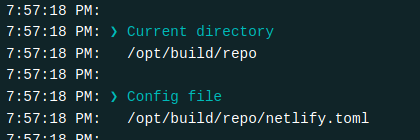
Not sure if that's clear enough though, might need more copy?
@verythorough
 ehmicky
on 22 May 2020
ehmicky
on 22 May 2020
@ehmicky This is good, but the issue specifically was an issue with this deploy
Where there are redirects in the /netlify.toml, but they are ignored because the base dir is in /website
[build]
  base = "website"
  publish = "build"
  command = "yarn build"

[[redirects]]
  from = "/en"
  to = "/"
  status = 301

[[redirects]]
  from = "/en/*"
  to = "/"
  status = 301
 talves
on 22 May 2020
talves
on 22 May 2020
The solution:
/netlify.toml
[build]
  base = "website"
/website/netlify.toml
[build]
  publish = "build"
  command = "yarn build"

[[redirects]]
  from = "/en"
  to = "/"
  status = 301

[[redirects]]
  from = "/en/*"
  to = "/"
  status = 301
Although there are other solutions that are recommended in this one use case, there was an issue when the user was trying to figure out why the redirects were not working. A solution like @jlengstorf is mentioning combined with some documentation might help the user to realize there is a configuration that will not work in their setup. It's not instantly apparent to the user why.
talves
on 22 May 2020
Related issue: https://github.com/netlify/buildbot/issues/650
 verythorough
on 24 May 2020
verythorough
on 24 May 2020
The need to update the documentation may have been obsoleted by https://github.com/netlify/buildbot/pull/901, which brings the functionality more in-line with the existing documentation. Can someone verify if this is still a problem?
 bettse
on 25 Aug 2020
bettse
on 25 Aug 2020
This was fixed by the PR linked above, thanks @bettse .
 vbrown608
on 23 Sep 2020
vbrown608
on 23 Sep 2020
Related issues
 sw-yx
·
4Comments
sw-yx
·
5Comments
ehmicky
·
5Comments
sw-yx
·
4Comments
sw-yx
·
5Comments
ehmicky
·
5Comments
 williamjacksn
·
5Comments
ehmicky
·
4Comments
williamjacksn
·
5Comments
ehmicky
·
4Comments
Most helpful comment
Although there are other solutions that are recommended in this one use case, there was an issue when the user was trying to figure out why the redirects were not working. A solution like @jlengstorf is mentioning combined with some documentation might help the user to realize there is a configuration that will not work in their setup. It's not instantly apparent to the user why.