Build: Help unblock DartCode backlog on web integration
Issues: https://github.com/Dart-Code/Dart-Code/labels/in%20web
This is a meta tracking issue for @DanTup, so he can focus on non-web for the time being on DartCode until we have a better (and documented) integration story for him to follow.
/cc @DanTup @kevmoo @devoncarew
 matanlurey
All 75 comments
Hi,
I'm interested in helping for DartCode web support (especially breakpoints for both serve and tests).
Where can I start ? 😄
 rrousselGit
on 8 Mar 2018
rrousselGit
on 8 Mar 2018
I think a good first step would be:
- Try and get something running via a task in
task.jsonthat watches for changes in the BG (so you can make code changes and hit save, and they're recompiled). @matanlurey I presume something likepub run build_runner serveis the new equiv ofpub serve? - See if you can debug this code using Chrome Debugger Extension and the source maps
Both of these can be done without any changes to Dart Code, and will likely form the foundation of it's web support :-)
 DanTup
on 8 Mar 2018
DanTup
on 8 Mar 2018
As of now, Chrome Debugger successfully attach to Chrome.
But source maps don't works as we get 2 errors in vscode's debug console :
SourceMaps.loadSourceMapContents: Could not download sourcemap from http://localhost:8080/packages/$sdk/dev_compiler/web/dart_stack_trace_mapper.js.map
SourceMaps.loadSourceMapContents: Could not download sourcemap from http://localhost:8080/packages/$sdk/dev_compiler/amd/dart_sdk.js.map
These files don't exists (but the version without .map does).
Setting breakpoints in vscode won't work due to source maps.
On the other hand, setting some in chrome does trigger vscode's debug mode. But pointing to .ddc.js files instead of .dart.
rrousselGit
on 8 Mar 2018
fwiw, those files are not intended to have source maps. You should be able to ignore the error, and if not we should file bugs to get the sourcemap lines removed.
 jakemac53
on 8 Mar 2018
jakemac53
on 8 Mar 2018
Theses errors don't seems to have any impact.
For actual projects sources ; the source map problem seems to come from Chrome Debugger looking for .dart files in project/packages/projectname/file.dart instead of project/lib/file.dart
Confirmed, as copy pasting sources to this actual directory will make debugging work.
rrousselGit
on 9 Mar 2018
OH - ya that makes sense. Do we have any hooks to tell it how to interpret a specific uri?
jakemac53
on 9 Mar 2018
Fwiw - on the web package: uris don't work (they have no meaning) so we have this convention around a packages/ directory mapping to package:.
We also can't use absolute paths because that would point into your pub cache which would mean non-hermetic builds.
jakemac53
on 9 Mar 2018
Seems like. There's a sourceMapPathOverrides property we can set in the launch.json. Currently trying to get it working.
rrousselGit
on 9 Mar 2018
Ok - you should be able to look in the .packages file to get _almost_ all the info you need for the mapping. There is also the pesky issue of generated files though which for build_runner live in .dart_tool/build/generated.
For pub serve they don't exist on disk at all so I don't see what can be done there.
jakemac53
on 9 Mar 2018
Hum...
The only way I found to get things to work is to have a custom sourceMapPathOverrides per source file.
By running vscode Chrome Debugger .script command inside the debug console on Angular Tour of Heroes we get the following :
...
› http://localhost:8080/packages/angular_tour_of_heroes/src/dashboard_component.ddc.js
- dashboard_component.dart (myproject/packages/angular_tour_of_heroes/src/dashboard_component.dart)
...
Which imply that to override the path, we have to use the following sourceMapPathOverrides :
"sourceMapPathOverrides": {
"dashboard_component.dart": "${webRoot}/lib/src/dashboard_component.dart"
}
Notice how the key is not path/dashboard_component.dart. Just the filename. Preventing us from using * or similar.
Interestingly, reading the extension's logs, we can see SourceMap: no sourceRoot specified, using webRoot + script path dirname: myproject/packages/angular_tour_of_heroes/src.
Considering dashboard_component's map contains "sourceRoot":"","sources":["dashboard_component.dart"] everything above is makes sense.
Is there anything we can do about that ?
rrousselGit
on 9 Mar 2018
Notice how the key is not path/dashboard_component.dart. Just the filename.
Wait.... isn't that super broken? You can't have files with the same name under different paths?
jakemac53
on 9 Mar 2018
Well yeah. I guess we're supposed to play around sourceRoot and sources of .map files to fix this issue.
create-react-app seems to have relative path to sources inside their .map files. Not just the filename. That may be a solution.
rrousselGit
on 9 Mar 2018
Any ideas ?
Changing sources inside .map files to an absolute path pointing to the real .dart works. But it breaks debugging from Chrome.
rrousselGit
on 13 Mar 2018
This is a bit tricky if there is only a single sourceRoot. When we serve files the path from the web can be translated to one of 2 different places:
/some_file.dart could be web/some_file.dart or .dart_tool/build/generated/<package_name>/web/some_file.dart
And /packages/package_name/some_file.dart could be ~/.pub-cache/hosted/pub.dartlang.org/package_name-version/lib/some_file.dart or .dart_tool/build/generated/package_name/lib/some_file.dart or even other paths on the machine.
 natebosch
on 13 Mar 2018
natebosch
on 13 Mar 2018
I'll admit I have no knowledge on what can be done here.
I made a small dart script which fixes vscode debugging (by breaking chrome). But that's far from optimal.
rrousselGit
on 29 Mar 2018
Would it work to use the --output argument and point the sourceRoot to that directory?
The --output directory should mirror the structure that the browser sees.
natebosch
on 29 Mar 2018
Sorry but I don't see how --output would change anything here.
Mimicking the browser structure indeed does work. The thing is that inside the browser, sourcemap and .dart files are located next to each others. So we'd have to fork .dart files.
But then breakpoints have to be added on the forked .dart file, not the original.
rrousselGit
on 29 Mar 2018
Ah yeah, it would mean that breakpoints need to be on the .dart files in the output directory.
I guess this might be a fundamental limitation of vscode? I don't think we're ever going to have a source tree that mirrors the structure of the "built" version of the code.
natebosch
on 29 Mar 2018
I've read this case a few times, but I don't totally understand the problem being described :(
I guess this might be a fundamental limitation of vscode?
Debugging and source maps is all handled by extensions, so I don't think there should be anything we can't make work as long as the logic is sound :)
DanTup
on 4 Apr 2018
Yeah true.
Fundamentally I think our problem is with Vscode Chrome Debug sourceMapPathOverrides being unusable in our use-case.
And we most likely will need to create the same issue on Vscode Node Debug for VM debugging on dart2js. As it face the same problem.
But at the same time, is the generated output architecture fixed ?
I think it'd be much easier if we could override the current behavior to have built generate stuff based on the original .dart file location instead of creating a fork.
rrousselGit
on 4 Apr 2018
Can someone explain the problem in simple terms? I'm not familiar with any of these tools yet, so a lot of the comments above didn't make much sense to me. What's the layout of files, and why don't we think they will match up? Isn't that what the source maps are supposed to give us?
DanTup
on 4 Apr 2018
consider the following project
myproject/
pubspec.yaml
lib/
main.dart
When we debug it in the browser or using node the architecture is different :
myproject/ // same folder as before
packages/
myproject/
lib/
main.dart
main.dart.js
main.dart.map
but that main.dart is a fork of the original file. So Vscode chrome debug and node expects us to add our breakpoints inside the forked main.dart file instead of the original.
It is possible to edit those sourcemaps make the following work it vscode. But that architecture doesn't work in the browser (I don't know the specifics here).
myproject/ // same folder as before
packages/
myproject/
lib/
main.dart.js
main.dart.map
lib/
main.dart
The apparent structure that the browser sees is:
/main.dart, /main.template.dart, /packages/some_package/foo.dart etc so the source maps will point like main.dart.js -> main.dart, and main.template.dart.js => main.template.dart.
The "real" structure on disk is more like
web/main.dart, .dart_tool/build/generated/main.template.dart, ~/.pub_cache/.../some_package/lib/foo.dart
So there is a completely different hierarchy to describe the mapping from main.dart.js to main.dart compared to the mapping formmain.template.dart.js to main.template.dart. The source maps we generate are based on the structure the browser sees, which we are creating artificially in our server.
The source maps that VSCode needs don't work sine the structure is different on disk.
natebosch
on 4 Apr 2018
Aha, gotcha. I guess this is a similar problem to anything with virtual directories where the url structure isn't the same as on disk, so maybe it's not entirely Dart-specific. I wonder if @roblourens might have any suggestions?
DanTup
on 5 Apr 2018
Interesting case, the part I don't follow is where you have two copies of main.dart, and
but that main.dart is a fork of the original file
So the sourcemaps point to the second main.dart, but is it the same as the original one? I assume you want to set breakpoints in the original main.dart file, but if it's not the same as the version that the sourcemap is mapping back to, then there will be problems.
What the Chrome debugger expects you to do is to either change your build process so the sourcemap has paths that point to the real path of the original source, or, to use the sourceMapPathOverrides tool to tell it where the original sources are.
If you're copying the second main.dart to somewhere under the webserver so chrome devtools can see it, another option would be inlining the sources for chrome devtools, then changing the paths in the sourcemap to more accurately reflect the location of the original source file.
If that's not easy to do, you can experiment more with sourceMapPathOverrides. For example,
"sourceMapPathOverrides": {
"*": "web/*",
"*.template.dart": ".dart_tool/build/generated/*.template.dart",
...
}
If that can't cover it in general, we would need a more powerful sourceMapPathOverrides, like the ability to search in multiple places per matching pattern?
 roblourens
on 5 Apr 2018
roblourens
on 5 Apr 2018
@roblourens The long-term goal would be to invoke this all from Dart Code - could we dynamically provide sourceMapPathOverrides and launch from another extension?
DanTup
on 5 Apr 2018
If that's not easy to do, you can experiment more with sourceMapPathOverrides. For example,
I tried that before. sourceMapPathOverrides is definitely not powerful enough. As we have some .dart files that need to be redirected and some that should be left unchanged.
But the only information we can use to differentiate them in our architecture is the filename.
rrousselGit
on 5 Apr 2018
You can use registerDebugConfigurationProvider to intercept the debug configuration and modify it before it runs, or you can use startDebugging to create your own debug config from scratch.
That would make it easy to start a config with sourceMapPathOverrides for every individual file, if that's what you need to do. Obviously it would be simpler if the file layout was more predictable, but I have no idea what your constraints are.
roblourens
on 5 Apr 2018
@roblourens Thanks for the info, seems like we have some options :)
@rrousselGit
I tried that before.
sourceMapPathOverridesis definitely not powerful enough
From the sample given above, it seems like we can pretty much include every file we want in sourceMapPathOverrides so in the absolute worst case, we could just build a big mapping of every file, and that work would, right? While that's not realistic to maintain, if it works then Dart Code can generate this mapping and pass it into the Chrome debugger to launch it? As long as we know the rules (and there isn't missing information), we should be able to do it. Probably it would actually only need to be per-package rather than per-file at worst though?
I posted some notes at https://github.com/Dart-Code/Dart-Code/issues/68#issuecomment-379337028 about how to make F5 run pub run build_runner serve and launch the Chrome debugger once the build finishes. Source maps for your files in the web folder just work out of the box.
DanTup
on 6 Apr 2018
I had a quick look, and I can't get source maps for the SDK to work in Chrome (no VS Code here, just running pub run build_runner serve and opening Chrome manually). I put a breakpoint in main.dart and then stepped into an SDK function, but I end up in JS. There's a banner saying source maps are detected, but I can't figure out if I have to do something to make it work (I also can't see the SDK dart source anywhere in the file list on the left):
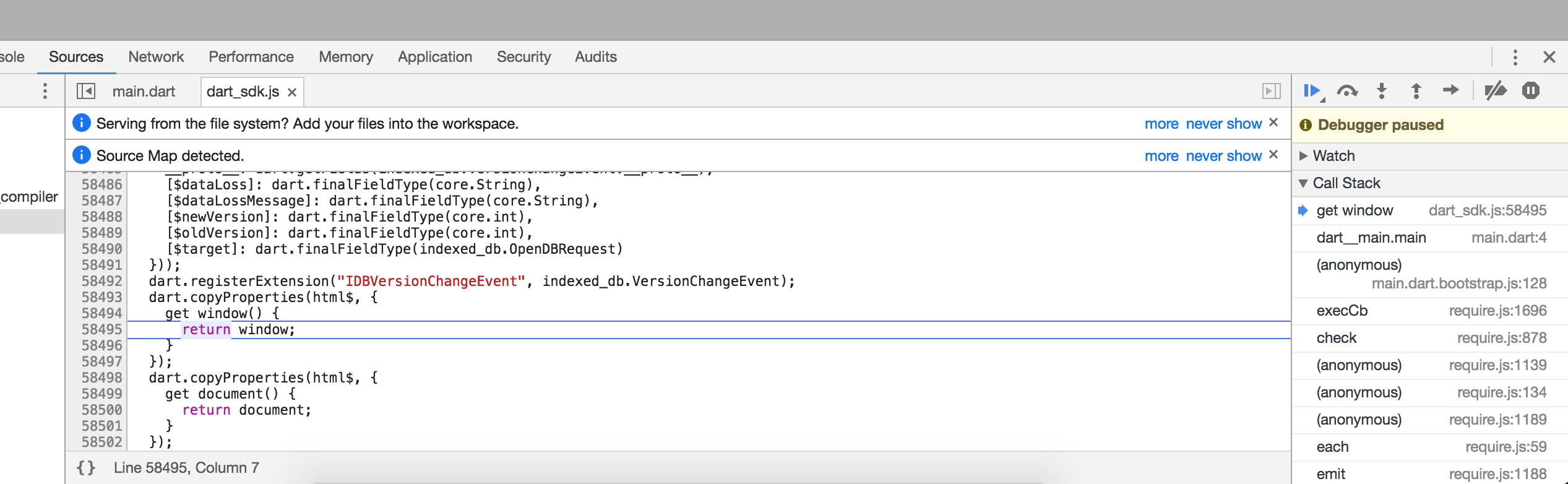
Is Chrome supposed to support stepping into the SDK dart files? If so, how does it work, and what's the path from this JS file into the dart file (all via urls is fine at this point, let's ignore the complications of the filesystem paths for now).
DanTup
on 6 Apr 2018
Ah, ok, at the bottom of the JS file it says the source map is dart_sdk.js.map, however that file is a 404. I presume it shouldn't be? I think if it wasn't, that the debugging from within VS Code would actually already somewhat work (because as far as I can tell, it may be pulling sources from the web?).
DanTup
on 6 Apr 2018
From the sample given above, it seems like we can pretty much include every file we want in sourceMapPathOverrides so in the absolute worst case, we could just build a big mapping of every file, and that work would, right?
Actually no. It _really_ is not possible to use with the current setup.
I explained it in the beggining of the conversation but :
Let's say we have a myproject/lib/main.dart. When built it'll have as sourcemaps sourceRoot: "", sources: ["main.dart"]
The problem is that sourceMapPathOverrides key is the concatenation of sourceRoot with sources.
So only main.dart in our case.
So if we ever have a second file on a different path but with the same filename, they'll both use the same override.
rrousselGit
on 6 Apr 2018
Am I right in thinking what we really want to do, is supply a set of path overrides at the folder level?
eg.:
http://localhost:8080/packages/myproject -> ./
http://localhost:8080/packages/ -> /blah/some/pub-cache/
http://localhost:8080/ -> ./web/
If so, won't pathMapping handle this?
https://github.com/Microsoft/vscode-chrome-debug#other-optional-launch-config-fields
DanTup
on 6 Apr 2018
We actually have multiple places that these files might live though unfortunately (with build_runner at least). Generated files will live in .dart_tool/build/generated/<package>/<path>. Original sources for the packages are not copied there, and should be in the pub cache.
jakemac53
on 6 Apr 2018
If so, won't pathMapping handle this?
It doesn't seems like pathMapping has any effect here. I don't think it's used for sourcemaps to begin with. I tried a few possible values with no success (but I may be wrong here).
rrousselGit
on 6 Apr 2018
@jakemac53 Gotcha! What's the simplest code I can write that would generate some of these generated files that the user would want to be able to debug?
@roblourens I've opened https://github.com/Microsoft/vscode-chrome-debug/issues/643 because pathMapping doesn't seem to work as I'd expect from the docs. It's very possible I've misunderstood, so any suggestions would be appreciated :-)
DanTup
on 6 Apr 2018
pathMapping is for resolving scripts loaded on the page (not sources in sourcemaps) to a location on disk. It's the same as webRoot, but for when scripts are included by the webserver from different locations. If you're at the point where it's loading sourcemaps, then pathMapping probably won't help.
The problem is that sourceMapPathOverrides key is the concatenation of sourceRoot with sources. So only main.dart in our case.
This is an interesting case. Any thoughts on how to extend sourceMapPathOverrides to support your case? You need to be able to scope a mapping to a particular sourcemap file, or to write mappings that are resolved against not what's literally in the sourcemap, but the source path as it would be resolved relative to the script file.
sourceMapPathOverrides has mainly been used to support setups that put sources under some fake uri scheme like webpack:/// so I haven't thought a lot about remapping relative paths like these.
roblourens
on 6 Apr 2018
@DanTup The easiest is to clone angular_tour_of_heroes on the 5-dev branch.
And run pub run build_runner serve. or . pub run build_runner build depending on your need.
Then if you want to try breakpoints you can set one inside ngOnInit of /lib/src/dashboard_component.dart. Which you should hit simply by navigating to localhost:8080.
rrousselGit
on 6 Apr 2018
It's the same as webRoot, but for when scripts are included by the webserver from different locations. If you're at the point where it's loading sourcemaps, then pathMapping probably won't help.
Source maps aren't working for packages, only for the stuff that's mapped simply.
sourceMapPathOverrides has mainly been used to support setups that put sources under some fake uri scheme like webpack:/// so I haven't thought a lot about remapping relative paths like these.
I don't know much about source maps but here's what I see inside the JS file I'm stepping into:
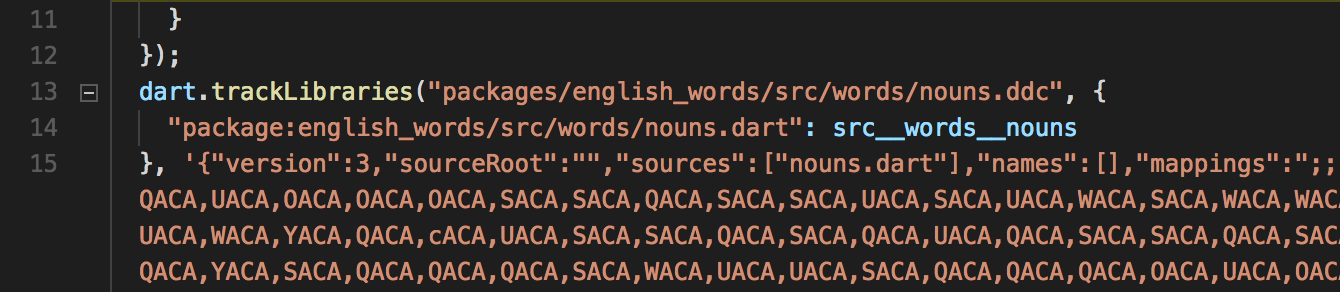
I don't know which of those parts (the one that looks like a relative uri and the one that starts package:) is being used, but in Chrome it does seem to step into the .dart file - but in VS Code I get the .js file.
DanTup
on 6 Apr 2018
Sorry, I'm confusing two issues a little here :)
- When I change from
webRoottopathMapping, breakpoints in the simple case stop working (this is where the files are all in the web root) - When I use
webroot(such that my breakpoints in the simple script works) and then "step into" a file that has the "complicated setup" (the real .dart file is outside of the webroot) then I end up in JS
I think (1) is a bug (posted in the issue tracker above), and I don't currently understand enough to know if fixing that will also help with (2).
DanTup
on 6 Apr 2018
I'm trying to setup the angular_tour_of_heroes repo to try this myself. I installed the 2.0 dev sdk which that repo requires. When I run pub get, I get several errors like
Failed to precompile angular_test:angular_test:
Unhandled exception:
Could not load "http://localhost:53694/angular_test.dart": SocketException: Failed host lookup: 'localhost' (OS Error: nodename nor servname provided, or not known, errno = 8)
Any idea what that means, or can I try the project you're using @DanTup?
roblourens
on 6 Apr 2018
@DanTup You get into .js files because the .dart file pointed by sourcemaps doesn't exist in reality.
If you run cp -r lib/ packages/angular_tour_of_heroes, breakpoints will work on .dart files inside that folder (with the default configuration of chrome debugger).
rrousselGit
on 6 Apr 2018
@roblourens I don't know what the error means, I've never used AngularDart. I've pushed my code here:
https://github.com/DanTup/dart-web-app-test
Code is in web/dart/main.dart. If you press F5 in VS Code it should run pub run build_runner serve and then launch the Chrome debugger. If you put a breakpoint in the main method of main.dart it'll get hit, but if you swap webRoot to pathMapping that will stop working (it'll never hit the breakpoint).
DanTup
on 7 Apr 2018
One thing to be aware of, is that the exact same problem happens on node with dart2js (which I use too, for firebase functions written in dart).
I think it'd be better to simply "fix" the sourcemaps than making a PR for each potential plugins.
@jakemac53 @matanlurey Would it be possible to edit build so that it doesn't duplicate .dart but instead point to their real location ?
Anyway, is there anything I can work on from here ? This is an important feature for me. So I'd really like to unblock it.
rrousselGit
on 8 Apr 2018
I think it'd be better to simply "fix" the sourcemaps than making a PR for each potential plugins.
Not sure what PRs you mean - the behaviour I described above seems to be a bug in something (the docs suggest webRoot is same as a pathMapping for / but swapping them changes behaviour). I think that needs fixing (or at least explaining) whether there's something wrong with the source maps or not.
Anyway, is there anything I can work on from here ? This is an important feature for me. So I'd really like to unblock it.
Honestly, I'm not sure :( I'd like to explore whether pathMappings provides the functionality we need (even if we might need changes elsewhere to use it properly), but I can't verify that while it doesn't seem to work. I'm hoping if @roblourens is able to confirm the behaviour is correct and why, or that it's a bug, it might be clearer how to proceed.
There's some work that could possible be started in Dart Code (like eliminating the need for some much stuff in launch.json and tasks.json, having some of this provided by the extension), but it may be better to wait until we have a full working launch.json/tasks.json to simplify debugging and avoid having to go back and tweak it.
DanTup
on 8 Apr 2018
Not sure what PRs you mean
The thing is, sourceMapPathOverrides or pathMapping or whatever is specific to Chrome debugger. While the breakpoint issue is not.
A node project will face the same issue : Breakpoints needs to be placed into myproject/packages/my_package/file.dart instead of myproject/lib/file.dart.
But there's no such sourceMapPathOverrides or similar with Node debugger.
rrousselGit
on 8 Apr 2018
The thing is,
sourceMapPathOverridesorpathMappingor whatever is specific toChrome debugger. While the breakpoint issue is not.
The breakpoint issue I'm trying to fix first is, it's a breakpoint in web/dart/main.dart which gets hit when I use webRoot and not when I use the equivalent pathMapping. I'm not saying there aren't other issues, but I don't think they can be fully investigated properly without this being understood first. The first thing worth trying IMO is making things work using pathMapping (even if it's a big hard-coded list). If that works, at least we understand exactly what the problem is, but we can't do that if there are issues with pathMapping (or we're using it wrong) though.
FWIW, if I understand correctly, I don't know if you'll be able to "fix the source maps". It doesn't make sense for the source maps to have file system paths in them, because they should work in Chrome too. If there's a disconnect between the file system paths and urls, it's going need to be mapped somewhere, and that seems to be exactly what pathMapping is for. The ideal thing would to be able to get this info from build_runner (or the web part of it) since presumably that's where the knowledge of the mapping is. If we can make it work with a big hard-coded list, then at least we know that's the only missing piece.
DanTup
on 8 Apr 2018
So taking a small step back - while all files might live in one of two locations, the build system does know exactly where to look for each file.
We could potentially add a flag which causes us to generate a file with the correct path mappings? This would have to get generated after each build and would slow builds down a bit though, and it might be a bit annoying to have to pass the flag.
I am not sure if this is really the path we want to go down but if there aren't other solutions it wouldn't be difficult to implement, assuming it can work at all.
cc @natebosch @grouma
jakemac53
on 10 Apr 2018
+1 on outputting a big map of files.
natebosch
on 10 Apr 2018
@roblourens has identified a difference between webRoot and pathMapping in the Chrome debugger extension which hopefully explains the behaviour I was seeing above. Once that's fixed, we should be able to get a bit further and figure out exactly what's needed. I'm not convinced we need the entire tree of mappings as long as we can figure out the patterns, but it'll be easier to tell once we have things working with a hard-coded list.
One thing I did notice when originally looking at this, is that the packages in the pub cache have version numbers in the folder names, but over the web they do not - that means we can't just map /packages to ~/.pub-cache (or whatever). Is that something that could change (for ex, the web uris have the version numbers in too? maybe it'd help with browsers caching things if you upgraded too?).
DanTup
on 10 Apr 2018
I see what's going on with webRoot/pathMapping, thanks @DanTup.
Is your goal to open source files in ~/.pub-cache/... and set breakpoints in those files? That's fixable.
But I still don't have a solution for remapping paths in sourcemaps from the copied version of the source file to the version on disk. I still can't get the angular example working.
Let me suggest something that some other frameworks do. Instead of copying the source files around, inline them in the sourcemap. Then set paths in the sourcemap that are unique and absolute with some made up URI scheme.
For example, webpack will set sourceRoot: webpack:/// in every sourcemap and have paths like webpack:///src/foo/file.ts. You can come up with some predictable pattern which would make it easy to remap in the vscode launch config.
roblourens
on 10 Apr 2018
Is your goal to open source files in ~/.pub-cache/... and set breakpoints in those files?
Yeah, though I suspect stepping into the source is more common than setting breakpoints (but I think the problem is the same). I think there are actually a couple of places that contain code here that's being served up by the dev web server:
- The web folder of the users project
- The lib folder of the users project
- Packages referenced by the users code - these are what generally live in
~/.pub-cache - Generated code - based on comments above, this lives in
.dart_tool/build/generated/<package>/<path>.. I don't know a lot about what this code is though (so hopefully others can jump in)
I'm not sure if having a custom protocol for the uris changes things much though, but if pathMapping "fell through" when it didn't find a matching file and we could provide multiple paths for a folder (I don't know if supporting this makes sense though, honestly it feels kinda wonky if we have a single web folder mapping to multiple file system folders) I'm wondering if the mapping would end up relatively simple like this?
{
"/packages/my_project_name/": "./lib/",
"/packages/": ["./.dart_tool/build/generated/", "~/.pub-cache/"],
"/": "./web/"
}
(I'm ignoring the version-numbers-in-folders mismatch for now to try and get confirmation that I understand things correctly!)
DanTup
on 10 Apr 2018
I agree with @roblourens. I think we should consider a modification of the sourcemaps instead.
It's not that we can't make it work by editing extensions/their confs. But that's more of a workaround than a real fix. In the end the current problem is neither about web nor about vscode.
It's just dart2js sourcemaps pointing to the wrong file when outside of the browser.
Because like I pointed out earlier, webapp aren't the only ones to have a debugging issue. We have the same problem with nodeJS apps. And although I don't know any, it's most likely that some less popular text editors face the same problem too.
@DanTup I doubt pathMapping is a solution at all. As it's doesn't overrides the file pointed by sourcemaps but _all_ files. At least that's what I understand from the doc and the following from @roblourens :
pathMapping is for resolving scripts loaded on the page (not sources in sourcemaps) to a location on disk
rrousselGit
on 10 Apr 2018
I still don't understand the whole scheme - I can always implement something that searches multiple folders for a file, but if you're mapping multiple folders into one web path, how are you avoiding collisions?
Looking at this with @DanTup's example project, I could sort of extend what pathMapping does to fix setting breakpoints in the ~/.pub-cache files. Those sources appear to not be duplicated. So that's a separate issue from the other issue with sourcemaps that point at a copied version of the source file, and wanting to map that back to the original source location. I don't have a running project that demonstrates that behavior.
And I'm not sure what Dart is doing in Node, @rrousselGit I could take a look if you have a sample project that I could try.
roblourens
on 10 Apr 2018
if you're mapping multiple folders into one web path, how are you avoiding collisions?
Only one of the folders is in the user's control, the others are implementation details that should be hidden from the user. They _could_ go and modify those folders directly but they really aren't supposed to. In our usage a given path will only map to a single file.
natebosch
on 11 Apr 2018
Sorry if I'm just adding noise to this issue, but reading through the history and looking at how similar tools appoach the problem I'm wondering if my thoughts make sense.
Since it seams like the Chrome debugger should be able to understand custom url scheme so long as they are served properly from the server (in this case pub serve), instead of relying on the path in the source map to be relative, could we leverage dart's "package:" identifier as a custom url scheme that both pub and DartCode / Debugger for Chrome could use to locate the necessary original source without conflict. This would require a few modifications of some tools:
- Modify ddc to output source map files fully qualifying the package location with a package:// custom scheme (e.g. "package://mypackage/src/dart_file.dart") instead of assuming a relative location
- Modify pub serve to recognize package: and have it understand how to parse the package: scheme to find those files (and hopefully have it understand how to link to original source over source in .dart_tool where available)
- Modify DartCode to supply sourcePathOverrides for Debugger for Chrome automatically for any linked package (which would be of the form '"package://mypackage/*": "${root}/lib/" and could be extended to also hit the pub cache as necessary)
My only questions would be - would these changes also affect the WebStorm plugin, and if so, how is WebStorm dealing with these issues?
 fuzzybinary
on 16 Apr 2018
fuzzybinary
on 16 Apr 2018
I have a beta version of the Chrome debug adapter which lets us set up the pathMappings we need to at least make @DanTup's project work. I'm not clear what else will need to be done but if anyone is working on this right now, try this version out (just rename to .vsix and install):
debugger-for-chrome-4.3.1-beta.0.zip
Left some more comments in https://github.com/Microsoft/vscode-chrome-debug/issues/643 too
roblourens
on 1 May 2018
@roblourens Awesome, thanks! 😃
If nobody beats me to it, I'll try and have a look at the weekend. I guess the next thing is to add some of these generated files and ensure they work with hard-coded mappings too, and then we need to figure out how to get that mapping from the build system or simplify it so it's easier to infer. It should be clearer once we have a full working mapping though.
I'll try and repro the source map issue you mentioned too and open an issue.
DanTup
on 1 May 2018
Hey @DanTup did you get a chance to try it out?
roblourens
on 10 May 2018
Sorry, I didn't get chance last weekend; it's still at the top of my inbox - I hope to spend some time on it this weekend :-)
DanTup
on 10 May 2018
Ok, Rob's fix seems to address the initial issue I hit.
@jakemac53 @natebosch what's the simplest way way to get a small project that includes files in .dart_tool/build/generated that I could try stepping through?
DanTup
on 14 May 2018
what's the simplest way way to get a small project
pub global activate stagehand
stagehand web-angular
pub get
pub run build_runner serve
After the first build (the first one will take a bit of time) you can visit localhost:8080
natebosch
on 14 May 2018
@natebosch beat me to it :). See below for alternatives.
If you want a simple "Hello Angular" style example app, see the Angular Setup page. It has instructions for getting the quickstart example app sources.
Otherwise, the tutorial works through progressively more complex example (from part 1 to part 6). On any page, search for "view source" for a link to the source files.
cc @kwalrath
 chalin
on 14 May 2018
chalin
on 14 May 2018
Again, anything I can do ? 😄
rrousselGit
on 18 May 2018
@rrousselGit Using the beta version of Chrome debugger above you should be able to use pathMapping. My next step (which I might not get to this weekend, so feel free to try!) was going to be to try and solve the issue with a hard-coded mapping. I'm still not familiar with how the generated/not files are split (eg. if they have clear separation in the urls), but I figured if we can make a big hard-coded mapping that works (even if it has every file from the package listed in it) then the task becomes either generating that mapping or finding a way to simplify it so it doesn't need all the files.
DanTup
on 18 May 2018
I was able to try this with the new beta version and it works as advertised for non-generated code
You will have to add path mappings if you're doing the common practice of having a bare-bones web/ directory and having all your code in lib/ and lib/src (as most AngularDart tutorials have you do)
Simply add two path mappings, replacing
"pathMapping": {
"/": "${workspaceFolder}/web",
"/packages/<package name>/": "${workspaceFolder}/lib"
},
It sounds like from the linked issue that "pathMapping" should make it into master soon-ish
fuzzybinary
on 19 May 2018
Got to try the beta too, on angulardart. Seems to work fine with the following config :
{
    "type": "chrome",
    "request": "launch",
    "name": "Launch Chrome against localhost",
    "url": "http://localhost:8080",
    "webRoot": "${workspaceFolder}/web",
    "pathMapping": {
        "/packages/angular_tour_of_heroes": "${workspaceFolder}/lib"
    },
}
Considering how minimalistic and close to default the configuration is. I'd say we don't need Dart Code to do anything here.
Instead we should update both Dart Code README and angular dart website by providing the default configuration.
rrousselGit
on 20 May 2018
@rrousselGit But this still doesn't handle the generated files, right?
(also, your example I think also doesn't handle other packages other than your own app?)
DanTup
on 23 May 2018
No this does not handle generated files, but it's better than not having debuging at all ;)
In order to handle all packages, I think we'd need to parse the ".packages" file. If DartCode would do that, it could assume a mapping for "pathMapping" between /packages/{package_name} and the location of the files specified in the .packages file, but it would still have to look for generated .template files in the .dart_tool directory....
fuzzybinary
on 29 May 2018
FYI, the change for chrome-debug is (finally) in the latest update.
roblourens
on 2 Jun 2018
any updates on this?
 glenfordwilliams
on 3 Nov 2018
glenfordwilliams
on 3 Nov 2018
@glenfordwilliams The latest version of the Dart VS Code plugin has a preview flag to enable registering VS Code "Tasks" for build_runner commands. With this you can more simply adding build_runner serve as a preLaunchTask:
https://dartcode.org/releases/v2-20/#preview-build_runner-tasks
This makes it slightly simpler than the comments above (you no longer need a tasks.json). If this works well for people then it may make sense to detect a web project in the plugin and automatically resolve a debug configuration that includes this (which means you'd be able to open a web project and just hit F5). I'd like to get some validation that it's working well before doing anything automatically though.
DanTup
on 5 Nov 2018
@DanTup Thanks much, currently testing out and it seems to be working well so far. will continue testing and will let you know if there are any issues.
oh i saw this initially when i attempted to reference pub: buildrunner serve in my chrome launch config
Error: Invalid problemMatcher reference: dart-pub-build_runner
glenfordwilliams
on 5 Nov 2018
Hmm, that's strange - the problem matcher is defined in the manifest:
Did it just happen once, or can you reproduce it? Can you post exactly what your launch.json looked like?
DanTup
on 5 Nov 2018
@glenfordwilliams This came up again, and I think I figured out your issue above - you apparently need to prefix the problemMatcher name with a $ (presumably it's a variable replaced with the problemMatcher definition object):
{
    "type": "pub",
    "command": "serve",
    "problemMatcher": [
        "$dart-pub-build_runner"
    ],
    "runOptions": {
        "runOn": "folderOpen"
    }
}
I'll fix the definition that's creating it without.
DanTup
on 7 Mar 2019
Related issues
 comigor
·
3Comments
comigor
·
3Comments
 smaifullerton-wk
·
5Comments
smaifullerton-wk
·
5Comments
 jonahwilliams
·
6Comments
jonahwilliams
·
6Comments
 kentcb
·
7Comments
kentcb
·
7Comments
 zgramming
·
6Comments
zgramming
·
6Comments
Most helpful comment
Got to try the beta too, on angulardart. Seems to work fine with the following config :
Considering how minimalistic and close to default the configuration is. I'd say we don't need
Dart Codeto do anything here.Instead we should update both
Dart CodeREADME and angular dart website by providing the default configuration.