Build-image: Support code in subdirectory of repo
I have a gatsby app - it lives in the site/ directory of my repo. When I attempt to build the app with netlify I get:
/opt/build/build.sh: line 427: gatsby: command not found
I believe this is because npm install is never successfully run - when it runs it finds no package.json in the repo root.
Is it currently possible to build a subdirectory of the repo?
 r1b
r1b
All 17 comments
CircleCI has an option called build_dir for this use case:
r1b
on 18 Sep 2017
There is a configuration option for this already in our netlify.toml file:
https://www.netlify.com/docs/continuous-deployment/#deploy-contexts
Specifically the "base" setting is a "cd here and then run my build command". As a bonus it also makes dependency caching work right ;)
 fool
on 19 Sep 2017
fool
on 19 Sep 2017
@fool I have a monorepo and how can I specify configuration for multiple different sites ?
 ferhatelmas
on 6 Apr 2018
ferhatelmas
on 6 Apr 2018
There is no way to handle that in netlify.toml right now, but if you ping [email protected] with your already-configured site we can set it in the database for you. We are discussing adding it to the UI, since that is the thing we can do fastest. Coming up with a better solution for netlify.toml is still on our minds but we do not have an immediate plan about how to do so.
fool
on 7 Apr 2018
@fool - any ETA on when the interface for this will be completed? If I am not on a paid plan will [email protected] help with this?
 khrome83
on 22 Jul 2018
khrome83
on 22 Jul 2018
No need to be paid, @khrome83 ! Just ping us in the helpdesk.
There's no ETA for this - just some open feature requests.
fool
on 25 Jul 2018
@fool It would be fabulous to have the ability to deploy multiple apps in a monorepo through the deploy UI. Please keep us updated on the progress of this feature.
 pdeka
on 9 Aug 2018
pdeka
on 9 Aug 2018
this is hacky but you can basically set up multiple sites separately for a monorepo: demo here https://github.com/sw-yx/TwoSitesOneRepo
 sw-yx
on 12 Sep 2018
sw-yx
on 12 Sep 2018
@sw-yx > this is hacky but you can basically set up multiple sites separately for a monorepo: demo here https://github.com/sw-yx/TwoSitesOneRepo
What about subdirectories on the same domain? Something like
https://twositesonerepo.com/site1
https://twositesonerepo.com/site2
 wahidshafique
on 18 Nov 2018
wahidshafique
on 18 Nov 2018
oh thats even easier. https://www.netlify.com/docs/redirects/
sw-yx
on 18 Nov 2018
Any news on this? I'd love to have acces via UI.
 bkniffler
on 5 Dec 2018
bkniffler
on 5 Dec 2018
I'm also looking for this. I'm trying to do what was suggested above but manually running npm i isn't working for some reason... 🤔
Edit: Just make sure you're running npm i from the build command and not from another build system.
 whaaaley
on 11 Dec 2018
whaaaley
on 11 Dec 2018
@sw-yx could you please show how the "multiple sites separately for a monorepo" configuration is set up in netlify UI? I've added an issue in your example repo. Thanks!
 adekbadek
on 14 Mar 2019
adekbadek
on 14 Mar 2019
literally deploy the same repo twice...
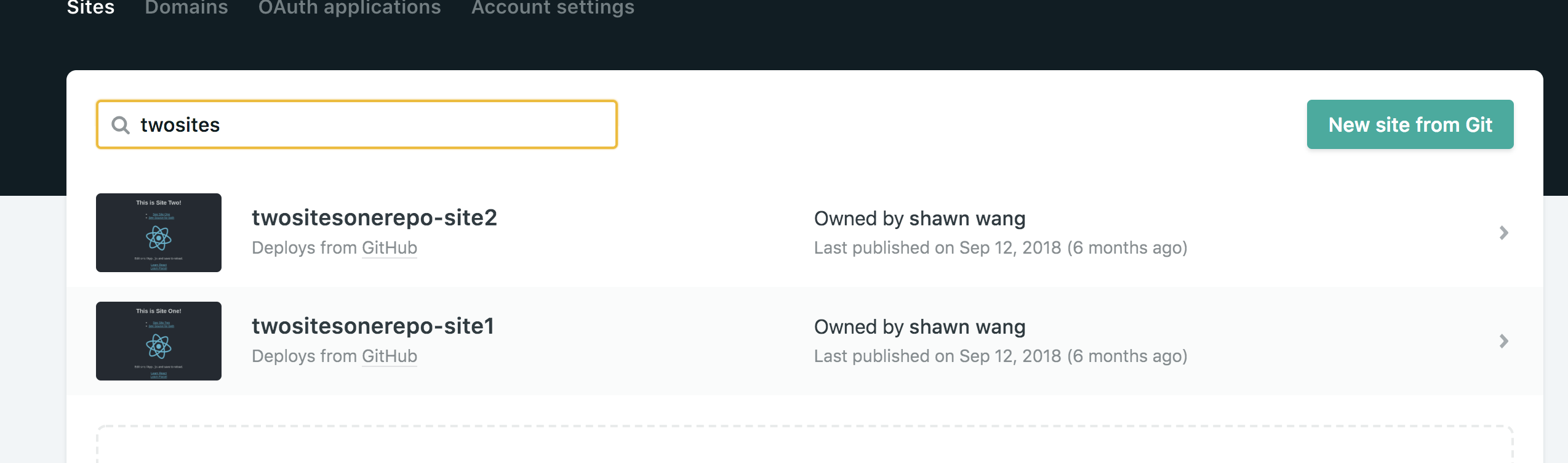
and use different build commands...
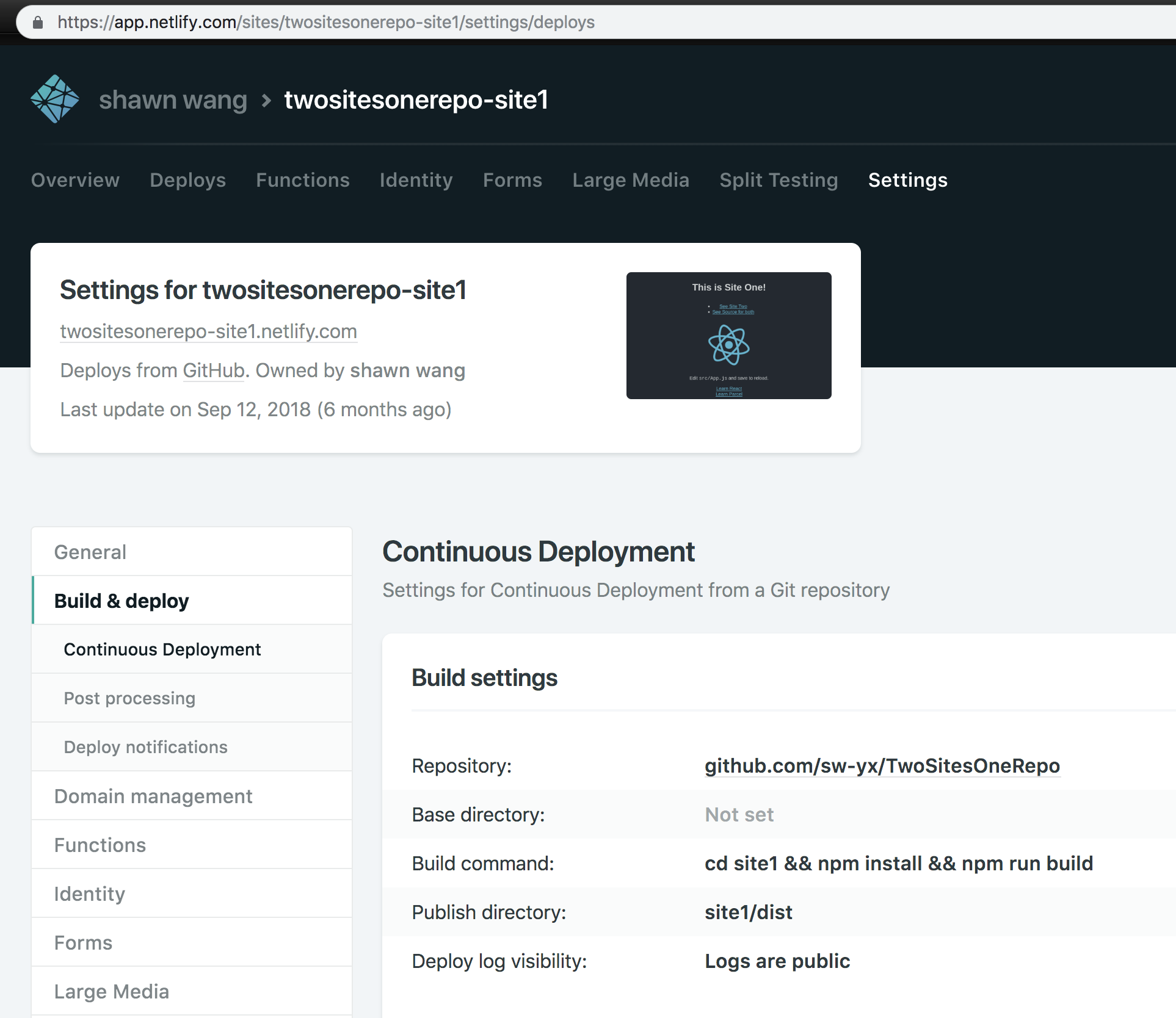
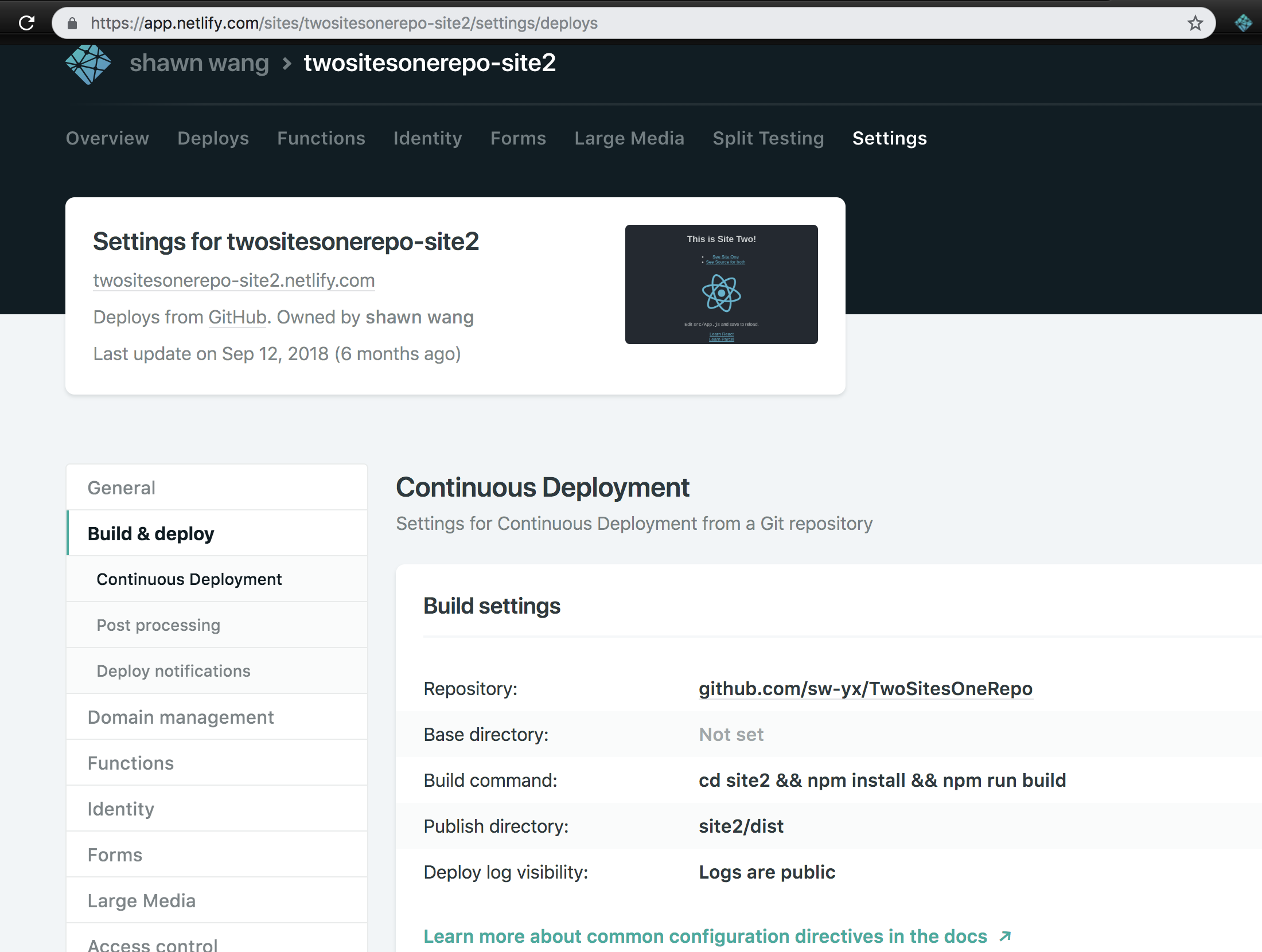
if you have @wahidshafique's usecase, you can also set up a redirect from your main site to the sub site
sw-yx
on 15 Mar 2019
oh, nice! and doesn't really feel "hacky", as these in fact separate sites. thanks!
adekbadek
on 15 Mar 2019
Any news on this? I'd love to have access via UI.
 chrisgalvan
on 3 Jul 2019
chrisgalvan
on 3 Jul 2019
Issue with the proposed solutions is that they'll always trigger a build for both sites, which is obviously undesirable
Edit: seems there's an official solution now 🎉
https://www.netlify.com/blog/2019/10/09/launching-monorepo-support-for-netlify-sites/
 andreasvirkus
on 29 Jan 2020
andreasvirkus
on 29 Jan 2020
Related issues
 evanrelf
·
10Comments
evanrelf
·
10Comments
 ehmicky
·
3Comments
ehmicky
·
3Comments
 jwicks31
·
6Comments
jwicks31
·
6Comments
 MikeBeas
·
5Comments
MikeBeas
·
5Comments
 depadiernos
·
6Comments
depadiernos
·
6Comments
Most helpful comment
There is no way to handle that in netlify.toml right now, but if you ping [email protected] with your already-configured site we can set it in the database for you. We are discussing adding it to the UI, since that is the thing we can do fastest. Coming up with a better solution for netlify.toml is still on our minds but we do not have an immediate plan about how to do so.