Bugsnag-js: Error 'caller', 'callee', and 'arguments' properties may not be accessed on strict mode
Getting this weird error randomly in my app.
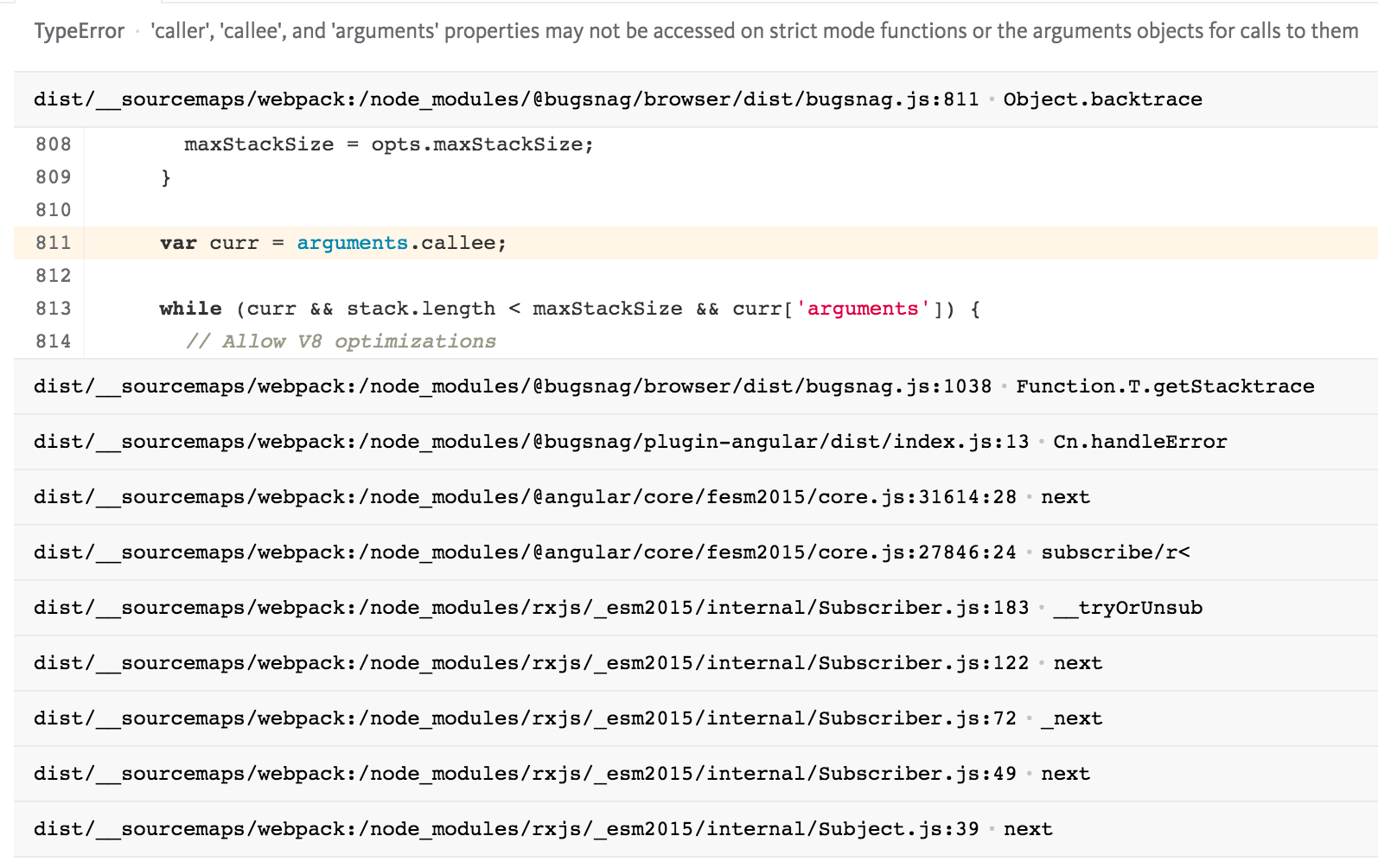
'caller', 'callee', and 'arguments' properties may not be accessed on strict mode functions or the arguments objects for calls to them
 hassanasad
All 16 comments
Hi @hassanasad. I'm able to reproduce this but only when I set "strict mode" on the entire script and I attempt to notify Bugsnag with something that isn't an error (and so is missing the .stack property).
How is your code being bundled?
Which browsers are you seeing this in?
I think we can be defensive about not trying to walk the call stack when we're in strict mode but I'd like to understand the situations where this happens first.
 bengourley
on 25 Jun 2019
bengourley
on 25 Jun 2019
Hi @bengourley - I am using bugsnag in an Angular 8 app. It was working fine on older versions of bugsnag. When i upgraded to the new bugsnag-js plugin and then plugin-angular i started seeing this error. I am using bugsnag the way its mentioned on one of your readme pages with it being part of the core module.
This event is firing on all sorts of browsers, Chrome 75, Safar 12.1.1 etc on the production app. I have about 3k events in one of my app reported on bugsnag itself.
hassanasad
on 25 Jun 2019
@bengourley I'm having the same issue with the exact same setup as @hassanasad . Upgraded a few hours ago to Angular 8, bugsnag is set up the way your doc mentioned. It only happens after we build the solution with aot: true. ng serve works OK. I'll also check if building it without aot also produces the same error.
Have a look below at where in BugSnag library this error triggers up.

 nicolae-olariu
on 26 Jun 2019
nicolae-olariu
on 26 Jun 2019
For everyone else that has this issue, you should
- unfortunately downgrade the typescript compilerOptions target from es2015 (es6) to es5
- use [email protected]
Code that works: "target": "es5"

As a note: we've also tested the @6.3.2-alpha.0 version of BugSnag but unfortunately we had the same runtime exception.
If you guys find anything else that could fix this, please let us know. Thanks!
nicolae-olariu
on 26 Jun 2019
I can't reproduce this. I'm using the following versions:
@bugsnag/[email protected]@bugsnag/[email protected]@angular/core,compiler,common,[email protected]
And with the following __tsconfig.json__ (relevant parts only):
  "compilerOptions": {
    "target": "es2015"
  },
  "angularCompilerOptions": {
     "enableIvy": true
  }
I can make a speculative fix, but I want to be able to reproduce the problem to ensure we fix it. The following two conditions must be present in your application for this issue to occur:
@bugsnag/jsmust be bundled into a file with"use strict"at the top, causing the entire bundle (including third party modules that rely on non-strict mode) to operate in strict mode OR the function importing bugsnag must be using "use strict".- the error passed to Angular's error handler callback must not have a
stackproperty (i.e something is thrown that is not anErrorobject – this is bad practice but Bugsnag should tolerate it). I acheived this by throwing a string in an app component method that gets called duringrender()–throw "some error".
I have only managed to recreate condition 2. None of the Angular settings I have used (--aot, --prod have caused "use strict" to appear at the top of the file for me, nor bundled Bugsnag in such a way that it is forced to operate in strict mode.
Please can you help by making a reduced test case that exhibits this behaviour? Starting with a fresh project created with ng new would be ideal. Thanks for your assistance and patience!
bengourley
on 27 Jun 2019
Same issue here.
with
@bugsnag/js 6.3.2
@bugsnag/plugin-angular 6.3.2
still encounter the same problem.
 hijamoya
on 8 Jul 2019
hijamoya
on 8 Jul 2019
@hijamoya can you help me reproduce the problem? Would be very helpful, thanks!
bengourley
on 8 Jul 2019
With the following config, you can reproduce:
{
  "compileOnSave": false,
  "compilerOptions": {
    "downlevelIteration": true,
    "module": "esnext",
    "outDir": "./dist/out-tsc",
    "sourceMap": true,
    "declaration": false,
    "moduleResolution": "node",
    "emitDecoratorMetadata": true,
    "experimentalDecorators": true,
    "target": "es2015",
    "typeRoots": [
      "node_modules/@types"
    ],
    "lib": [
      "es2017",
      "dom"
    ]
  }
}
And
ng build --aot
@hijamoya I used your tsconfig.json settings and still couldn't reproduce. Can you provide steps to reproduce the same kind of error too?
bengourley
on 10 Jul 2019
@bengourley I found that it happens when an error occurs but you don't have a handleError function in BugsnagErrorHandler.
In my case, I post an url and get 403 forbidden:
post()
.subscribe(() => {
// data
});
if you don't handle onError, then the error occurs.
However, if you:
post()
.subscribe(() => {
// data
}, err => console.log(err));
Then the error won't appear.
By the way, this is an Angular 8 project.
hijamoya
on 11 Jul 2019
I've tried this and it still works for me. There must be something else going on. I've pushed up the code I'm using so you can see.
Please can you try the following:
- Clone https://github.com/bugsnag/angular-debug-issue-546 and see if you can reproduce the problem
- If you can't, add compare it with what you have in you project setup and see if you can spot what causes the problem
bengourley
on 11 Jul 2019
I just create a pr which can reproduce the problem:
https://github.com/bugsnag/angular-debug-issue-546/pull/2
Run
npm start
And you will see the error.
I think it relates to angular version.
hijamoya
on 11 Jul 2019
Thanks @hijamoya, I can now reproduce the problem! I'll investigate and get a fix out as soon as possible.
bengourley
on 11 Jul 2019
So comparing the differences between a project running Angular 8.0.2 vs. 8.1.0 it looks like the bundling is exactly the same, but the script tag that gets rendered in index.html changed like this:
+ <script src="vendor.js" type="module"></script>
- <script src="vendor.js"></script>
I can't pinpoint the exact change in Angular (I think it's in @angular/cli somewhere).
When the script attribute type="module" is used, this causes the entire script to be executed in strict mode. I can envisage this breaking any other vendored modules that expect to run in non-strict mode (I'm sure there are some) so it would be good to file an issue with Angular too if you can find the right place.
We'll update Bugsnag so it tolerates being bundled into a strict mode context and I'll let know when that gets released.
Thanks again for providing the steps to reproduce, it really helps to understand the cause of the issue and helps make sure we address it properly! 🙇
bengourley
on 12 Jul 2019
@bengourley It seems that you don't need to modify code to tolerate in strict mode. Since type="module" will be removed in angular 8.2.
See:
https://github.com/angular/angular-cli/issues/14956
hijamoya
on 12 Jul 2019
This has now been released in the latest version of bugsnag-js: https://github.com/bugsnag/bugsnag-js/releases/tag/v6.4.0
 phillipsam
on 13 Aug 2019
phillipsam
on 13 Aug 2019
Related issues
 livthomas
·
4Comments
livthomas
·
4Comments
 darkyndy
·
4Comments
darkyndy
·
4Comments
 antoinerousseau
·
4Comments
antoinerousseau
·
4Comments
 mattimatti
·
4Comments
mattimatti
·
4Comments
 lifeiscontent
·
6Comments
lifeiscontent
·
6Comments
Most helpful comment
Hi @hassanasad. I'm able to reproduce this but only when I set "strict mode" on the entire script and I attempt to notify Bugsnag with something that isn't an error (and so is missing the
.stackproperty).How is your code being bundled?
Which browsers are you seeing this in?
I think we can be defensive about not trying to walk the call stack when we're in strict mode but I'd like to understand the situations where this happens first.