#
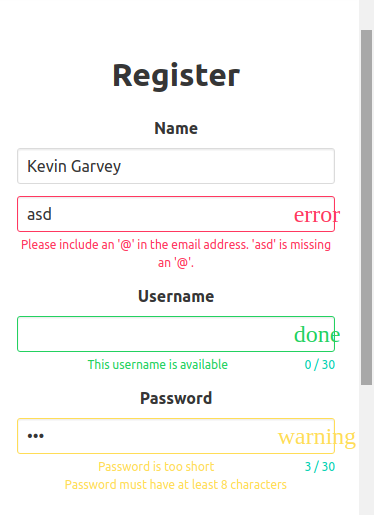
Overview of the problem
Buefy version: [0.5.0]
Vuejs version: [2.1.10]
OS/Browser:Chrom Ubuntu Linux
Description
<b-field label="Email"
    type="is-danger"
    message="This email is invalid">
    <b-input type="email"
        value="john@"
        maxlength="30">
    </b-input>
</b-field>
Expected @rafaelpimpa
When I type a wrong email id it alerts the danger type but the small icon on the right-hand side of the input field is not shown instead it shows a message on that corner saying "ERROR" or for other types, it says like "WARNING" or "INFO" etc.
Thanks in advance.
need more info
 OGhawsi
All 3 comments
@OGhawsi Did you import font-awesome or material icons? Is it working?
 jtommy
on 17 Aug 2017
jtommy
on 17 Aug 2017
change #Vue.use(Buefy); to look like this
Vue.use(Buefy, {
defaultIconPack: 'fa'
})
 thamibn
on 17 Aug 2017
thamibn
on 17 Aug 2017
👍3
❤1
👎1
Thanks so much @thamibn it worked.
OGhawsi
on 18 Aug 2017
Was this page helpful?
0 / 5 - 0 ratings
Related issues
 daltonrooney
·
3Comments
daltonrooney
·
3Comments
 kaeltis
·
3Comments
kaeltis
·
3Comments
 Shahinyanm
·
3Comments
Shahinyanm
·
3Comments
 akubasa
·
3Comments
akubasa
·
3Comments
 diego-lipinski-de-castro
·
3Comments
diego-lipinski-de-castro
·
3Comments
Most helpful comment
change #Vue.use(Buefy); to look like this
Vue.use(Buefy, {
defaultIconPack: 'fa'
})