Buck: How To Debug (Using breakpoint) buck build?
I have been trying to wrap around my head with buck build but still doesn't know how to debug the build. Especially using breakpoint in IntelliJ. The troubleshooting section in the docs https://buck.build/concept/troubleshooting.html doesn't really help me achieve what I want. I usually develop an Android App.
I know I can use the chrome://tracing page to find out where the build is failed, but i still can't figure out how the buck build work behind the scene such as in which point the code is starting or adding breakpoint to evaluate variables.
Can you tell me how to add breakpoint when building with buck? Also can it achieved by using Intellij IDEA? Thank you
 rifqimfahmi
All 4 comments
Copied from FB internal wiki:
USING IDE AND REMOTE DEBUGGER, HELPS TO DEBUG THINGS END TO END
You can use a remote debugger to debug your local buck.
From terminal, run
your buck command, prepending it with
NO_BUCKD=1and BUCK_DEBUG_MODE=1 e.g.NO_BUCKD=1 BUCK_DEBUG_MODE=1 buck build //src/com/facebook/buck/cli:main. Buck will then pause and wait for IntelliJ. The terminal should look like it's hanging at this point.In IntelliJ, use
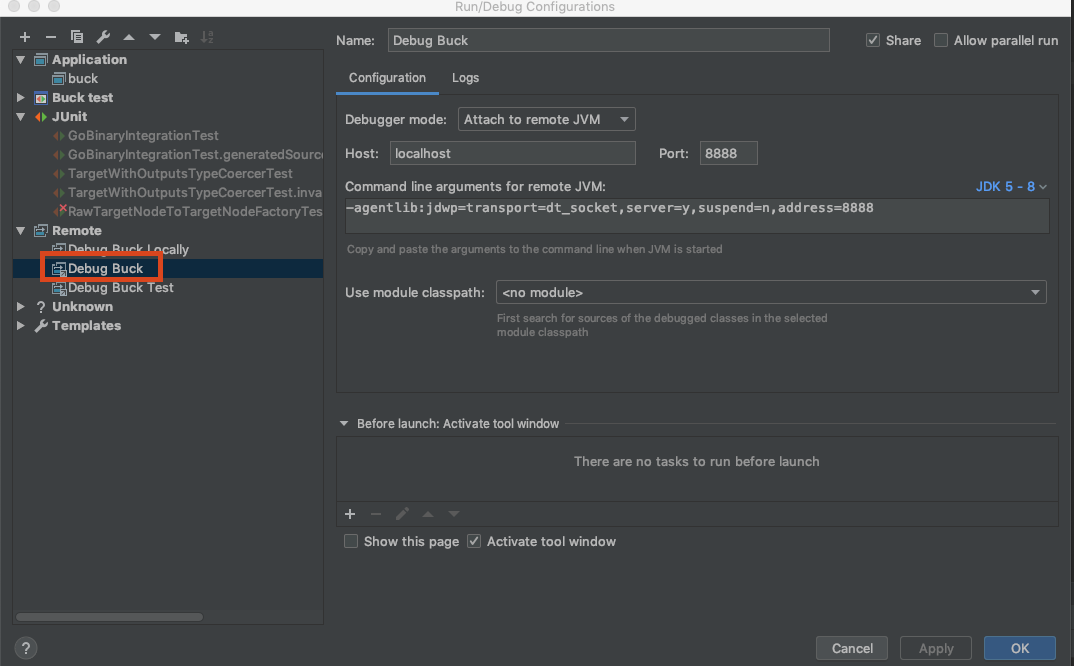
Debug Buckconfiguration underRemote debugsection (which points to localhost:8888). This configuration should already be available in your Run / Debug configurations.
Screen Shot 2019-10-25 at 1.37.49 PM 1.png
NOTE: If there is something occupying port 8888, kill it with fire: lsof -i:8888 | tail +2 | awk '{ print $2 }' | xargs -L1 kill -9
 v-jizhang
on 22 Jan 2020
v-jizhang
on 22 Jan 2020
v-jizhang
on 22 Jan 2020
Thank you @v-jizhang will try it later, haven't got the time
rifqimfahmi
on 12 Feb 2020
This is really helpful, huge thanks to you both for the question and the answer!
For some reason quite extensive googling didn't point me at any docs,
and finally this is the only right place to get help on such question... 😫
 RAM237
on 23 Aug 2020
RAM237
on 23 Aug 2020
Related issues
 shybovycha
·
6Comments
shybovycha
·
6Comments
 piotrwach
·
9Comments
piotrwach
·
9Comments
 Nickersoft
·
3Comments
Nickersoft
·
3Comments
 leodeleon22
·
14Comments
leodeleon22
·
14Comments
 cwoodwar6
·
8Comments
cwoodwar6
·
8Comments
Most helpful comment
Copied from FB internal wiki:
USING IDE AND REMOTE DEBUGGER, HELPS TO DEBUG THINGS END TO END
You can use a remote debugger to debug your local buck.
From terminal, run
your buck command, prepending it with
NO_BUCKD=1and BUCK_DEBUG_MODE=1 e.g.NO_BUCKD=1 BUCK_DEBUG_MODE=1 buck build //src/com/facebook/buck/cli:main. Buck will then pause and wait for IntelliJ. The terminal should look like it's hanging at this point.In IntelliJ, use
Debug Buckconfiguration underRemote debugsection (which points to localhost:8888). This configuration should already be available in your Run / Debug configurations.Screen Shot 2019-10-25 at 1.37.49 PM 1.png
NOTE: If there is something occupying port 8888, kill it with fire:
lsof -i:8888 | tail +2 | awk '{ print $2 }' | xargs -L1 kill -9