Btcpayserver: fix the indentation problem, launchSettings.json on VS Mac
Describe the problem/bug
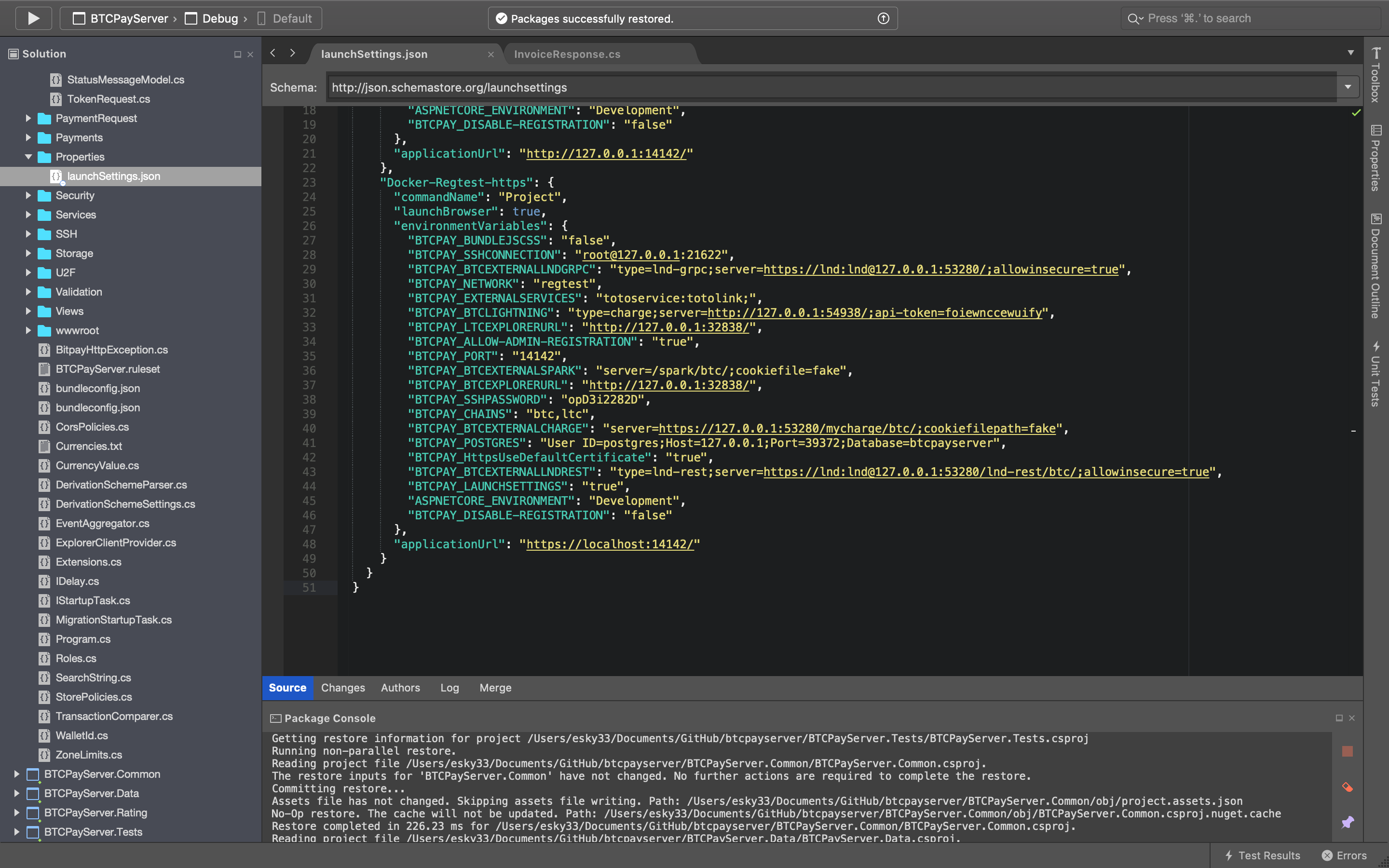
the problem is when restoring packages for solution, the launchSettings.json changes,
it defaults back down two indents. instead of standard pref of BTCPay four indents, I think this is a Mac only bug!! have gone over this problem for about a week on & off. tried to change my user config to BTCPay config, with no luck, this is not a huge problem as my project still builds, and compiles, but wants to make a new change in btcpay/btcpayserver GitHub ,
which I have to revert it back.
This happens in both Visual Code Studio / Visual Studio, as well
*Operating System
Mac OS X 10.14.6
Darwin 18.7.0 Darwin Kernel Version 18.7.0
1.0.3.130 BTCPay Version
Docker Azure
Visual Studio Community 2019 for Mac
Version 8.2.6 (build 26)
Mono Framework MDK
Runtime:
Mono 6.0.0.334 (2019-02/6256b82d62f) (64-bit)
Package version: 600000334
NuGet
Version: 5.1.0.6013
.NET Core
Runtime: /usr/local/share/dotnet/dotnet
Runtime Versions:
2.1.12
2.1.9
2.1.2
2.1.1
SDK: /usr/local/share/dotnet/sdk/2.1.701/Sdks
SDK Version: 2.1.701
MSBuild SDKs: /Library/Frameworks/Mono.framework/Versions/6.0.0/lib/mono/msbuild/Current/bin/Sdks
To Reproduce
Steps to reproduce the behavior:
- Load BTCPayServer Project on a Mac
Expected behavior
launchSettings.json should not change file with my user settings.
Actual behavior
it defaults back down two indents. instead of standard BTCPay four indents
Screenshots/Links

Additional context
I think this affects VS Mac only launchSettings.json
 Eskyee
All 3 comments
I'm on a Mac using VSCode and this doesn't happen for me.
Just so I'm totally clear, you make some changes to code, launch BTCPay in debug mode and your launchSettings.json changes? If so, this sounds like some sort of VS configuration issue on your machine rather than a BTCPay issue.
 bolatovumar
on 19 Sep 2019
bolatovumar
on 19 Sep 2019
This happens after I launch the btcpay project solution without any changes to the codebase, and yes I thought the same thing, my VS Confg, but same thing happens in VS Code as well as VS, any ideas 💡, happy to hear this is just my problem, I check my config In the morning again!!
Eskyee
on 19 Sep 2019
launchSettings.json
Solved, this was a VS bug on my mac, since I have a old install, on top of the 2019 update,
its now gone since, I tried out jet brains rider again or with VS code on Mac, no problems,
kool! thanks for the advice Rockstar!!
I will play again Visual Studio next month on a new fresh OS Mac build, I like VS , but this jet brains rider is good, and builds are fast on my machine, :)
Eskyee
on 11 Oct 2019
Related issues
 RiccardoMasutti
·
3Comments
RiccardoMasutti
·
3Comments
 astupidmoose
·
3Comments
astupidmoose
·
3Comments
 ghost
·
3Comments
ghost
·
3Comments
 Zaxounette
·
3Comments
Zaxounette
·
3Comments
 nvk
·
4Comments
nvk
·
4Comments
Most helpful comment
launchSettings.json
Solved, this was a VS bug on my mac, since I have a old install, on top of the 2019 update,
its now gone since, I tried out jet brains rider again or with VS code on Mac, no problems,
kool! thanks for the advice Rockstar!!
I will play again Visual Studio next month on a new fresh OS Mac build, I like VS , but this jet brains rider is good, and builds are fast on my machine, :)