Browser: Firefox addon popup menu differs in size
Describe the Bug
The height of the Firefox addon popup menu is different in height depending on how/when you click on the Bitwarden icon to open the menu.
Steps To Reproduce
- Click once on the Bitwarden icon to open the menu. You'll notice that the menu is not very tall.
- Without moving the mouse away click the icon again to close the menu.
- Now still keep the mouse hovering over the icon. Click the icon again to open the menu yet again. This time the menu is the normal/correct height.
- Move the mouse cursor away and click somewhere outside the popup to make the popup close.
- Open the popup menu again. The size of the popup is small again.
Expected Result
The popup menu should always be the same size.
Actual Result
The popup menu is sometimes smaller then expected. It shows less information and makes working with it (especially when editing items) a bit more difficult.
Screenshots or Videos
The "wrong" height: https://i.ibb.co/hsGbShX/bitwarden.jpg
Screen recording of the issue: https://i.ibb.co/dsvnZhh/bw.gif
Environment
- Operating system: macOS High Sierra (10.13.6)
- Browser: Firefox 82.0.2 (64-bit)
- Bitwarden Firefox addon: Version 1.46.2
- Bitwarden macOS app: Version 1.22.2 (1.22.2)
Other acive Firefox addons:
- uBlock Origin
- uMatrix
- Privacy Settings (https://add0n.com/privacy-settings.html)
- HTTPS Everywhere
- Web Developer (https://chrispederick.com/work/web-developer/)
Ref: https://www.reddit.com/r/Bitwarden/comments/jnzw62/change_height_of_firefox_addon_popup/
 internetuser2
All 7 comments
I have exactly the same issue.
Browser: Firefox 84.0.1
Bitwarden Firefox addon: 1.47.1
 fifal
on 31 Dec 2020
fifal
on 31 Dec 2020
I can also confirm this issue.
- OS; Arch Linux
- Browser: Firefox 84.0.2 (64-bit)
- Bitwarden Firefox extension: 1.47.1
Other active Firefox extensions:
- Cookie AutoDelete 3.5.1
- Dark Reader 4.9.26
- Decentraleyes 2.0.15
- Facebook Container 2.1.2
- Firefox Multi-Account Containers 7.1.0
- HTTPS Everywhere 2020.11.17
- uBlock Origin 1.32.4
 pwyde
on 12 Jan 2021
pwyde
on 12 Jan 2021
I managed to resolve this issue.
I have restored Firefox to default settings and after that the issue never occurred again.
I'm not sure if this helps anybody else but I guess it is worth a try.
fifal
on 12 Jan 2021
In my humble opinion it is not a solution to reset to default settings. I would not even call it a workaround. As a Firefox user I should be able to run it with my preferred settings, wether it is in extensions or Firefox itself. It would be a shame having to nuke all settings just to resolve this issue.
I do however acknowledge that some advanced settings might be conflicting with the Bitwarden extension. Hence I did some investigation on my system.
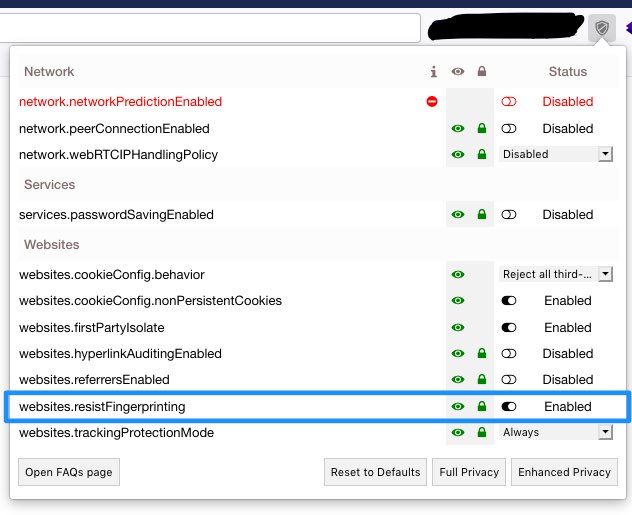
I found that the setting privacy.resistFingerprinting = true causes this behaviour. According to privacytools this should be set to true to achieve better online privacy. Setting this to the default of false resolved the issue for me.
It is not totally unlikely that the extension Privacy Settings (that OP uses) modifies this advanced setting or some other setting which causes this behaviour of Bitwarden extension in Firefox.
pwyde
on 12 Jan 2021
I can confirm that privacy.resistFingerprinting causes this issue.
In my humble opinion it is not a solution to reset to default settings. I would not even call it a workaround. As a Firefox user I should be able to run it with my preferred settings, wether it is in extensions or Firefox itself. It would be a shame having to nuke all settings just to resolve this issue.
After I restored Firefox to default settings I synced the settings using Firefox account, but I didn't know it does not sync the custom changes made in about:config, my bad.
fifal
on 12 Jan 2021
I found that the setting privacy.resistFingerprinting =
truecauses this behaviour. According to privacytools this should be set totrueto achieve better online privacy. Setting this to the default offalseresolved the issue for me.It is not totally unlikely that the extension Privacy Settings (that OP uses) modifies this advanced setting or some other setting which causes this behaviour of Bitwarden extension in Firefox.
Great find and yes, I do have that option enabled through that extension:
internetuser2
on 12 Jan 2021
Resist fingerprinting was the issue for me.
 alexmehta
on 13 Jan 2021
alexmehta
on 13 Jan 2021
Related issues
 nehalvpatel
·
55Comments
nehalvpatel
·
55Comments
 liberty1tech
·
25Comments
liberty1tech
·
25Comments
 njibhu
·
15Comments
njibhu
·
15Comments
 0b10011
·
25Comments
0b10011
·
25Comments
 Moxville
·
38Comments
Moxville
·
38Comments
Most helpful comment
In my humble opinion it is not a solution to reset to default settings. I would not even call it a workaround. As a Firefox user I should be able to run it with my preferred settings, wether it is in extensions or Firefox itself. It would be a shame having to nuke all settings just to resolve this issue.
I do however acknowledge that some advanced settings might be conflicting with the Bitwarden extension. Hence I did some investigation on my system.
I found that the setting privacy.resistFingerprinting =
truecauses this behaviour. According to privacytools this should be set totrueto achieve better online privacy. Setting this to the default offalseresolved the issue for me.It is not totally unlikely that the extension Privacy Settings (that OP uses) modifies this advanced setting or some other setting which causes this behaviour of Bitwarden extension in Firefox.