Browser: Safari bitwarden toolbar icon disappeared
Rebooted machine after updates, and discovered the Bitwarden toolbar icon in Safari no longer exists. It is also not shown in the "Customize toolbar" dialog either. When I opened Safari preferences and looked in the extensions list it showed Bitwarden installed and active. I deactivated and reactivated it but it did not resolve the issue. I have also uninstalled and reinstalled the Bitwarden app from the Mac App Store but the issue persists. Other extensions still operate normally.
Impact: Currently I cannot easily use Bitwarden from Safari, because I have to navigate between Safari and the Bitwarden app to access and manage my passwords.
System: MacOS 10.15.1 with Safari 13.0.3.
Thanks for any suggestions or fixes!
 davecan
All 14 comments
This is the first I have heard of this issue. Unfortunately I don't have any ideas at this time. I'll let you know if I think of anything.
 kspearrin
on 24 Mar 2020
kspearrin
on 24 Mar 2020
hi, I got the same problem since the last Catalina update.
 isebmo
on 27 Mar 2020
isebmo
on 27 Mar 2020
Killing the Safari process and restarting it fixed it for me.
But now it constantly requires me to re-enter my master password regardless of how it is set.
I've set it to require the password on browser restart and every 4 hours, in both cases it re-prompts me for my password well before either situation happens. It is currently set to re-prompt on browser restart but it has required me to enter a new password several times in the past couple of hours, regardless of restarts.
davecan
on 29 Mar 2020
I just opened a new tab and clicked the toolbar icon and it again re-prompted me for my master password. I had entered my master password not 5 minutes ago (which I entered) which caused me to come update the issue here.
Clicking it again now it again prompts me for my master password, which I entered again.
Here's my setting:
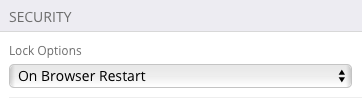
EDIT Right after posting this comment I opened a new tab and clicked the icon and it again prompted me for my master password, which I again entered. Then I clicked on other tabs in the same window and in each I clicked the bitwarden toolbar icon and it did not prompt me for my password -- it worked as expected this time.
BUT in the time it took me to write the above edit it timed out again -- I went to another tab after writing the above edit and it again was locked and prompted me to enter my master password again.
It looks like it is setting to 1 or 5 minute timeout regardless of what option is selected.
davecan
on 29 Mar 2020
This is a very common and months old issue. #1021
It re-locks automatically on safari very quickly.
 kushpvo
on 7 Apr 2020
kushpvo
on 7 Apr 2020
It re-locks automatically on safari very quickly.
This was absolutely not the case for me. I've been using Bitwarden for perhaps a year on Safari and it never exhibited this behavior until the crash originally described above.
Something changed to cause this behavior change. It seems likely the change was something on the MacOS/Safari side but it was definitely not locking this aggressively for me before.
davecan
on 7 Apr 2020
This was absolutely not the case for me. I've been using Bitwarden for perhaps a year on Safari and it never exhibited this behavior _until the crash originally described above._
I started using BW since last 12-14 hours and I've probably entered my Master Password on Safari more than 100 times lol
IDK about the past behaviour because I'm a new user.
kushpvo
on 7 Apr 2020
Suddenly last night it started staying unlocked properly again.
I've changed nothing. No reboot.
Safari did crash yesterday though and restarted. Most likely that fixed it.
So... ¯\_(ツ)_/¯
davecan
on 11 Apr 2020
I have also been experiencng problems with the Safari extension since the Catalina update. Whenever I launch Safari I have to go into Preferences > Extensions, disable Bitwarden, then re-enable it before it will appear in the toolbar.
 iaingraydon
on 18 Apr 2020
iaingraydon
on 18 Apr 2020
Same issue happening to me on Safari 13.1, but on Mojave. Started 36 hours ago. Worked fine prior. Now if I re-enable the extension, it remains in the tool bar for a few seconds before disappearing again.
 w2drt
on 9 May 2020
w2drt
on 9 May 2020
Incidentally it started back again for me about 3 days ago, after a reboot. Now it is timing out and locking within a minute or two of last use regardless of setting. At least it remains in the toolbar for me.
Again, ¯\_(ツ)_/¯
davecan
on 10 May 2020
Same issue (bitwarden icon is not showing in the Safari toolbar). For me disabling and re-enabling the extension brings it back. I have this problem whether or not the bitwarden app is running too.
This may be the same as this issue: https://github.com/bitwarden/browser/issues/1211
I'm on Safari Version 13.1.2 (15609.3.5.1.3), Bitwarden 1.45.0, Mac OS 10.15.6
 nealeyoung
on 31 Jul 2020
nealeyoung
on 31 Jul 2020
Same here:
In an undefined situation, the icon disappears from the Safari toolbar. Re-enabling via Extensions tab in Safari settings resolving temporary this issue. Faced this issue months ago, but issue is more annoying to me in last days... so I decided to report it.
Issue occurs on Safari with Catalina 10.5.7 and Big Sur 11.0.1. Safari Version 14.0.1 (16610.2.11.51.8). Bitwarden App was updated to latest version downloaded via AppStore.
 lvtz
on 17 Nov 2020
lvtz
on 17 Nov 2020
Experienced this a few times on my new macOS Big Sur install (now 11.1) and Safari (14.0.2). Quit and start Sarafi brings the icon back.
 mackaaij
on 14 Dec 2020
mackaaij
on 14 Dec 2020
Related issues
 garygreen
·
4Comments
garygreen
·
4Comments
 iaremarkus
·
4Comments
iaremarkus
·
4Comments
 blockloop
·
6Comments
kspearrin
·
5Comments
blockloop
·
6Comments
kspearrin
·
5Comments
 HizzyHaz
·
4Comments
HizzyHaz
·
4Comments
Most helpful comment
hi, I got the same problem since the last Catalina update.