Browser: Issue when opening the extension in Chrome
Running on macOS 10.12.6 and Chrome 61.0.3163.100 the extension will often not draw correctly when clicked:
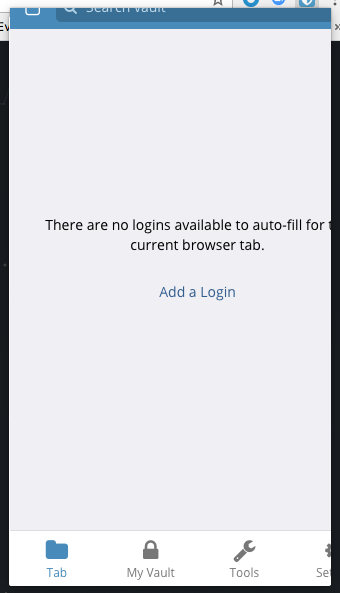
This will always happen when clicking the icon also has Chrome gain focus. For example when switching from one desktop to another and clicking on BitWarden this will happen all of the time.
It will also happen sometimes when Chrome already has focus.
 Briansbum
All 15 comments
I am on the same setup as you here with my macbook and am having trouble reproducing. Can you be a bit more clear about the steps to take to reproduce?
 kspearrin
on 2 Oct 2017
kspearrin
on 2 Oct 2017
I use multiple monitors so Chrome is always visible to me and I can do the following to reproduce it:
- Be focused on an app that is not Chrome. I have tried it from a bunch of apps which include: Another chrome window, iTerm2, Atom, Excel, Safari
- Click on the bitwarden extension icon.
Briansbum
on 2 Oct 2017
I've been experiencing the same issue for about a month. I'm also on macOS 10.12, Chrome 61.0.3163.91. I haven't noticed a particular pattern to the issue. I can open and close the menu ten times in a row. Half the time it will open fine, half the time it will show up cut off as in the first comment.
It does see like when it opens incorrectly that it briefly opens full size and then immediately shrinks to be cut off, but it happens so quickly its hard for me to be sure.
 c2nes
on 4 Oct 2017
c2nes
on 4 Oct 2017
I'm experiencing a similar problem. macOS 10.12.6, chrome 61.0.3163.100
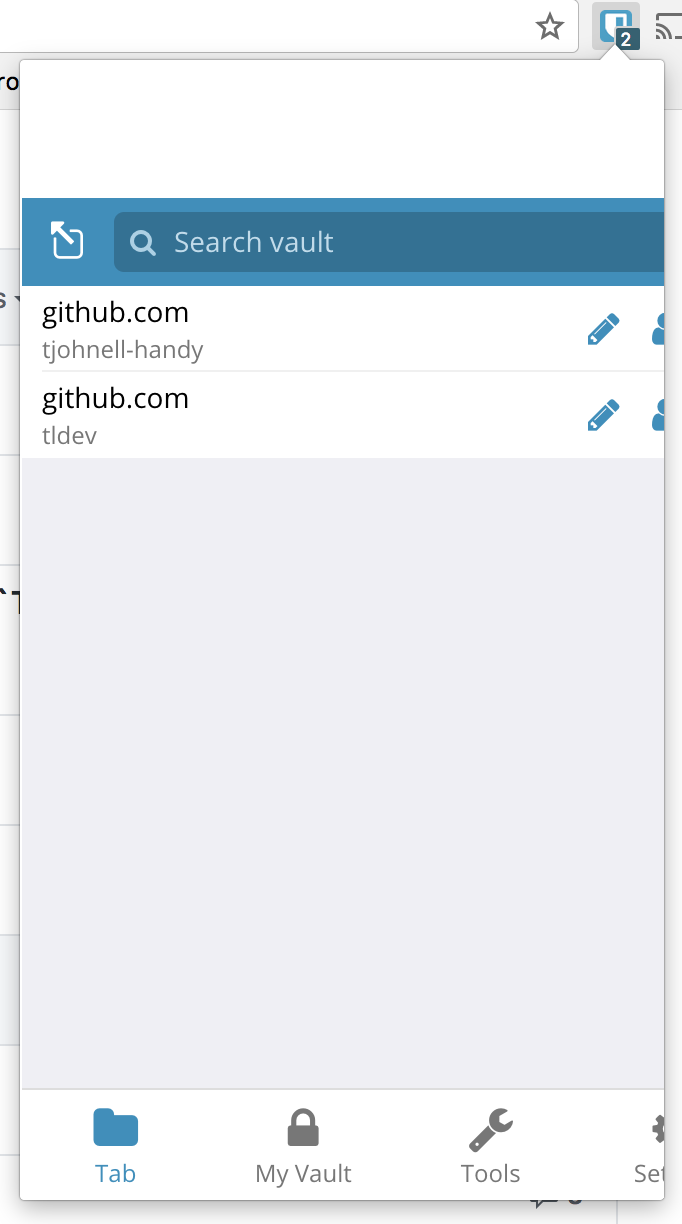
 tjohnell-handy
on 7 Oct 2017
tjohnell-handy
on 7 Oct 2017
I treacherously bisected this to https://github.com/bitwarden/browser/commit/cac9c22632194524a534cac9c5f2d3379ffdb8ca
 tldev
on 7 Oct 2017
tldev
on 7 Oct 2017
Can anyone inspect and determine what the actual size of the popup is when this occurs (or the classes on body)? I have a feeling it has something to do with the different sizes we support with https://github.com/bitwarden/browser/blob/master/src/popup/app/global/mainController.js#L9
kspearrin
on 7 Oct 2017
I just got it to occur on my macbook. I'll keep investigating.
kspearrin
on 7 Oct 2017
@kspearrin if it still helps, mine is getting dimension of 375x600
Briansbum
on 9 Oct 2017
I'm fairly certain this issue was created by the update to jQuery 3. If the extension hasn't used any of jQuery 3's new APIs, it might be worthwhile to downgrade until you can find a solution.
tldev
on 9 Oct 2017
That's pretty weird. We were actually required to update to jQ v3 by our friends at Mozilla or they would not accept any of our updates :-/
I'll look into it
kspearrin
on 9 Oct 2017
I have added a workaround for the next release. Fix is here:
https://github.com/bitwarden/browser/commit/fe73ffc21e24996d0a4eb7a314655bbe086432a5
However, this issue is still present when we need to do the sm and xs device sizes, but that only affects a very small number of users. I will work on putting together a bug report for the chrome team.
kspearrin
on 10 Oct 2017
I created a test case and opened a bug report for chrome here: https://bugs.chromium.org/p/chromium/issues/detail?id=773459
kspearrin
on 10 Oct 2017
v1.19.0 has gone live. Please update and let me know if this is now better
kspearrin
on 11 Oct 2017
@kspearrin 👍 All good now
tjohnell-handy
on 11 Oct 2017
@kspearrin I've been using it all morning without issue. Thanks for the quick turnaround!
Briansbum
on 12 Oct 2017
Related issues
 HizzyHaz
·
4Comments
HizzyHaz
·
4Comments
 gavrilfb
·
4Comments
gavrilfb
·
4Comments
 Attoy
·
3Comments
Attoy
·
3Comments
 passcod
·
5Comments
passcod
·
5Comments
 aarikere
·
4Comments
aarikere
·
4Comments
Most helpful comment
I've been experiencing the same issue for about a month. I'm also on macOS 10.12, Chrome 61.0.3163.91. I haven't noticed a particular pattern to the issue. I can open and close the menu ten times in a row. Half the time it will open fine, half the time it will show up cut off as in the first comment.
It does see like when it opens incorrectly that it briefly opens full size and then immediately shrinks to be cut off, but it happens so quickly its hard for me to be sure.