Add a hotkey to autofill username/password for a website so that a user does not have to open the browser action popup to select.
If no site is available in the vault, do nothing.
- Ideally we would show a notification error of some sort but this is not available at the moment.
If multiple sites are available, just pick the first one.
- Ideally we would use the most recently used, but we would need to start tracking dates for sites that are autofilled which is not currently available.
Thoughts on the hotkey combination to use?
 kspearrin
All 15 comments
Customizable with something like Alt+Shift+F for a default. Here's Firefox and Chrome's default keybindings for bindings to avoid.
 cwmke
on 2 Dec 2016
cwmke
on 2 Dec 2016
Actually I often have several accounts for one website so a popup showing all logins would be better than using the last one.
Moreover, a small icon next to the fields to select the available logins is also a good alternative. I know many 'normal' users don't like hotkeys / shortcuts.
 Primokorn
on 14 Dec 2016
Primokorn
on 14 Dec 2016
@Primokorn That is being tracked here https://github.com/bitwarden/browser/issues/3
kspearrin
on 16 Dec 2016
I was wondering why bitwarden doesn't always autofill without the user having to take any actions e.g. how lastpass does?
 mtahmed
on 21 Jan 2017
mtahmed
on 21 Jan 2017
@mtahmed We haven't implemented that because it is very dangerous. There have been many exploits shown with that feature in LastPass.
kspearrin
on 21 Jan 2017
Actually I often have several accounts for one website so a popup showing all logins
If the extension could click on/open itself that would solve this.
 ple103
on 29 Mar 2017
ple103
on 29 Mar 2017
Sorry for reviving this issue, but I would really like to see that feature.
I recently switched from LastPass to Bitwarden (because their addon for Firefox is pretty broken for some time now) and one of the things I really miss is a quick access to generate passwords and fill in username and password with a shortcut. I think the suggestion with alt + Shift + F is pretty okay, should work on all platforms and browsers.
I think being able to change the hotkey would be a great option as well.
As for the functionality I would envision something like:
- No entries -> nothing happens.
- One entry -> fills in the data of that entry.
- Multiple entries -> Opens the popup that would be opened by clicking the bitwarden icon with the first entry selected. The user could then select an entry by using the arrow keys and hit enter to close the popup and fill in the selected entry.
 JohannesDeml
on 27 Sep 2017
JohannesDeml
on 27 Sep 2017
@JohannesDeml This feature is actually already implemented. Ctrl + Shift + L
Firefox does not allow you to change default hotkeys for extensions like other browsers.
kspearrin
on 27 Sep 2017
@kspearrin Ah thanks for pointing it out! Is this documented somewhere? I was searching for that information, but couldn't find it anywhere. Additionally I noticed that this shortcut works on chrome, but not with Vivaldi, even though there is no shortcut set for Ctrl+Shift+L on vivaldi. Any idea why that is the case?
JohannesDeml
on 27 Sep 2017
@JohannesDeml See https://help.bitwarden.com/article/auto-fill-browser/
You can adjust the hotkey in vivaldi by navigating to chrome://extensions
kspearrin
on 27 Sep 2017
@kspearrin Thanks again for your response. I somehow missed the help site. I tried using the shortcut as well as changing the shortcut, but couldn't get it working in Vivaldi. Should I open an issue for it?
JohannesDeml
on 27 Sep 2017
Seems to work correctly in Vivaldi for me?
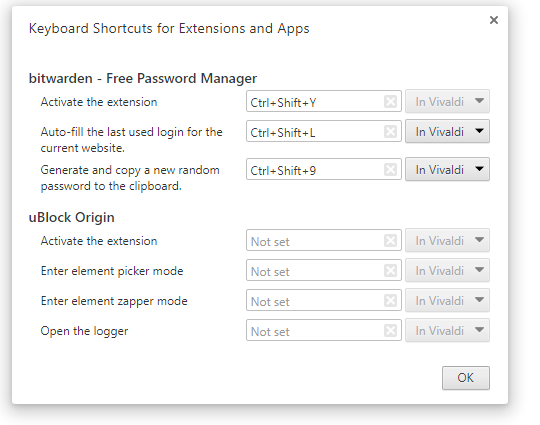
kspearrin
on 27 Sep 2017
I do see the exact same settings

My problem is that using the shortcut does not work for me. For example for facebook. Either hitting ctrl+shift+Y as well as ctrl+shift+L does not do anything.
JohannesDeml
on 27 Sep 2017
Hmm, yea, I can confirm that as well. Seems like a Vivaldi bug since that is not really something we control (other than provide the shortcut keys).
kspearrin
on 27 Sep 2017
Ah, yep you are right. Sorry for blaming the extension before googling. Seems like Vivaldi does not support any shortcuts from extensions (see here: https://forum.vivaldi.net/topic/15274/extension-custom-shortcut-not-working/3).
Sorry again for reviving the topic and thanks for sticking with me on the problem!
JohannesDeml
on 27 Sep 2017
Related issues
 lainy
·
4Comments
lainy
·
4Comments
 kosvrouvas
·
3Comments
kspearrin
·
5Comments
kosvrouvas
·
3Comments
kspearrin
·
5Comments
 andrejrcarvalho
·
5Comments
andrejrcarvalho
·
5Comments
 HizzyHaz
·
4Comments
HizzyHaz
·
4Comments
Most helpful comment
@JohannesDeml This feature is actually already implemented.
Ctrl + Shift + LFirefox does not allow you to change default hotkeys for extensions like other browsers.