Browser-sync: [2.26.10] YError: Invalid first argument. Expected boolean or string but received function.
Issue details
Getting the version or just running browser-sync outputs this error:
# browser-sync --version
YError: Invalid first argument. Expected boolean or string but received function.
    at argumentTypeError (/usr/lib/node_modules/browser-sync/node_modules/yargs/build/lib/argsert.js:64:11)
    at /usr/lib/node_modules/browser-sync/node_modules/yargs/build/lib/argsert.js:45:17
    at Array.forEach (<anonymous>)
    at Object.argsert (/usr/lib/node_modules/browser-sync/node_modules/yargs/build/lib/argsert.js:38:25)
    at Object.version (/usr/lib/node_modules/browser-sync/node_modules/yargs/build/lib/yargs.js:796:19)
    at runFromCli (/usr/lib/node_modules/browser-sync/dist/bin.js:46:10)
    at Object.<anonymous> (/usr/lib/node_modules/browser-sync/dist/bin.js:38:5)
    at Module._compile (internal/modules/cjs/loader.js:955:30)
    at Object.Module._extensions..js (internal/modules/cjs/loader.js:991:10)
    at Module.load (internal/modules/cjs/loader.js:811:32)
[Function]
It doesn't produce an exit code so my Travis-CI builds continued to push it to my repos and breaks my stack's updater. Very bad.
Build log: https://travis-ci.org/github/demyxco/browsersync/builds/709580148
Steps to reproduce/test case
- npm -g install browser-sync
- browser-sync --version
Please specify which version of Browsersync, node and npm you're running
- Browsersync [ 2.26.10 ]
- Node [ v12.15.0 ]
- Npm [ 6.13.4 ]
Affected platforms
- [ ✅ ] linux
- [ ] windows
- [ ] OS X
- [ ] freebsd
- [ ] solaris
- [ ] other _(please specify which)_
Browsersync use-case
- [ ] API
- [ ] Gulp
- [ ] Grunt
- [ ✅ ] CLI
If CLI, please paste the entire command below
No issues, works fine even with that exit 0 error.
 demyxco
All 18 comments
Same issue.
New user here...
Windows 10 x64
New install.
Node v 12.18.2
npm v6.14.4
 scottquayle
on 21 Jul 2020
scottquayle
on 21 Jul 2020
Same issue, tried both version of nodejs as well, still made no difference.
Windows 10 64bit
Node v12.18.2
npm v6.14.5
 Valord01
on 21 Jul 2020
Valord01
on 21 Jul 2020
You all will have to downgrade since 2.26.9 is affected as well.
npm -g install [email protected]
Same issue. Downgrading to 2.26.7 isn't great under NodeJS 14+ since it wants fsevents 2 and that version of browser-sync is using fsevents 1.
 ychaikin
on 22 Jul 2020
ychaikin
on 22 Jul 2020
I'm also seeing this issue and would appreciate a fix. It does seem to be a warning rather than an error, so I am using browsersync OK at version 2.26.10, but it is muddying the tooling console output. Using node v14.3.0.
 helenb
on 22 Jul 2020
helenb
on 22 Jul 2020
On OSX too
 Anoesj
on 22 Jul 2020
Anoesj
on 22 Jul 2020
Hi, my website is using php files, and after I start browser-sync , it shows Cannot GET /.
I typed browser-sync start --server --files="./.jsx, ./.css" to start the browser-sync.
Is it wrong? What should I type?
Thank you very much.
 Christina1125
on 24 Jul 2020
Christina1125
on 24 Jul 2020
Tried on Windows 10 & OSX
Node v12.18.2
npm v6.14.5
For windows: Error stopped showing when I downgraded to 2.26.10
For OSX: I can't get it to work even with version 2.26.10
 Portiz1
on 24 Jul 2020
Portiz1
on 24 Jul 2020
Microsoft Windows [Version 6.1.7601]
Copyright (c) 2009 Microsoft Corporation. All rights reserved.
C:\Users\GODFRED>browser-sync --version
YError: Invalid first argument. Expected boolean or string but received function
.
at argumentTypeError (C:\Users\GODFRED\AppData\Roaming\npm\node_modules\brow
ser-sync\node_modules\yargs\build\lib\argsert.js:64:11)
at C:\Users\GODFRED\AppData\Roaming\npm\node_modules\browser-sync\node_modul
es\yargs\build\lib\argsert.js:45:17
at Array.forEach (
at Object.argsert (C:\Users\GODFRED\AppData\Roaming\npm\node_modules\browser
-sync\node_modules\yargs\build\lib\argsert.js:38:25)
at Object.version (C:\Users\GODFRED\AppData\Roaming\npm\node_modules\browser
-sync\node_modules\yargs\build\lib\yargs.js:796:19)
at runFromCli (C:\Users\GODFRED\AppData\Roaming\npm\node_modules\browser-syn
c\dist\bin.js:46:10)
at Object.
wser-sync\dist\bin.js:38:5)
at Module._compile (internal/modules/cjs/loader.js:1137:30)
at Object.Module._extensions..js (internal/modules/cjs/loader.js:1157:10)
at Module.load (internal/modules/cjs/loader.js:985:32)
[Function]
C:\Users\GODFRED>
 Godfrey111
on 25 Jul 2020
Godfrey111
on 25 Jul 2020
the browser sync is not installing, i need assistance am new to programming
Godfrey111
on 25 Jul 2020
Versions:
Browser-sync --version command not working ("Invalid first argument")
node 12.16.1
npm 6.13.4
Windows OS
Using CLI.
Pls help. Have also asked the question in SPA Angularjs course Discussion Forum, taught by @ychaikin ...
 hackothaurus
on 26 Jul 2020
hackothaurus
on 26 Jul 2020
Just do same as mention by Author demyxco and sir Yaakov Chaikin.
@hackothaurus
@Godfrey111
You all will have to downgrade since 2.26.9 is affected as well.
You can run this directly without uninstalling old ones
npm -g install [email protected]
 Yesh123456
on 26 Jul 2020
Yesh123456
on 26 Jul 2020
When I install version 2.26.7 I get vulernability warning:
  High            Denial of Service

  Package         http-proxy

  Dependency of   browser-sync [dev]

  Path            browser-sync > http-proxy

  More info       https://npmjs.com/advisories/1486
Is the annoying warning message preferable to this vulernability?
 thecodeclimber
on 26 Jul 2020
thecodeclimber
on 26 Jul 2020
Please give me the needed steps to follow to resolve the issue.
On Sun, Jul 26, 2020, 10:02 AM Yesh123456 notifications@github.com wrote:
Just do same as mention by Author demyxco and sir Yaakov Chaikin.
@hackothaurus https://github.com/hackothaurus
You all will have to downgrade since 2.26.9 is affected as well.
You can run this directly without uninstalling old onesnpm -g install [email protected]
—
You are receiving this because you are subscribed to this thread.
Reply to this email directly, view it on GitHub
https://github.com/BrowserSync/browser-sync/issues/1782#issuecomment-663961320,
or unsubscribe
https://github.com/notifications/unsubscribe-auth/AQLUPFPJOD3LV6LJPPEGVALR5PWJ7ANCNFSM4PCSH35A
.
Godfrey111
on 26 Jul 2020
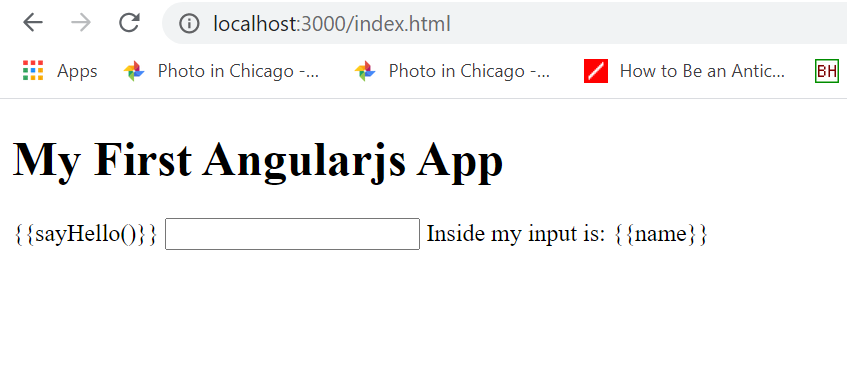
Okay, so it's not giving an error anymore, but it's still not loading my js files or processing angular js. Although when I open index.html without browser-sync, it works. So there's something wrong with my browser-sync command, I imagine? I'm writing "browser-sync start --server --directory --files "*/"" in my directory that contains index.html, app.js and angular.min.js.
Can you figure out why this is happening? @Yesh123456
hackothaurus
on 26 Jul 2020
Hi all, fixed as of [email protected] :)
 shakyShane
on 26 Jul 2020
shakyShane
on 26 Jul 2020
@shakyShane thanks, works like it should.
demyxco
on 26 Jul 2020
What should I do sir, it showing error, when I try to check command prompt
to check if it installed it not showing.
Please give me steps to get this set up, am stucked
On Sun, Jul 26, 2020, 9:07 PM Demyx notifications@github.com wrote:
@shakyShane https://github.com/shakyShane thanks, works like it should.
—
You are receiving this because you were mentioned.
Reply to this email directly, view it on GitHub
https://github.com/BrowserSync/browser-sync/issues/1782#issuecomment-664034009,
or unsubscribe
https://github.com/notifications/unsubscribe-auth/AQLUPFOT7AAM726GEIXXACTR5SEH5ANCNFSM4PCSH35A
.
Godfrey111
on 26 Jul 2020
Related issues
 demisx
·
4Comments
demisx
·
4Comments
 codeofsumit
·
3Comments
codeofsumit
·
3Comments
 ericmorand
·
3Comments
ericmorand
·
3Comments
 sedubois
·
3Comments
sedubois
·
3Comments
 zewa666
·
3Comments
zewa666
·
3Comments
Most helpful comment
You all will have to downgrade since 2.26.9 is affected as well.