Browser-sync: File event change but doesn't reload in browser- random
I have an issue with BrowserSync set up via Gulp in both Laravel Valet and VVV Vagrant workflows using WordPress. (Valet and VVV are not run at the same time - I just have noticed the issue in both)
I find that that new sites created work fine with BrowserSync and all watched files when changed update and the browser reloads - however _randomly_ after a while the browser reload stops even though the file event change is recognised in the output. Other Gulp tasks carry on working normally just the BrowserSync stops.
I have macOS Sierra 10.12.6
Gulp 3.9.1
Node 8.11.3
BrowserSync 2.24.6
Once the issues occurs it fails in all browsers and on restart - it also fails if executed as a command in a terminal session - ie
browser-sync start --proxy "mysite.test" --files "*.css"
My gulp file task...
var gulp = require('gulp');
var gutil = require('gulp-util');
var browserSync = require('browser-sync').create();
var sitename = 'mysite';

// Fire up browserSync
gulp.task('sync', function() {
    browserSync.init({
        proxy: sitename +'.test',
    xip: true,

    files: ["./*.css","*.php","css/*css","lib/*.php", "includes/*.php", "includes-child/*.php", "includes-child/woocommerce/*.php", "includes-child/woocommerce/*.css"],

    });

});
My Task output
> Executing task: node_modules/.bin/gulp sync <

[18:26:01] Using gulpfile ~/Sites/mysite/wp-content/themes/mytheme/gulpfile.js
[18:26:01] Starting 'sync'...
[18:26:01] Finished 'sync' after 69 ms
[Browsersync] Proxying: http://mysite.test
[Browsersync] Access URLs:
 --------------------------------------------
       Local: http://127.0.0.1.xip.io:3000
    External: http://192.168.0.22.xip.io:3000
 --------------------------------------------
          UI: http://localhost:3001
 UI External: http://192.168.0.22.xip.io:3001
 --------------------------------------------
[Browsersync] Watching files...
[Browsersync] File event [change] : style.css
[Browsersync] File event [change] : style.css
[Browsersync] File event [change] : style.css
[Browsersync] File event [change] : style.css
Any thoughts?
 neilgee
All 9 comments
@neilgee one way you could help to debug this, is to verify if the event is actually making it to the browser.
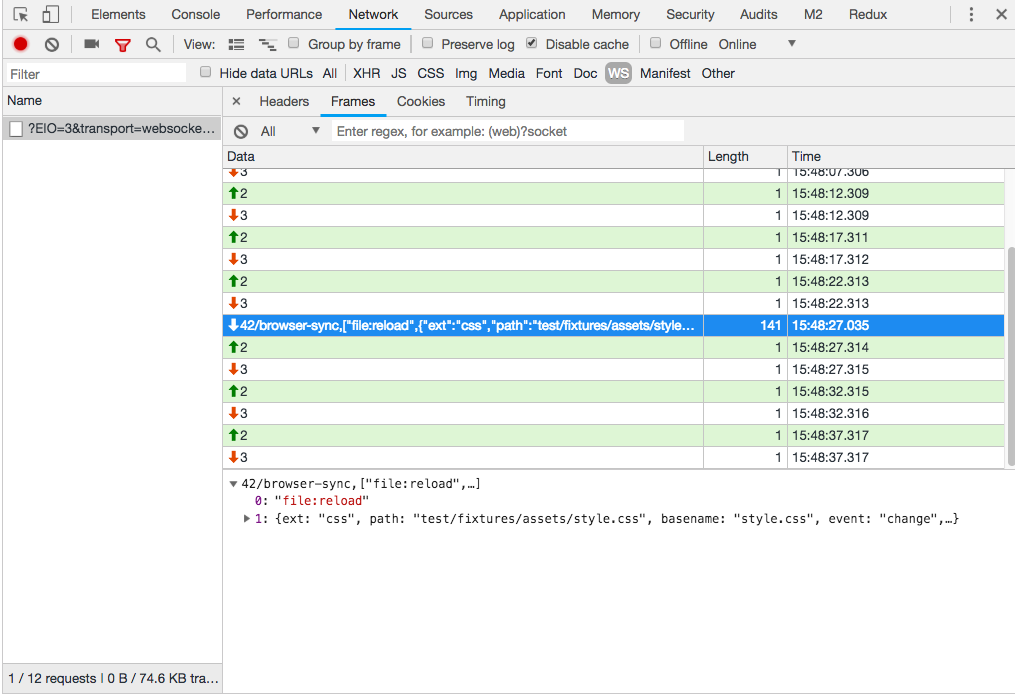
if you open the websocket connection in Dev Tools, then click 'frames', you'll see the messages that the client is receiving.
 shakyShane
on 26 Aug 2018
shakyShane
on 26 Aug 2018
Ok @shakyShane - had a look at this and seems all is getting to the browser, but not reloading on my problematic site...
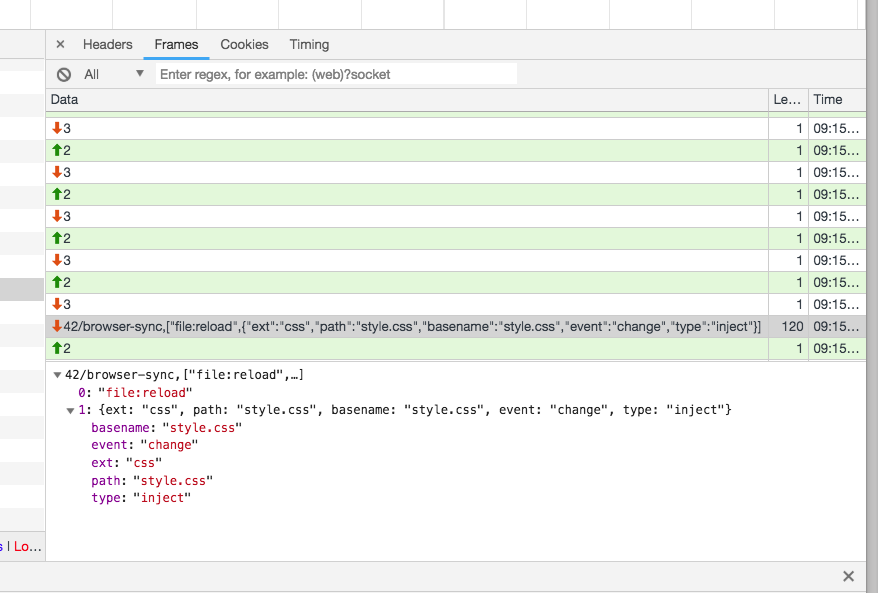
The same output is given on a site that does not reload and on a site that does.
neilgee
on 27 Aug 2018
does your page actually contain a file ending in style.css?
shakyShane
on 27 Aug 2018
the file is named style.css
neilgee
on 27 Aug 2018
I should also add to this thread that in local sites that this happens to, when BrowserSync fails to reload the browser - PHP and JS watched files do force the browser to reload but CSS files do not.
[16:38:59] Using gulpfile ~/Sites/saltuary/wp-content/themes/saltuarynew/gulpfile.js
[16:38:59] Starting 'sync'...
[16:38:59] Finished 'sync' after 16 ms
[Browsersync] Proxying: http://saltuary.test
[Browsersync] Access URLs:
--------------------------------------------
Local: http://127.0.0.1.xip.io:3000
External: http://192.168.0.22.xip.io:3000
--------------------------------------------
UI: http://localhost:3001
UI External: http://localhost:3001
--------------------------------------------
[Browsersync] Watching files...
[Browsersync] File event [change] : style.css
[Browsersync] File event [change] : style.css
[Browsersync] Reloading Browsers...
[Browsersync] File event [change] : includes-child/woocommerce/woo.css
[Browsersync] Reloading Browsers...
So in the above any CSS watched files get the File event [change] and don't reload whereas JS or PHP get Reloading Browsers... and do reload
neilgee
on 24 Oct 2018
No didn’t get to the bottom of it, not really using it that much at the moment - let me know if you figure it out :)
On 16 May 2019, at 4:58 pm, Tracey Shaw notifications@github.com wrote:
@neilgee https://github.com/neilgee Did you ever figure out a fix for this? I'm having this exact issue, where JS and PHP are reloading correctly but CSS changes aren't refreshing. I have other sites in development that are working correctly with the exact same settings (other than the proxy URL and port), but I can't figure out why this one won't work.
—
You are receiving this because you were mentioned.
Reply to this email directly, view it on GitHub https://github.com/BrowserSync/browser-sync/issues/1589?email_source=notifications&email_token=AAPV63IS5YVA5YKI32OJ24DPVUAZZA5CNFSM4FOIIC62YY3PNVWWK3TUL52HS4DFVREXG43VMVBW63LNMVXHJKTDN5WW2ZLOORPWSZGODVQ3POI#issuecomment-492943289, or mute the thread https://github.com/notifications/unsubscribe-auth/AAPV63IIPQ5BAIND7ZQ75G3PVUAZZANCNFSM4FOIIC6Q.
neilgee
on 22 May 2019
Here's the solution that worked for me:
browserSync.init({
  injectChanges: false
});
injectChanges is true by default: https://www.browsersync.io/docs/options#option-injectChanges
 uaibo
on 12 Sep 2019
uaibo
on 12 Sep 2019
Yes @uaibo solution also worked for me
neilgee
on 16 May 2020
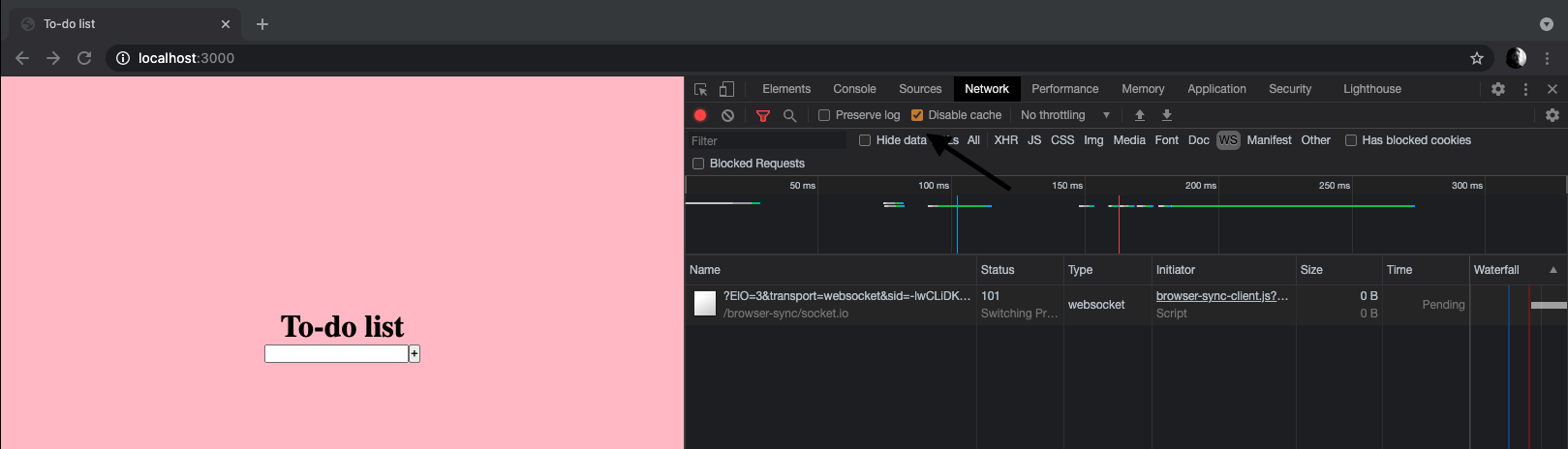
I disabled cache in Chrome DevTools and refresh the browser and it solve the issue.
I have no idea why, maybe you guys do?
 anthonyarguello96
on 15 Jan 2021
anthonyarguello96
on 15 Jan 2021
Related issues
 hgl
·
3Comments
hgl
·
3Comments
 jitendravyas
·
4Comments
jitendravyas
·
4Comments
 tonyoconnell
·
3Comments
tonyoconnell
·
3Comments
 pensierinmusica
·
4Comments
pensierinmusica
·
4Comments
 Mil00Z
·
3Comments
Mil00Z
·
3Comments
Most helpful comment
Here's the solution that worked for me:
injectChangesistrueby default: https://www.browsersync.io/docs/options#option-injectChanges