Browser-laptop: Windows has odd display color for some users after updating to 0.23.73
Description
Reported via community:
https://community.brave.com/t/upgraded-to-v0-23-73-and-brave-is-now-a-garish-yellow/28765
https://community.brave.com/t/odd-discoloration-on-windows-10-v1803-after-0-23-73-update/28766
https://community.brave.com/t/entire-window-has-orange-yellow-tint/28786
Some users are reporting that after updating to 0.23.73 on Windows Brave has an odd color in the URL bar/ bookmarks bar/ tool bar area.
Steps to Reproduce
- Have 0.23.73
- Launch Brave
3.
Actual result:
Some users are reporting an odd color in the URL bar, bookmarks bar, and tool bar area. A screenshot is in these posts:
https://community.brave.com/t/upgraded-to-v0-23-73-and-brave-is-now-a-garish-yellow/28765/11
https://community.brave.com/t/odd-discoloration-on-windows-10-v1803-after-0-23-73-update/28766
Also, here is a side by side of Chrome/Brave on the same page: https://community.brave.com/t/upgraded-to-v0-23-73-and-brave-is-now-a-garish-yellow/28765/13
Expected result:
No discoloration
Reproduces how often:
Unknown
Brave Version
about:brave info:
0.23.73
Reproducible on current live release:
For some users, yes
Additional Information
Only reported on Windows so far, @kjozwiak has not reproduced.
 LaurenWags
All 8 comments
same bug as in chrome... I wonder if you test that stuff before you fork?
 btsfav
on 1 Aug 2018
btsfav
on 1 Aug 2018
+1 from Reddit: https://www.reddit.com/r/brave_browser/comments/93q4ud/is_there_a_reason_there_is_such_a_warmred_hue_to/
 Brave-Matt
on 1 Aug 2018
Brave-Matt
on 1 Aug 2018
Here's the fix I had identified before:
https://community.brave.com/t/colors-are-not-showing-correctly-how-can-i-fix-this/27401/2
Basically, forcing the color profile to be srgb via the command line param:
--force-color-profile=srgb
The system can return a different color profile if you use Adobe Photoshop for example and alter your color profile. But this should also be happening in Chrome, unless you explicitly go to chrome://flags and manually set the color profile flag (in Chrome/Chromium, you can navigate to chrome://flags/#force-color-profile to check)
@btsfav can you please try this out? I am unsure why this would pop up all of the sudden for folks- the detection code has been there since Chromium 61 or so, IIRC
 bsclifton
on 1 Aug 2018
bsclifton
on 1 Aug 2018
Update: We're receiving confirmation from users that disabling hardware acceleration resolves the issue.
Others have reported similar issues with Google Chrome in the past, and found that disabling _hardware acceleration_ often resolved the issue. You can try this in Brave via _Settings > Advanced_.
I am on 0.23.73/Windows 10 (17134.165) and I do not see any issues. It would be helpful to have impacted users run dxdiag and share their results.
 jonathansampson
on 1 Aug 2018
jonathansampson
on 1 Aug 2018
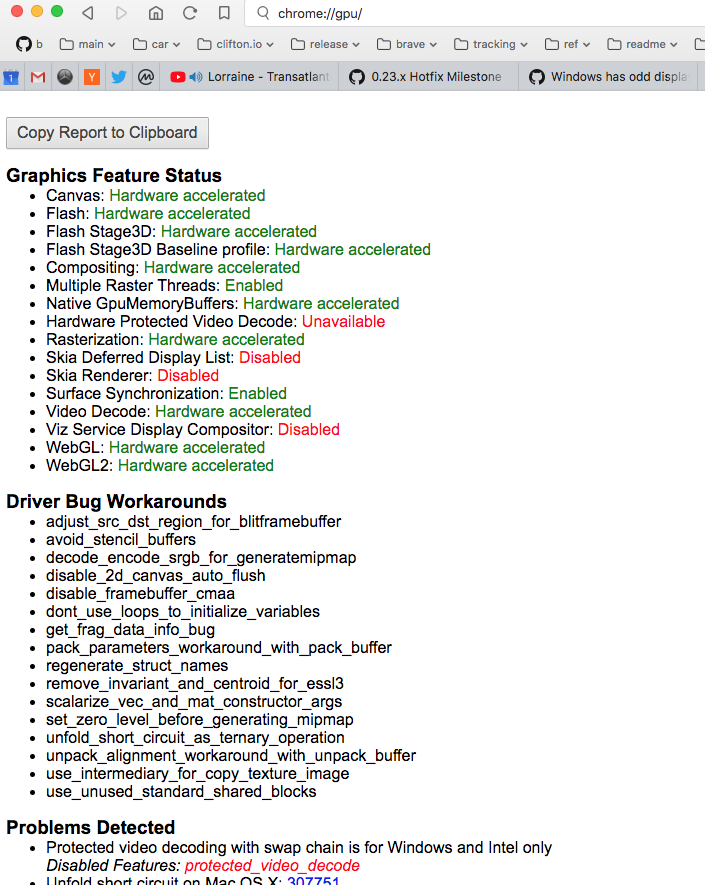
For folks experiencing this problem who are NOT resolved by the --force-color-profile=srgb work-around and would like to help us troubleshoot, can you please try the following?
- In Brave, load up
chrome://gpu/ - In Chrome, load up
chrome://gpu/ - Compare the text on both screens - look for any differences
I suspect that Muon is not running all of the code for detecting driver bug work-arounds (or similar) and that folks will see differences between the output in Brave and Chrome
Here's what the chrome://gpu/ screen looks like (for those curious):
bsclifton
on 1 Aug 2018
in chrome color profile fixed it, DO NOT disable hardware acceleration
btsfav
on 2 Aug 2018
I had this same issue, and the 'fix' from bsclifton worked great on my Windows 10 system.
This only started with the most recent Brave update.
 LenOttSocketMobile
on 3 Aug 2018
LenOttSocketMobile
on 3 Aug 2018
Closing issue as wontfix. Chromium using your system's color profile (by default) is expected behavior and it does happen with Chrome also. We could force srgb or expose the setting in our preferences, but when discussing with the team, we didn't think those changes would be worthwhile, since brave-core is around the corner
The above comments show a work-around to alter your color profile (forcing srgb) and brave-core does support chrome://flags/#force-color-profile
bsclifton
on 9 Aug 2018
Related issues
 mykkymk
·
3Comments
jonathansampson
·
3Comments
bsclifton
·
3Comments
mykkymk
·
3Comments
jonathansampson
·
3Comments
bsclifton
·
3Comments
 antiroyalty
·
3Comments
antiroyalty
·
3Comments
 bbondy
·
3Comments
bbondy
·
3Comments
Most helpful comment
in chrome color profile fixed it, DO NOT disable hardware acceleration