Browser-laptop: Macbook Emoji Window shortcut is disabled
Description
Normally when a text field has focus if you press [CTRL + CMD + Space] an emoji window appears for text entry. Brave is the only application on my Macbook that has this disabled.
Steps to Reproduce
- Click a text entry to gain focus
- Press [CTRL + CMD + Space] together
Actual result:
Doesn't appear
Expected result:
Should appear. Happens 100% of the time.
Brave Version
about:brave info:
Brave | 0.20.30
-- | --
V8 | 6.4.388.40
rev | 8b78402
Muon | 4.7.9
OS Release | 17.4.0
Update Channel | Release
OS Architecture | x64
OS Platform | macOS
Node.js | 7.9.0
Brave Sync | v1.4.2
libchromiumcontent | 64.0.3282.119
Reproducible on current live release:
Yes. Only tested on live release
 chackle
All 7 comments
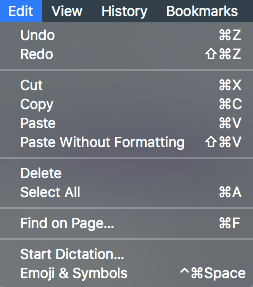
Confirmed with Brave 0.20.42 on macOS 10.13.3. The shortcut is listed on the menu, so I'm not sure why it's not working. Workaround is to use the menu.
 cndouglas
on 15 Feb 2018
cndouglas
on 15 Feb 2018
+1 from #13400 and #14336
@jonathansampson in #13400 says
May be caused by some of our accelerator logic: https://github.com/brave/browser-laptop/search?utf8=%E2%9C%93&q=cmdorctrl&type=
cndouglas
on 5 Jun 2018
+1 on Twitter: https://twitter.com/dietrich/status/1020443913780203520
 jonathansampson
on 21 Jul 2018
jonathansampson
on 21 Jul 2018
The address bar does not block the emoji window. Text inputs on web pages, however, do.
jonathansampson
on 21 Jul 2018
Hi @bsclifton, this emoji palette doesn't work for me in the latest MacOS version. Was this closed because there is no plan to fix this or was it actually "fixed-with-brave-core" previously? Thanks
Brave: 0.25.2
V8: 6.9.427.23
rev: 8ea2a9ce5ca329478186e6393e07f1cf87d34a22
Muon: 8.1.8
OS Release: 17.7.0
Update Channel: Release
OS Architecture: x64
OS Platform: macOS
Node.js: 7.9.0
Brave Sync: v1.4.2
libchromiumcontent: 69.0.3497.100
 evvvritt
on 12 Nov 2018
evvvritt
on 12 Nov 2018
@evvvritt This problem is fixed in brave-core. Because the old version of Brave does not automatically update to brave-core, please manually download the latest version here: https://brave.com/download
cndouglas
on 12 Nov 2018
@evvvritt what @Liunkae said captures it perfectly 😄 We're also working on an auto-upgrade of the browser-laptop version of Brave in case you wanted to wait (it will install the newer Brave and import settings)
 bsclifton
on 14 Nov 2018
bsclifton
on 14 Nov 2018
Related issues
 bbondy
·
3Comments
bbondy
·
3Comments
 luixxiul
·
3Comments
bsclifton
·
3Comments
luixxiul
·
3Comments
luixxiul
·
3Comments
bsclifton
·
3Comments
luixxiul
·
3Comments
 briannyeko
·
3Comments
briannyeko
·
3Comments
Most helpful comment
The address bar does not block the emoji window. Text inputs on web pages, however, do.