Browser-laptop: AltGr + Number opens up a new session tab
Test plan
https://github.com/brave/browser-laptop/pull/13042#issue-167512154
The shortcut for New Tab is the same as @ (at-sign) on Nordic keyboards. That's pretty annoying when typing in email addresses in web forms...
Just realized that when I type square brackets (as in the subject) I open new tabs as well...
So the result after this posting is 4 new tabs... 🐛
I can't find anywhere I can change it myself.
Are this option missing in the menues, or do I oversee something?
Thanks in advance,
Rasmus
 rasved
All 21 comments
+1 very annoying. Combination is ALT GR + 2
 sepeiFH
on 31 Jan 2018
sepeiFH
on 31 Jan 2018
+1 really frustrating! Please change the shortcut to something else or let us disable it!
 Christoffer-M
on 31 Jan 2018
Christoffer-M
on 31 Jan 2018
+1 So annoying! Can we get a fix ASAP please?
Edit: Using Swedish keyboard layout, problem started with latest stable update
 vinicentus
on 31 Jan 2018
vinicentus
on 31 Jan 2018
+2 from community https://community.brave.com/t/typing-in-brave-opens-a-new-tab/15067?u=eljuno
One of reporter said s/he used Estonian keyboard.
cc @bsclifton
 eljuno
on 31 Jan 2018
eljuno
on 31 Jan 2018
+1 Same for me. Issue started with 0.20.29.
Any attempt to type special characters using Alt gr + number like #,$,[.. opens a new tab.
A hotfix is immediately necessary.
Keyboard layout is Turkish.
 aliakyurek
on 1 Feb 2018
aliakyurek
on 1 Feb 2018
+1 Same for me. Issue also started with 0.20.29.
Finnish keyboard layout in use.
 raakis
on 1 Feb 2018
raakis
on 1 Feb 2018
This is not specific to any keyboard. Happens even on English keyboard as well. Pressing AltGr + number causes a session tab to open.
Pressing AltGr + number key combination changes to Ctrl+Alt+

Here's what it looks like on 0.19.147
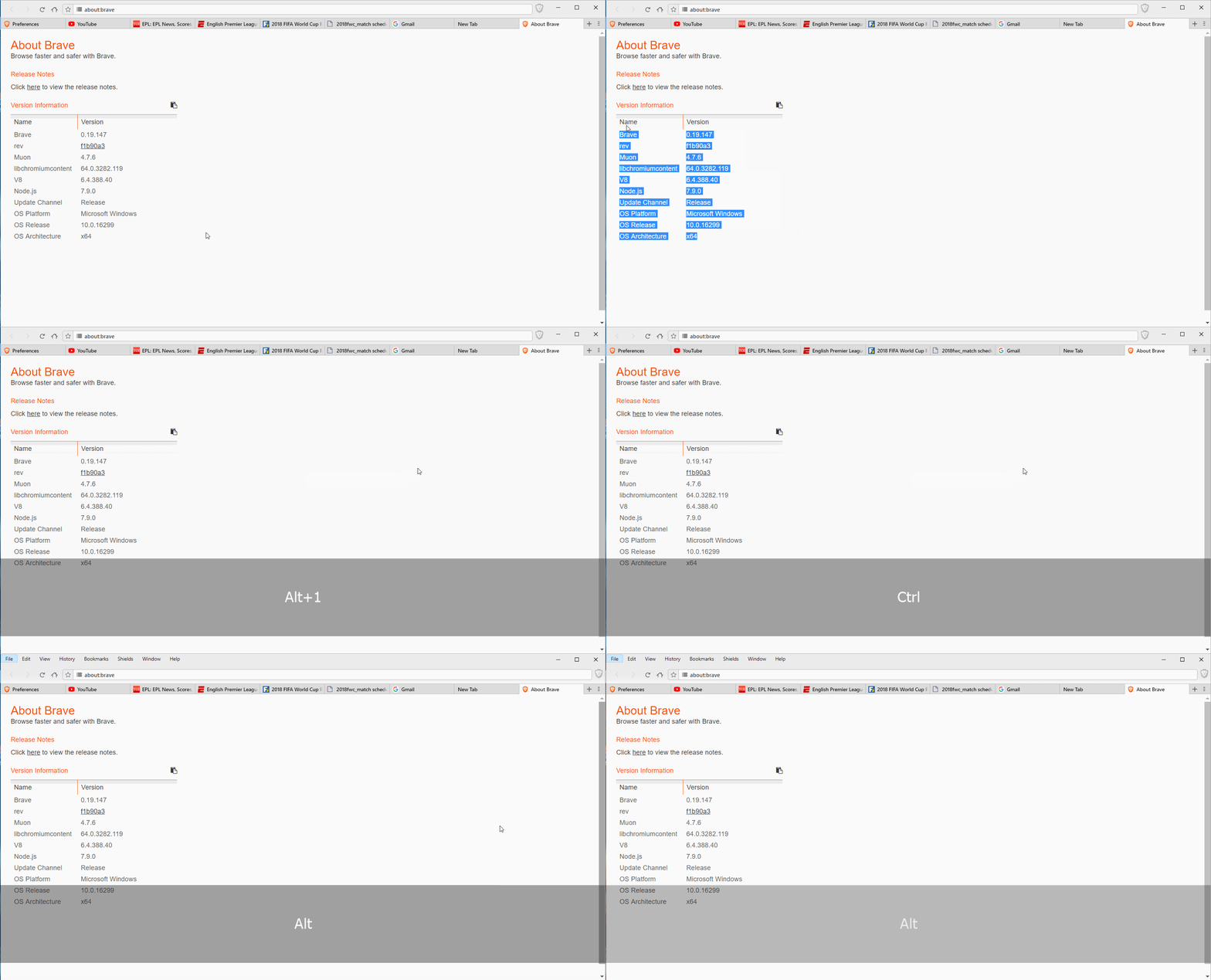
Pressing and holding AltGr keeps switching between Ctrl+Alt and Alt although not noticeable on the recording but clearly visible.
 srirambv
on 1 Feb 2018
srirambv
on 1 Feb 2018
+1 for the Estonian keyboard. version 0.20.30
 gert7
on 2 Feb 2018
srirambv
on 2 Feb 2018
srirambv
on 2 Feb 2018
gert7
on 2 Feb 2018
srirambv
on 2 Feb 2018
srirambv
on 2 Feb 2018
+1 from community https://community.brave.com/t/alt-numbers-keyboard-shortcut-to-opening-tabs/15244?u=eljuno
+1 from community https://community.brave.com/t/when-i-type-the-with-alt-2/15314?u=eljuno
+1 from community https://community.brave.com/t/brave-opening-new-session-tabs-when-typing-or/15305?u=eljuno
eljuno
on 2 Feb 2018
+1 from Spanish (Spain) keyboard.
Brave: 0.20.30
V8: 6.4.388.40
rev: 8b78402e7b3b91d44d8146cbe4dc8013592c33fd
Muon: 4.7.9
OS Release: 6.3.9600
Update Channel: Release
OS Architecture: x64
OS Platform: Microsoft Windows
Node.js: 7.9.0
Brave Sync: v1.4.2
libchromiumcontent: 64.0.3282.119
 eiyey
on 3 Feb 2018
eiyey
on 3 Feb 2018
Thanks for bringing this up in Slack @srirambv! This should definitely get fixed ASAP as it's affecting a large % of the community as demonstrated by all the +1's above.
 kjozwiak
on 5 Feb 2018
kjozwiak
on 5 Feb 2018
+1 from me using Swedish keyboard, really annoying
 Jacalz
on 5 Feb 2018
Jacalz
on 5 Feb 2018
+1 from Swiss keyboard and german keyboard. It's a nightmare as it make my password manager entering password in the URL field and send to search engine !
 ElucGeek
on 6 Feb 2018
ElucGeek
on 6 Feb 2018
The original problem lies here: #6915
A solution: #13015 Note that this would change the shortcut to Control + Shift + [session number] for Windows and Linux and Command + Shift + [session number]Command + Alt + [session number] on Mac OS.
vinicentus
on 6 Feb 2018
+1 from Belgian Keyboard ... This is really a showstopper, i won't be using brave until this gets fixed
 chrisvanderheyden
on 8 Feb 2018
chrisvanderheyden
on 8 Feb 2018
@chrisvanderheyden we reverted PR that broke this one and new version should be out next week. Sorry for your trouble
 NejcZdovc
on 8 Feb 2018
NejcZdovc
on 8 Feb 2018
+1 from community: https://community.brave.com/t/altgr-registrers-as-ctrl-alt-in-brave/15691
 LaurenWags
on 9 Feb 2018
LaurenWags
on 9 Feb 2018
+1 Just installed to day, eager to start using it - Now I'm forced to wait until a new version without the bug is released - I can't wait :)
 daath
on 13 Feb 2018
daath
on 13 Feb 2018
+1 Norwegian
 tomasroaldsnes
on 26 Mar 2018
tomasroaldsnes
on 26 Mar 2018
Related issues
 bsclifton
·
3Comments
bsclifton
·
3Comments
 luixxiul
·
3Comments
luixxiul
·
3Comments
 jkup
·
3Comments
luixxiul
·
3Comments
jkup
·
3Comments
luixxiul
·
3Comments
 jonathansampson
·
3Comments
jonathansampson
·
3Comments
Most helpful comment
Thanks for bringing this up in Slack @srirambv! This should definitely get fixed ASAP as it's affecting a large % of the community as demonstrated by all the +1's above.