Browser-laptop: Extensions have connectivity issues with Strict Site Isolation
New description:
Seems like both Lastpass and Bitwarden are experiencing these issues! probably more also!!!
Old description
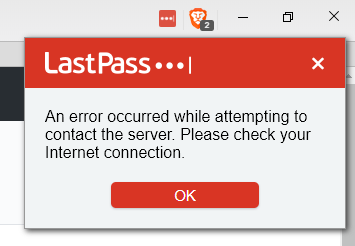
Lastpass breaks when you enable "strict site isolation". The extension gives an error that it was unable to connect to the servers after you enable that option.
Steps to Reproduce
- Install lastpass from about:preferences#extensions
- Log in to lastpass with an account
- Go to about:preferences#security and enable "strict site isolation"
Actual result:
Lastpass enters offline mode because it can´t connect to the servers.
Expected result:
Should work like a dream :)
Reproduces how often:
All the time
Brave Version
about:brave info:
Brave: 0.19.131
rev: da2f34787e51eb44190a7a77249e100fb2368306
Muon: 4.5.36
libchromiumcontent: 63.0.3239.132
V8: 6.3.292.49
Node.js: 7.9.0
Update Channel: Release
OS Platform: Microsoft Windows
OS Release: 10.0.16299
OS Architecture: x64
Reproducible on current live release:
YES
 Jacalz
All 22 comments
+1 from a user on Reddit
Jacalz
on 11 Jan 2018
You might need to update lastpass to the latest version to fix this, version 4.5.0 was released 3 days ago while you are on 4.3.0.5...
Jacalz
on 11 Jan 2018
The same thing can not be reproduced in chrome with “strict site isolation” so this must be in Brave only
Jacalz
on 12 Jan 2018
+1
I observe the same issue with LastPass in Brave on Linux. Also, Pocket doesn't work in site isolation either.
Brave: 0.19.131
rev: da2f34787e51eb44190a7a77249e100fb2368306
Muon: 4.5.36
libchromiumcontent: 63.0.3239.132
V8: 6.3.292.49
Node.js: 7.9.0
Update Channel: Release
OS Platform: Linux
OS Release: 4.13.0-21-generic
OS Architecture: x64
 josefadamcik
on 14 Jan 2018
josefadamcik
on 14 Jan 2018
Might be an issue with all extensions 😅 cc @diracdeltas on this
Jacalz
on 14 Jan 2018
Strict Site Isolation does appear to affect multiple extensions
 bsclifton
on 15 Jan 2018
bsclifton
on 15 Jan 2018
 eljuno
on 18 Jan 2018
eljuno
on 18 Jan 2018
+1 from community https://community.brave.com/t/lastpass-connection-error/14170?u=eljuno
eljuno
on 19 Jan 2018
This really needs to be fixed, needing to disable strict site isolation because if the use of a password manager is a security issue in itself 😔
Jacalz
on 19 Jan 2018
eljuno
on 23 Jan 2018
+1 from community https://community.brave.com/t/lastpass-extention-fails-to-find-internet-connection-with-strict-site-isolation-enabled/14992?u=eljuno
eljuno
on 29 Jan 2018
+1 from Twitter https://twitter.com/MirkoJankovic/status/959212217190281216
eljuno
on 2 Feb 2018
+1 from Reddit https://www.reddit.com/r/brave_browser/comments/8bhoq9/issues_with_lastpass_extension_and_alleged/?ref=share&ref_source=link
eljuno
on 12 Apr 2018
+1
Just installed Brave today so this is on a completely fresh setup (with 'strict site isolation' on, was the first thing I turned on.
 natv
on 17 Apr 2018
Jacalz
on 17 Apr 2018
natv
on 17 Apr 2018
Jacalz
on 17 Apr 2018
+1
Toggled it and a bunch of other settings and took me a little while to isolate the issue.
 Twitchykid
on 23 Apr 2018
Twitchykid
on 23 Apr 2018
+1 from community: https://community.brave.com/t/lastpass-add-on-wont-display-drop-down-menu-or-run-selected-commands/22129/4
 LaurenWags
on 29 May 2018
LaurenWags
on 29 May 2018
+1 from community: https://community.brave.com/t/lastpass-extension/23654
LaurenWags
on 11 Jun 2018
+1 from community https://community.brave.com/t/lastpass-error-occurred-while-attempting-to-contact-server/26624?u=eljuno
eljuno
on 1 Jul 2018
+1 from @stefanperson via https://github.com/brave/browser-laptop/issues/14794
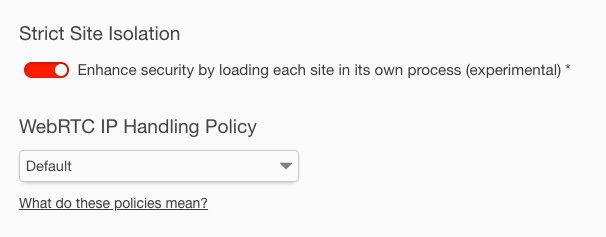
Enabling "Strict Site Isolation" breaks Yubikey U2F 2FA.
Steps to Reproduce
- Enable Strict Site Isolation
- Login to ex) google mail
- Enter username
- Enter password
- Enter 2FA. Prompts user with error. See attached pics.
 bsclifton
on 22 Jul 2018
bsclifton
on 22 Jul 2018
Issues with strict site isolation are fixed with brave-core 😄
You can download the developer channel release here:
https://brave.com/download-dev
bsclifton
on 18 Sep 2018
Awesome! Thanks for the heads up!
On Tue, Sep 18, 2018 at 2:58 PM Brian Clifton notifications@github.com
wrote:
Issues with strict site isolation are fixed with brave-core 😄
You can download the developer channel release here:
https://brave.com/download-dev—
You are receiving this because you were mentioned.
Reply to this email directly, view it on GitHub
https://github.com/brave/browser-laptop/issues/12612#issuecomment-422571049,
or mute the thread
https://github.com/notifications/unsubscribe-auth/AH0xNaZnP6T85Ho1QPOL9IJ7i3yxSlxAks5ucWyPgaJpZM4RbPqd
.>
Sent from Gmail Mobile
 stefanperson
on 19 Sep 2018
stefanperson
on 19 Sep 2018
Related issues
 luixxiul
·
3Comments
luixxiul
·
3Comments
 bbondy
·
3Comments
bbondy
·
3Comments
 antiroyalty
·
3Comments
antiroyalty
·
3Comments
 lukemulks
·
3Comments
lukemulks
·
3Comments
 octohedron
·
3Comments
octohedron
·
3Comments