Browser-laptop: More Explicit Indicators in Brave Payments
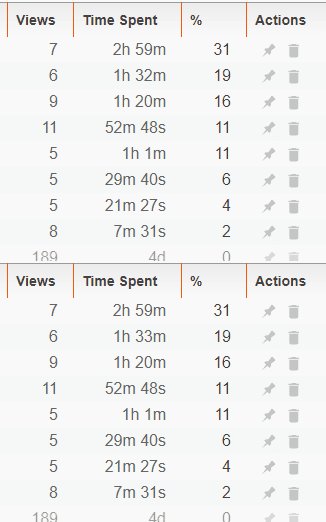
Presently, it may be difficult for some users to identify when _time spent_ is progressing or increasing for entries. No indicator (outside of incrementation) is present:
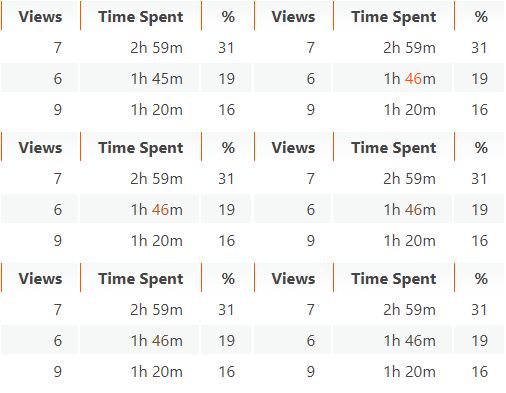
I suggest we briefly change the color of the mutated element, and then fade back to the default color:
 jonathansampson
All 12 comments
00BCD6 for the time transition
 jenn-rhim
on 14 Dec 2017
jenn-rhim
on 14 Dec 2017
Hi there. First off, keep up the great work. ;)
I'd like to tackle this issue. I've found the appropriate component,

I was wondering how you generally mock data when building your UI components. In the case of the ledger, do you have test wallets accounts and run the whole app to test the UI? I generally use a tool like Storybook to build components in isolation and inject test data via props so that I can see how the component behaves but it's not clear to me how your team goes about it in Brave. Is there an example in the code base that I can refer to?
 nickytonline
on 4 Jan 2018
nickytonline
on 4 Jan 2018
From what I can see, I could set the ledgerData at https://github.com/brave/browser-laptop/blob/master/app/browser/tabs.js#L240, but this feels dirty to modify the code with mocked data temporarily just to make the change to the indicator.
nickytonline
on 4 Jan 2018
@nickytonline you can do it like this
- start browser with
npm run start - enable payments
- close browser
- run
npm run add-simulated-synopsis-visits - start browser
This will create 50 fake visits. Hope that this answers your question. If not let me know how I can help
 NejcZdovc
on 4 Jan 2018
NejcZdovc
on 4 Jan 2018
Cool, thanks @NejcZdovc!
nickytonline
on 4 Jan 2018
hi @nickytonline thanks for your interest.
you can generate fake ledger data by running npm run add-simulated-synopsis-visits which will populate the table for you, hope that helps!
 cezaraugusto
on 4 Jan 2018
cezaraugusto
on 4 Jan 2018
How many seconds do you want for the transition? I have a simple example here using the colour @jenn-rhim mentioned, https://codepen.io/nickytonline/pen/MrXNdx.
nickytonline
on 7 Jan 2018
@nickytonline I _think_ I used 2s in my GIFs above. @jenn-rhim, what do you think? 🙂
jonathansampson
on 7 Jan 2018
Now for the hard part. ;)
From what I can see in the code so far, there is no way to know in the synopsis if a time part of the timeSpent changed, e.g. this.props.ledgerData.get('minutesSpent').
If we persist the previous time part values in the synopsis (state in Redux), then we could decide in the <LedgerTable /> component whether not to change the colour of the time part.
The other way we could do it is when the rows prop comes in to the <SortableTable /> component in componentWillUpdate(…) in browser-laptop/ledgerTable.js#296, we could compare the prevProps.rows with nextProps.rows and see which ones had their time parts altered. This would be slower though as this would be processed on every componentWillUpdate(...) of the <SortableTable /> component and would also require us to have some optional method on <SortableTable /> for checking this.
Thoughts?
Maybe there is a more obvious way of knowing this, but for the moment, it's not obvious to me. I'll keep digging into the code base.
nickytonline
on 8 Jan 2018
hi, thanks for the update :)
I think that we need to discuss one thing first. We have two options how we log time. First one is when you are visiting a regular site. We are checking for few events (focus out, new tab, switch tab, etc) and when one of this events happen we log the time. Second one is YouTube video. We are logging this time every time that we receive a heartbeat from YT. This happens every ~40s.
So to get to my point. You need to have at least two monitors or split screen, where in one you have ledger page and in another you have site that you are visiting or video that you are playing, to see this minutes/seconds in real time and experience this effect that we want to achieve.
My question is how big use case is that? I would say quite small. But I like the idea to somehow show users what is the latest that was changed. So I think that we should talk about regular users and their flow as well. So regular user will browse for some time and after x days or when contribution is due will check out the ledger page. Any thoughts on how we should handle or add this feature in this flow? @jonathansampson @jenn-rhim @nickytonline
NejcZdovc
on 8 Jan 2018
The way you've explained it @NejcZdovc, it sounds like it's pretty rare that someone just stares at the ledger page, but if they do, we should show the activity visually for the time spent on sites.
Perhaps we just get the list of domains currently open in all tabs or Windows, pass that in as a prop and when the ledger renders/re-renders, we know to only add colour like in https://codepen.io/nickytonline/pen/MrXNdx to the time spent rows that are in any of the currently open domains.
Thoughts? I'm still new to the Brave code base, so feel free to slice and dice my ideas 😉
nickytonline
on 18 Jan 2018
We've addressed this functionality in brave-core with the upcoming Brave Rewards implementation 😄
 bsclifton
on 3 Sep 2018
bsclifton
on 3 Sep 2018
Related issues
jonathansampson
·
3Comments
 luixxiul
·
3Comments
luixxiul
·
3Comments
 jkup
·
3Comments
bsclifton
·
3Comments
jkup
·
3Comments
bsclifton
·
3Comments
 eljuno
·
3Comments
eljuno
·
3Comments