Browser-laptop: time spent not always being added when viewing live YT video's
Description
Live video doesn't show the time spent on YT
Steps to Reproduce
Original steps
- Install 0.19.91, enable payments
- Visit YouTube and launch a live video, play it for a while
Switch to payments, no time spent shown but lists other values
Updated steps per https://github.com/brave/browser-laptop/issues/11956#issuecomment-344667208
Clean install 0.19.92, enable payments
- Change advance settings to 5 visits
- Continue watching the channel for other videos
- Change settings back to default 1 visit, time spent is not shown
Actual result:

Expected result:
Should be able to record the time the live video is watched
Reproduces how often:
100%
Brave Version
about:brave info:
Brave | 0.19.91
-- | --
rev | a308504
Muon | 4.5.15
libchromiumcontent | 62.0.3202.89
V8 | 6.2.414.40
Node.js | 7.9.0
Update Channel | Release
OS Platform | Microsoft Windows
OS Release | 10.0.15063
OS Architecture | x64
Reproducible on current live release:
N/A
Additional Information
 srirambv
All 9 comments
Removing milestone- @davidtemkin this would require investigation and code changes. Let's chat about when this should be done 😄
 bsclifton
on 14 Nov 2017
bsclifton
on 14 Nov 2017
shows for me on Mac

 darkdh
on 14 Nov 2017
darkdh
on 14 Nov 2017
@darkdh wow, nice! ❤️
bsclifton
on 14 Nov 2017
Seeing the time spent on a new profile

srirambv
on 14 Nov 2017
Seeing the same as @srirambv mentioned here: https://github.com/brave/browser-laptop/issues/11956#issuecomment-344360190 for both new profile and profile upgrade.
 LaurenWags
on 14 Nov 2017
LaurenWags
on 14 Nov 2017
Seems like there's an edge case somewhere where sometimes the time won't appear... However, it looks like it's generally working right now... I checked on Ubuntu, and the times are appearing as expected....
We'll leave this issue in the "Prioritization" milestone and see if we can get more detailed STR.
 kjozwiak
on 14 Nov 2017
kjozwiak
on 14 Nov 2017
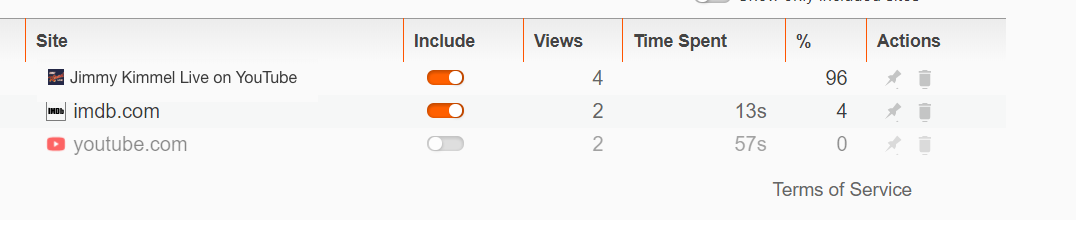
Found good STR for this
Clean install 0.19.92, enable payments
Change advance settings to 5 visits
Continue watching the channel for other videos
Change settings back to default 1 visit, time spent is not shown
srirambv
on 15 Nov 2017
@srirambv can you please try this one with the latest beta?
 NejcZdovc
on 19 Feb 2018
NejcZdovc
on 19 Feb 2018
Looks fixed for now. Followed steps mentioned in https://github.com/brave/browser-laptop/issues/11956#issuecomment-344667208. Tried on existing beta profile and on a clean profile and both the times time spent was shown correctly.
Closing for now. Can reopen it if it happens again.
srirambv
on 19 Feb 2018
Related issues
 lukemulks
·
3Comments
bsclifton
·
3Comments
lukemulks
·
3Comments
bsclifton
·
3Comments
 bbondy
·
3Comments
bbondy
·
3Comments
 luixxiul
·
3Comments
bsclifton
·
3Comments
luixxiul
·
3Comments
bsclifton
·
3Comments