Browser-laptop: Report: Google Chat not working w/latest release
Did you search for similar issues before submitting this one?
YesDescribe the issue you encountered:
Received a report from a b2b partner that Gchat (likely hangouts text via gmail UI) on browser-laptop no longer works in the latest release.
Note: contact mentioned the lack of Gchat functionality forced a switch from Brave to Chrome as their default browser.
Platform (Win7, 8, 10? macOS? Linux distro?):
tbd: assume global.Brave Version (revision SHA):
"Current version" as of 09.08.17 (waiting on actual vConfirmation.)Steps to reproduce:
- Open gmail
- Open a Google chat dialogue via the hangouts module in the gmail web client.
- Attempt to chat. Reports are that it fails.
Actual result:
Gchat doesn't work.Expected result:
Gchat should work.Will the steps above reproduce in a fresh profile? If not what other info can be added?
Should- Is this an issue in the currently released version?
Yes. Can this issue be consistently reproduced?
Tbd. Needs testing.Extra QA steps:
1.
2.
3.Screenshot if needed:
Any related issues:
Potentially related to: https://github.com/brave/browser-laptop/issues/2101
 lukemulks
All 13 comments
+1 from community.brave on macOS
https://community.brave.com/t/latest-brave-update-gchat-blocked-by-3rd-party-cookie-control/7477
lukemulks
on 11 Sep 2017
+1 from community https://community.brave.com/t/google-hangouts-bug-message-not-delivered/7464?u=eljuno
Brave: 0.18.30 on Windows
And I noticed that I can no longer send messages over Gmail (Hangouts).
 eljuno
on 11 Sep 2017
eljuno
on 11 Sep 2017
this requires 3rd party cookies blocking disabled. We can use the sitehack solution just like we did on google drive
 darkdh
on 12 Sep 2017
darkdh
on 12 Sep 2017
Another report of the same issue (when inside Google Hangouts): https://github.com/brave/browser-laptop/issues/10862
 bsclifton
on 12 Sep 2017
bsclifton
on 12 Sep 2017
larger discussion here (maybe we need to revisit): https://github.com/brave/browser-laptop/issues/3715
cc: @bbondy
bsclifton
on 12 Sep 2017
this requires 3rd party cookies blocking disabled. We can use the sitehack solution just like we did on google drive
Is this something users can do, or are we talking behind the curtains things here. I also have issues with Google Hangouts and Google Drive not working. My solution is to just open those things in Chrome. Would love to not have to do that.
 lindsm
on 6 Oct 2017
lindsm
on 6 Oct 2017
@lindsm you can turn the cookie control setting to
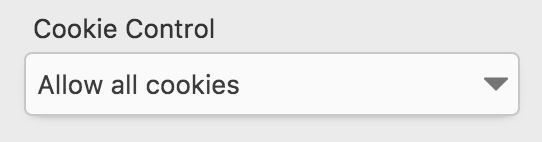
on the site you visit for now
darkdh
on 6 Oct 2017
Perfect, thank you @darkdh. In case anyone else stumbles upon this googling, the site cookie control is found in the "Open Brave Shields Panel" icon.
lindsm
on 7 Oct 2017
Is there any update on this? Brave reverts the cookie setting to "Block 3rd Party" every time it updates or restarts...
 Danl2620
on 4 Nov 2017
Danl2620
on 4 Nov 2017
It's been some months and I see no activity on this thread, which is the thread particular to the Gchat problem. Is there any update to this issue?
Thanks all for the brainsweat you've put into it so far.
 mrfosi
on 5 Apr 2018
mrfosi
on 5 Apr 2018
Thank you @lindsm I was just about to ask. :-)
 gbisaga
on 25 Apr 2018
gbisaga
on 25 Apr 2018
+1 from @rjdp via #14117
 srirambv
on 14 May 2018
srirambv
on 14 May 2018
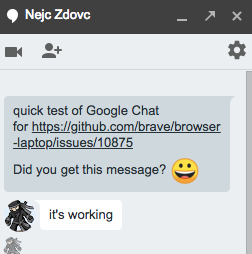
Confirmed this is fixed and working great (thanks @NejcZdovc for confirming). Possibly fixed with https://github.com/brave/browser-laptop/pull/13820
bsclifton
on 2 Jul 2018
Related issues
 stevespringett
·
3Comments
stevespringett
·
3Comments
 octohedron
·
3Comments
lukemulks
·
3Comments
octohedron
·
3Comments
lukemulks
·
3Comments
 jonathansampson
·
3Comments
bsclifton
·
3Comments
jonathansampson
·
3Comments
bsclifton
·
3Comments
Most helpful comment
@lindsm you can turn the cookie control setting to

on the site you visit for now