Browser-laptop: Feature Request: Add Chromium "Tab to Search" feature
Did you search for similar issues before submitting this one?
yesDescribe the issue you encountered:
From community https://community.brave.com/t/implement-the-open-search-client-specification-like-chromiums-tab-to-search-feature/6677?u=eljuno
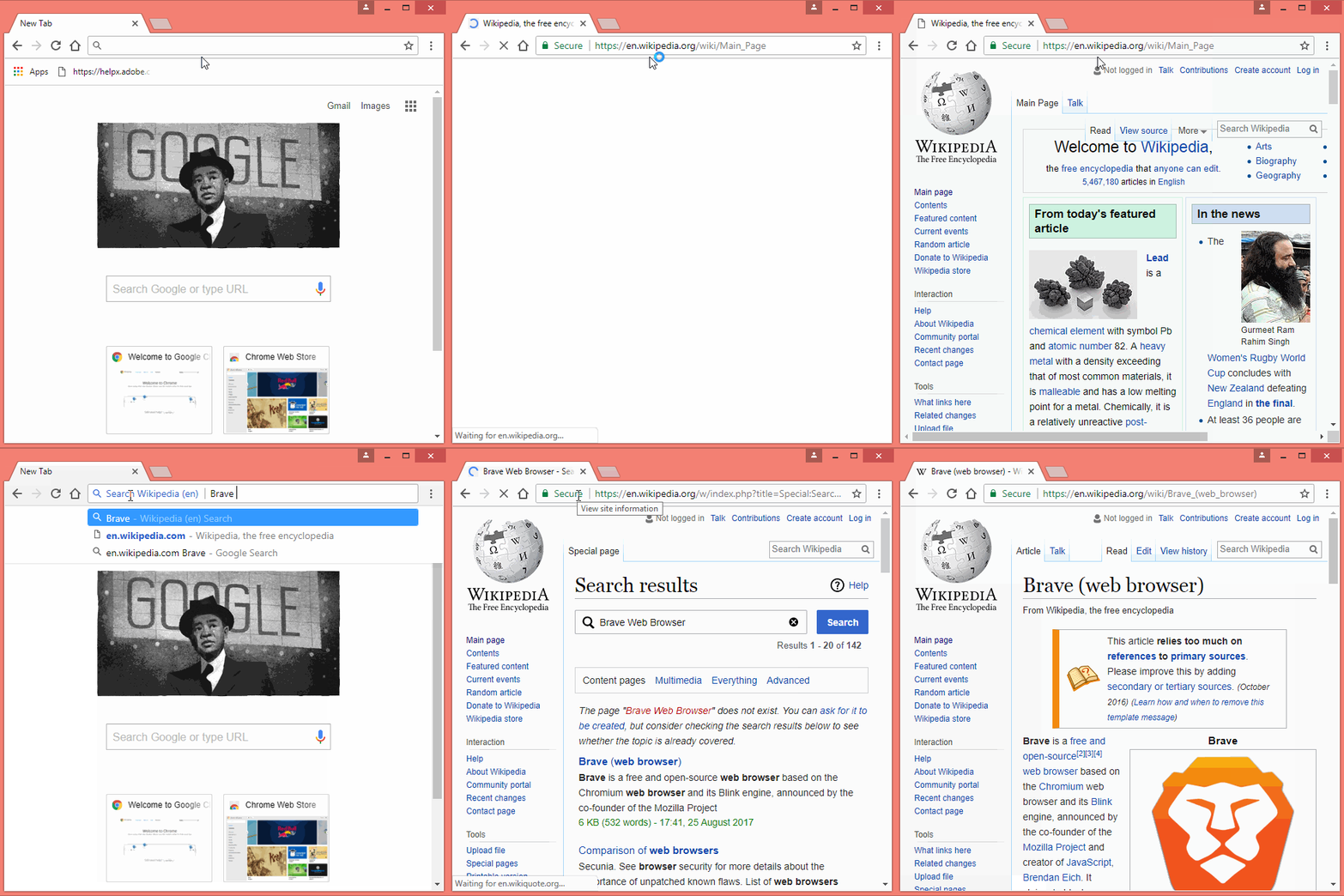
On Chrome, after you visit a website that adheres to the open search standard, Chrome enables this feature where:
a. You begin typing the domain name
b. It suggests a domain completion
c. You hit Tab and it scopes the search to within that domain (like “Search on en.wikipedia.org:”)

d. You type the search term and hit Enter, and it takes you to that website’s search results page (not the default search engine’s)
Engine Go Key is a good solution for the most common websites, but it requires manually adding new ones, remembering the key combination, and misses some other benefits of the Open Search specification like autocomplete.
IE, Firefox, and Chrome all adopt the standard, and well as 200,000+ websites, including most if not all the ones listed in the default Engine Go Key settings.
I do think Engine Go Keys and Open Search are complementary though, so not advocating for one to take the other’s place, but for Open Search to be considered as a future enhancement alongside EGKs.
Here are the relevant references:
a. Details about Chromium’s Tab to Search feature https://www.chromium.org/tab-to-search
b. Open Search FAQ and specification http://www.opensearch.org/Documentation/Frequently_asked_questions
Screenshot if needed:
Here's the record how this feature work in Chrome
Any related issues:
 eljuno
All 2 comments
+1 from community https://community.brave.com/t/add-opensearch-support-add-search-bar-search-engine-suggestion/11504?u=eljuno
eljuno
on 2 Dec 2017
I just wanted to add that I would love the OpenSearch functionality addition. In Chrome I'm always searching by typing half a URL into my address bar then hitting tab. For instance, I'll type "en", the browser autocompletes to "en.wikipedia.org", I hit tab, then I'm in searching-wikipedia-on-enter mode. It's really indispensable.
 jrussellnj
on 27 Mar 2018
jrussellnj
on 27 Mar 2018
Related issues
 jonathansampson
·
3Comments
eljuno
·
3Comments
jonathansampson
·
3Comments
eljuno
·
3Comments
 luixxiul
·
3Comments
luixxiul
·
3Comments
 mykkymk
·
3Comments
luixxiul
·
3Comments
mykkymk
·
3Comments
luixxiul
·
3Comments
Most helpful comment
I just wanted to add that I would love the OpenSearch functionality addition. In Chrome I'm always searching by typing half a URL into my address bar then hitting tab. For instance, I'll type "en", the browser autocompletes to "en.wikipedia.org", I hit tab, then I'm in searching-wikipedia-on-enter mode. It's really indispensable.