Browser-laptop: Brave Keyboard Shortcuts interfere with OS Keyboard Shortcuts
I am running the latest OS X software on a mac.
And I am using the latest version of Brave browser:
Brave: 0.17.16
rev: 2d2ee2fba6a494eb63d0cabb8d5f3e709278c147
Muon: 4.1.8
libchromiumcontent: 59.0.3071.115
V8: 5.9.211.38
Node.js: 7.9.0
Update Channel: dev
os.platform: darwin
os.release: 16.6.0
os.arch: x64
Problem
The brave browser comes with built in command key shortcuts for OSX.
See:

But they interfare with my OS X set command shortcuts. For example it toggles my screen when im trying to make a selective screenshot, preventing me from using the command I intent to use. Is there way to alter or delete this commands in the Brave browser?
If not, I think it should be updated, for me personally it's unworkable, and I imagine it's the same for other potential OS X users. And I desperately want to use Brave and the whole world to use Brave ; )
Thanks in advance.
Tom
 tommyquite
All 12 comments
Original community post with some additional information:
https://community.brave.com/t/mac-keyboard-cmd-shortcuts-toggle-browser-unintented/4872
 LaurenWags
on 21 Jul 2017
LaurenWags
on 21 Jul 2017
Default shortcuts:
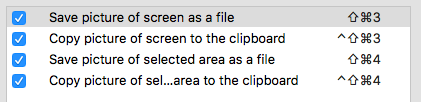
Cmd+number is not a shortcut by default, so @tommyquite must have customized the screenshot shortcuts.
Safari uses the same shortcuts as Brave (Cmd + number), but it does not use them if the user has set the shortcuts to something else.
Steps to reproduce:
- Go to System Preferences > Keyboard > Shortcuts > Screenshots.
- Change "Save picture of screen as a file" to Cmd+3.
- Open Brave, open three tabs, and activate the first tab.
- Press Cmd+3.
- Notice that Brave still switches tabs, and a screenshot is saved to the desktop.
- Open Safari, open three tabs, and activate the first tab.
- Press Cmd+3.
- Notice that Safari does not change tabs, and a screenshot is saved to the desktop.
Brave should use Safari's behavior in this case.
 cndouglas
on 21 Jul 2017
cndouglas
on 21 Jul 2017
Yes @Liunkae, I have customized my OSX keyboard shortcuts.
Hoping there will be a way to resolve this soon. Thanks so far!
tommyquite
on 21 Jul 2017
I have raised this a couple of times over the last 6 months. Sorry for becoming impatient, but are there any plans of fixing this?
It's really preventing me from using the browser and I know many other mac users with me.
Thanks!
tommyquite
on 15 Apr 2018
+1 This issue unfortunately makes Brave a nonstarter for me and I really want to use it.
I also remap Cmd+# to switch desktop spaces and Brave is nonfunctional for me without either operating the same way as Safari or letting me re-assign Brave's hotkeys.
 andrewgioia
on 16 Apr 2018
andrewgioia
on 16 Apr 2018
This affects me as well. I'm trying to use shortcuts on "Select Next Tab" and "Select Previous Tab" (cmd+← and cmd+→) . Works for other apps (iTerm, Chrome). Doesn't work on Brave. When looking at these two menu items in Brave I can see my custom shortcut (that it overrode the default ctrl-tab), but using it just goes through history, and the originals don't work either.
 aljets
on 19 May 2018
aljets
on 19 May 2018
+1
I resize my browser to the right half of the screen (using Spectacle) and it switches to the next tab. This non-feature is doing something I never intended to do.
There should either be a way to disable/change these shortcuts (#545) or Brave should have more sensible defaults. I use a lot of different apps and none of them conflicted with ⌥ + ⌘ + → so far.
 krmbzds
on 4 Jun 2018
krmbzds
on 4 Jun 2018
When will this be solved? Have been waiting for almost a year now for this functionality..
 Gitsomelearnsome
on 20 Jun 2018
Gitsomelearnsome
on 20 Jun 2018
@Gitsomelearnsome It may be fixed when the new Chromium-based version of Brave comes out in a few months.
cndouglas
on 21 Jun 2018
I have very similar issues on Linux (vs. KDE based apps and even urxvt). Unfortunately it's non-deterministic (I know it's Brave because all shortcuts start working after I close the browser) so I can't provide repro steps yet.
 v-p-b
on 28 Sep 2018
v-p-b
on 28 Sep 2018
Closing as wontfix; for folks affected by this, can you please try our Beta channel release?
https://brave.com/download-beta
 bsclifton
on 28 Sep 2018
bsclifton
on 28 Sep 2018
@bsclifton , tried the beta release, this is fixed there for me.
aljets
on 28 Sep 2018
Related issues
 luixxiul
·
3Comments
luixxiul
·
3Comments
 antiroyalty
·
3Comments
antiroyalty
·
3Comments
 bbondy
·
3Comments
bbondy
·
3Comments
 briannyeko
·
3Comments
bsclifton
·
3Comments
briannyeko
·
3Comments
bsclifton
·
3Comments
Most helpful comment
@bsclifton , tried the beta release, this is fixed there for me.