Browser-laptop: Feature request: Add allow forever option to noscript menu
It would be great to have an option to allow certain scripts forever or to always have the browser to remember wich scripts I want blocked on a specific site. And having the option in here:

Originaly posted from community: https://community.brave.com/t/allow-scripts-dropdown-in-address-bar-should-have-an-allow-forever-option/3141
but I would also love this :+1:
 Jacalz
All 22 comments
I remember we used to have that option, though it was removed at some point... CC @diracdeltas for more info.
 luixxiul
on 7 Jun 2017
luixxiul
on 7 Jun 2017
I feel like an "Allow forever" option is a requirement for those of us used to running with javascript disabled by default. I trust Google, I trust Reddit, I trust a handful of other websites I visit regularly, so I don't want to have to re-declare my trust every time I restart the browser. I also very much don't trust a significant number of the links that I follow, so allowing javascript on every site I visit by default isn't an option.
 pierce403
on 7 Jun 2017
pierce403
on 7 Jun 2017
the 'allow always' button was removed because the functionality to allow scripts persistently for a top-level origin is already possible through the Brave shields menu (orange icon in upper right corner)
it's never been possible to allow scripts persistently for specific subresource origins on a top-level origin. we could add this if there is a lot of demand. for most use cases, allowing scripts persistently by top-level origin is sufficient.
 diracdeltas
on 7 Jun 2017
diracdeltas
on 7 Jun 2017
Ah, I see, so the expected workflow is to hit the Lion icon and switch off the "Block Scripts" toggle.
That works, but it does seem a bit out of the way, and not super intuitive for those of using coming from Chrome :-) I still think it would be good to add the button back, despite the redundancy. Thanks!
pierce403
on 7 Jun 2017
I mean to allow a specific script so we can use the website with no script and always have that script that breaks the website allowed @diracdeltas
This is what I want and what I thought you meant @pierce403
Jacalz
on 7 Jun 2017
@Jacalz i understood what you meant; i was addressing both your use case and @pierce403's by distinguishing between top-level and subresource origins in my comment.
diracdeltas
on 7 Jun 2017
Oh sorry didn't quite get that, my bad 🤗 @diracdeltas
But let's keep this open if we get more requests 👍
Jacalz
on 7 Jun 2017
No script also has this that it remembers which scripts to block so it might be a big thing for no script fans 👍
Jacalz
on 7 Jun 2017
I'm not exactly sure how to indicate that I'd like this feature. I thumb'd up and heart'd the original request.
If this exact requirement (Allowing scripts from specific domains on specific pages) is "a bridge too far", maybe it could be amended to always allow scripts from certain domains.
For instance, this page has scripts from github.com.
I believe this feature request would be to always allow scripts from github.com to run on github.com.
Would it be easier if there was some way to always allow scripts from github.com to run on all sites?
(That's kind of the inverse of the solution that @pierce403 felt was sufficient)
 danstolz
on 17 Aug 2017
danstolz
on 17 Aug 2017
I would also like this feature. Some sites I use attempt to use iesnare which I would like to keep blocked whilst permanently enabling the sites base functionality
 dsdavis6
on 8 Sep 2017
dsdavis6
on 8 Sep 2017
+1 from community https://community.brave.com/t/noscript-approach/7240/6?u=eljuno
 eljuno
on 9 Sep 2017
eljuno
on 9 Sep 2017
I feel like an "Allow forever" option is a requirement for those of us used to running with javascript disabled by default. I trust Google, I trust Reddit, I trust a handful of other websites I visit regularly, so I don't want to have to re-declare my trust every time I restart the browser. I also very much don't trust a significant number of the links that I follow, so allowing javascript on every site I visit by default isn't an option.
I agree with this message. The "Allow forever" or "Add to whitelist" is indeed desirable to the ones who have javascript disabled by default, because in my case, besides of not trusting in some scripts in some particular web pages, I don't trust in certain scripts that are common in many web pages like Google's, as example, so (a) I don't want to re-accept my desired scripts each time I visit my favorite web pages (since it's a pain in the a...), but at the same time, (b) I don't want to allow all the scripts in some web pages in order to not do (a).
This is the main non-implemented feature that has me with one of my foot 'outside' the Brave browser and the other one 'inside', so it has a huge importance to me, as you can see.
 Jarkolov
on 10 Sep 2017
Jarkolov
on 10 Sep 2017
+1 from community https://community.brave.com/t/block-third-party-scripts-toggle-remember-custom-script-toggles/9352
Jacalz
on 21 Oct 2017
+1
At the moment it is just possible to allow all scripts for a site or to block all scripts (and then allow specific scripts in the NoScript menu for the current session or until the tab is closed).
But there is no possibility to blacklist all and just allow a few specific scripts forever (which is the feature most people with NoScript use).
Small example:
I visit a site from some specific newspaper rather often.
This site is running 12 scripts. Half of them are from some third-party sites. Just one (!) of them is needed to display the site. So why should i run the other 11?
 uriesk
on 12 Nov 2017
uriesk
on 12 Nov 2017
+1
For most websites the default that I would want is to allow just the scripts that come from the same top-level domain.
 BorisVSchmid
on 18 Dec 2017
BorisVSchmid
on 18 Dec 2017
Agreed, allowing the same domain would help. Allowing specific scripts forever would be better. Allowing specific scripts for each site separately would be even better, as then you can decide for each site which scripts should be allowed until you disable it again.
 nkempe
on 1 Feb 2018
nkempe
on 1 Feb 2018
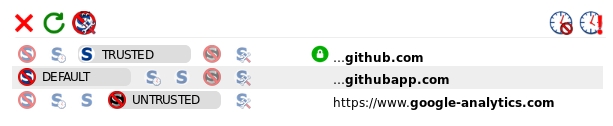
Indeed, it would allow to do something like that, blocking some scripts, and allowing others, that is how NoScript does it natively, so why not adding this window instead of the custom one you made:
 Tvax
on 20 Mar 2018
Tvax
on 20 Mar 2018
Surprised this one isn't sorted yet. Please implement this.
A site I frequent regularly has 1 dodgy ad-script, 2 trackers & one legit / site functionality script (to do with anti-bot verification). I'd like to allow JUST the ONE script on that site. Unfortunately for now I either have to allow ALL, or keep using the panel to de-select all others and allow that single script till browser reboot.
I visit this site almost every day, so you can imagine how annoying this gets having to re-allow that one script every bloody time. Why can I not manually edit the whitelist?
 BobT36
on 1 Jul 2018
BobT36
on 1 Jul 2018
+1 from @illuzen via https://github.com/brave/browser-laptop/issues/14659
So I have JS turned off by default. One of my favorite features of Brave. Then I restart my computer and I have to recreate the whitelist every time. While this is probably a little more secure as accidental additions to the whitelist get removed pretty quickly, it also takes up a lot of my time. Could we make an opt-in persist-preferences-in-a-config-file-somewhere feature?
 bsclifton
on 6 Jul 2018
bsclifton
on 6 Jul 2018
+1
I specifically allow each and every script for every website (ex. "noscript"), that doesn't seem possible with brave. Can you expand this feature so it's more like "noscript", or allow for a 3rd party plugin/extension like noscript for people that need more functionality?
 dimyself
on 17 Sep 2018
dimyself
on 17 Sep 2018
Looks like this is fixed with brave-core 😄
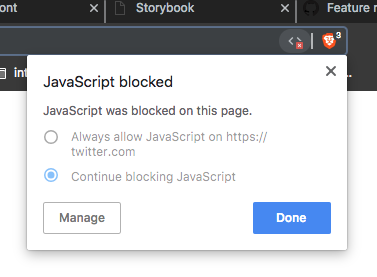
If folks watching this issue want to grab a copy, head on over to:
https://brave.com/download-dev
bsclifton
on 21 Sep 2018
I incorrectly thought this was fixed in brave-core... technically, it may be fixed because of the above dialog. But we want an integration with out shields menu. I've captured an issue in the brave-core issue log to track that here:
https://github.com/brave/brave-browser/issues/1889
bsclifton
on 29 Oct 2018
Related issues
eljuno
·
3Comments
 antiroyalty
·
3Comments
antiroyalty
·
3Comments
 jonathansampson
·
3Comments
jonathansampson
·
3Comments
 lukemulks
·
3Comments
lukemulks
·
3Comments
 jkup
·
3Comments
jkup
·
3Comments
Most helpful comment
Surprised this one isn't sorted yet. Please implement this.
A site I frequent regularly has 1 dodgy ad-script, 2 trackers & one legit / site functionality script (to do with anti-bot verification). I'd like to allow JUST the ONE script on that site. Unfortunately for now I either have to allow ALL, or keep using the panel to de-select all others and allow that single script till browser reboot.
I visit this site almost every day, so you can imagine how annoying this gets having to re-allow that one script every bloody time. Why can I not manually edit the whitelist?