Browser-laptop: Windows only - Bookmarks toolbar - Bookmark hover targets are pushed down if there are no tabs below the folder
Did you search for similar issues before submitting this one?
YesDescribe the issue you encountered:
A user from support reported that the highlight effect did not work as expected if there wasn't a tab underneath the bookmark folder.Platform (Win7, 8, 10? macOS? Linux distro?):
WindowBrave Version (revision SHA):
0.15.310Steps to reproduce:
- Create quite a few bookmark folders and add bookmarks
- Check bookmark folders above a tab vs those which exist over no tab.
- Slowly hover over each option
Actual result:
The bookmark or sub-folder did not highlight for folders without tabs beneath them. (It was later discovered the targets were pushed down to the last couple pixels of each first bookmark entry in the expansion menu.Expected result:
The bookmark or sub-folder should have a highlight style appliedWill the steps above reproduce in a fresh profile? If not what other info can be added?
YesIs this an issue in the currently released version?
YesCan this issue be consistently reproduced?
YesExtra QA steps:
1.
2.
3.Screenshot if needed:
Any related issues:
 alexwykoff
All 26 comments
Have a somewhat similar problem since last update to 0.15.310 on MacOS.
Bookmarks can no longer be dragged, dropped. Only created or deleted.
OS: Sierra 10.12.5 (16F73)
 xjmzx
on 30 May 2017
xjmzx
on 30 May 2017
 eljuno
on 3 Jun 2017
eljuno
on 6 Jun 2017
eljuno
on 3 Jun 2017
eljuno
on 6 Jun 2017
@alexwykoff try to repro this plz 😸
alexwykoff
on 13 Jun 2017
+1 from community https://community.brave.com/t/unable-to-click-first-bookmark-in-a-folder-via-bookmark-bar/5803?u=eljuno
eljuno
on 14 Aug 2017
+3 from #10323
 NejcZdovc
on 15 Aug 2017
NejcZdovc
on 15 Aug 2017
+1 from community https://community.brave.com/t/favorite-bar-issue/5900?u=eljuno
eljuno
on 15 Aug 2017
+1 from community https://community.brave.com/t/bug-report-bookmarks-not-being-selected/8656?u=eljuno
eljuno
on 6 Oct 2017
I suspect it is due to that the area is reserved for system context menu on Windows. @bsclifton might know well about that.
 luixxiul
on 19 Oct 2017
luixxiul
on 19 Oct 2017
+1 from https://github.com/brave/browser-laptop/issues/12097#issuecomment-348804531
 bsclifton
on 4 Dec 2017
bsclifton
on 4 Dec 2017
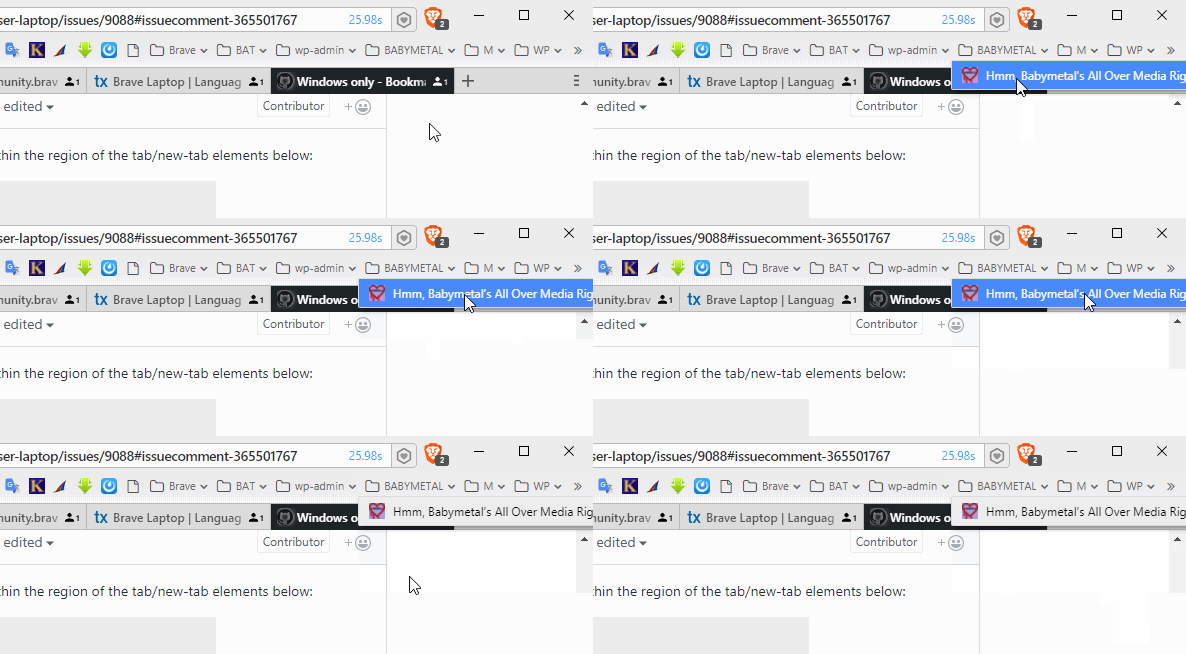
This does appear to rely on the mouse being within the region of the tab/new-tab elements below:


Looks like it may be identical/related to https://github.com/brave/browser-laptop/issues/9436#issuecomment-323191622.
 jonathansampson
on 4 Dec 2017
jonathansampson
on 4 Dec 2017
The problem here is collision with _drag regions_. These do not respect z-index, and thus take-over the mouse anytime you enter a the coordinates of a drag-region. In the above example, the entire tabStrip is draggable. The tabs and new-tab button are not, which allows you to hover bookmarks while in their drag region.
One solution is to temporarily remove the .allowDragging class from .tabStripContainer when a bookmark menu is opened, and restore the class once the bookmark menu has closed.
<span class="tabStripContainer allowDragging">...</span>
+1 from twitter: https://twitter.com/wwwmarty/status/944245295927394304
 LaurenWags
on 22 Dec 2017
LaurenWags
on 22 Dec 2017
+1 from community https://community.brave.com/t/first-favourite-website-in-a-folder-is-clickable-only-on-a-first-pixel/13328?u=eljuno
eljuno
on 8 Jan 2018
+2 from community https://community.brave.com/t/bookmark-bug-unable-to-click-the-first-bookmark/13996/2
 srirambv
on 18 Jan 2018
eljuno
on 18 Jan 2018
srirambv
on 18 Jan 2018
eljuno
on 18 Jan 2018
+1 from community https://community.brave.com/t/bookmark-folder/14350?u=eljuno
+1 from community https://community.brave.com/t/difficult-time-accessing-first-bookmark-within-bookmark-folders/14417?u=eljuno
eljuno
on 20 Jan 2018
I think that we need to bump priority on this one @bsclifton
NejcZdovc
on 20 Jan 2018
+1 from community https://community.brave.com/t/unclickable-bookmark-area/14652?u=eljuno
eljuno
on 23 Jan 2018
pulled into 0.21
NejcZdovc
on 23 Jan 2018
Can't reproduced on latest stable version 0.20.30
Record:

eljuno
on 8 Feb 2018
@elia The dropdown needs to overlap the tab and new-tab button. See the positions of the UI elements in this comment: https://github.com/brave/browser-laptop/issues/9088#issuecomment-349021143
jonathansampson
on 13 Feb 2018
pushing back to 0.22
NejcZdovc
on 14 Feb 2018
@jonathansampson Still can't reproduce this on latest stable. 😄
eljuno
on 14 Feb 2018
@bsclifton @jonathansampson feel free to close if no repro thx
alexwykoff
on 13 Mar 2018
Confirmed this works great using 0.21.18 on Windows 10 x64 😄 👍
bsclifton
on 20 Mar 2018
Related issues
 bbondy
·
3Comments
luixxiul
·
3Comments
jonathansampson
·
3Comments
bbondy
·
3Comments
luixxiul
·
3Comments
jonathansampson
·
3Comments
 briannyeko
·
3Comments
briannyeko
·
3Comments
 stevespringett
·
3Comments
stevespringett
·
3Comments
Most helpful comment
@alexwykoff try to repro this plz 😸