Browser-laptop: Loading spinner sometimes doesn't stop
Hello
This issue effects all versions of Brave I have tried on Linux and Windows
Basically when a page is loading nothing is happening until the page is displayed, this is a huge pitfall of Brave as it looks like nothing is happening, this could lead to multiple refreshes thinking nothing is happening.
I would say this is a bug and not a feature request as every browser has some form of progress bar and I think as part of a UI it is a vital aspect of any browser.
I will hope this gets resolved as so far I love brave and using it to replace Firefox
With Regards
 ClarLabs
All 18 comments
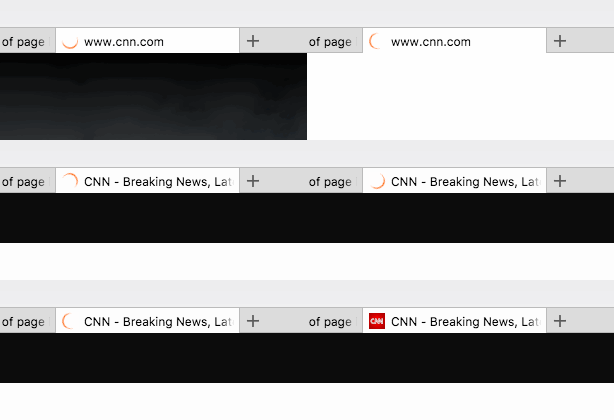
@ClarLabs we should be having a spinner which shows in the tab... are you not seeing it? (or maybe it's not obvious enough)
We did have a version (possibly two) of Brave where this functionality unintentionally broke (so no spinner would be shown). It should work great- here's a demo:
 bsclifton
on 9 Jun 2017
bsclifton
on 9 Jun 2017
Add progress bar of page load
I assume a progress bar like one which Vivaldi has.
 luixxiul
on 9 Jun 2017
luixxiul
on 9 Jun 2017
I assume a progress bar like one which Vivaldi has.
Vivaldi has the progress indicator in the URL bar.

I would suggest add the progress indicator to the tab itself rather than anywhere else. With an option to disable it in settings similar to page theme color option under tabs.
cc: @bradleyrichter on thoughts
 srirambv
on 11 Jun 2017
srirambv
on 11 Jun 2017
Hello
Sorry for the late response, there is an indication of page loading, which is fine, however, in some circumstances, it does not show up, I cannot find a way to replicate the issue, other times it is delayed which can lead to thinking nothing is happening.
I hope this helps
With Regards
Chris Russell
June 11, 2017 8:53 AM, "Sriram Bellur Venkataram" wrote:
I assume a progress bar like one which Vivaldi has.
Vivaldi has the progress indicator in the URL bar.
I would suggest add the progress indicator to the tab itself rather than anywhere else. With an option to disable it in settings similar to page theme color option under tabs.
cc: @bradleyrichter (http://click.clarlabs.com/f/a/xyzS6xTVkJC0hTZDVRyoww~~/AAGm0AA~/RgRbHmRfP0EIACybosh3fWNXA3NwY1gEAAAAAFkGc2hhcmVkYQlnZW5lcmFsXzFgDDUyLjI3LjQ0LjE5MEIKAADfMD1ZI_MubFJrcmVwbHkrMDBlMmUzOTFiZmMxZWM4MzkwY2ExNzU4ZjEyMzE1MzA0ZGViMzY3ZDRmYjMzYzA3OTJjZjAwMDAwMDAxMTU1NGI4ZTE5MmExNjljZTBkYmQ0OTM0QHJlcGx5LmdpdGh1Yi5jb20JUQQAAAAARCFodHRwczovL2dpdGh1Yi5jb20vYnJhZGxleXJpY2h0ZXJHAnt9) on thoughts
—
You are receiving this because you were mentioned.
Reply to this email directly, view it on GitHub (http://click.clarlabs.com/f/a/nPZHTkAFBWZ10EFixU6tNg/AAGm0AA~/RgRbHmRfP0EIACybosh3fWNXA3NwY1gEAAAAAFkGc2hhcmVkYQlnZW5lcmFsXzFgDDUyLjI3LjQ0LjE5MEIKAADfMD1ZI_MubFJrcmVwbHkrMDBlMmUzOTFiZmMxZWM4MzkwY2ExNzU4ZjEyMzE1MzA0ZGViMzY3ZDRmYjMzYzA3OTJjZjAwMDAwMDAxMTU1NGI4ZTE5MmExNjljZTBkYmQ0OTM0QHJlcGx5LmdpdGh1Yi5jb20JUQQAAAAAREpodHRwczovL2dpdGh1Yi5jb20vYnJhdmUvYnJvd3Nlci1sYXB0b3AvaXNzdWVzLzkwMDEjaXNzdWVjb21tZW50LTMwNzYxMjc4NEcCe30~), or mute the thread (http://click.clarlabs.com/f/a/ChNlvEJWLrOMNijlYCNkpg/AAGm0AA~/RgRbHmRfP0EIACybosh3fWNXA3NwY1gEAAAAAFkGc2hhcmVkYQlnZW5lcmFsXzFgDDUyLjI3LjQ0LjE5MEIKAADfMD1ZI_MubFJrcmVwbHkrMDBlMmUzOTFiZmMxZWM4MzkwY2ExNzU4ZjEyMzE1MzA0ZGViMzY3ZDRmYjMzYzA3OTJjZjAwMDAwMDAxMTU1NGI4ZTE5MmExNjljZTBkYmQ0OTM0QHJlcGx5LmdpdGh1Yi5jb20JUQQAAAAARGZodHRwczovL2dpdGh1Yi5jb20vbm90aWZpY2F0aW9ucy91bnN1YnNjcmliZS1hdXRoL0FPTGprUkZ1MF95WUhGOWFtMGRKZnlZWjkxTmdsWXFFa3M1c0M1emhnYUpwWk00TmkxODJHAnt9).
ClarLabs
on 11 Jun 2017
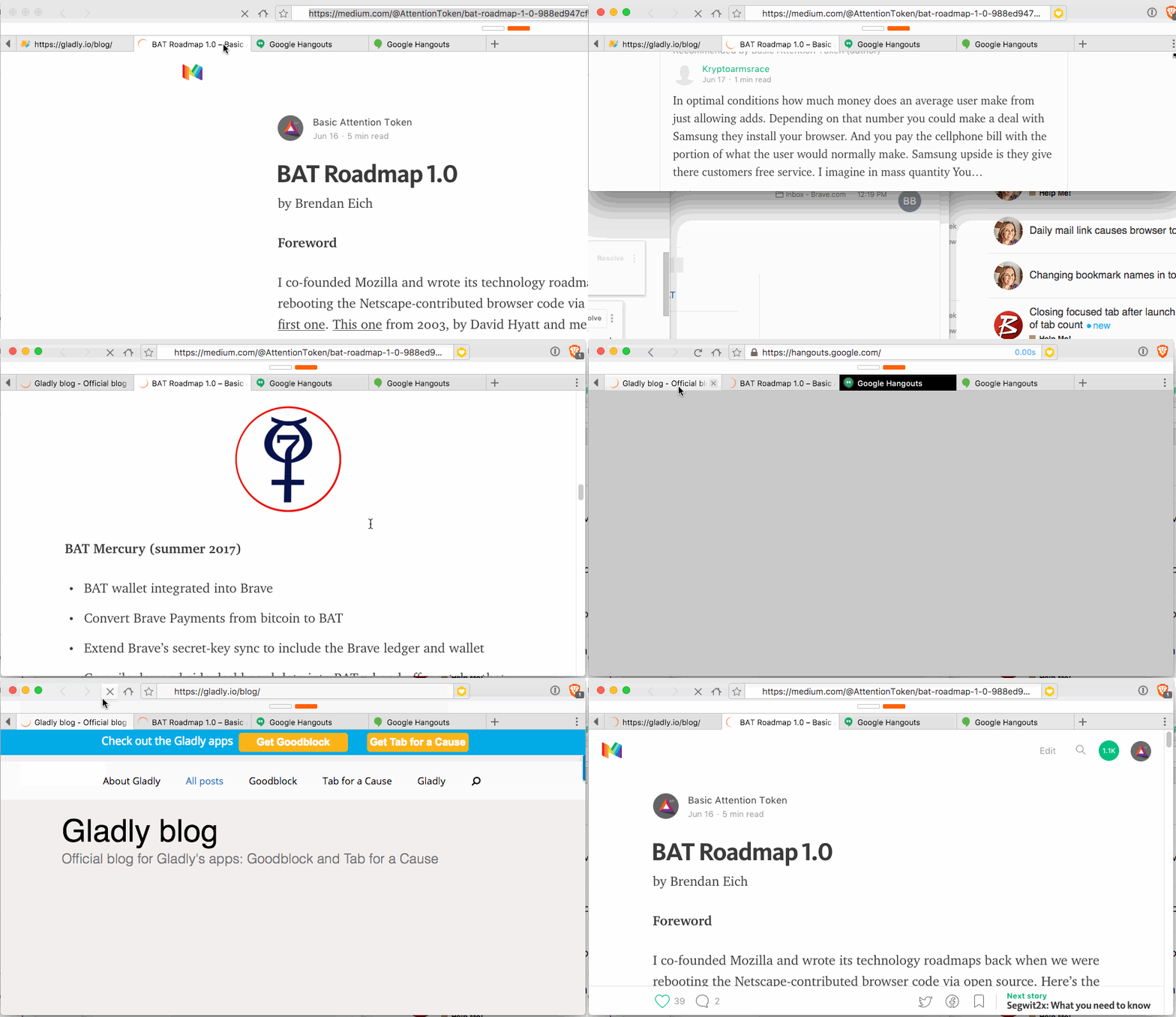
+1 from @bradleyrichter; He noticed it spinning and never stopping
bsclifton
on 21 Jun 2017
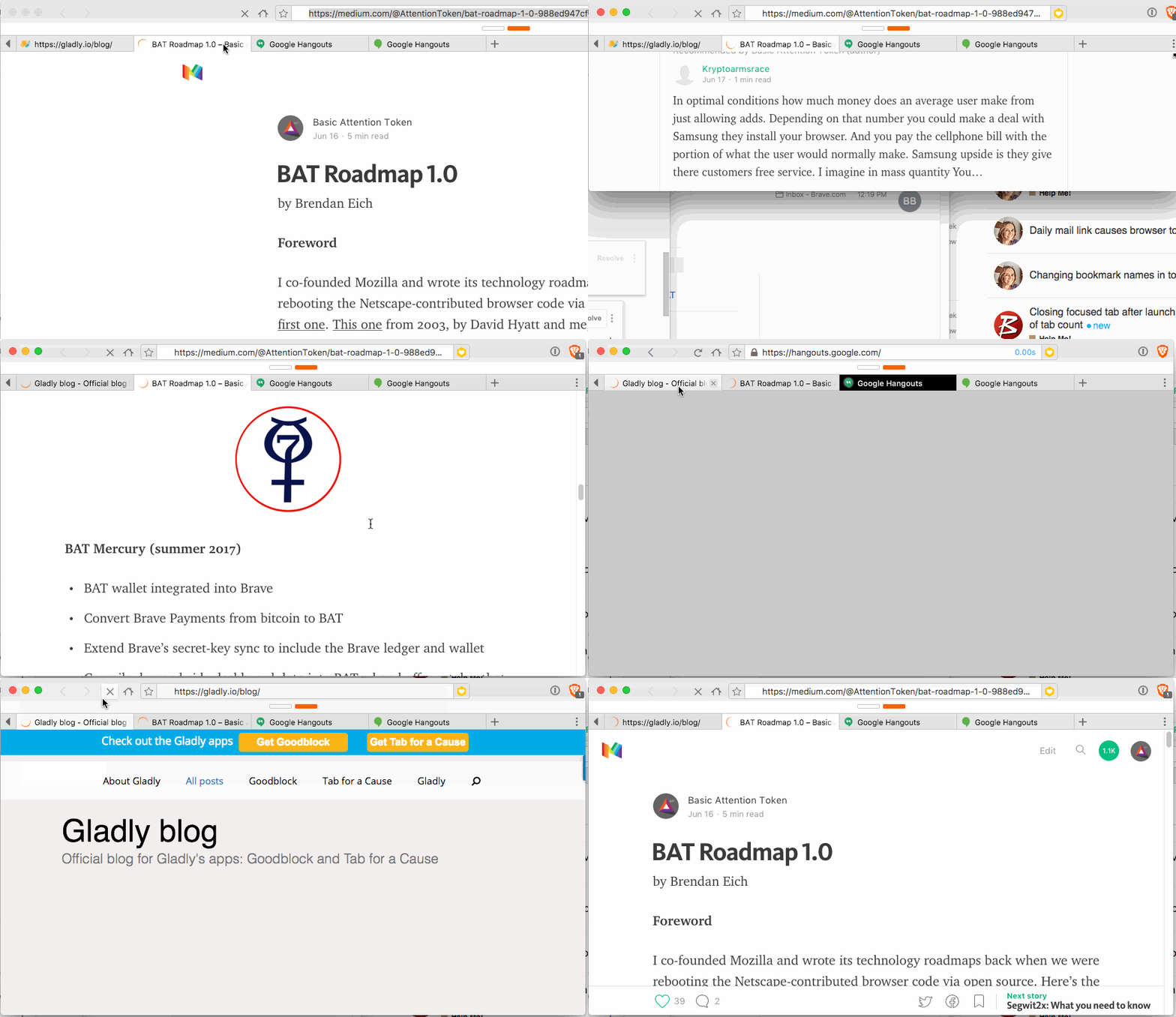
I will add to this issue and state that we are also seeing an increase in tabs that show as loading but they are indeed finished loading so the icon state change is somehow missed.
 bradleyrichter
on 27 Jun 2017
bradleyrichter
on 27 Jun 2017
I also see this quite often with Youtube tabs.
 NejcZdovc
on 27 Jun 2017
NejcZdovc
on 27 Jun 2017
+1 from https://github.com/brave/browser-laptop/issues/9893 via Twitter:
https://twitter.com/Music_Journeys/status/882809848445927424
_another bug i've noticed that still exists in the latest Brave is i get a spinner in the tab even when a tab has fully loaded from Soundcloud. an example is the following: https://t.co/zVgGE9E4gy_
bsclifton
on 13 Jul 2017
one STR:
- load a page
- while loading, drag tab to another index
- loading keeps forever
 cezaraugusto
on 20 Sep 2017
cezaraugusto
on 20 Sep 2017
so for me, there are three main issues that may lead to this:
- adblocker issue, where some ad/tracker keeps trying to pop out and never finish loading
- browser rendering problem, where due to animation timing the browser never stops rendering the animation
- react rendering problem, when at a given point React should update, it never does
I have a hard time reproducing it and now even after my above comment, it is still hard to repro.
cezaraugusto
on 20 Sep 2017
ok found a new one. 100% reproducible.
- Open a page
- While still loading, detach from window
- loading forever
cezaraugusto
on 20 Sep 2017
another good str:
cezaraugusto
on 21 Sep 2017
^^ props to @bsclifton 🚗
cezaraugusto
on 21 Sep 2017
srirambv
on 23 Oct 2017
I have this in progress and nearly done, but it is pretty big so I think I won't put it in a hotfix and put it in 0.20.x instead.
 bbondy
on 31 Oct 2017
bbondy
on 31 Oct 2017
With google sheets, the loading finishes, and the spinner switches to a normal favicon, after which loading starts again and never finishes. With shields turned off, this does not replicate.
With the benzworld link ^, the same thing happens in chrome, so probably an issue with that site.
Cannot reproduce with soundcloud. So I can look at the google sheets with shields issue, and the detached loading tabs issue.
 petemill
on 22 Dec 2017
petemill
on 22 Dec 2017
Going to move this to a later milestone, so it is done in parallel with the single-webview work, which will require a lot of events (not only the loading start / end events) to move to the browser process from the renderer process (it is currently attached to the webview in the renderer process)
petemill
on 22 Dec 2017
Was about to contribute a ticket related to this issue for tab spinner and found this thread open. Wanted to add that while using Google Sheets, I'm...:
- unable to refresh w/o 'stopping' the page first by clicking on X.
- unable to remove spinner issue by turning shields off.
Hope this helps.
Brave: 0.19.123
rev: f45cb3a2b308ea1c893f8b2db6143958b8e8d0ac
Muon: 4.5.31
libchromiumcontent: 63.0.3239.108
V8: 6.3.292.48
Node.js: 7.9.0
Update Channel: Release
OS Platform: macOS
OS Release: 17.3.0
OS Architecture: x64
 modusops
on 4 Jan 2018
modusops
on 4 Jan 2018
Related issues
 jonathansampson
·
3Comments
bsclifton
·
3Comments
jonathansampson
·
3Comments
bsclifton
·
3Comments
 jkup
·
3Comments
luixxiul
·
3Comments
jkup
·
3Comments
luixxiul
·
3Comments
 lukemulks
·
3Comments
lukemulks
·
3Comments