Browser-laptop: Cannot login to Google Account with Google Prompt 2FA
- Did you search for similar issues before submitting this one?
Yes - Describe the issue you encountered:
When signing in to Google Account, I have 2FA set with Google Prompt being the primary. When logging in, the prompt goes to phone, but before I can approve, says 2FA failed. Have to use another 2FA method to login. - Platform (Win7, 8, 10? macOS? Linux distro?):
Win8.1, Win10 Brave Version (revision SHA):
Brave: 0.13.5
rev: 1db81cb18b6919535792bb7e198ab87276bd67ea
Muon: 2.56.8
libchromiumcontent: 56.0.2924.87
V8: 5.6.326.50
Node.js: 7.4.0
Update Channel: dev
os.platform: win32
os.release: 6.3.9600
os.arch: x64Steps to reproduce:
- Login to Google Account
- Get prompt
- Get Denied message
Actual result:
Denied access- Expected result:
Granted Access - Will the steps above reproduce in a fresh profile? If not what other info can be added?
Yes - Is this an issue in the currently released version?
Yes - Can this issue be consistently reproduced?
Yes, has happened on 2 machines. Extra QA steps:
1.
2.
3.Screenshot if needed:
Will record next time I try this.- Any related issues:
 mouse-man
All 39 comments
I've got the same issue -- Brave browser shows immediate 2FA failure although my phone receives (Yes|No) prompt successfully. I have to fall back to Google Authenticator. Other details identical except for OS which is Win 7 (x64).
 philkloose
on 29 Mar 2017
philkloose
on 29 Mar 2017
+1 from community https://community.brave.com/t/gmail-2fa-authentication-not-working-when-shield-is-up/3532
 srirambv
on 12 Jul 2017
srirambv
on 12 Jul 2017
+1 from community (see # 16 in this post: https://community.brave.com/t/issue-small-bugs-found-in-first-couple-hours-of-using-brave/5075)
 LaurenWags
on 3 Aug 2017
LaurenWags
on 3 Aug 2017
 luixxiul
on 18 Aug 2017
luixxiul
on 18 Aug 2017
Also getting this with Chrome Version 60.0.3112.113 and Android.
Chrome instantly shows “Your sign-in attempt timed out. Resend the prompt to try again.” and does not react when I tap yes on the phone
 deive
on 8 Sep 2017
deive
on 8 Sep 2017
I also getting in with resembling problem.
"One tap auth" doesn't work.
When I get prompt from google to my phone, brave shows me "time out" dialogue without second.
My enviroment is
Wiindows10 32bit
brave 0.19.53 reve09025b
Strangely, google chrome on same device works normaly.
Only brave deny my access.
 volcani
on 21 Oct 2017
volcani
on 21 Oct 2017
I'm developing a http proxy and for some reasons I have the same error with "One tap auth" regardless of the browser. Any idea what might cause that?
 winteraz
on 2 Dec 2017
srirambv
on 5 Dec 2017
winteraz
on 2 Dec 2017
srirambv
on 5 Dec 2017
+1 from #12196
srirambv
on 6 Dec 2017
Same problem here. Need to use Google Authenticator
 thereseng
on 15 Feb 2018
thereseng
on 15 Feb 2018
This is definitely still a problem in normal tabs and private tabs. End up having to use sms to authenticate.
Brave: 0.21.18
V8: 6.4.388.41
rev: 580be782bc37ed8580dd22f79e1d2d355fddfb89
Muon: 4.8.2
OS Release: 17.4.0
Update Channel: Release
OS Architecture: x64
OS Platform: macOS
Node.js: 7.9.0
Brave Sync: v1.4.2
libchromiumcontent: 64.0.3282.140
 bbw22
on 11 Mar 2018
bbw22
on 11 Mar 2018
I have a slightly different issue, but related. 2FA does not work in Brave even with shields down when using a Yubikey:
Brave: 0.21.24
V8: 6.5.254.36
rev: 19c78a1624118e344852c4c0f44c0d45be841b5f
Muon: 4.9.3
OS Release: 16.7.0
Update Channel: Release
OS Architecture: x64
OS Platform: macOS
Node.js: 7.9.0
Brave Sync: v1.4.2
libchromiumcontent: 65.0.3325.162
This is for github, gitlab, and basically any 2FA site I tried. It works perfectly fine in Chrome.
Version 65.0.3325.181 (Official Build) (64-bit)
 freimer
on 25 Mar 2018
freimer
on 25 Mar 2018
@freimer Yeah, Brave doesn't seem to support Fido U2F, as the Yubikey won't flash to prompt. 🙁
 csleary
on 27 Mar 2018
csleary
on 27 Mar 2018
Actually, this works with brave-beta...
freimer
on 27 Mar 2018
This may have been fixed with https://github.com/brave/browser-laptop/issues/11401 in 0.22.x (if you imported from Chrome)
For folks experiencing this: can you please try our 0.22.x release?
https://github.com/brave/browser-laptop/releases/tag/v0.22.9dev
 bsclifton
on 28 Mar 2018
bsclifton
on 28 Mar 2018
@bsclifton Does indeed sort it. Thanks Brian!
csleary
on 28 Mar 2018
@csleary awesome! I'll close this issue for now- let's re-open if 0.22.x does not work for you (as @freimer mentioned, beta is on the 0.22.x version, which is why it worked)
bsclifton
on 28 Mar 2018
Still hapenning
Brave: 0.22.22
V8: 6.5.254.41
rev: 63033109963be0a995b3d1ed9723870beeb191c4
Muon: 5.1.2
OS Release: 17.5.0
Update Channel: Release
OS Architecture: x64
OS Platform: macOS
Node.js: 7.9.0
Brave Sync: v1.4.2
libchromiumcontent: 65.0.3325.181
 DanEhrlich
on 19 Apr 2018
DanEhrlich
on 19 Apr 2018
I'm getting this issue as well.
Brave | 0.22.22
V8 | 6.5.254.41
rev | 6303310
Muon | 5.1.2
OS Release | 10.0.16299
Update Channel | Release
OS Architecture | x64
OS Platform | Microsoft Windows
Node.js | 7.9.0
Brave Sync | v1.4.2
libchromiumcontent | 65.0.3325.181
 qmlowery
on 24 Apr 2018
qmlowery
on 24 Apr 2018
I still have the issue aswell, I have the beta right?
Brave | 0.22.669
-- | --
V8 | 6.6.346.24
rev | 6cda2e8
Muon | 5.2.7
OS Release | 15.6.0
Update Channel | Release
OS Architecture | x64
OS Platform | macOS
Node.js | 7.9.0
Brave Sync | v1.4.2
libchromiumcontent | 66.0.3359.117
 kaibakker
on 20 May 2018
kaibakker
on 20 May 2018
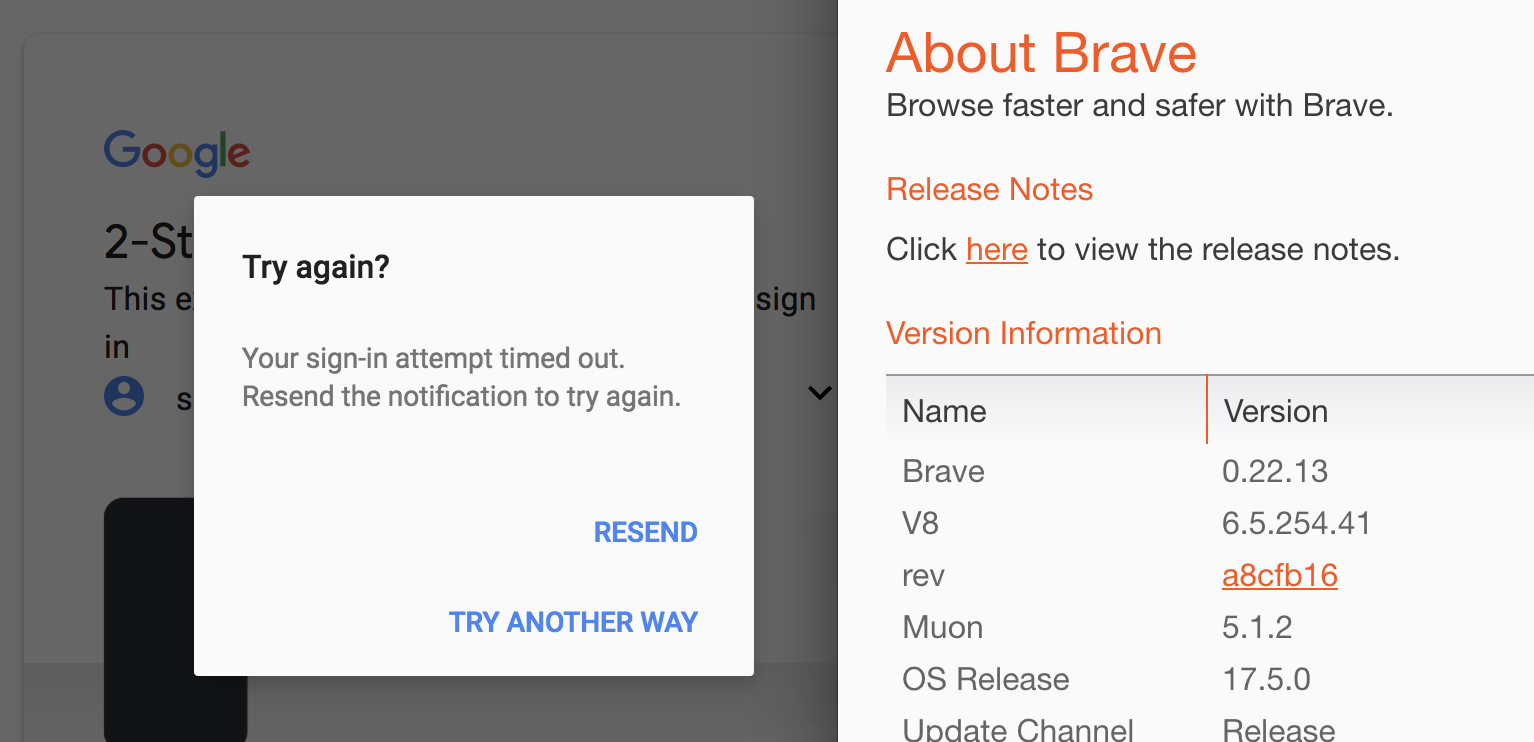
@bsclifton still failing on 0.22.13
 chibicode
on 20 May 2018
chibicode
on 20 May 2018
Reproducible on 0.22.714.
 garrettr
on 24 May 2018
garrettr
on 24 May 2018
Still happening on 0.22.721 on Xubuntu 18.04.
 Captain-Chaos
on 5 Jun 2018
Captain-Chaos
on 5 Jun 2018
Still happening to me. Android, 1.0.48, chromium 66.0.3359.158
7.1.1, build NMF26V
 gymnastboatman
on 8 Jun 2018
gymnastboatman
on 8 Jun 2018
+1 from community: https://community.brave.com/t/google-inbox-login-with-2fa-using-google-app-on-iphone-not-working-properly/23976
LaurenWags
on 20 Jun 2018
+1 from community https://community.brave.com/t/brave-cant-login-with-google-tap-your-smartphone-feature/26460?u=eljuno
 eljuno
on 28 Jun 2018
eljuno
on 28 Jun 2018
Why is this closed? This is still an issue
Brave | 0.23.31
-- | --
V8 | 6.7.288.46
rev | 3148ace
Muon | 7.1.5
OS Release | 17.5.0
Update Channel | Release
OS Architecture | x64
OS Platform | macOS
Node.js | 7.9.0
Brave Sync | v1.4.2
libchromiumcontent | 67.0.3396.103
 ghost
on 18 Jul 2018
ghost
on 18 Jul 2018
Still happening for me as well.

 jacobcantele
on 9 Aug 2018
jacobcantele
on 9 Aug 2018
How's this closed? The crap's still going on. If you can't fix it don't close it. Incompetent.
 zeroxxx2
on 12 Aug 2018
zeroxxx2
on 12 Aug 2018
@zeroxxx2 it's not closed actually. It was thought that a patch earlier this year fixed it (which it didn't) and the issue was re-opened (back in May)
bsclifton
on 13 Aug 2018
...and then closed/re-opened again right now, because I clicked the wrong button 😛
bsclifton
on 13 Aug 2018
I just came here after encountering this issue. I was able to work around by setting Cookie Control to Allow all cookies for accounts.google.com, after which my two-factor push immediately started working.
Brave: 0.23.79
V8: 6.8.275.24
rev: 51b49051a779f0db94fbcfd0df5faca781299ea0
Muon: 8.0.7
OS Release: 4.4.0-130-generic
Update Channel: Release
OS Architecture: x64
OS Platform: Linux
Node.js: 7.9.0
Brave Sync: v1.4.2
libchromiumcontent: 68.0.3440.84
 scgruber
on 25 Aug 2018
scgruber
on 25 Aug 2018
Writing to confirm @scgruber's workaround:
Cookie Control(Clear all)
https?://accounts.google.com:
Allow all cookies
My version details are as follows.
Brave | 0.23.105
V8 | 6.8.275.24
rev | 9a46f8f
Muon | 8.0.9
OS Release | 10.0.17134
Update Channel | Release
OS Architecture | x64
OS Platform | Microsoft Windows
Node.js | 7.9.0
Brave Sync | v1.4.2
libchromiumcontent | 68.0.3440.84
 studro
on 11 Sep 2018
studro
on 11 Sep 2018
Still there in v0.24.0

 erasmus
on 21 Sep 2018
erasmus
on 21 Sep 2018
Same critical issues as it preventing usinge most common webapps, any progress?
Brave: 0.24.0
V8: 6.9.427.23
rev: f657f15bf7e0e0c50a2b854c6b05edb59bfc556c
Muon: 8.1.6
OS Release: 18.0.0
Update Channel: Release
OS Architecture: x64
OS Platform: macOS
Node.js: 7.9.0
Brave Sync: v1.4.2
libchromiumcontent: 69.0.3497.100
 Northshoot
on 30 Sep 2018
Northshoot
on 30 Sep 2018
For folks experiencing this problem: can you please try out new Beta release?
https://brave.com/download-beta
You should be able to import everything from your existing Brave install (except Brave Payments- for that, you'd want to export your wallet). The problem should be fixed there
Unfortunately, I don't think we'll be able to address this issue with this code-base. My recommendation would be to try the Beta and if the problem persists, let me know and I can help create an issue in our new repository:
https://github.com/brave/brave-browser
bsclifton
on 1 Oct 2018
Looks like this is possibly still an issue in our new code-base; issue is being tracked with https://github.com/brave/brave-browser/issues/1356
bsclifton
on 1 Oct 2018
Can confirm. Experiencing this issue as of this morning.
Brave: 0.25.2
V8: 6.9.427.23
rev: 8ea2a9ce5ca329478186e6393e07f1cf87d34a22
Muon: 8.1.8
OS Release: 17.7.0
Update Channel: Release
OS Architecture: x64
OS Platform: macOS
Node.js: 7.9.0
Brave Sync: v1.4.2
libchromiumcontent: 69.0.3497.100
 TheGorf
on 10 Oct 2018
TheGorf
on 10 Oct 2018
@bsclifton Beta works as it should...
 stenmuchow
on 10 Dec 2018
stenmuchow
on 10 Dec 2018
Related issues
 antiroyalty
·
3Comments
antiroyalty
·
3Comments
 jonathansampson
·
3Comments
luixxiul
·
3Comments
jonathansampson
·
3Comments
luixxiul
·
3Comments
 briannyeko
·
3Comments
luixxiul
·
3Comments
briannyeko
·
3Comments
luixxiul
·
3Comments
Most helpful comment
I just came here after encountering this issue. I was able to work around by setting Cookie Control to Allow all cookies for accounts.google.com, after which my two-factor push immediately started working.