Browser-laptop: Focus on tabs keeps "bouncing" back to previous tab
Did you search for similar issues before submitting this one? Yes
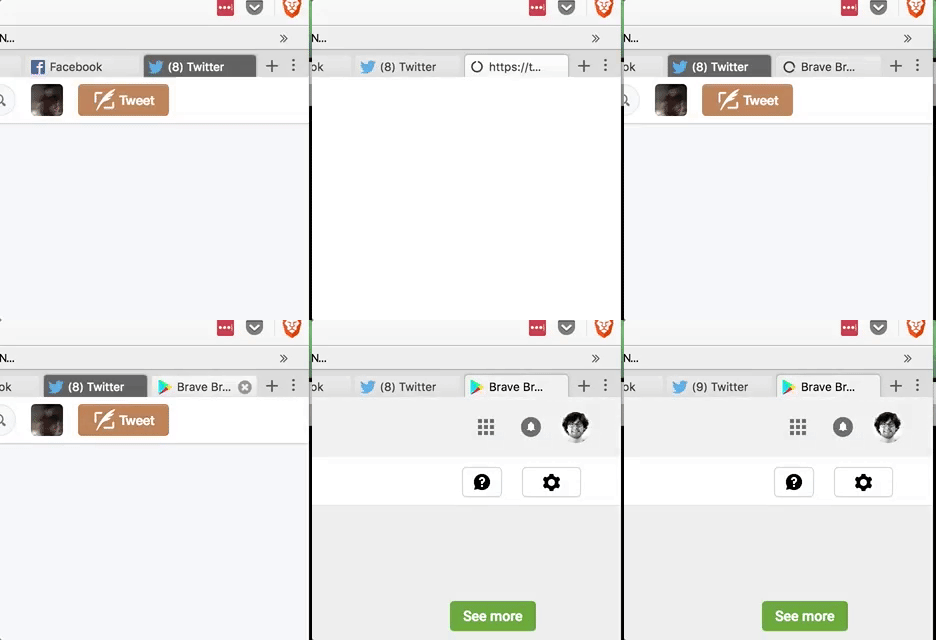
Describe the issue you encountered: Sometimes when opening a new tab—1) right click to open new tab, with "switch to new tab" setting enabled, or 2) clicking the "fingerprinting (?)" help button in the brave shield menu—the new tab gets opened but the current tab stays active. Attempting to click on the new tab or using keyboard shortcuts will keep "bouncing" me back to the old tab, repeatedly, until I deliberately click several times on the new tab or hit the keyboard shortcut several times.
This happens at least twice per browsing session on average.
Expected behavior: It switches to the new tab without resetting.
Platform (Win7, 8, 10? macOS? Linux distro?): macOS 10.11.5
Brave Version: 0.12.9
Steps to reproduce:
- Open a new tab through right click -> open in new tab, or some Brave system mechanism.
- Have it reset to the current tab.
- Continue clicking on the tab until it finally "sticks".
Screenshot if needed:
Gif of it working (and me trying to click on the newly opened tab):
 tcr
tcr
All 15 comments
+1 - this one happens way too often :frowning_face:
 bsclifton
on 21 Nov 2016
bsclifton
on 21 Nov 2016
I hadn't noticed this until I read this bug and now it's driving me crazy. I'll take a look.
 bbondy
on 23 Nov 2016
bbondy
on 23 Nov 2016
Does it always happen for you with those steps or only sometimes? I was getting this before and now it stopped happening.
bbondy
on 24 Nov 2016
It happens only sometimes. I can confirm it still occurs on the latest Brave version, I'll try and find a reproducible set of steps.
tcr
on 24 Nov 2016
It's happening much, much more often. Some notes:
- I usually have browser tabs open for a long time. Right now I have about 10 I haven't closed in a bit.
- In a new tab, I can go to Twitter.com, right click and open my profile in a new tab (with "switch to new tab when right clicking" set to On) and the rubber-banding starts. This is repeatable, kinda.
- I think it happens much more often when the page is loading.
- I think it happens much more often when I use keyboard shortcuts to switch between tabs.
tcr
on 30 Nov 2016
@tcr do you happen to have pocket enabled? I have been having this issue for at least the past two weeks and it's driving me nuts. I figured I'd try disabling pocket and immediately, things seem better
@jonathansampson can pocket be pretty CPU intensive?
bsclifton
on 4 Dec 2016
unassigned myself for now because I tried a few times to reproduce but still not having luck. Ill try to debug next time it happens to me, but if someone else sees it and can reproduce please jump in.
bbondy
on 5 Dec 2016
I can't reproduce on latest master or chromium 54 either. But it can easily reproduce on 0.12.09 - 0.12.11
 darkdh
on 5 Dec 2016
darkdh
on 5 Dec 2016
I'm not sure what fixed it but I think this is fixed now in 0.13.0 series.
bbondy
on 5 Dec 2016
I labelled this with QA/no qa needed as the steps to confirm this has been fixed are unavailable.
 luixxiul
on 16 Jan 2017
luixxiul
on 16 Jan 2017
I'm still seeing this in Brave 0.13.0, but only when the Pocket extension is enabled, like @bsclifton said.
I'm running MacOS 10.12.4 Beta on a MacBook Pro (Retina, 13-inch, Late 2012), 2.5 GHz Intel Core i5.
 dustinswan
on 27 Jan 2017
dustinswan
on 27 Jan 2017
+1 from #2094.
Might be caused by the Pocket extension. Reopening.
 cndouglas
on 31 Mar 2017
cndouglas
on 31 Mar 2017
My money is on this being related to Pocket. I wonder if this behavior is due to our implementations for the extension APIs that Pocket uses?
(ex: do we have an unsupported API? any errors in stdout when launching via command line OR in shift+f8 console?)
bsclifton
on 19 Apr 2017
Let's just close the issue if this is no longer reproduced.
luixxiul
on 29 May 2017
I haven't seen this issue in a VERY long time. Closing
bsclifton
on 10 Jun 2017
Related issues
bbondy
·
3Comments
bsclifton
·
3Comments
luixxiul
·
3Comments
 lukemulks
·
3Comments
lukemulks
·
3Comments
 antiroyalty
·
3Comments
antiroyalty
·
3Comments
Most helpful comment
+1 - this one happens way too often :frowning_face: