Browser-laptop: Login problem on Medium based blogs
Did you search for similar issues before submitting this one?
Yes
Describe the issue you encountered:
It seems like Medium is always signing me off on Brave.
Expected behaviour:
Login on Medium, keep logged in.
Platform (Win7, 8, 10? macOS? Linux distro?):
Ubuntu 16.10Brave Version:
0.12.7Steps to reproduce:
- Navigate to https://thisweekinreact.com (or any other Medium based blog)
- Login
- Reload the page
Screenshot if needed:

Any related issues:
5437
 jaydson
All 23 comments
Tried to look into this. Can't reproduce.
 antiroyalty
on 13 Dec 2016
antiroyalty
on 13 Dec 2016
+1 from Community:
https://community.brave.com/t/medium-com-publications-cause-sign-out/2985/3
Steps to reproduce:
- Allow all cookies for Medium.com
- Allow all cookies for https://themission.co (this is a publication connected to Medium)
- Sign into Medium.com, you'll see your profile is active by looking at the top right-hand corner
- Click on any article on The Mission (Like this one)
- Click the back button or return to Medium.com
- You'll now be signed out of Medium
 bsclifton
on 18 May 2017
bsclifton
on 18 May 2017
Yes I can also reproduce.
https://blog.gridplus.io/why-ethereum-needs-stable-coins-b777b55945b5
 jamesray1
on 25 Jul 2017
jamesray1
on 25 Jul 2017
I can reproduce this.
Brave: 0.19.88
rev: c29eca63249e3d43584ca1dcc47f3e7a7e904324
Muon: 4.5.15
libchromiumcontent: 62.0.3202.89
V8: 6.2.414.40
Node.js: 7.9.0
Update Channel: Release
OS Platform: macOS
OS Release: 16.7.0
OS Architecture: x64
 alex-miller-0
on 17 Nov 2017
alex-miller-0
on 17 Nov 2017
@alex-miller-0 Does this repro for you if you lower your shields for that domain?
 jonathansampson
on 18 Nov 2017
jonathansampson
on 18 Nov 2017
Yes, shields are down for medium.com (and all relevant domains for blogs). It appears to have more to do with the tab itself:
- If I open a new tab and navigate to medium, I am not signed in.
- If I open a new story in a new tab (i.e. click a link) it signs me out on all tabs.
- Interestingly, if I navigate inside the existing tab (i.e. click on the M logo to return to medium.com), I remain signed in. If I click on a story, I'm still signed in, but once I click the M logo a second time, I get logged out (logging out always happens simultaneously on all tabs).
alex-miller-0
on 18 Nov 2017
When I clicked on the Medium logo while signed in I was signed out.
This is with Brave shields down on a custom Medium blog: When trying to add tags, as soon as I type a comma or two spaces, it repeatedly says every few seconds (after removing each popup) or if I try to click the publish button: "Uh oh!
Tags can only have letters, numbers, spaces, and dashes, and limited to 5 per post." I can't publish the comment or change to the full-screen editor. I did not experience this on Chrome.
jamesray1
on 18 Nov 2017
I'm having a different and weird behaviour here.
I can login on Medium and navigate through different posts.
Steps:
1) Go to https://medium.com
2) Login with Twitter
3) Navigate to a personal Medium account, like https://medium.com/@jaydson/
4) Navigate through different posts
This steps works just fine.
But the odd thing is, in the moment I access a custom domain Medium based blog, like https://thisweekinreact.com, I'm signed out.
Bottom line is, Medium personal profiles seems to work fine.
Medium with custom domains keep signing me out.
jaydson
on 18 Nov 2017
Yeah, it's definitely related to custom domains for me as well. Whenever I go to a page on a custom domain, I get logged out on the main site.
Edit: I have shields down as well.
 superMDguy
on 18 Nov 2017
superMDguy
on 18 Nov 2017
Ah, it is related to custom domains for me too. Note that I can verify my shields are down for the custom domains that I have tested and they still trigger the bug.
alex-miller-0
on 18 Nov 2017
And it's still happening... No solution found!
 Shad-Iqbal
on 23 Jan 2018
Shad-Iqbal
on 23 Jan 2018
this is still in deep backlog?
 jpita
on 1 Feb 2018
jpita
on 1 Feb 2018
Same issue as described above
 jgmio
on 5 Feb 2018
jgmio
on 5 Feb 2018
@Shad-Iqbal, @jpita, @jgmio -- would one of you be interested in joining me via Skype or Discord to have a closer look at this issue?
jonathansampson
on 13 Feb 2018
I ran into this problem as well. I think I worked around it by setting the global default shields Cookie Control to Allow all cookies. The problem is probably because of third party cookies (maybe medium.com tries to pass cookies to the custom domain?).
 cndouglas
on 13 Feb 2018
cndouglas
on 13 Feb 2018
@jonathansampson sure. jose.pita4 on skype
jpita
on 13 Feb 2018
I have this problem since day one with medium on brave.
It makes me login to medium dozens of times a day ( every time I visit a medium based blod, that is not ot the domain "medium.com" )
 j1v
on 18 Feb 2018
j1v
on 18 Feb 2018
+1 on this - is it partly due to custom domains pointing to Medium publications?
I wonder if Medium uses a tag of some sort that could identify publications even if they're using a custom domain?
It's a pretty frustrating issue, as it essentially keeps you from interacting with Medium articles in any way.
 nneuman
on 16 Apr 2018
nneuman
on 16 Apr 2018
+1 from https://medium.com/@PaulRBerg/constructive-feedback-for-the-brave-browser-9f08b422a05
Like I said above, as a workaround, please try changing global default shields Cookie Control to Allow all cookies.
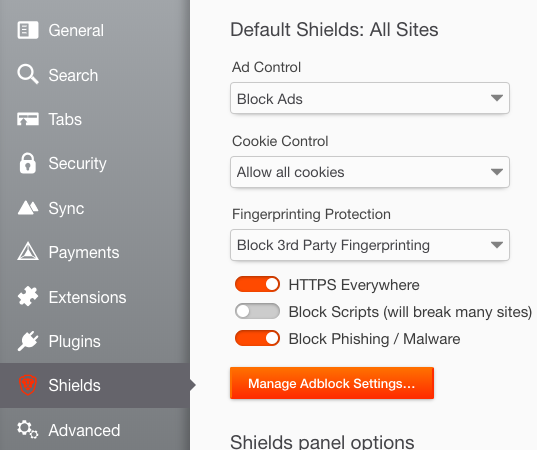
cndouglas
on 18 Jun 2018
But that completely defeats the purpose of the brave browser.
-1 for this one
On Mon, Jun 18, 2018, 23:08 Liunkae notifications@github.com wrote:
+1 from
https://medium.com/@PaulRBerg/constructive-feedback-for-the-brave-browser-9f08b422a05Like I said above, as a workaround, please try changing global default
shields Cookie Control to Allow all cookies.https://user-images.githubusercontent.com/19424103/41562309-d5c6fba8-7311-11e8-9494-8ad1c3e7847d.png
—
You are receiving this because you were mentioned.
Reply to this email directly, view it on GitHub
https://github.com/brave/browser-laptop/issues/5499#issuecomment-398196397,
or mute the thread
https://github.com/notifications/unsubscribe-auth/AKsrTbSQ7rWAXmoyH1kg_bm6EB8b4Qn2ks5t-BbdgaJpZM4KtFp5
.
jgmio
on 19 Jun 2018
I agree with @jgmio, no reason to use Brave if I have to turn off the security features. I've gone back to Chrome + a variety of privacy extensions.
nneuman
on 19 Jun 2018
@jgmio @nneuman This is just a workaround until the underlying problem is fixed. You can also reset all cookies on browser quit.
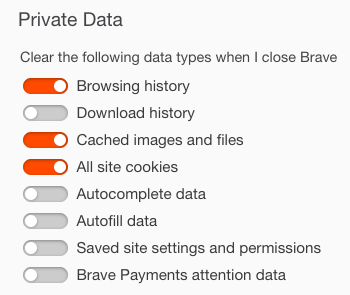
We'll also have to see if the new version of Brave fixes this problem for good. https://brave.com/development-plans-for-upcoming-release/
cndouglas
on 19 Jun 2018
I'm not able to recreate in the beta
 pes10k
on 1 Oct 2018
pes10k
on 1 Oct 2018
Related issues
 bbondy
·
3Comments
jonathansampson
·
3Comments
bbondy
·
3Comments
bbondy
·
3Comments
jonathansampson
·
3Comments
bbondy
·
3Comments
 lukemulks
·
3Comments
lukemulks
·
3Comments
 octohedron
·
3Comments
octohedron
·
3Comments
Most helpful comment
+1 from Community:
https://community.brave.com/t/medium-com-publications-cause-sign-out/2985/3
Steps to reproduce: